

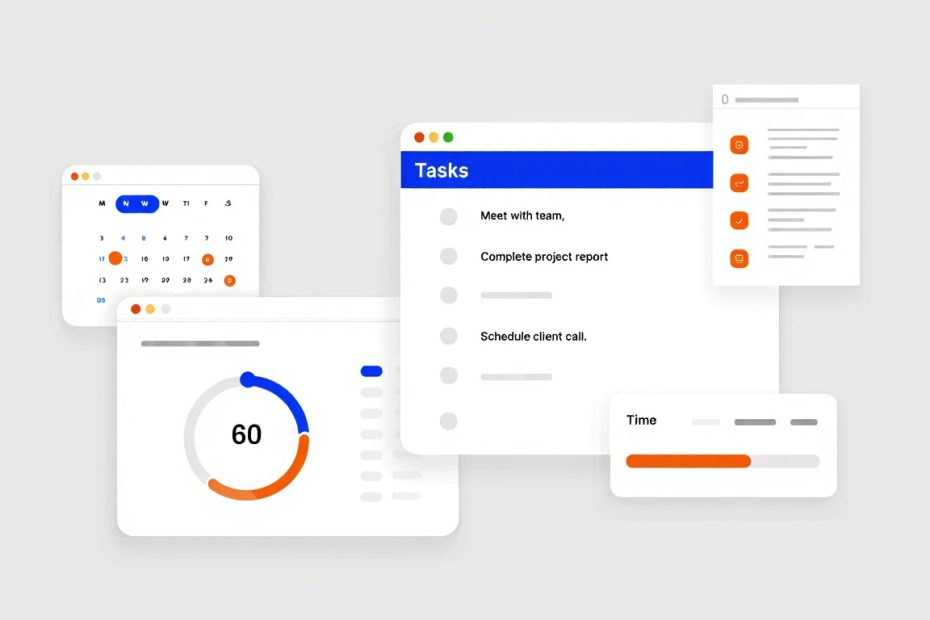
Have you ever felt overwhelmed by endless tasks, missed deadlines, and scattered information across different apps? You’re working hard but somehow not getting enough done. That’s where productivity software comes in to save your day.
Productivity software is any digital tool or application designed to help you complete tasks more efficiently, organize your work better, and accomplish more in less time. These tools don’t just make you busy. They make you effective. They help you focus on what matters, automate repetitive work, and collaborate smoothly with others.
Think about it. Before productivity software, people managed everything with paper calendars, physical filing systems, and endless meetings. Now you can track projects, communicate with teams worldwide, and access all your work from any device. That’s the power of productivity tools. In this guide, I’ll show you exactly what productivity software does, the different types available, and how to choose the right tools for your specific needs.
What Does Productivity Software Actually Do?
Productivity software helps you organize tasks, manage time effectively, collaborate with teams, automate repetitive work, and track progress toward your goals. These tools transform how you work by removing obstacles that slow you down.
Let me break down the core functions:
Task organization: You capture all your work in one place instead of keeping it in your head or scattered across sticky notes. You can see what needs to be done, when it’s due, and who’s responsible. Project management platforms excel at this.
Time management: You schedule your day, set reminders, and allocate time for important work. These tools help you stop wasting time deciding what to do next. Time tracking software shows you exactly where your hours go.
Team collaboration: You share files, communicate instantly, and work together on documents without endless email chains. Collaboration platforms keep everyone on the same page.
Workflow automation: You eliminate repetitive tasks by setting up automatic processes. The software handles routine work while you focus on creative and strategic thinking.
Progress tracking: You monitor how much you’ve accomplished, identify bottlenecks, and adjust your approach. Visual dashboards show you real-time progress without asking everyone for updates.
Information management: You store documents, notes, and resources in organized systems you can access instantly. No more digging through folders or asking colleagues where files are saved.
The beauty of productivity software is how it adapts to your workflow. Whether you’re a student managing assignments, a freelancer juggling clients, or a team leading projects, these tools mold to fit your specific needs.

Types of Productivity Software
Productivity software comes in several categories: task and project management tools, time tracking applications, document and note-taking software, communication platforms, workflow automation tools, and specialized business applications. Each type solves different productivity challenges.
Task and Project Management Software
These tools help you organize work, assign responsibilities, set deadlines, and track project progress from start to finish.
Asana lets teams break down projects into manageable tasks. You create lists, set due dates, assign team members, and visualize workflows. It’s perfect for marketing teams, product development, and creative agencies managing multiple projects simultaneously.
Work management platforms go beyond basic task lists. They connect your goals with daily work, showing how individual tasks contribute to bigger objectives. This alignment keeps everyone focused on what truly matters.
Key features of project management software include:
- Visual project boards: Kanban views, Gantt charts, and timeline displays that show project flow at a glance
- Task dependencies: Link related tasks so team members know which work must finish before they can start
- Resource allocation: Distribute workload evenly to prevent burnout and maximize efficiency
- Milestone tracking: Mark important project phases and celebrate progress toward completion
- Custom workflows: Adapt the software to match how your team actually works
These tools shine when projects involve multiple people, complex dependencies, and tight deadlines. You see bottlenecks before they cause delays and can reallocate resources quickly.
Time Tracking and Scheduling Tools
Understanding where your time goes is crucial for improving productivity. Time tracking software records how long tasks take and reveals productivity patterns.
Remote team time trackers help distributed teams stay accountable. Managers see who’s working on what without micromanaging. Team members understand their own productivity patterns and can optimize their schedules.
Essential time management features:
- Automatic time capture: Software runs in the background recording how you spend work hours
- Project time allocation: See exactly how much time each client or project consumes
- Productivity reports: Identify your most productive hours and biggest time wasters
- Billable hours tracking: Generate accurate invoices based on actual time worked
- Calendar integration: Sync with your schedule to block focused work time
These tools benefit freelancers billing by the hour, agencies tracking client work, and anyone wanting to eliminate time-wasting activities. The data shows you real facts about your work habits, not guesses.
Document and Collaboration Software
Creating, sharing, and editing documents together forms the foundation of modern teamwork.
Word processors, spreadsheets, and presentation tools have evolved into collaborative platforms. Multiple people edit the same document simultaneously. You see changes in real-time and never deal with version confusion.
Note-taking applications capture ideas, meeting notes, research, and knowledge in searchable databases. You access information instantly instead of flipping through notebooks or searching old emails.
Cloud storage solutions keep files accessible from any device. You share folders with team members, control permissions, and ensure everyone works with the latest versions.
Document collaboration capabilities:
- Real-time co-editing: Multiple team members work on the same file simultaneously
- Comment and feedback tools: Leave notes without changing the original content
- Version history: Restore previous versions if changes need to be undone
- Access controls: Decide who can view, edit, or share each document
- Cross-device sync: Start work on your computer and continue on your phone seamlessly
Communication and Collaboration Platforms
Effective communication speeds up decision-making and reduces misunderstandings that waste time.
Instant messaging tools replace most emails with quick conversations. You get answers in minutes instead of waiting hours or days for email responses. HR communication software specifically helps internal teams stay connected.
Video conferencing platforms bring remote teams face-to-face. You conduct meetings, give presentations, and build relationships without travel time and expenses.
Shared workspaces combine messaging, file sharing, and project updates in one place. Everything related to a project lives together instead of scattered across different apps and inboxes.
Communication platform advantages:
- Organized channels: Separate conversations by project, department, or topic
- Search functionality: Find past discussions and decisions instantly
- File sharing integration: Drop documents directly into conversations
- Notification controls: Focus on important messages while muting distractions
- Screen sharing: Show exactly what you mean instead of explaining with words
Business Management Software
Specialized tools handle specific business functions more efficiently than general productivity apps.
CRM software manages customer relationships, tracks sales pipelines, and stores all communication history. Sales teams close more deals because they never lose track of leads or forget follow-ups.
Accounting software automates invoicing, expense tracking, and financial reporting. Small businesses save hours previously spent on manual bookkeeping. You can also find specialized accounting solutions for nonprofits that handle fund accounting and donor management.
Inventory management systems track stock levels, automate reordering, and prevent both overstocking and stockouts. Retail and manufacturing businesses operate more smoothly.
ERP platforms integrate all business processes into unified systems. Large organizations coordinate operations across departments without information silos.
Business software typically includes:
- Customer database: Store contact information, purchase history, and preferences in one location
- Automated workflows: Trigger actions based on customer behavior or business events
- Financial reporting: Generate profit and loss statements, cash flow reports, and tax documents
- Integration capabilities: Connect with other business tools you already use
- Mobile access: Manage your business from anywhere using smartphone apps
Industry-Specific Solutions
Some productivity tools target particular industries with specialized features.
Building materials software helps construction companies manage inventory, track deliveries, and coordinate with contractors. These specialized features matter more than generic tools.
Forestry software solutions assist timber companies with land management, harvest planning, and regulatory compliance. The industry-specific functionality saves enormous time.
Woodworking design software lets craftspeople create detailed plans, generate cut lists, and visualize finished products. Specialized tools understand industry needs better than general applications.
Dental practice management software combines appointment scheduling, patient records, billing, and insurance processing. Healthcare providers need these integrated solutions.
Civil engineering software handles complex design work, terrain modeling, and infrastructure planning that general productivity tools can’t manage.

Key Benefits of Using Productivity Software
Productivity software saves time, reduces errors, improves collaboration, provides better visibility into work, and helps you accomplish more with existing resources. The benefits multiply as you master these tools.
Time Savings and Efficiency
The most obvious benefit is getting work done faster. You eliminate wasted motion and focus energy on valuable activities.
How productivity software saves your time:
- Automation handles routine tasks: Software automatically sends reminders, updates statuses, generates reports, and performs countless other repetitive actions
- Quick information access: Finding documents, data, or past conversations takes seconds instead of minutes or hours
- Reduced context switching: Working within integrated platforms means less jumping between different apps
- Streamlined workflows: Well-designed tools guide you through processes efficiently without figuring out next steps
- Template reuse: Save common formats and processes to avoid recreating work from scratch
Improved Accuracy and Quality
When you’re less rushed and better organized, you make fewer mistakes and produce higher quality work.
Automated processes reduce human error: Software follows rules consistently. It doesn’t forget steps, transpose numbers, or make typos in routine tasks. Software testing practices ensure these tools work reliably.
Version control prevents confusion: Everyone works with the current version of documents. You avoid the nightmare of multiple people editing outdated files and conflicting changes.
Built-in checks and validation: Many productivity tools include error checking, required fields, and validation rules that catch mistakes before they cause problems.
Quality improvements you’ll experience:
- Consistent formatting: Documents and reports maintain professional appearance automatically
- Data validation: Software prevents invalid entries that cause downstream problems
- Audit trails: Track who changed what and when for accountability
- Backup and recovery: Never lose work due to computer crashes or accidental deletions
- Quality checkpoints: Build review stages into workflows before work moves forward
Better Team Collaboration
Modern work requires coordination among multiple people. Productivity software makes collaboration natural instead of painful.
Transparency eliminates confusion: Everyone sees project status, upcoming deadlines, and who’s responsible for what. You don’t need status meetings to know what’s happening.
Asynchronous communication: Team members contribute when it suits their schedules. You’re not stuck waiting for everyone to be available simultaneously.
Remote work enablement: Geography doesn’t matter anymore. Distributed teams work together as smoothly as people in the same office.
Collaborative productivity benefits compound as teams develop shared understanding and efficient communication patterns.
Collaboration advantages:
- Centralized information: Everyone accesses the same data source eliminating conflicting information
- Clear accountability: Task assignments make responsibilities obvious to all team members
- Reduced meetings: Async updates replace many status meetings that interrupt focused work
- Knowledge sharing: Capture expertise and decisions so they’re available to future team members
- Cross-functional coordination: Different departments work together without organizational barriers
Enhanced Visibility and Insights
Understanding what’s happening in your work provides strategic advantages.
Progress tracking features:
- Real-time dashboards: See project status, team capacity, and deadline risks at a glance
- Performance metrics: Measure productivity, identify trends, and make data-driven decisions
- Bottleneck identification: Spot where work gets stuck and fix problems before they escalate
- Resource utilization: Understand if team members are overloaded or underutilized
- Historical analysis: Learn from past projects to estimate better and plan more accurately
Cost Reduction and ROI
Productivity software represents an investment that pays for itself through efficiency gains.
Reduced operational costs: Automation eliminates manual work that previously required staff hours. You accomplish more without hiring additional people.
Faster project completion: Finishing work quicker means you can take on more clients or projects with the same team size.
Lower error costs: Mistakes are expensive to fix. Catching errors early or preventing them entirely saves significant money.
Better resource utilization: Understanding where time goes helps you allocate resources to highest-value activities.
Financial benefits:
- Reduced software costs: Integrated platforms replace multiple separate tools and subscriptions
- Lower training expenses: Intuitive interfaces require less training time for new employees
- Decreased turnover: Better tools reduce frustration and improve employee satisfaction
- Scalability: Grow your business without proportionally increasing administrative overhead
- Competitive advantage: Deliver faster and more reliably than competitors using outdated methods
How to Choose the Right Productivity Software
Select productivity software by identifying your specific needs, evaluating features that matter most, considering integration with existing tools, assessing ease of use, and calculating total cost of ownership. The right choice depends on your unique situation.
Identify Your Core Requirements
Before browsing software options, understand exactly what problems you need to solve.
Questions to answer:
- What tasks consume most of your time? Focus on tools that address your biggest time sinks first
- Where do communication breakdowns occur? Identify collaboration pain points that software can fix
- What information do you frequently search for? This reveals knowledge management needs
- Which processes involve repetitive manual work? These are prime automation candidates
- How many people need to use this tool? Team size affects which solutions make sense
I’ve seen many businesses buy sophisticated software they don’t fully utilize. Start with clear needs rather than impressive feature lists.
Evaluate Essential Features
Different productivity tools excel at different functions. Match features to your requirements.
For project management, look for:
- Task assignment and tracking capabilities
- Calendar and deadline management
- File attachment and document storage
- Progress reporting and dashboards
- Mobile app availability
For time tracking solutions, prioritize:
- Automatic time capture or easy manual entry
- Project and task categorization
- Detailed reports showing time distribution
- Invoice generation for billable work
- Integration with accounting software
For business management tools, consider:
- Customer database and contact management
- Sales pipeline tracking
- Email integration and communication logging
- Reporting and analytics capabilities
- Customization options for your business processes
Consider Integration Capabilities
Your productivity software should work with tools you already use, not replace everything.
Integration priorities:
- Email platforms: Connect with Gmail, Outlook, or your email provider
- Calendar systems: Sync with Google Calendar, Outlook Calendar, or Apple Calendar
- File storage: Work with Dropbox, Google Drive, OneDrive, or other cloud storage
- Communication tools: Integrate with Slack, Microsoft Teams, or your chat platform
- Accounting software: Connect to QuickBooks, Xero, or your financial management system
Seamless integration means data flows between systems automatically. You avoid manual data entry and reduce errors from copying information between platforms.
Assess Usability and Adoption
The most powerful software is useless if your team won’t use it. Prioritize tools people actually adopt.
Usability factors:
- Intuitive interface: Can new users figure out basic functions without extensive training?
- Clean design: Is the interface cluttered or overwhelming, or is it focused and clear?
- Learning curve: How long before team members become productive with the tool?
- Support resources: Are there tutorials, documentation, and responsive customer support?
- Mobile experience: Does the mobile app work well or feel like an afterthought?
Request free trials before committing. Have your team test the software with real work, not just demo scenarios. Their feedback matters more than marketing promises.
Calculate True Cost
Productivity software pricing involves more than monthly subscription fees.
Total cost considerations:
- Subscription tiers: What features are included at each price point? Do you need premium tiers?
- Per-user pricing: How does cost scale as your team grows?
- Implementation costs: Do you need consulting help to set up and configure the software?
- Training expenses: How much time will training take, and do you need external trainers?
- Data migration: What will it cost to move information from your current systems?
- Integration development: Do you need custom integrations that require programming?
Compare costs against expected benefits. If software saves 10 hours per week across your team, calculate that time savings as dollar value. Good productivity software pays for itself many times over.

Common Productivity Software Mistakes to Avoid
The biggest mistakes include choosing overly complex tools, neglecting proper training, failing to integrate systems, using too many separate apps, and not measuring actual productivity improvements. Learn from common pitfalls to maximize your success.
Mistake 1: Choosing Feature-Rich Over User-Friendly
Many people select software with the most features rather than the most usable interface.
Why this happens: Feature lists look impressive. More features seem like better value. You imagine using every capability.
The reality: Most users only need 20% of features. Complex software with steep learning curves leads to low adoption. Team members stick with old methods instead of struggling with complicated new tools.
Better approach: Choose software that does core functions exceptionally well. Simple, focused tools that your team actually uses beat sophisticated platforms they avoid.
Mistake 2: Skipping Training and Onboarding
Buying productivity software and expecting instant results without proper training wastes your investment.
Why this happens: Training seems like unnecessary expense. People assume software should be intuitive. You’re eager to see results immediately.
The reality: Even intuitive software has specific workflows and best practices. Without training, users develop inefficient habits or miss powerful features. Software implementation requires intentional adoption support.
Better approach: Budget time and money for comprehensive training. Create internal champions who master the tool and help colleagues. Provide ongoing learning resources as people encounter new use cases.
Mistake 3: Failing to Integrate Systems
Operating productivity tools as isolated islands creates data silos and duplicate work.
Why this happens: Integration seems technically complex. You focus on individual tool features rather than overall workflow. Different departments choose different tools independently.
The reality: Manually copying information between systems wastes time and introduces errors. Important data gets trapped in separate platforms. You lose the efficiency gains productivity software should provide.
Better approach: Prioritize integration from the start. Choose platforms with robust APIs and pre-built connectors. Consider how data will flow between systems before committing to specific tools.
Mistake 4: Using Too Many Separate Tools
Tool sprawl creates more problems than it solves.
Why this happens: You find specialized tools for each specific need. Different team members prefer different platforms. You add tools without retiring old ones.
The reality: Context switching between many apps kills productivity. Information fragments across platforms. Subscription costs add up. Training burden multiplies.
Better approach: Consolidate on integrated platforms that handle multiple functions. Retire old tools when adding new ones. Limit the total number of productivity tools your team must learn.
Mistake 5: Not Measuring Results
Implementing productivity software without tracking outcomes means you can’t verify ROI or identify improvement opportunities.
Why this happens: Measurement seems time-consuming. Results feel intuitively obvious. You lack baseline data from before implementation.
The reality: Without measurement, you don’t know if the software actually improves productivity or just changes how work happens. You can’t justify renewal costs or make data-driven decisions about features and training.
Better approach: Establish baseline metrics before implementation. Track key indicators like project completion time, task turnaround, meeting frequency, and employee satisfaction. Review metrics quarterly to assess impact and identify optimization opportunities.
Popular Productivity Software Examples
Leading productivity platforms include Asana, Microsoft 365, Google Workspace, Slack, Trello, Monday.com, and numerous specialized solutions for different business functions. Each brings unique strengths to different use cases.
Project Management Leaders
Asana excels at visual project planning with multiple view options. Teams track work across portfolios, projects, and individual tasks. It’s particularly strong for marketing teams, creative agencies, and product development.
Monday.com offers highly customizable boards that adapt to virtually any workflow. The visual interface makes status tracking intuitive. It works well for teams needing flexibility in how they organize work.
Trello uses simple kanban boards perfect for smaller teams or straightforward projects. Its simplicity makes adoption easy, though it lacks advanced features larger teams need.
Office Productivity Suites
Microsoft 365 combines Word, Excel, PowerPoint, Outlook, and Teams into an integrated ecosystem. It dominates enterprise environments and offers deep feature sets for complex work.
Google Workspace provides Gmail, Docs, Sheets, Slides, Drive, and Meet with superior real-time collaboration. It’s popular with small businesses and teams prioritizing simplicity over advanced features.
Both suites handle core productivity needs with different philosophies. Microsoft emphasizes powerful features while Google focuses on collaboration and accessibility.
Communication Platforms
Slack revolutionized workplace communication with organized channels, powerful search, and extensive integrations. It reduces email volume and keeps conversations organized by topic.
Microsoft Teams integrates tightly with Microsoft 365 and includes video conferencing, file sharing, and collaboration features. It’s the natural choice for organizations already using Microsoft products.
Specialized Business Tools
CRM systems like Salesforce, HubSpot, and Pipedrive manage customer relationships and sales processes. They’re essential for sales-focused organizations.
Accounting platforms like QuickBooks, Xero, and FreshBooks automate financial management. Small businesses particularly benefit from their invoice and expense tracking.
Expense management software streamlines receipt collection, reimbursement, and policy enforcement.
Attendance tracking systems help HR departments monitor employee time and schedule management.
360 feedback tools facilitate performance reviews and employee development.
Industry-Specific Solutions
Merchandising planogram software helps retail businesses optimize product placement and store layouts.
Cargo tracking platforms give logistics companies visibility into shipment locations and delivery status.
Building materials management tools serve construction and supply businesses with inventory and project coordination.
Lead generation software helps B2B companies identify and qualify potential customers.
Invoicing applications simplify billing processes for freelancers and small businesses.
Security and Data Protection Considerations
Productivity software handles your business data, making security crucial. Evaluate encryption practices, access controls, backup procedures, compliance certifications, and vendor security track records before committing to any platform. Your data protection depends on these factors.
Essential Security Features
Look for these security capabilities:
- Data encryption: Information should be encrypted both in transit and at rest to prevent unauthorized access
- Two-factor authentication: Require more than just passwords to access accounts and sensitive data
- Granular permissions: Control who can view, edit, share, or delete specific information
- Activity logging: Track who accessed what data and when for accountability and forensics
- Automatic backups: Regular data backups protect against loss from technical failures or accidents
- Compliance certifications: Look for SOC 2, ISO 27001, GDPR compliance, and industry-specific standards
Data protection practices vary significantly between providers. Research their security posture before trusting them with business information.
Cloud Storage Security
Many productivity tools store your files in cloud infrastructure. Understand how they protect this data.
Reputable providers use enterprise-grade security with encryption protocols, redundant backups, and professional security teams. They’re often more secure than storing files on local computers.
Lesser-known providers might lack resources for robust security. Research their practices, certifications, and security incident history.
Consider cloud storage alternatives if you handle highly sensitive information requiring additional control.
Handling Sensitive Information
Some data requires extra protection beyond standard security features.
Sensitive information handling involves:
- Classifying data by sensitivity level
- Restricting access to only those who need it
- Using additional encryption for highly confidential files
- Establishing retention and deletion policies
- Training employees on data protection responsibilities
Financial services, healthcare, legal firms, and other industries face regulatory requirements for data protection. Ensure your productivity software meets these standards.
Vendor Security Track Record
Research whether providers have experienced security breaches or data loss incidents.
Check for:
- History of security breaches and how they were handled
- Transparency about security incidents
- Speed of security patches and updates
- Third-party security audits and certifications
- Clear data ownership and portability policies
Major providers like Microsoft, Google, and established SaaS companies invest heavily in security. Smaller vendors might offer less protection despite good intentions.
The Future of Productivity Software
Productivity software is evolving toward greater AI integration, improved automation, enhanced personalization, deeper cross-platform integration, and focus on remote work enablement. These trends will reshape how we work.
Artificial Intelligence Integration
AI is transforming productivity tools from passive helpers to active assistants.
Current AI applications:
- Smart scheduling: AI suggests optimal meeting times based on participant availability and preferences
- Automated task prioritization: Systems analyze deadlines, dependencies, and importance to recommend what to work on next
- Predictive analytics: Tools forecast project completion dates based on historical performance patterns
- Natural language processing: Voice commands and conversational interfaces simplify interaction with software
- Content generation: AI writing assistants help draft emails, reports, and documents
Future AI capabilities will include proactive problem identification, automated decision support, and systems that learn individual work patterns to provide personalized assistance.
Enhanced Automation
Automation will handle increasingly complex workflows without human intervention.
Emerging automation trends:
- Multi-step workflows that span across multiple applications
- Conditional logic that adapts processes based on circumstances
- Self-optimizing workflows that improve based on performance data
- Automated quality checks that catch errors before they propagate
- Intelligent routing that directs work to appropriate team members
These advances will let knowledge workers focus on creative problem-solving while automation handles routine coordination and administration.
Remote Work Optimization
The shift to distributed teams drives productivity software evolution.
Remote work features:
- Asynchronous collaboration tools that don’t require simultaneous availability
- Virtual workspace environments that replicate office presence digitally
- Enhanced video and audio quality for natural remote communication
- Time zone management built into scheduling and coordination
- Digital wellness features preventing burnout in always-connected environments
Productivity tools increasingly recognize that effective remote work requires different approaches than office-based collaboration.
Greater Personalization
Future productivity software will adapt to individual work styles rather than forcing everyone into the same interface.
Personalization directions:
- Customizable interfaces that show relevant information for each role
- Adaptive workflows that match personal preferences and habits
- Context-aware notifications that interrupt only when truly important
- Learning systems that improve recommendations based on your choices
- Flexible work structures accommodating different productivity approaches
This shift recognizes that people work differently and no single approach suits everyone.
Frequently Asked Questions
What is productivity software used for?
Yes. Productivity software helps you complete work tasks more efficiently by organizing information, automating repetitive processes, facilitating team collaboration, and tracking progress toward goals.
Is productivity software expensive?
No. Many productivity tools offer free versions with basic features. Paid plans typically range from $5 to $30 per user monthly, which most businesses easily justify through efficiency gains and time savings.
Can small businesses benefit from productivity software?
Yes. Small businesses gain proportionally more benefits because they have fewer resources. Productivity tools let small teams accomplish work that previously required larger staffs, creating competitive advantages against bigger competitors.
Do I need technical skills to use productivity software?
No. Modern productivity tools prioritize user-friendly interfaces requiring no programming or technical expertise. Most people become comfortable with basic functions within hours, and advanced features are optional.
Will productivity software work with my existing tools?
Yes, usually. Most productivity platforms offer integrations with popular tools like Gmail, Outlook, Google Drive, Dropbox, and accounting software. Check integration options before committing to ensure compatibility with your current systems.
How long does it take to see productivity improvements?
It varies. Simple tools like task lists show immediate benefits. Complex project management or ERP systems might require 2-3 months before teams become proficient and realize full benefits.
Is my data safe in productivity software?
Yes, when using reputable providers. Established productivity platforms implement enterprise security measures including encryption, backups, and compliance certifications. They’re typically more secure than storing data locally.
Can productivity software replace project managers?
No. Software handles administrative tasks, tracking, and reporting but can’t replace human judgment, leadership, and problem-solving that experienced project managers provide.
What’s the difference between productivity software and collaboration tools?
They overlap significantly. Productivity software encompasses tools helping you work efficiently, including time management, task tracking, and automation. Collaboration tools specifically focus on team communication and joint work, representing one category within broader productivity software.
How do I convince my team to adopt new productivity software?
Involve them early. Let team members test options and provide input before deciding. Address their concerns, provide thorough training, and demonstrate how the software solves problems they currently face.
Conclusion
Productivity software transforms how you work by eliminating inefficiencies, automating repetitive tasks, and enabling seamless collaboration. Whether you’re managing projects, tracking time, organizing documents, or communicating with teams, the right tools multiply your effectiveness without requiring longer hours or larger teams.
The key is choosing software that matches your specific needs rather than chasing impressive feature lists. Start by identifying your biggest productivity challenges. Look for tools that solve those specific problems with interfaces your team will actually adopt. Ensure integration with existing systems so data flows smoothly between platforms. Calculate total costs including training and implementation, not just subscription fees.
Remember that productivity software is an investment, not an expense. The time you save, errors you prevent, and additional work you can handle with existing resources far outweigh the costs. Small businesses particularly benefit because productivity tools let lean teams compete effectively against larger competitors with more resources.
Start simple with one or two core productivity tools addressing your most pressing needs. Project management platforms, time tracking applications, or collaboration software often provide the biggest immediate impact. Master these foundations before expanding to specialized solutions for accounting, customer management, or industry-specific functions.
The future of productivity software promises even greater benefits through AI integration, enhanced automation, and personalization that adapts tools to your unique work style. Organizations embracing these technologies position themselves for success in increasingly competitive markets.
Take action today. Identify one productivity challenge causing the most frustration in your work. Research software options designed to solve that specific problem. Request free trials and test with real work scenarios. Involve your team in the decision process. Implement thoughtfully with proper training and support.
Your productivity improvements start with the first tool you adopt. Don’t wait for perfect conditions or comprehensive solutions. Begin improving how you work right now, and build from there.
For more insights about business software, work management strategies, and digital tools that enhance your efficiency, explore our comprehensive software guides and resources.
You May Also Like
 Software
9 Best Free Laser Engraver Software Tools in 2026
 Software
When Fixing Bugs Is No Longer Enough: How to Rescue a Failing Software Project
 SaaS
SaaSNotion vs Coda vs ClickUp for Teams: A Field Report From 18 Months
 SaaS
SaaSTrello vs monday.com vs ClickUp: Which Project Management Tool Fits Your Team in 2026?
 SaaS
SaaS8 Best Asana Alternatives in 2026: Free Tools, Top Competitors, and How to Choose
 Software
What is Asana Software? How Businesses Use It for Project Management and Team Collaboration
 Software
10 Best Audio Redaction Software in 2026 (Tested Picks by Use Case)
 SaaS
SaaS10 Best AI Audio Enhancers for Podcasts in 2026 (Reviewed & Compared)
 Software