

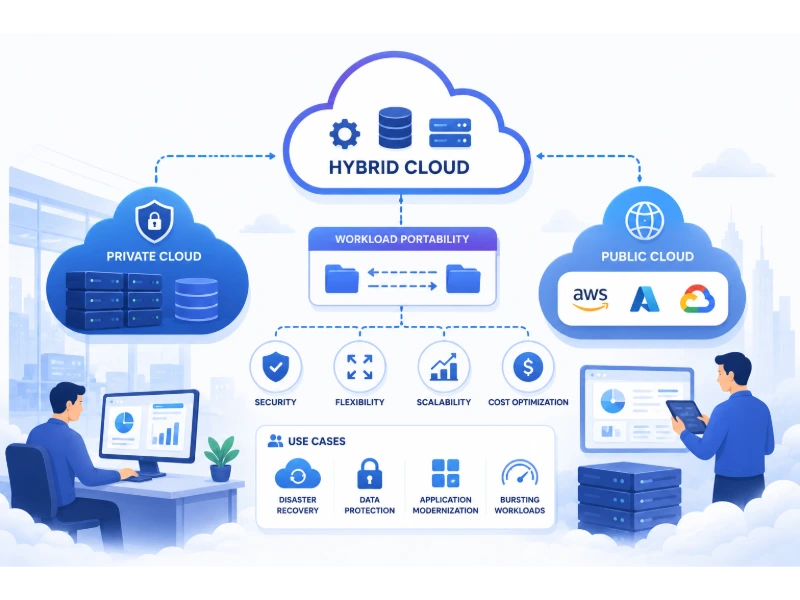
Most companies don’t wake up one day and decide to build a hybrid cloud. They end up with one. A legacy system that’s too risky to move off-premises. A new AI workload that needs a public cloud’s GPU capacity. A compliance requirement that says certain data can never leave the country. Put those three realities together and you’ve already got a hybrid cloud, whether anyone officially planned it or not.
That accidental origin story is actually the best way to understand what hybrid cloud computing really is. It’s not a single product you buy or a single vendor you sign with. It’s an architecture, a deliberate (or sometimes not so deliberate) combination of private infrastructure and public cloud services, connected well enough to work as one coordinated system instead of two disconnected ones. According to Flexera’s 2026 State of the Cloud Report, 73% of organizations now run hybrid cloud environments, making it the dominant enterprise architecture rather than a transitional stepping stone toward “full cloud.” This guide breaks down exactly what that means, how it actually works, and why it’s become the default choice for so many organizations.
Key Takeaways
- Hybrid cloud combines private infrastructure (on-premises data centers or private cloud) with public cloud services, connected through networking and orchestration so workloads and data can move between them as needed.
- It’s now the dominant enterprise architecture, not a temporary phase. 73% of organizations report using hybrid cloud as of 2026, and industry analysts expect that figure to keep climbing as AI workloads intensify the need for flexible infrastructure.
- The main drivers are cost, compliance, and control, not just technology preference. Data gravity, unpredictable public cloud billing, data residency laws, and legacy systems that simply can’t be migrated all push organizations toward a hybrid model rather than an all-or-nothing choice.
- Hybrid cloud is not the same thing as multi-cloud, even though the terms get used interchangeably. Multi-cloud means using multiple public cloud providers. Hybrid specifically means combining private and public environments together.
- The hardest part of hybrid cloud isn’t the technology, it’s the coordination. Consistent security, cost visibility, and operational management across environments that don’t naturally share the same tools is where most hybrid cloud strategies actually struggle.
What Is Hybrid Cloud Computing, Exactly?
Hybrid cloud computing is an IT architecture that combines at least one private environment (typically an on-premises data center or a private cloud) with at least one public cloud service, integrated closely enough that data and applications can move between them, and often be managed through shared tools and processes.
The word “hybrid” is doing real work in that definition. It’s not just running some things on-premises and some things in the cloud, side by side but disconnected, which is closer to what’s sometimes called a fragmented or siloed IT environment. A genuine hybrid cloud involves actual integration: consistent networking between environments, some level of shared or coordinated management, and often the ability to move a workload from one environment to the other without rebuilding it from scratch.
This distinction matters because plenty of organizations technically have both private and public infrastructure without having a real hybrid cloud strategy. They just have two separate systems that happen to coexist. The organizations getting genuine value from hybrid cloud have built the connective tissue, networking, identity management, monitoring, and orchestration, that lets those environments function as one coordinated system.
How Hybrid Cloud Differs From Public, Private, and Multi-Cloud
These terms get used loosely enough in casual conversation that it’s worth being precise about what each one actually means.
| Model | What It Is | Who Manages the Infrastructure | Best Suited For |
|---|---|---|---|
| Public Cloud | Computing resources owned and operated by a third-party provider (AWS, Azure, Google Cloud) and shared across many customers | The cloud provider | Variable or unpredictable workloads, rapid scaling, new application development |
| Private Cloud | Cloud-like infrastructure (self-service, scalable, virtualized) dedicated to a single organization, either on-premises or hosted | The organization itself, or a dedicated hosting partner | Sensitive data, strict compliance needs, predictable steady-state workloads |
| Multi-Cloud | Use of two or more public cloud providers, without necessarily involving any private infrastructure | Each respective cloud provider | Avoiding vendor lock-in, using best-of-breed services from different providers |
| Hybrid Cloud | A combination of private infrastructure and public cloud, integrated and often orchestrated together | Split between the organization and one or more public cloud providers | Workloads with mixed requirements: some sensitive or steady-state, some variable or compute-intensive |
Public Cloud
Public cloud is what most people picture when they hear “the cloud.” Resources like servers, storage, and databases are owned and run by a provider like AWS, Microsoft Azure, or Google Cloud, and shared across many different customers, with usage typically billed by consumption. It’s fast to scale and requires no hardware investment, but it means less control over exactly where your data physically lives and how the underlying infrastructure is configured.
Private Cloud
Private cloud takes the same cloud-like experience, self-service provisioning, virtualization, elastic scaling, but dedicates the infrastructure to a single organization, either hosted on-premises or by a dedicated provider. This gives an organization far more control over security configuration, compliance posture, and data location, at the cost of the hardware investment and operational overhead that public cloud is specifically designed to eliminate.
Multi-Cloud
Multi-cloud specifically refers to using more than one public cloud provider, for example running some services on AWS and others on Google Cloud, without necessarily involving any private infrastructure at all. Organizations do this to avoid depending entirely on one vendor, to take advantage of each provider’s particular strengths (Google Cloud’s data analytics tools versus AWS’s broader service catalog, for instance), or simply because different teams or acquisitions ended up on different platforms over time.
Hybrid Cloud
Hybrid cloud is the combination of private infrastructure and public cloud, integrated together. It’s entirely possible, and increasingly common, to run a hybrid multi-cloud environment: private infrastructure connected to more than one public cloud provider simultaneously. That combined complexity is exactly why hybrid cloud management has become its own specialized discipline rather than something IT teams can handle as an afterthought.
How Hybrid Cloud Actually Works
Connectivity Between Environments
The foundation of any real hybrid cloud setup is reliable, secure networking between the private and public environments. This is typically achieved through a dedicated private connection (like AWS Direct Connect or Azure ExpressRoute), a site-to-site VPN, or a combination of both, ensuring that data moving between environments doesn’t have to traverse the public internet unprotected and that latency stays predictable enough for applications to function well across the boundary.
Workload Orchestration and Management Layer
On top of that networking foundation sits an orchestration and management layer, often built around container platforms like Kubernetes, that lets applications be deployed, scaled, and moved with a consistent set of tools regardless of which underlying environment they’re actually running on. This is what allows a workload to genuinely move between private and public infrastructure rather than requiring a full rebuild every time it crosses that boundary. I go into how the underlying technology that makes this kind of environment abstraction possible works in exploring virtualization technology: key features and benefits.
Data Synchronization and Movement
Data itself needs a coherent strategy too, whether that’s real-time replication between environments, scheduled batch synchronization, or a deliberate design where certain data simply stays put in one environment while only specific derived data or results move to the other. This is often the most technically demanding part of a hybrid cloud architecture, since data has gravity: large datasets are expensive and slow to move, which is exactly why so many hybrid cloud designs are built around keeping compute close to where the data already lives rather than constantly shuttling data back and forth.
Why Hybrid Cloud Has Become the Default Enterprise Architecture
The 73% adoption figure from Flexera’s 2026 report isn’t really surprising once you understand what’s actually pushing organizations toward this model. It’s rarely a single reason. It’s usually several overlapping pressures at once.
Data Gravity and Egress Costs
As datasets grow larger, moving them becomes progressively more expensive and slower, a phenomenon commonly called data gravity. Public cloud providers also charge for data leaving their network (egress fees), which can turn seemingly simple architecture decisions into significant, sometimes unpredictable, recurring costs. For data-heavy or continuously running workloads, keeping data and its associated compute together in a stable, predictable environment often produces a meaningfully better total cost of ownership than constantly moving it in and out of a public cloud.
Regulatory and Data Residency Requirements
Industries like healthcare, finance, and government, along with any organization operating across multiple countries, increasingly face specific requirements about where certain categories of data are allowed to physically reside. Sovereign cloud requirements and data residency laws are pushing many organizations toward region-aware, hybrid architectures where sensitive data stays within a specific jurisdiction while less sensitive workloads run wherever makes the most operational sense. I cover the broader compliance landscape driving these decisions in how can companies protect customer data, and the private cloud side of this tradeoff specifically in benefits of private cloud for healthcare organizations, an industry where these requirements are especially strict.
AI and GenAI Workload Demands
Generative AI and large-scale machine learning have become one of the single biggest drivers of hybrid cloud adoption in the past two years. Training large models requires dense, sustained compute, GPUs and TPUs running continuously, which many organizations find is more cost-effective on owned or colocated hardware than on public cloud pricing for the same sustained load. At the same time, the more variable, bursty nature of inference (actually running the trained model to answer real user requests) is often a better fit for public cloud’s ability to scale up and down on demand. This split has pushed many organizations toward exactly the kind of hybrid pattern where training happens on private infrastructure and inference happens in the public cloud, or vice versa depending on the specific economics involved.
Avoiding Vendor Lock-In
Relying entirely on a single public cloud provider means accepting that provider’s pricing changes, service availability, and architectural decisions as fixed constraints on your own business. A hybrid architecture, especially one built with portable technologies like containers and open-source databases, preserves the ability to move workloads if pricing or terms shift unfavorably, which matters more to negotiating leverage than most organizations initially expect when they first commit to a single cloud provider.
Legacy System Realities
Not every system can move to the public cloud, at least not without a rewrite that many organizations simply can’t justify the cost or risk of undertaking. Mainframes, specialized industrial systems, and deeply customized legacy applications often stay exactly where they are, while new development happens in the public cloud around them. Hybrid cloud isn’t always a deliberate strategic choice in this case so much as a practical acknowledgment that some systems are staying put for the foreseeable future, and the architecture needs to account for that reality rather than pretend it doesn’t exist.
Key Benefits of Hybrid Cloud
Flexibility to Match Workloads to the Right Environment
Not every application has the same requirements. Hybrid cloud lets an organization place each workload where it actually fits best, sensitive data on private infrastructure, variable-demand applications on public cloud, rather than forcing every single system into the same environment regardless of whether that’s actually the best fit.
Cost Optimization
Contrary to the assumption that “more cloud equals more savings,” a well-designed hybrid architecture often costs less than an all-public-cloud approach for organizations with steady, predictable workloads, since public cloud pricing is optimized for elasticity, not necessarily for large, constant, always-on usage. Reserving public cloud capacity specifically for the workloads that actually benefit from elastic scaling, while keeping steady-state systems on private infrastructure, is a common and effective cost strategy.
Improved Business Continuity and Disaster Recovery
Hybrid cloud provides a natural failover option: if on-premises infrastructure goes down, workloads can potentially shift to the public cloud to maintain availability, and vice versa. This kind of geographic and infrastructural redundancy is far more achievable in a hybrid model than it typically is with a single, fully private data center.
Better Compliance and Data Control
Keeping regulated or highly sensitive data on private infrastructure while still gaining the scalability and innovation speed of public cloud for everything else lets organizations satisfy strict compliance requirements without giving up the practical benefits of cloud computing entirely.
Scalability Without Full Migration
Organizations can extend their existing on-premises capacity into the public cloud during periods of high demand, a pattern often called cloud bursting, without needing to commit to a full migration of everything all at once. This lets teams test and adopt public cloud capabilities incrementally rather than facing an all-or-nothing decision.
Common Challenges of Hybrid Cloud
Increased Complexity
Managing two (or more) fundamentally different environments is inherently more complex than managing one. Different tools, different management consoles, and different operational practices between private and public infrastructure all add real overhead that a single-environment strategy simply doesn’t have to deal with.
Security Across Multiple Environments
Maintaining consistent security policy across environments that don’t naturally share the same identity systems, monitoring tools, or access controls is genuinely difficult, and it’s a common source of the misconfigurations that lead to real breaches. A zero trust approach, which verifies every access request individually rather than assuming anything inside a given network boundary is automatically trustworthy, has become an increasingly important part of securing hybrid environments specifically because the old idea of a single trusted network perimeter doesn’t really apply anymore once your infrastructure spans multiple environments. I go into how this works in more depth in zero trust security: why it matters and how it works.
Cost Visibility and Governance
Tracking spend across a hybrid environment is harder than tracking a single cloud bill, and industry data consistently shows a real gap between how many organizations have spread workloads across multiple environments and how many actually have strong financial governance in place to manage that complexity. Without dedicated cost management practices, hybrid environments can quietly become more expensive than either a fully private or fully public approach would have been.
Skills Gap
Effectively running a hybrid environment requires expertise across both traditional infrastructure management and modern cloud-native practices, a combination that’s genuinely harder to hire for than either skill set alone. Many organizations underestimate this staffing requirement when they first commit to a hybrid strategy.
Integration and Interoperability
Not every private system integrates cleanly with every public cloud service, and building the connective tissue, consistent APIs, shared data formats, compatible identity systems, between environments that were never designed to work together can require significant custom engineering work that isn’t always visible during the initial planning stage.
Common Hybrid Cloud Use Cases
Cloud Bursting
An organization runs its baseline workload on private infrastructure and automatically extends into public cloud capacity during periods of unusually high demand, like a retailer handling a holiday traffic spike, then scales back down to private infrastructure once demand normalizes.
Disaster Recovery and Backup
Public cloud serves as a geographically separate, cost-effective backup and recovery target for data and systems that primarily live on private infrastructure, providing resilience without the cost of maintaining a full second physical data center.
Running AI Training On-Premises, Inference in the Cloud
As covered earlier, this specific split has become one of the most common AI-driven hybrid patterns, using owned or colocated hardware for sustained model training while leveraging public cloud elasticity for the more variable demand of serving real user requests.
Gradual Cloud Migration
Rather than migrating everything at once, organizations move applications to the public cloud incrementally, keeping the rest on private infrastructure until each piece is ready, tested, and proven, which significantly reduces the risk profile of a large-scale migration project. If you’re planning a move like this, understanding what the actual migration process involves, covered in what is application migration, is a useful starting point before committing to a timeline.
Data Sovereignty Compliance
Multinational organizations keep specific categories of regulated data within required geographic boundaries on private or regional infrastructure, while running less sensitive workloads wherever makes the most operational and cost sense, satisfying data residency law without sacrificing the benefits of cloud computing for the rest of the business.
Hybrid Cloud vs. Multi-Cloud: Why the Distinction Actually Matters
These two terms get conflated constantly, but they answer different questions. Multi-cloud asks “which public cloud providers are we using?” Hybrid asks “how are we combining private and public infrastructure?” It’s entirely possible to be multi-cloud without being hybrid (using AWS and Azure together with no private infrastructure at all), and it’s possible to be hybrid without being multi-cloud (private infrastructure connected to a single public cloud provider). Many large enterprises today are actually both at once: hybrid multi-cloud, meaning private infrastructure connected to more than one public cloud provider simultaneously, which is exactly the kind of setup that makes strong orchestration and governance tools essential rather than optional.
Key Technologies That Make Hybrid Cloud Possible
Containers and Kubernetes
Containers package an application together with everything it needs to run, making it far more portable across different environments than a traditional application tied tightly to specific underlying hardware or operating system configuration. Kubernetes, the dominant platform for managing containers at scale, has become a central piece of hybrid cloud strategy precisely because it provides a consistent way to deploy and manage workloads regardless of whether they’re running on private infrastructure or a public cloud provider’s Kubernetes service.
Software-Defined Networking and VPNs
Reliable hybrid cloud depends on networking that behaves consistently across environments, which is typically achieved through software-defined networking combined with dedicated private connections or VPNs linking private infrastructure directly to a public cloud provider’s network.
Hybrid Cloud Management Platforms
Purpose-built management platforms, offered by major cloud providers as well as independent vendors, provide a single control plane for monitoring, deploying, and governing resources across both private and public environments, addressing the complexity and cost visibility challenges that come up so often in hybrid deployments.
APIs and Abstraction Layers
Well-designed APIs and abstraction layers let development teams build applications without hardcoding assumptions about exactly which environment they’ll run in, which is part of what preserves the portability and vendor flexibility that make hybrid architecture valuable in the first place, rather than accidentally recreating the same lock-in problem hybrid cloud is often adopted specifically to avoid.
How to Get Started With Hybrid Cloud
Organizations building a hybrid cloud strategy for the first time generally have the best results starting with a clear-eyed inventory of what they actually have: which systems are candidates for the public cloud, which need to stay private for compliance or technical reasons, and which fall somewhere in between. From there, choosing workloads with lower risk and clear benefit for an initial move, rather than attempting a comprehensive migration all at once, builds both technical experience and organizational confidence before tackling more complex or sensitive systems. Working with an experienced partner for the initial phases can meaningfully reduce risk, and it’s worth comparing options directly, covered in best cloud migration service providers, rather than assuming every provider handles hybrid environments with the same level of expertise.
It’s also worth building security into the architecture from the very beginning rather than retrofitting it later. Technologies like confidential computing, which protect data even while it’s actively being processed rather than just at rest or in transit, are increasingly relevant for hybrid environments handling particularly sensitive workloads, and I cover how this works in more detail in secure your data with confidential computing.
Is Hybrid Cloud Right for Your Business?
For most organizations beyond a certain size, the honest answer in 2026 isn’t really “should we consider hybrid cloud” so much as “how deliberately are we managing the hybrid environment we probably already have.” Very few organizations run entirely on a single, uniform infrastructure anymore. The real question is whether that mix of private and public resources is being actively architected, secured, and governed as one coordinated system, or whether it’s been allowed to accumulate as disconnected pieces that happen to coexist. The organizations getting genuine value from hybrid cloud are consistently the ones treating it as a deliberate architecture decision, with real investment in the networking, orchestration, and governance that make private and public infrastructure actually work together, rather than an accident of how their IT environment happened to grow over time.
Final Thoughts
Hybrid cloud computing isn’t a compromise between “real cloud” and “old-fashioned infrastructure.” It’s a recognition that different workloads genuinely have different requirements, and forcing everything into a single environment, whether that’s entirely private or entirely public, usually means accepting real tradeoffs in cost, compliance, or flexibility that most organizations don’t actually need to accept. With 73% of organizations already running hybrid environments and AI workloads only intensifying the demand for flexible, well-orchestrated infrastructure, understanding how to build and manage this kind of environment deliberately, rather than letting it accumulate by accident, has become one of the more consequential IT decisions a modern organization can make.
You May Also Like
 Cybersecurity
Is Fanatical Legit and Safe? My Honest Take on Buying Game Keys
 Data Security & Privacy
Is Gameflip Legit and Safe for Gift Cards? What Buyers Should Know
 Data Security & Privacy
Is Eldorado.gg Legit and Safe in 2026? My Investigation and What Buyers Should Know
 Web Development
Supabase vs Firebase: Which Backend Platform is Right for Your Project?
 Cloud Computing
8 Best AWS S3 Alternatives Compared: Pricing, Egress, and S3 Compatibility
 Cloud Computing
What Is Cloud Cost Optimization? Strategy & Best Practices
 Web Development
Supabase Auth Guide: Authentication, OAuth, OTP, MFA, SSO, Sessions, and Pricing
 Web Development
15 Best CyberPanel Alternatives in 2026: Free and Paid
 Web Development