

You’ve got a stack of beautiful wood in your workshop, and you’re ready to create that amazing bookshelf or dining table you’ve been dreaming about. But where do you start? How do you make sure all those pieces fit together perfectly? What if you could see exactly how your project will look before cutting even one board? That’s where woodworking design software comes in – it’s like having a super-smart workshop assistant who helps you plan, design, and build incredible projects with confidence.
Whether you’re just starting your woodworking journey or you’ve been crafting for years, the right design software can transform how you work. These digital tools help you visualize your ideas in 3D, calculate exactly how much wood you need, and even show you where to make each cut. No more guessing, no more wasted materials, and no more frustrating mistakes that send you back to the lumber store. Let’s explore the 10 best software options that will help you bring your woodworking visions to life!
What Makes Woodworking Design Software Essential for Modern Woodworkers?
Woodworking design software has become essential because it lets you see your projects in 3D before cutting a single piece of wood. These digital tools help you create detailed plans, generate accurate cutlists, and even test how different parts will fit together. Think of it as having a virtual workshop where you can experiment, make mistakes, and perfect your designs without wasting expensive materials.
The benefits go far beyond just avoiding mistakes. With woodworking software, you can easily change dimensions, try different wood types, and even show clients exactly what their custom furniture will look like. Many programs can calculate how much wood you’ll need and help you arrange cuts to minimize waste. For professional woodworkers, this means more accurate quotes and happier customers. For hobbyists, it means more time enjoying the craft and less time fixing errors.
How Do You Choose the Right Woodworking Design Software for Your Needs?
Choosing the right woodworking design software depends on several factors. First, consider your skill level. Some programs are designed for beginners and have simple interfaces, while others offer advanced features that might overwhelm someone just starting out. Next, think about what kinds of projects you want to create. Basic furniture design requires different tools than complex cabinetry or artistic wood sculptures.
Your budget is another important consideration. Woodworking software ranges from completely free to several thousand dollars. While expensive programs often offer more features, many affordable options provide everything most woodworkers need. Also, consider whether you need features like CNC integration, which allows you to send designs directly to computer-controlled cutting machines.
Finally, think about your computer. Some design software requires powerful computers to run smoothly, while others work well on basic systems. Before making a decision, check the software requirements to ensure your computer can handle it.
What Are the Best Professional Woodworking Design Software Options?
1. Fusion 360

Fusion 360 stands out as the best all-around woodworking design software because it combines powerful 3D modeling with practical woodworking features. This cloud-based program lets you create detailed furniture designs, test how parts will fit together, and even generate plans for CNC machines. What makes Fusion 360 special is its parametric design capability, which means you can change one measurement and the entire design updates automatically.
Top learning resources include:
- Official Autodesk tutorials and learning center
- YouTube channels like “Fusion 360 for Woodworkers”
- Online courses on Udemy and Skillshare
- Active user forums on the Autodesk community
Main Features:
- Parametric 3D modeling that updates automatically
- Integrated CAM for CNC toolpath generation
- Photorealistic rendering capabilities
- Cloud-based collaboration and storage
- Assembly design for complex furniture
- Technical drawing generation
Pros:
- Free for hobbyists and small businesses
- Professional-grade capabilities
- Regular updates and improvements
- Works on both Windows and Mac
- Large online community for support
Cons:
- Steep learning curve for beginners
- Requires internet connection for full functionality
- Can be slow on older computers
- Complex interface might overwhelm new users
Best for: Serious hobbyists and professional woodworkers who need advanced design capabilities and CNC integration, and are willing to invest time in learning a powerful tool.
2. SketchUp Pro

SketchUp Pro is perhaps the most user-friendly 3D woodworking software available today. Its simple interface lets you start designing almost immediately, even if you’ve never used CAD software before. The program uses a push-pull modeling system that feels natural to woodworkers – you draw a shape and then pull it into 3D, much like you would build something in real life.
Top learning resources include:
- Official SketchUp campus tutorials
- YouTube channels like “The SketchUp Essentials”
- Extension Warehouse for woodworking-specific tools
- Active user forums and community groups
Main Features:
- Intuitive push-pull 3D modeling
- Extension library with woodworking add-ons
- 3D Warehouse with millions of free models
- Layout tool for creating shop drawings
- Style builder for custom rendering styles
- Section planes for interior views
Pros:
- Gentle learning curve for beginners
- Free web version available
- Huge library of extensions and components
- Large user community and abundant tutorials
- Affordable compared to professional CAD software
Cons:
- Limited parametric capabilities
- Can struggle with very complex designs
- Some advanced features require paid version
- Less precise than professional CAD programs
Best for: Beginners and intermediate woodworkers who want an intuitive, easy-to-learn program for visualizing projects and creating basic plans without getting overwhelmed by technical complexity.
3. SketchList 3D

SketchList 3D is unique because it was built specifically for woodworkers, by woodworkers. Unlike general CAD programs that were designed for engineers and adapted for woodworking, SketchList speaks your language. You work with “boards” and “joints” instead of abstract geometric shapes, making it feel more natural for anyone who works with wood.
Top learning resources include:
- Video tutorials on the SketchList website
- Weekly user meetings and webinars
- Detailed user manual and guides
- Direct customer support via phone and email
Main Features:
- Woodworking-specific terminology and tools
- One-click joint creation (dado, rabbet, tenon, etc.)
- Automatic cutlist and material optimization
- Grain direction visualization
- 3D PDF generation for client presentations
- Direct CNC export capabilities
Pros:
- Designed specifically for woodworkers
- Very intuitive for those familiar with woodworking
- Excellent customer support
- Affordable one-time purchase option
- Quick learning curve for woodworking basics
Cons:
- Less powerful than general CAD software
- Limited to woodworking applications
- Fewer advanced modeling features
- Smaller user community than mainstream software
Best for: Woodworkers who want software that thinks like they do, especially cabinet makers, furniture builders, and anyone who prefers woodworking terminology over technical CAD language.
4. SolidWorks

SolidWorks is the professional’s choice for complex furniture design and engineering. This powerful CAD software is used by major furniture manufacturers and design firms to create everything from simple chairs to complex architectural millwork. While it has a steep learning curve and high price tag, SolidWorks offers unmatched precision and advanced features for serious woodworking professionals.
Top learning resources include:
- Official SolidWorks training courses
- Certified SolidWorks Professional program
- YouTube channels dedicated to SolidWorks tutorials
- Industry-specific training for furniture design
Main Features:
- Advanced parametric modeling
- Assembly design with motion simulation
- Structural analysis tools
- Photorealistic rendering and animation
- Comprehensive drawing tools
- Design automation capabilities
Pros:
- Industry standard in professional design
- Extremely precise and powerful
- Advanced simulation and analysis tools
- Excellent for complex, engineered furniture
- Professional documentation capabilities
Cons:
- Very expensive (around $2,800/year)
- Steep learning curve
- Overkill for simple projects
- Requires powerful computer hardware
Best for: Professional furniture designers, large woodworking businesses, and anyone creating complex, engineered furniture pieces that require precise calculations and structural analysis.
5. AutoCAD

AutoCAD has been the industry standard for technical drawing for decades, and it remains a powerful tool for woodworkers who need precise technical drawings. While not specifically designed for woodworking, its precision and extensive feature set make it valuable for architectural woodworkers, custom furniture designers, and professionals who create detailed construction documents.
Top learning resources include:
- Autodesk University online courses
- AutoCAD-specific YouTube tutorials
- Community forums and user groups
- Books and guides for AutoCAD beginners
Main Features:
- Precise 2D drafting and documentation
- 3D modeling capabilities
- Extensive symbol and block libraries
- Customizable interface and tools
- Collaboration and sharing features
- Specialized toolsets for different industries
Pros:
- Extremely precise and accurate
- Industry-standard file compatibility
- Powerful documentation tools
- Customizable for specific workflows
- Widely used in design and construction
Cons:
- Expensive subscription model
- Steep learning curve
- Not specifically designed for woodworking
- Can feel outdated compared to modern 3D software
Best for: Professional woodworkers who work with architects and designers, create technical drawings for clients, or need precise documentation for custom furniture and built-in projects.
What Are the Best Woodworking Design Software Options for Hobbyists and Beginners?
6. Shapr3D

Shapr3D brings professional 3D modeling to your tablet, making it perfect for woodworkers who want to design anywhere, anytime. This innovative app runs on iPad and Windows tablets, letting you sketch ideas with your finger or stylus and turn them into precise 3D models. It’s like having a professional design studio that fits in your bag.
Top learning resources include:
- Shapr3D Academy with structured lessons
- Video tutorials on YouTube
- Community forums and user groups
- Regular live training sessions
Main Features:
- Touch-based modeling interface
- Professional-grade 3D modeling tools
- Direct modeling without complex constraints
- Import/export compatibility with other CAD programs
- Offline capability for working anywhere
- High-quality rendering and visualization
Pros:
- Intuitive touch interface
- Works on tablets for mobile design
- Professional capabilities in a simple package
- Regular updates and improvements
- Good balance of power and ease of use
Cons:
- Subscription-only pricing model
- Limited to tablet devices
- Less powerful than desktop CAD software
- Smaller user community than mainstream options
Best for: Woodworkers who want to design on tablets, meet with clients and make changes on the spot, or prefer the intuitive feel of touch-based modeling over traditional mouse and keyboard interfaces.
7. TurboCAD

TurboCAD offers professional-level 2D and 3D design capabilities at a fraction of the cost of premium CAD software. This comprehensive program provides many of the same features as more expensive alternatives but with a more affordable pricing structure, making it ideal for serious hobbyists and small woodworking businesses who need professional tools without the professional price tag.
Top learning resources include:
- IMSI Design official tutorials
- TurboCAD YouTube channel
- User forums and community support
- Printed and digital user guides
Main Features:
- 2D drafting and 3D modeling in one package
- Architectural tools for built-in furniture
- Woodworking joint creation tools
- Photorealistic rendering capabilities
- Comprehensive dimensioning tools
- File compatibility with other CAD programs
Pros:
- Much more affordable than premium CAD
- Permanent license option available
- Powerful 2D and 3D capabilities
- Good selection of woodworking tools
- Works on both Windows and Mac
Cons:
- Learning curve can be steep
- Interface feels somewhat dated
- Less intuitive than modern alternatives
- Limited advanced features compared to premium options
Best for: Budget-conscious woodworkers who need professional-level capabilities but can’t justify the cost of premium CAD software, and those who prefer a one-time purchase over subscription models.
8. Blender

Blender is amazing because it’s completely free yet offers professional-grade 3D design, rendering, and animation tools. While not specifically designed for woodworking, its powerful modeling capabilities and extensive feature set make it an excellent choice for budget-conscious woodworkers who need advanced 3D design functionality without spending a dime.
Top learning resources include:
- Blender official tutorials and documentation
- YouTube channels like “Blender Guru”
- Blender Stack Exchange for Q&A
- Community forums and Discord groups
Main Features:
- Professional 3D modeling and sculpting
- Photorealistic rendering engine
- Animation and motion graphics
- Comprehensive texturing and materials
- Video editing capabilities
- Python scripting for automation
Pros:
- Completely free with no limitations
- Professional-grade capabilities
- Active development and regular updates
- Huge online community and resources
- Cross-platform compatibility
Cons:
- Steep learning curve
- Not specifically designed for woodworking
- Can be overwhelming for beginners
- Limited technical drawing tools
Best for: Budget-conscious woodworkers, artists and sculptors working with wood, and anyone willing to invest time in learning a powerful, free tool for creating complex 3D designs.
What Are the Best Specialized Woodworking Design Software Options?
9. Vectric Aspire

Vectric Aspire is the go-to software for woodworkers who use CNC routers. This specialized program is purpose-built for creating 2D and 3D designs for CNC machining, making it perfect for carving intricate designs, creating inlays, and producing complex shapes that would be difficult or impossible to make by hand.
Top learning resources include:
- Vectric official training portal
- YouTube tutorials and project walkthroughs
- User forums and community groups
- Monthly training webinars
Main Features:
- 2D and 3D design for CNC machining
- Vector editing and drawing tools
- 3D component modeling
- Texture and relief creation
- Toolpath strategies for different materials
- Nesting optimization for material efficiency
Pros:
- Specifically designed for CNC woodworking
- Intuitive interface for CNC operations
- Excellent toolpath control
- Good simulation and preview features
- Strong customer support
Cons:
- Expensive for specialized software
- Limited to CNC applications
- Not suitable for general design work
- Requires CNC machine to be fully useful
Best for: CNC woodworkers, sign makers, and anyone creating carved or machined wooden parts who need precise control over toolpaths and machining operations.
10. FreeCAD
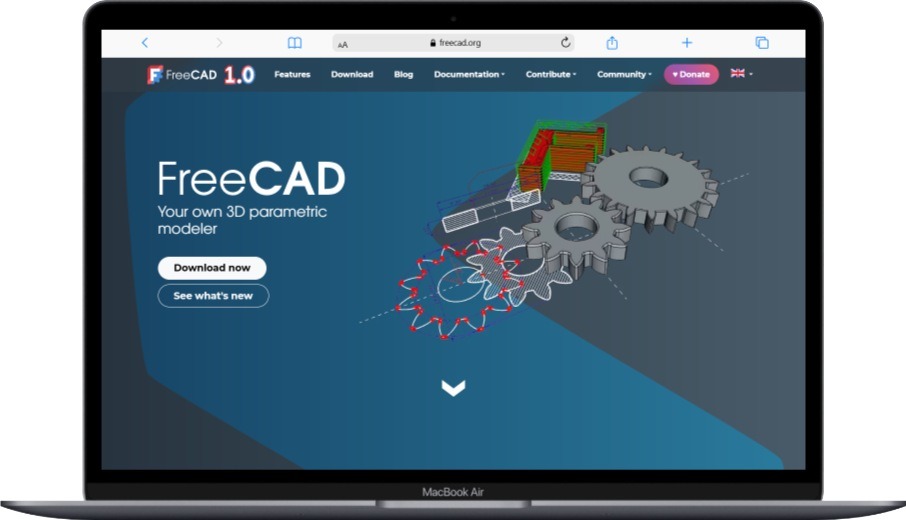
FreeCAD is a powerful open-source parametric 3D modeler that can be extended for woodworking applications. As free software, it offers capabilities similar to expensive CAD programs, making it an excellent choice for woodworkers who need professional features without the cost. Its modular architecture lets you add specialized tools for woodworking design.
Top learning resources include:
- FreeCAD official documentation and wiki
- YouTube tutorials for woodworking applications
- Community forums and user groups
- GitHub repository for development updates
Main Features:
- Parametric 3D modeling
- Modular architecture with workbenches
- Constraint-based sketching
- Assembly design capabilities
- Technical drawing generation
- Python scripting for customization
Pros:
- Completely free and open-source
- Professional parametric capabilities
- Highly customizable and extensible
- Active development community
- Cross-platform compatibility
Cons:
- Steep learning curve
- Interface can be confusing
- Less polished than commercial software
- Limited woodworking-specific features out of the box
Best for: Technical-minded woodworkers, those comfortable with open-source software, and anyone needing parametric modeling capabilities who can’t afford commercial CAD software.
How Do These Woodworking Design Software Options Compare?
When choosing between these software options, consider what matters most for your specific needs. Fusion 360 and SolidWorks offer the most professional capabilities but come with steep learning curves and higher costs. SketchUp Pro and SketchList 3D provide more user-friendly experiences specifically tailored for woodworkers. Free options like Blender and FreeCAD can be powerful but require more technical knowledge and customization.
For beginners, SketchUp Pro or SketchList 3D are often the best starting points. They offer gentle learning curves while providing enough features to handle most woodworking projects. As your skills advance, you might move to more powerful options like Fusion 360 or SolidWorks for complex designs or CNC integration.
Consider your budget carefully. While free options can handle many woodworking needs, paid software often provides better support, more polished interfaces, and features specifically designed for woodworking applications. The time you save with better tools often justifies the investment, especially if you’re running a woodworking business.
Conclusion
The right woodworking design software can transform your woodworking experience, helping you create better projects with less stress and waste. Whether you choose a professional powerhouse like Fusion 360, a woodworking-specific tool like SketchList 3D, or a free option like Blender, investing time in learning design software will pay dividends in your woodworking journey.
Start with a program that matches your current skill level and needs, then grow into more advanced tools as your projects become more complex. Remember that the best software is the one you’ll actually use consistently, so prioritize ease of use and features that match your specific woodworking interests.
With the right digital tools in your workshop, you’ll be able to design with confidence, build with precision, and create woodworking projects that truly impress. The future of woodworking is here, and it’s digital!
FAQ About Woodworking Design Software
Is woodworking design software difficult to learn for beginners?
Yes, woodworking design software can be challenging for beginners, but user-friendly options like SketchUp Pro and SketchList 3D have gentle learning curves designed specifically for woodworkers without technical backgrounds. These programs use woodworking terminology rather than technical CAD jargon, making them more accessible to those new to digital design. Starting with simpler projects and utilizing available tutorials can help beginners overcome the initial learning curve.
Can woodworking design software replace traditional drafting and planning methods?
Yes, woodworking design software can effectively replace traditional drafting and planning methods by offering superior precision, easy modifications, and automatic generation of cutlists and shop drawings. Digital designs can be quickly adjusted, shared, and refined without the need to redraw entire plans by hand. However, some woodworkers still find value in sketching initial ideas on paper before moving to digital design for refinement and detailed planning.
Is free woodworking design software as capable as paid options?
No, free woodworking design software typically lacks the polished interfaces, dedicated support, and woodworking-specific features found in paid options, but programs like Blender and FreeCAD offer powerful capabilities that can meet many woodworkers’ needs. Free software often requires more technical knowledge and customization to work efficiently for woodworking applications. However, for hobbyists and those on tight budgets, free options can provide excellent functionality without financial investment.
Do I need a powerful computer to run woodworking design software?
Yes, most woodworking design software requires a reasonably powerful computer with sufficient RAM, a dedicated graphics card, and adequate storage space to handle 3D modeling and rendering tasks efficiently. Basic 2D design programs may run on modest hardware, but 3D modeling software typically benefits from more robust systems. Always check the minimum and recommended system requirements before purchasing software to ensure your computer can handle it effectively.
Can woodworking design software help me save money on materials?
Yes, woodworking design software can significantly reduce material costs by optimizing cut layouts, minimizing waste, and helping you avoid costly mistakes through virtual prototyping and testing. Material optimization features can reduce scrap by up to 30%, while the ability to identify and fix design issues before cutting wood prevents expensive errors. For professional woodworkers, these savings can quickly offset the cost of the software itself.
Is it worth learning woodworking design software for occasional hobby projects?
Yes, learning woodworking design software is worthwhile even for occasional hobby projects because it helps you visualize designs more clearly, plan more efficiently, and achieve better results with less trial and error. While there is an initial learning investment, the skills you develop will improve your woodworking regardless of project frequency. User-friendly programs like SketchUp Free offer accessible starting points for hobbyists who want to enhance their design capabilities without overwhelming complexity.
You May Also Like
 Software
9 Best Free Laser Engraver Software Tools in 2026
 Software
When Fixing Bugs Is No Longer Enough: How to Rescue a Failing Software Project
 SaaS
SaaSNotion vs Coda vs ClickUp for Teams: A Field Report From 18 Months
 SaaS
SaaSTrello vs monday.com vs ClickUp: Which Project Management Tool Fits Your Team in 2026?
 SaaS
SaaS8 Best Asana Alternatives in 2026: Free Tools, Top Competitors, and How to Choose
 Software
What is Asana Software? How Businesses Use It for Project Management and Team Collaboration
 Software
10 Best Audio Redaction Software in 2026 (Tested Picks by Use Case)
 SaaS
SaaS10 Best AI Audio Enhancers for Podcasts in 2026 (Reviewed & Compared)
 Software