

Picture a woman named Elena logging into her bank’s website on a Tuesday morning. She types the correct address, the padlock icon shows up in her browser like it always does, the page looks exactly right down to the logo and the login box. She enters her username and password like she’s done a thousand times before. Nothing about the experience feels wrong. And that’s exactly the problem, because Elena never actually reached her bank. Somewhere between her keyboard and the real website, something quietly rerouted her to a forged copy, and by the time she notices anything odd, her credentials are already gone.
That’s pharming, and it’s one of the more unsettling categories of cybercrime precisely because it doesn’t rely on the victim making a mistake. Elena didn’t click a suspicious link. She didn’t fall for an urgent email. She typed the right address into the right browser and still ended up somewhere else entirely.
What is Pharming in Cyber Security?
Pharming is a cyberattack that redirects a user from a legitimate website to a fraudulent one by tampering with the underlying process computers use to find websites in the first place, rather than by tricking the user into clicking a bad link. The name is a blend of “phishing” and “farming,” a nod to how attackers effectively cultivate a wide field of victims at once instead of angling for them one at a time.
To understand why that matters, it helps to understand what pharming actually attacks: the Domain Name System, or DNS. Every time you type a web address like yourbank.com, your device has no idea what that name actually means in networking terms. It asks a DNS server to translate the name into a numeric IP address, the way a phone directory turns a name into a number. Pharming attacks corrupt that translation step. Instead of your request going to your bank’s real IP address, it gets quietly pointed to an address the attacker controls, and your browser has no way of knowing the difference. The address bar still says yourbank.com. The page still looks right. Only the destination has changed.
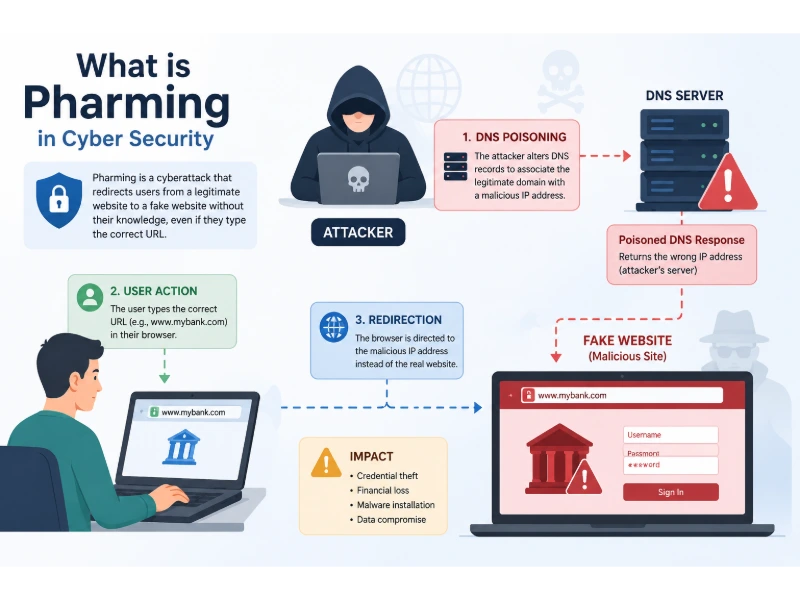
How Pharming Actually Works
Pharming attacks generally happen through one of two mechanisms, and the distinction matters because it determines who’s actually at risk and how you defend against it.
Malware-Based Pharming (Local Redirection)
In this version, attackers get malicious code onto your device, often through an infected email attachment, a compromised download, or a drive-by exploit on a vulnerable router. That malware modifies your computer’s local hosts file (a small file that maps domain names to IP addresses before your device ever asks a DNS server) or changes your device’s or router’s DNS settings directly. From that point forward, every time you type in a legitimate address, your own machine quietly sends you somewhere else. Nothing about your internet connection or your ISP is compromised. The problem lives entirely on your device or in your home router.
DNS-Based Pharming (Server-Level Redirection)
This version is scarier because it doesn’t require the victim to do anything wrong at all. Attackers target the DNS infrastructure itself, either by exploiting a vulnerability to inject false records into a DNS resolver’s cache (a technique known as DNS cache poisoning or DNS spoofing) or by compromising a DNS server outright and altering its records. Once a single caching server accepts a poisoned entry, every user who queries that server for the affected domain gets sent to the attacker’s site until the fake entry expires or is cleared. A single successful poisoning attempt against a widely used resolver can misdirect thousands of people who never did anything except type a familiar web address into their browser.
There’s a real historical example that illustrates just how deep this vulnerability runs. In 2008, security researcher Dan Kaminsky discovered a fundamental flaw in how DNS software validated responses, one serious enough that it prompted a coordinated, simultaneous patch release across virtually every major DNS vendor. It’s a useful reminder that pharming isn’t a theoretical risk dreamed up by security vendors trying to sell software. It’s built on structural weaknesses in a protocol the entire internet depends on.
Why Pharming Feels So Much More Personal Than Phishing
Most people have a mental model for phishing by now: a fake email pretending to be your bank, a link that doesn’t quite match the real domain, an urgent tone designed to make you click before you think. That model gives people something to watch for. Pharming takes that defense away.
With pharming, the fraudulent page can sit behind the correct, familiar URL. There’s no suspicious link to hover over, no misspelled domain to catch, no unexpected sender to question. Someone using a completely clean, malware-free computer can still land on a fake site if the DNS server they happen to be using has been poisoned. That’s a genuinely different threat model than phishing, and it’s why security teams treat the two as related but distinct problems. Phishing attacks the person. Pharming attacks the path the person’s traffic takes to get anywhere.
Real Pharming Attacks That Actually Happened
Abstract definitions only go so far, so it’s worth looking at a few incidents that show what pharming looks like when it’s carried out at scale.
The 2007 attack on more than 50 financial institutions. One of the most cited pharming incidents targeted over fifty banks across the United States, Europe, and Asia. Attackers built convincing replica pages for each targeted bank and used a Microsoft vulnerability, combined with malware distribution, to quietly redirect victims and harvest login credentials before sending them on to the real site, often without the victim ever noticing anything happened. According to research summarized by Kaspersky’s threat encyclopedia, the exact number of affected users was never fully determined, which is itself telling: pharming victims frequently don’t realize they were ever redirected in the first place.
Operation Ghost Click, 2011. This case is technically built on DNSChanger malware rather than classic server-side poisoning, but it shows the same underlying redirection principle at a massive scale. According to the FBI’s own account of the investigation, a ring of cybercriminals infected roughly four million computers across more than 100 countries with malware that silently altered victims’ DNS settings, rerouting their web traffic to sites the attackers controlled and profiting from fraudulent advertising revenue. The Cybersecurity and Infrastructure Security Agency later issued public guidance urging affected individuals and organizations to check their systems before the FBI’s temporary cleanup DNS servers were shut down, since disconnecting them would have cut off internet access entirely for machines still infected.
The first documented drive-by pharming attack, 2008. Researchers documented an attack against a Mexican bank’s customers that exploited a vulnerability in home routers rather than the victim’s computer or the bank’s own servers. Simply visiting a malicious webpage was enough to silently change a router’s DNS settings, no download or click required beyond loading the page itself. It’s a good reminder that the weakest link in pharming defense is often the cheap router sitting in someone’s living room, running firmware that hasn’t been updated in years.
What connects all three cases is the same uncomfortable truth: the people who got redirected did nothing that a security awareness training video would have told them to watch for.
How to Detect Pharming
Because pharming hides behind a legitimate-looking address, detection depends on noticing details that don’t fit rather than an obviously suspicious link.
- Certificate warnings that shouldn’t be there. If your browser flags an SSL/TLS certificate mismatch or warning on a site you visit regularly, don’t dismiss it as a glitch. A legitimate site’s certificate shouldn’t suddenly look wrong.
- A page that’s almost right, but not quite. Slightly off logos, unfamiliar layout changes, or login fields asking for information the real site never requests are worth a second look.
- Unusual account activity following a login. Unrecognized charges, password reset emails you didn’t request, or login alerts from unfamiliar locations shortly after visiting a site are a strong signal something intercepted your credentials.
- The same redirect happening across multiple devices on one network. If several devices on the same home or office network all land somewhere unexpected when visiting the same address, the problem likely sits in the router or local DNS configuration rather than on any single device.
- DNS settings that don’t match what you configured. Checking your router’s DNS server settings against what your ISP or organization actually assigned is a simple, often-overlooked check that catches a surprising number of local pharming infections.
How to Prevent Pharming: Practical Defenses
1. Enable DNSSEC Where You Can
DNS Security Extensions (DNSSEC) add a cryptographic signature to DNS responses, allowing resolvers to verify that a response actually came from the domain’s authoritative source rather than an attacker. It’s not something an average end user configures directly, but it’s worth asking your domain registrar, hosting provider, or IT team whether it’s enabled, since it directly closes off the DNS cache poisoning vector.
2. Use a Reputable, Security-Focused DNS Resolver
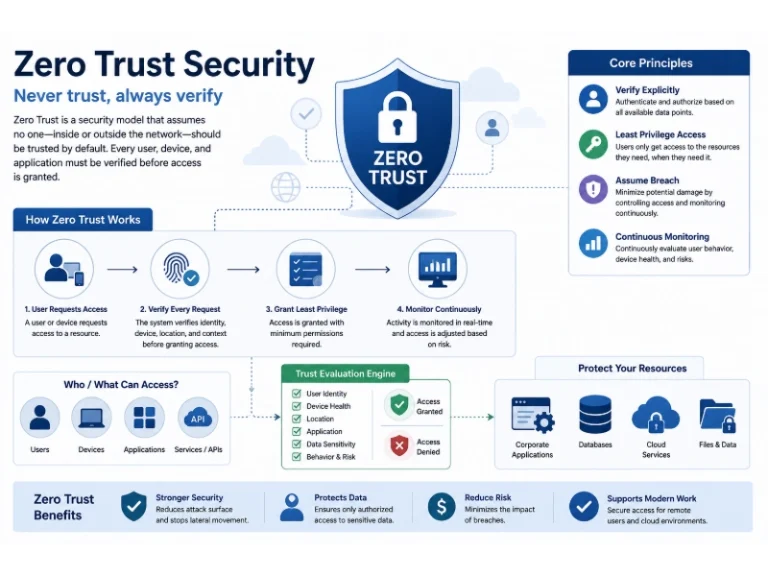
Not all DNS resolvers are equal. Providers that actively monitor for and filter known malicious domains add a meaningful layer of protection beyond whatever your ISP offers by default. This is a genuinely useful complement to broader defenses like a zero-trust security posture, since it assumes any given DNS response could be tampered with and verifies rather than automatically trusts it.
3. Harden Your Router
Home and office routers are a favorite pharming target precisely because they’re so often ignored after setup. Change the default administrator password immediately, disable remote administration if you don’t need it, and keep firmware updated. Reviewing your wireless network security settings as part of that hardening process closes off several of the same entry points attackers use for drive-by DNS hijacking.
4. Keep Software, Browsers, and Security Tools Updated
A meaningful share of malware-based pharming rides in on an unpatched vulnerability, whether in a browser plugin, an operating system, or router firmware. Regular updates close the gaps attackers rely on to install DNS-changing malware in the first place.
5. Watch for HTTPS and Certificate Details, Not Just the Padlock
HTTPS confirms your connection is encrypted, not that you’re talking to the site you think you are. A pharming site can, in some cases, present its own valid certificate for a lookalike domain. Understanding how encryption actually works helps clarify what that padlock is and isn’t promising you, which matters more than most people realize when evaluating whether a page is genuinely trustworthy.
6. Run Endpoint Protection That Catches Hosts File and DNS Tampering
Modern endpoint protection and anti-malware tools can flag unauthorized changes to a device’s hosts file or DNS configuration in real time, catching malware-based pharming attempts before they cause real damage.
7. Build DNS Monitoring Into Your Broader Security Program
For businesses, pharming risk deserves the same structured attention as any other network threat. Folding DNS monitoring into a regular network security audit and aligning your broader controls with an established framework like the NIST Cybersecurity Framework gives you a repeatable way to catch DNS anomalies before they turn into a full incident rather than discovering them after customers start complaining.
8. Train People to Recognize the Difference Between Pharming and Phishing
Security awareness training tends to focus heavily on spotting suspicious emails and links, which is valuable but incomplete. Employees and family members alike benefit from understanding that a correct-looking URL isn’t a guarantee of safety on its own. Pairing this with existing phishing awareness education gives people a more complete mental model of how DNS-based redirection differs from the email-based scams they’ve already learned to watch for.
Pharming vs. Phishing vs. DNS Attacks: How They Relate
It’s easy to lump pharming in with every other DNS-adjacent or credential-theft attack, but the distinctions matter for defense planning.
| Attack Type | What It Targets | Victim Action Required | Typical Defense |
|---|---|---|---|
| Phishing | The person, via a fake email or message | Yes, clicking a link or opening an attachment | Awareness training, email filtering |
| Malware-based pharming | The victim’s device or router | Initial infection, then none | Endpoint protection, router hardening |
| DNS-based pharming | Shared DNS infrastructure | None at all | DNSSEC, secure resolvers, monitoring |
| DDoS attacks | Availability of a service | None | Traffic filtering, rate limiting, redundancy |
The common thread across DNS-based pharming and other infrastructure-level attacks is that individual caution alone can’t fully protect you. That’s exactly why organizational-level defenses, not just personal vigilance, carry so much of the weight here.
Why This Matters More for Businesses Than It Might Seem
For an individual, a pharming attack is a serious but usually isolated problem. For a business, a single successful DNS-based pharming attempt against customer-facing infrastructure can affect every customer trying to reach the company at once, turning one vulnerability into a mass-casualty event for customer trust. That’s part of why cybersecurity matters so much for small businesses specifically. Smaller organizations often run consumer-grade routers and rarely audit their DNS configuration, which makes them a comparatively easy target relative to the damage a successful attack can cause.
What Pharming Actually Costs a Business
The direct financial theft from a pharming incident is often the smallest part of the damage. A few consequences tend to matter more in the long run:
- Customer trust takes the hardest hit. Someone who was redirected to a convincing fake version of your website and had their credentials stolen doesn’t always blame the attacker first; they often blame the company whose name was on the page, fairly or not.
- Support and remediation costs stack up fast. Investigating which customers were affected, resetting credentials, and fielding a spike in support inquiries all pull staff away from ordinary work, sometimes for weeks after the initial incident is resolved.
- Brand and search visibility can suffer. If a poisoned DNS record redirected traffic for any meaningful stretch of time, customers, partners, and even search engines may have interacted with the fraudulent version of the site, which can create confusion long after the technical problem is fixed.
- It rarely happens in isolation. Attackers who successfully pull off DNS-based redirection often use it as a stepping stone toward broader credential harvesting, follow-on phishing campaigns, or malware distribution, meaning the initial pharming incident is frequently just the first visible symptom of a larger compromise.
Treating pharming prevention as part of a broader data protection strategy, alongside steps like those covered in how companies can protect customer data, tends to catch these downstream costs before they compound.
Frequently Asked Questions
Is pharming the same thing as DNS spoofing?
They overlap heavily. DNS spoofing (or DNS cache poisoning) is one of the two primary mechanisms used to carry out a pharming attack, the other being malware that changes local DNS settings or hosts files. Pharming is the broader outcome; DNS spoofing is one of the tools used to achieve it.
Can pharming happen even if I never click a suspicious link?
Yes, and that’s what makes it distinct from phishing. DNS-based pharming can redirect you without any action on your part beyond typing a normal, correct web address into your browser.
How do I know if my router’s DNS settings have been changed?
Log into your router’s admin panel and compare the listed DNS servers against what your internet provider actually assigned you, or check for unfamiliar DNS entries in your device’s network settings. If you don’t recognize the numbers listed, that’s worth investigating immediately.
Does using a VPN protect against pharming?
Partially. A reputable VPN typically routes your DNS queries through its own resolvers, which can help if your local network or ISP-level DNS has been compromised, but it won’t protect you if malware on your device is directly modifying your hosts file after the VPN connection is established.
Are small businesses really at risk, or is this mostly a concern for banks?
Any organization with an online presence customers rely on is a potential target. Attackers don’t need a company to be a bank specifically; they need customers who trust the domain enough to enter sensitive information once redirected.
What should I do if I think I’ve been a victim of pharming?
Disconnect the affected device from the network, run a full malware scan, check and reset your router’s DNS settings and admin password, and change passwords for any accounts you accessed around the time of the suspected redirect, ideally from a different, unaffected device.
The Human Takeaway
What makes pharming worth understanding isn’t just the technical mechanism behind it. It’s the unsettling fact that doing everything right, typing the correct address, checking for the padlock, avoiding suspicious emails, still isn’t a complete guarantee of safety when the compromise happens somewhere between your keyboard and the destination you’re trying to reach. That’s not a reason for panic. It’s a reason to push some of that responsibility off the individual user and onto the infrastructure and habits that are actually built to catch it: hardened routers, verified DNS resolution, monitored networks, and organizations that treat DNS integrity as seriously as they treat any other layer of security.
Elena, the woman from the opening of this article, eventually noticed unfamiliar charges on her account and called her bank directly. Her bank’s fraud team had seen the pattern before and helped her secure her accounts within the day. Not every story ends that cleanly, which is exactly why the defenses above are worth putting in place before you ever find yourself in her position.
You May Also Like
 Cybersecurity
Is Fanatical Legit and Safe? My Honest Take on Buying Game Keys
 Data Security & Privacy
Is Gameflip Legit and Safe for Gift Cards? What Buyers Should Know
 Data Security & Privacy
Is Eldorado.gg Legit and Safe in 2026? My Investigation and What Buyers Should Know
 VPN & Proxy
Why Does Google Say Our Systems Have Detected Unusual Traffic From Your Computer Network?
 Cybersecurity
Is Groupon Legit? An Honest Review In 2026
 Cybersecurity
Is Romspure Safe? An Honest Look at the ROM Site’s Risks and Trust Scores
 Cybersecurity
Is KashKick Legit? Honest KashKick Review (Payouts, Earnings, and Pros & Cons)
 Cybersecurity
Bookvip reviews: Is Bookvip Travel Legit or Scam?
 Cybersecurity