

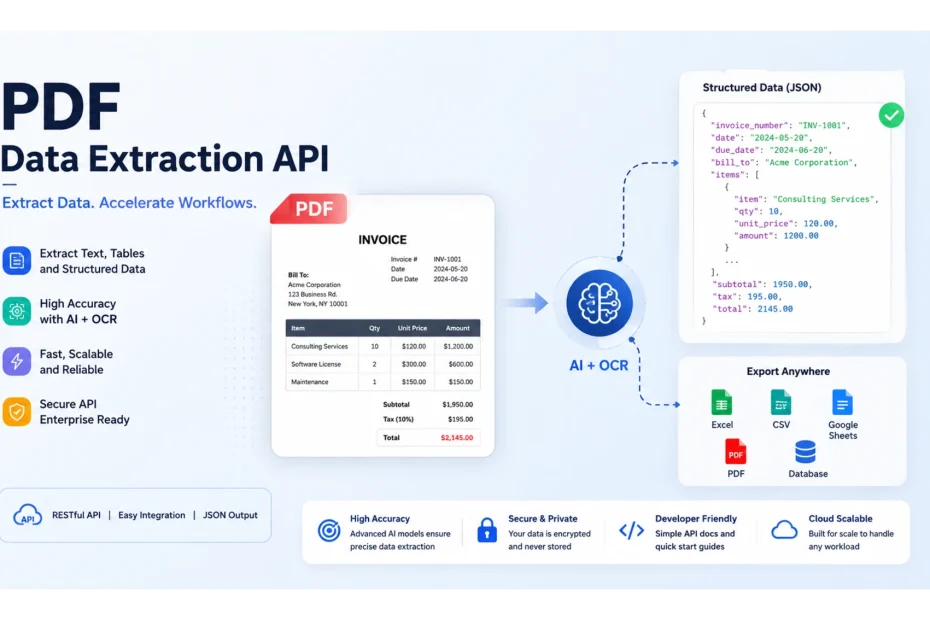
A PDF data extraction API is a cloud service that turns text, tables, forms, and scanned images inside a PDF into machine-readable output, usually JSON, CSV, or Markdown, so an application can use the data without a human reading the document.
The best choice depends on your documents. Text-heavy PDFs need less than scanned invoices or multi-column reports, and pricing, OCR quality, and structured-output support vary a lot between providers.
If we’re talking about (The Best), I think there is no single best PDF extraction API for every job. A developer building a RAG pipeline over research papers has different needs than a fintech team parsing bank statements or an enterprise processing thousands of invoices a day.
It is important for us to note together that pricing, rate limits, and model versions change often in this space; treat every number below as a snapshot verified against public sources at the time of writing, and confirm current figures on each provider’s own pricing and documentation pages before budgeting a production workload.
Key Takeaways
- There’s no universal “best” API. The right choice API for PDF data extraction depends on your purpose, document types (native vs. scanned), required output (plain text vs. structured JSON), and volume, not on a single leaderboard ranking.
- OCR, parsing, and document AI are different capabilities. Parsing reads a PDF’s existing internal text; OCR converts scanned images into text; document AI adds semantic structure (labeled fields, tables, entities) on top of either.
- Plain OCR is cheap; structured extraction costs far more. Across Google Document AI, Azure AI Document Intelligence, and Amazon Textract, moving from raw OCR to forms/tables/custom extraction can raise the per-page cost by 5 to 20x or more, so price the specific feature you need, not the advertised starting rate.
- Google Document AI and Azure AI Document Intelligence are strong general-purpose picks with broad prebuilt processor libraries and clearly published per-page pricing.
- Mistral OCR and LlamaParse are built with AI applications and RAG pipelines in mind, returning Markdown/JSON output designed for chunking and embedding.
- Adobe PDF Extract API stands out for layout fidelity (reading order, fonts, structure) but bills per “Document Transaction” rather than a flat per-page rate.
- Mathpix is the strongest option when a document contains math equations, chemistry diagrams, or other STEM notation that general-purpose OCR tends to mangle.
- Nutrient’s Data Extraction API offers four selectable extraction modes (text, structure, understand, agentic) that trade cost for accuracy, and can chain extraction with OCR, redaction, and conversion in one platform.
- Test on your own documents before committing. Published feature lists and benchmarks don’t reliably predict accuracy on your specific layouts, scan quality, or table structures.
- Review data-retention and training-data policies before uploading sensitive documents. Don’t assume a provider carries a specific compliance certification unless you’ve confirmed it directly.
What Is a PDF Data Extraction API?
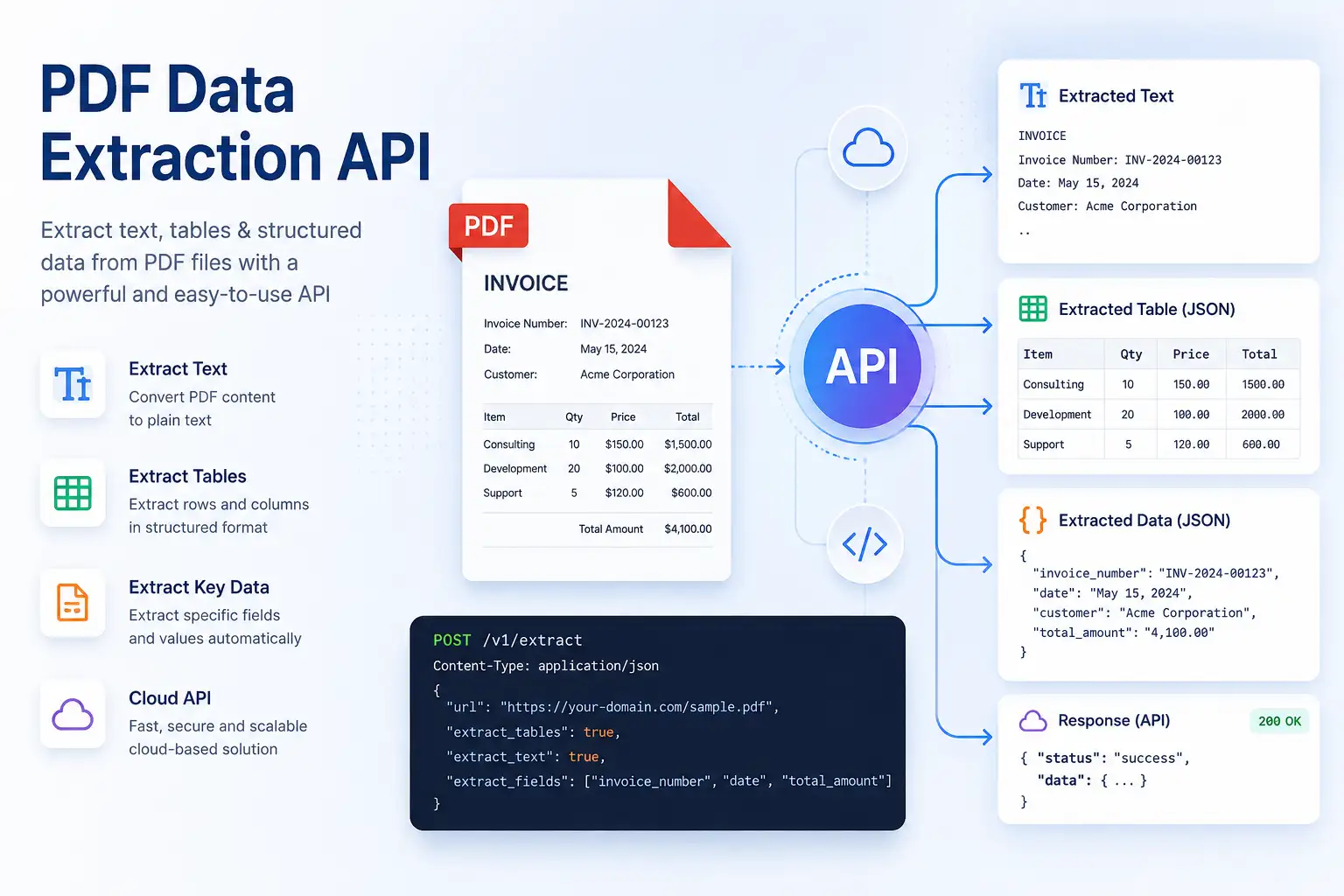
A PDF data extraction API is a hosted service you call over HTTPS (typically a REST endpoint) that accepts a PDF (or a link to one) and returns its content in a structured, programmatic format.
Instead of installing and maintaining a PDF parsing library, running your own OCR engine, and writing code to detect tables and forms, you send the file to the API and get back text, layout information, tables, key-value pairs, or a full JSON document tree.
This is a form of automated data scraping, though it’s worth noting PDF extraction and web scraping solve related but distinct problems: one pulls structured data out of a static file, the other pulls it from live web pages (see our web scraping API guide if you need both in the same pipeline).
A PDF extraction API differs from a local PDF library like PyMuPDF or pdfplumber in a few important ways:
- No infrastructure to manage. The provider runs the OCR models, layout-analysis models, and (in AI-powered services) the document-understanding models. You don’t provision GPUs or maintain model versions.
- Handles more PDF types out of the box. A local library is usually strong at digital, text-based PDFs but weak at scanned pages, complex tables, or handwriting unless you bolt on a separate OCR engine yourself.
- Scales elastically. APIs are built to process one page or one million pages without you managing queues, workers, or retries at the infrastructure level.
- Costs money per page or per document, rather than being free and self-hosted.
The typical workflow: a developer uploads a PDF (or a batch of PDFs) to the API, either synchronously for small files or asynchronously with a job ID and webhook for larger ones.
The API processes the document and returns structured data, commonly JSON, sometimes CSV, Markdown, or XML. Common use cases include invoice and receipt processing, contract analysis, financial statement parsing, resume parsing, research-paper ingestion for AI applications, and general document automation in back-office workflows.
How Does PDF Data Extraction Work?
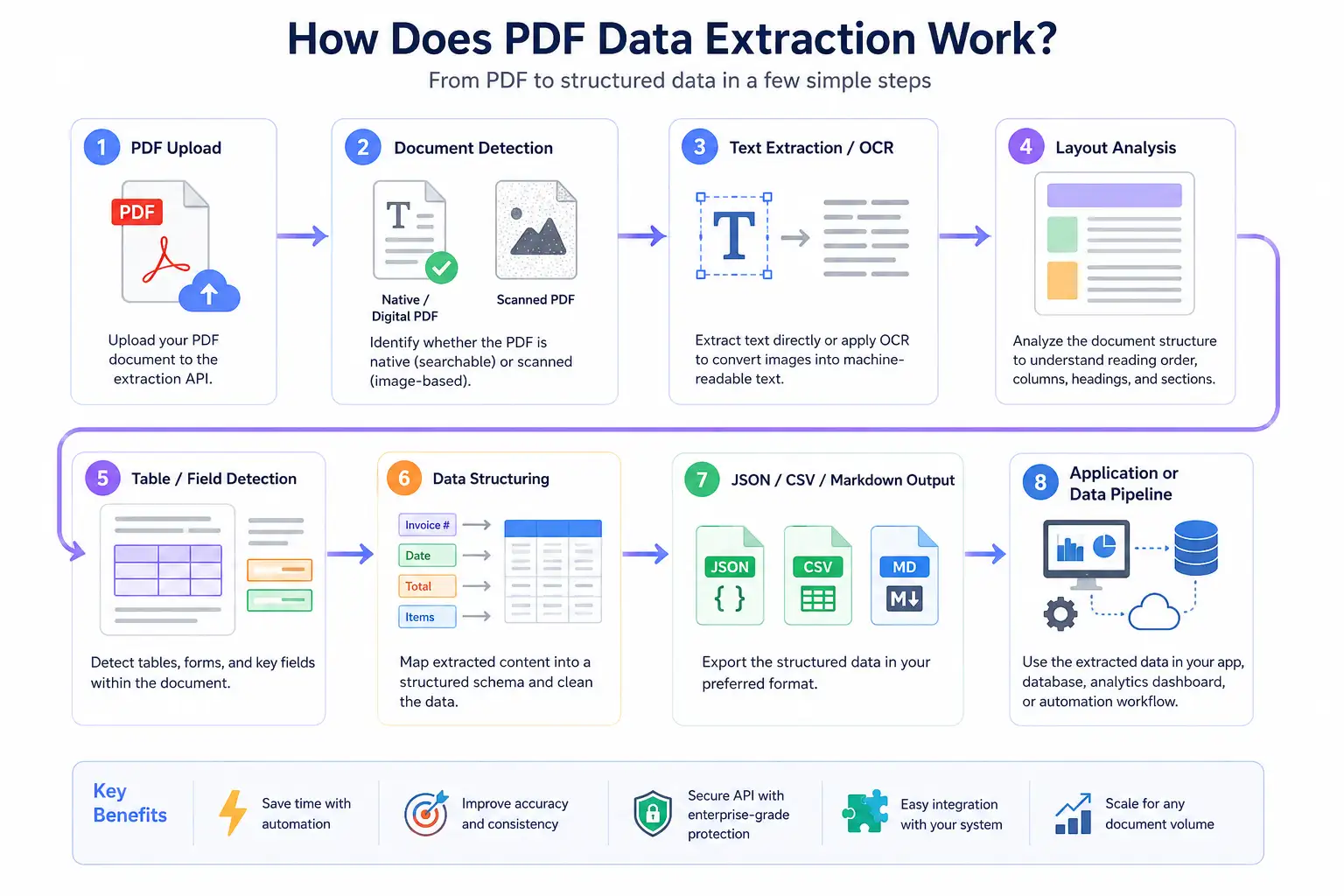
Most PDF extraction pipelines, whether traditional or AI-powered, follow a similar conceptual flow:
PDF Upload
   ↓
Document Detection (is it a native/digital PDF or a scanned image?)
   ↓
Text Extraction / OCR
   ↓
Layout Analysis (reading order, columns, headings, sections)
   ↓
Table / Field Detection
   ↓
Data Structuring (mapping raw text into a schema)
   ↓
JSON / CSV / Markdown Output
   ↓
Application or Data Pipeline
- Traditional parsing: reads the PDF’s internal structure directly (the text objects, fonts, and coordinates a PDF file already contains) and reconstructs reading order and tables from that. It’s fast and cheap on digital PDFs but breaks down on scanned documents, since there’s no embedded text to read.
- OCR (optical character recognition) converts pixels into text by recognizing character shapes on a scanned or image-based page. It’s necessary whenever a PDF is a photograph or scan rather than a digitally generated file.
- AI-powered document understanding goes a step further. Instead of just finding characters and lines, a model trained on documents (or a large multimodal language model) identifies semantic structures (this block is a heading, this cluster of numbers is a table, this text is an invoice total) even on messy, real-world layouts it hasn’t seen before. This is what lets modern APIs return clean structured JSON like
{"invoice_number": "12345"}instead of a flat wall of extracted text.
Why PDF Type Matters When Choosing an API
Not every PDF extraction problem is the same problem. The right API, and the right pricing tier, depends heavily on what kind of document you’re feeding it.
- Text-based PDFs (native, digitally generated) are the easiest case. The text is embedded in the file, so extraction is fast, cheap, and highly accurate even with lightweight parsers.
- Scanned PDFs are photographs or scans of paper documents saved as PDF. There’s no embedded text, so OCR is mandatory. Accuracy depends heavily on scan quality, resolution, and skew.
- Image-based PDFs behave the same way as scanned PDFs for extraction purposes: the “text” is really pixels, so OCR (or a vision-capable model) has to read it.
- PDFs with tables are difficult because a PDF has no real concept of a “table.” What looks like a table to a human is really just text positioned in a grid. Extracting it correctly means detecting rows, columns, merged cells, and header rows from visual layout alone.
- PDFs with forms require detecting labels and their associated values (key-value pairs), checkboxes, and signature fields, not just reading text top to bottom.
- Complex multi-column PDFs (academic papers, newsletters, some reports) can confuse extraction tools that read left-to-right across the whole page instead of down one column at a time, scrambling the reading order.
- PDFs with charts and images typically need the extraction tool to at least detect and separate embedded images from the surrounding text; only a few providers can meaningfully describe or extract data from a chart itself.
- Password-protected PDFs need to be unlocked (with a known password) before any extraction step, native or scanned, can run at all.
Knowing which of these categories your documents actually fall into, and testing with a representative sample, not just one clean PDF, is the single biggest factor in choosing the right API.
10 Top PDF Data Extraction APIs For Developers
Below are some comparisons of the PDF extract api providers most commonly evaluated for PDF data extraction.
1. Adobe PDF Services API (PDF Extract API)
Best for: Developers who need high-fidelity structural extraction (headings, lists, tables, reading order, fonts) from both native and scanned PDFs, especially teams already in the Adobe ecosystem.
Adobe’s PDF Extract API uses Adobe’s Sensei ML technology to pull text, tables, and figures into structured JSON, capturing reading order, layout position, and font/styling metadata. It also offers a PDF-to-Markdown operation aimed at LLM-friendly output. It’s part of the broader PDF Services API, which also handles PDF creation, conversion, compression, and OCR.
- Text extraction: Yes, with contextual blocks (paragraphs, headings, lists, footnotes)
- OCR: Yes, for scanned/native PDFs
- Tables: Yes, structured with rows/columns
- Forms: Supported via related PDF Services operations
- Structured JSON output: Yes, including layout and reading-order metadata
- SDKs: Node.js, Python, Java, .NET
- Free tier: 500 free Document Transactions per month
- Pricing model: Per “Document Transaction.” The Extract and PDF-to-Markdown operations count as 1 transaction per up to 5 pages; most other operations count as 1 transaction per up to 50 pages. Paid plans move to volume-based pricing with multi-product discounts; some users report a practical entry point in the low five figures annually for sustained production use, so it’s worth getting a quote for your expected volume rather than assuming a low per-page cost. Full details are on Adobe’s official pricing page.
- Main advantages: Strong layout fidelity, good documentation, generous free tier for evaluation, mature SDKs.
- Main limitations: The Extract API’s 5-pages-per-transaction billing unit makes it more expensive per page than several competitors once you’re past the free tier; enterprise pricing is not fully self-serve.
2. Amazon Textract
Best for: Teams already on AWS who want granular control over which extraction capability (plain OCR vs. forms vs. tables vs. invoices) they pay for.
Amazon Textract is AWS’s OCR and document-analysis service. It’s not one flat price: it’s a family of APIs, and which one you call has a large effect on your bill. Plain text detection is priced far lower than form and table analysis, and specialized calls like Analyze Expense (invoices/receipts) or Analyze ID sit at their own rate.
- Text extraction: Yes (DetectDocumentText)
- OCR: Yes, including handwriting
- Tables: Yes (AnalyzeDocument with TABLES), priced separately from plain OCR
- Forms: Yes (AnalyzeDocument with FORMS), priced separately from plain OCR
- Structured JSON output: Yes
- SDKs: All major AWS SDKs (Python/Boto3, Java, JavaScript, Go, .NET, etc.)
- Free tier: AWS’s free tier historically includes a limited number of pages per month for the first three months on core APIs (subject to change)
- Pricing model: Per page, tiered by which API you call and by processing volume. According to Adobe’s official pricing page, plain-text detection runs a small fraction of a cent per page, while enabling forms and/or tables detection on the same page raises the per-page cost substantially. Independent trackers cite the plain-OCR rate at roughly $1.50 per 1,000 pages and forms/tables detection at a meaningfully higher rate, with published estimates ranging from about $15 to $70+ per 1,000 pages depending on which combination of features and volume tier applies. Because this is one of the more layered pricing structures in the category, model your actual document mix against the official Textract pricing page rather than a single quoted figure.
- Main advantages: Deep AWS integration, mature and battle-tested, specialized invoice/ID/lending endpoints.
- Main limitations: Pricing complexity: picking the wrong API for a document type can multiply your bill many times over for no accuracy benefit; layout preservation for complex documents is weaker than some AI-native competitors.
3. Google Document AI
Best for: Teams that want a spectrum from cheap raw OCR up to prebuilt specialized parsers (invoices, receipts, pay slips, bank statements) without training a custom model.
Document AI is Google Cloud’s document-processing platform. According to Google’s official pricing page, it separates “digitize text” pricing from “extract structures and entities” pricing, and layers a further set of per-document rates on top for prebuilt processors.
- Text extraction / OCR: Enterprise Document OCR Processor, $1.50 per 1,000 pages for the first 5,000,000 pages/month, dropping to $0.60 per 1,000 pages above that
- Structured extraction (Form Parser, Custom Extractor): $30 per 1,000 pages for the first 1,000,000 pages/month, dropping to $20 per 1,000 pages above that
- Prebuilt Invoice, Expense, and Utility parsers: $0.10 for every 10 pages in a document (billed in 10-page blocks per document)
- Bank statement parser: $0.75 per classified document
- Pay slip / W-2 parsers: $0.30 per classified document
- Custom processor hosting: $0.05 per hour per deployed processor version
- Free tier: Google Cloud’s standard free-trial credit can be applied to Document AI usage during evaluation
- SDKs: Python, Java, Node.js, Go, and others via the standard Google Cloud client libraries
- Main advantages: Clear, published per-processor pricing directly from Google; strong prebuilt processor library; scales from cheap raw OCR to purpose-built extractors.
- Main limitations: Requires a Google Cloud project and billing setup, which adds integration overhead versus a single-purpose API; custom extractor training requires labeled data and time investment.
4. Azure AI Document Intelligence (formerly Form Recognizer)
Best for: Teams in the Microsoft/Azure ecosystem, or those needing on-prem/container deployment for data-residency requirements.
Azure’s document AI service, now positioned under Azure AI Foundry, prices per page across tiers roughly comparable to Google’s.
- Read (OCR) model: $1.50 per 1,000 pages
- Layout and prebuilt models (invoices, receipts, IDs, etc.): priced at a higher per-1,000-page tier than plain Read, commonly cited around $10 per 1,000 pages
- Custom extraction: priced highest, commonly cited around $30 per 1,000 pages, with volume discounts at higher usage
- Free tier (F0): Up to 500 pages per month, but the free tier only returns results for the first two pages of any given document: a real constraint for testing multi-page files
- Container/self-hosted deployment: Available for data-residency requirements, generally priced at a discount versus the equivalent cloud tier
- SDKs: .NET, Python, Java, JavaScript
- Main advantages: Strong prebuilt model library, container deployment option for regulated environments, tight integration with the rest of Azure AI Foundry.
- Main limitations: Batch/async calls are billed at the same rate as synchronous calls (no batch discount, unlike some AI-native competitors); free tier’s two-page limit makes real-world testing awkward.
5. Mistral OCR / Mistral Document AI
Best for: Teams that want a fast, low-cost, AI-native OCR engine with strong multilingual and layout-preservation performance, especially for RAG pipelines that want Markdown output.
Mistral’s dedicated OCR model (currently in its fourth generation as of mid-2026) is priced directly and simply per page, according to Mistral’s official pricing page.
- OCR API: $4 per 1,000 pages, with a 50% discount (to $2 per 1,000 pages) via the Batch API
- Document AI (structured/agentic document extraction): $5 per 1,000 pages
- Output: Markdown with tables, bounding boxes, and confidence scores; supports a large number of languages
- Deployment: Cloud API, with self-hosting available for teams with strict data-privacy requirements
- Main advantages: Simple, transparent per-page pricing with a genuine batch discount; strong benchmark performance on layout-heavy documents (tables, forms, mixed content) reported by Mistral’s own evaluations; good fit for teams already building on Mistral’s LLM stack.
- Main limitations: Younger product line than AWS/Google/Azure’s document services, so enterprise compliance tooling and prebuilt business-document parsers (invoice, bank statement, etc.) are less extensive than the big three clouds.
6. LlamaParse (LlamaCloud, by LlamaIndex)
Best for: RAG and AI-application developers already using the LlamaIndex framework who want layout-aware, LLM-friendly Markdown/JSON chunks out of complex PDFs.
LlamaParse is a parsing service built specifically for feeding documents into retrieval-augmented generation pipelines. It uses a credit-based pricing model rather than a flat per-page rate, and the credit cost per page varies sharply by parsing mode.
- Pricing model: Credit-based; published documentation and third-party trackers describe roughly $1–$1.25 per 1,000 credits, with a “Parse without AI” mode costing as little as 1 credit per page, a recommended “Cost-effective” mode around 3 credits per page, and higher-end “Agentic”/model-assisted modes costing dramatically more per page (reported as high as several dozen credits per page for the most LLM-intensive modes)
- Free tier: A monthly free credit allotment exists for prototyping (published figures vary by source, so confirm the current allotment on LlamaIndex’s own pricing page)
- Output: Markdown and structured JSON, designed for direct use in chunking/embedding pipelines
- Deployment: Hosted SaaS via LlamaCloud, with private VPC deployment available for enterprise customers
- Main advantages: Purpose-built for RAG; multiple quality/cost tiers let you trade off cost vs. accuracy per document type; tight integration with the LlamaIndex framework.
- Main limitations: Credit-based pricing makes cost forecasting harder than flat per-page pricing; the gap between cheap and premium parsing modes is large, so an unreviewed default setting can quietly inflate your bill.
7. Unstructured
Best for: Teams building RAG or ETL pipelines across many file types (not just PDF) who want a single API that also handles Word, PowerPoint, HTML, email, and more.
Unstructured focuses on turning “unstructured” documents of many formats into clean, chunked, LLM-ready output, with PDF as one of its core supported formats.
- Free tier: 15,000 free pages per month, resetting monthly, with full feature access
- Pay-as-you-go: $0.03 per page after the free allotment, with the effective bill capped once monthly spend reaches $3,000 (extra pages up to 1,000,000/month are then free within that billing period, per Unstructured’s published pricing page)
- Enterprise: Custom pricing for dedicated instance, VPC, or multi-tenant SaaS deployment, aimed at teams needing SOC 2-aligned isolation and support
- Main advantages: Broad file-format coverage beyond just PDF, generous free tier, transparent published pricing, strong existing integration with common RAG/vector-database frameworks.
- Main limitations: Historically has had more than one pricing model in market (compute-hour vs. per-page) as the product has evolved, so double-check which model applies to your account type; still requires you to own the rest of the RAG stack (embeddings, vector DB) separately.
8. Mathpix
Best for: Teams processing STEM and scientific content, math equations, chemistry diagrams, and technical tables, where general-purpose OCR tends to mangle notation that isn’t plain text.
Mathpix is an OCR and document-conversion API built around recognizing printed and handwritten STEM content (math, text, tables, and chemistry diagrams) from images, stroke data, or PDF files. Its primary output is Mathpix Markdown (MMD), a Markdown superset with support for equations and chemistry diagrams, which can then be converted into LaTeX, DOCX, HTML, PDF, or line-level JSON. A separate asynchronous Files API and an enterprise Secure Conversion Service (SCS) handle large batch jobs that read from and write results directly to a customer’s own cloud storage bucket.
- Text extraction: Yes, including two-column scientific articles and full-document PDF conversion
- OCR: Yes, including handwriting recognition for math and Latin/Hindi text
- Tables: Yes, via dedicated Table OCR
- Forms: Not a core focus; the product is optimized for STEM documents rather than general business forms
- Structured JSON output: Yes, line-level JSON alongside Markdown, LaTeX, DOCX, and HTML output
- SDKs: REST API, plus a Python SDK
- Free tier: A $29 credit is applied to new accounts for testing; a one-time $19.99 setup fee activates a paid API key
- Pricing model: Per page/image, according to Mathpix’s official API pricing page. Image OCR (
v3/text) runs $0.002 per image; PDF/DOCX/PPTX document conversion (v3/pdf) runs $0.005 per page for the first 1,000,000 pages/month, dropping to $0.0035 above that; the asynchronous Files API (for bulk batch jobs) runs $0.0015 per page up to 30,000,000 pages/month, dropping to $0.001 above that. High-volume enterprise processing through SCS is quoted directly by Mathpix’s sales team. - Main advantages: Notably strong accuracy on math equations, chemistry diagrams, and tables that trip up general-purpose OCR; multiple output formats from a single conversion; lower per-page rate on the asynchronous Files API for high-volume, non-real-time batches; SOC 2, HIPAA-ready, and GDPR-compliant SCS tier for enterprise-scale, large-language-model training data pipelines.
- Main limitations: Narrower focus than general-purpose document AI platforms, general business documents like invoices or government forms aren’t the primary use case; a one-time setup fee is required before paid usage; SCS enterprise pricing isn’t self-serve and requires a quote.
9. Nutrient Data Extraction API
Best for: Teams that want selectable cost/accuracy tradeoffs per document (cheap Markdown for clean digital PDFs vs. AI-augmented parsing for messy scans) and the option to chain extraction with OCR, redaction, and conversion in the same platform.
Nutrient’s Data Extraction API parses PDFs, scans, images, and Office files into spatial JSON or Markdown, returning coordinates, confidence scores, and page context so results can be validated before use. It’s part of Nutrient’s broader DWS (Document Web Services) Processor API, which also handles OCR, redaction, watermarking, digital signatures, and format conversion, meaning several of those operations can be chained into a single request.
- Text extraction: Yes, including a low-cost Markdown mode for digitally-born PDFs
- OCR: Yes
- Tables: Yes, with rows, columns, spans, captions, and footnotes preserved
- Forms: Yes, key-value region detection
- Structured JSON output: Yes, “spatial JSON” with bounding boxes, match labels, confidence scores, and reading order; a JSON Schema can be defined for specific fields to extract, or scaffolded automatically from example documents
- SDKs: Type-safe Python and TypeScript clients, plus a Postman collection and an MCP server for AI-agent integration
- Free tier: 5,000 free monthly credits for the Data Extraction API, according to Nutrient’s product page
- Pricing model: Credit-based, with cost scaling by extraction mode:
textmode (Markdown output, best for clean digital PDFs) runs 1 credit per page;structuremode (OCR-backed, spatial output) runs 1.5 credits per page;understandmode (the recommended default, handling all document types with semantic enrichment) runs 9 credits per page;agenticmode (for complex visual reasoning) runs 18 credits per page. Paid Processor API plans on Nutrient’s broader DWS pricing page start around $75 per 1,000 credits. - Main advantages: Four selectable extraction modes let you trade cost against accuracy per document type rather than paying a flat premium rate for every page; output ships with bounding boxes and confidence scores for downstream validation; can combine extraction with OCR, redaction, and conversion in one call; SOC 2 Type II audited with both US and EU hosting regions.
- Main limitations: Multi-mode credit pricing adds forecasting complexity similar to other credit-based competitors; the platform is a broad document-workflow suite (viewer, processor, generation, extraction), which may be more surface area than teams that only need extraction actually require.
10. Orshot (PDF Generation API)
Best for: Teams whose pipeline needs the reverse operation, generating PDFs (invoices, certificates, reports) from reusable templates via API, rather than extracting data out of existing PDFs.
It’s worth flagging that Orshot’s PDF Generation API does not perform PDF data extraction. It solves the opposite problem: it renders PDFs from a designed template plus structured data (JSON in, PDF out) via a single REST call, positioned as an alternative to headless-browser PDF generation stacks like Puppeteer or wkhtmltopdf. It’s included here because teams evaluating extraction APIs for an invoicing or reporting pipeline often need a generation API on the other end of that same pipeline.
- Text/data extraction: Not applicable, this is a generation tool, not an extraction tool
- Templating: Documents are designed once in Orshot Studio (imported from Figma or Canva, or built from scratch), with any layer markable as a dynamic field populated at render time
- Multi-page documents: Yes, multi-page templates render as a single PDF with per-page dynamic data
- Custom fonts: Yes, TTF, OTF, and WOFF fonts render pixel-perfect in the output PDF
- Structured input: Yes, template fields are populated from a JSON payload (or from a spreadsheet row via no-code tools) per render
- SDKs: Node.js, Python, Ruby, and PHP
- Free tier: 30 free render credits (1 credit = 1 PDF page) plus 50 AI credits, no credit card required
- Pricing model: Credit-based monthly subscriptions, according to Orshot’s pricing page: plans range from 1,500 credits/month at $39/month up to 300,000 credits/month at $600/month, with pay-as-you-go overage rates that drop from $36 to $24 per 1,000 credits at higher tiers; a custom Enterprise plan is available for larger volumes.
- Main advantages: No headless-browser stack to maintain; batch rendering from a JSON array for personalized documents at scale; signed, time-limited URLs for sensitive files, or delivery straight into a customer’s own S3, R2, Dropbox, or Google Drive; no-code integrations via Zapier, Make, and n8n alongside the API and an MCP server.
- Main limitations: Solves document generation, not extraction, so it doesn’t belong on a shortlist if the actual need is pulling data out of existing PDFs; credit-based pricing across multiple product tiers (render credits, AI credits, automation runs) adds more moving parts to forecast than a flat per-page rate.
Other providers worth evaluating
A number of other vendors are commonly shortlisted for PDF and document extraction, but their current pricing, rate limits, and exact feature sets should be checked directly on their sites rather than assumed, since this article does not have independently verified current figures for each of them: PDF.co (developer-focused PDF API with OCR, table, and forms endpoints, positioned as a budget-friendly option).
Parseur and Docsumo (no-code/low-code document parsing aimed at business users and finance teams), Nanonets, Veryfi, Affinda, Klippa, and Mindee (specialized in invoices, receipts, and identity documents, often with prebuilt fields for those document types), Unstract (open-source-friendly, LLM-based structured extraction platform), and Google Cloud Vision and OCR.space (lighter-weight OCR-only options for teams that don’t need full document understanding).
If any of these fit your shortlist, pull current pricing and feature docs before comparing them against the providers detailed above.
Comparison Table
| API | Best For | Text | OCR | Tables | Forms | Structured Data | AI-Native | JSON Output | Free Tier | Pricing Model | Enterprise Features |
|---|---|---|---|---|---|---|---|---|---|---|---|
| Adobe PDF Extract API | Layout-faithful extraction | Yes | Yes | Yes | Partial | Yes | Partial | Yes | 500 transactions/mo | Per document transaction | Volume discounts, SLAs |
| Amazon Textract | AWS-native workloads | Yes | Yes | Yes (priced separately) | Yes (priced separately) | Yes | Partial | Yes | Limited trial period | Per page, tiered by API called | Deep AWS integration |
| Google Document AI | Prebuilt business-document parsers | Yes | Yes | Yes | Yes | Yes | Yes | GCP trial credit | Per 1,000 pages / per document | Custom processors, GCP ecosystem | |
| Azure AI Document Intelligence | Microsoft/regulated environments | Yes | Yes | Yes | Yes | Yes | Yes | 500 pages/mo (2-page cap per doc) | Per 1,000 pages, tiered | Container/on-prem deployment | |
| Mistral OCR / Document AI | Fast, cheap, multilingual OCR | Yes | Yes | Yes | Partial | Yes | Yes | Not published | Per 1,000 pages, batch discount | Self-hosting option | |
| LlamaParse | RAG pipelines | Yes | Yes | Yes | Partial | Yes | Yes | Monthly free credits | Credit-based, mode-dependent | VPC deployment | |
| Unstructured | Multi-format ETL for LLMs | Yes | Yes | Yes | Partial | Yes | Yes | 15,000 pages/mo | Per page after free tier | VPC, SOC 2-aligned isolation | |
| Mathpix | STEM/math and chemistry documents | Yes | Yes (incl. handwriting) | Yes | Partial | Yes | Yes | $29 test credit | Per page/image, volume-tiered | SCS batch tier, SOC 2, HIPAA-ready | |
| Nutrient Data Extraction API | Selectable cost/accuracy modes + chained workflows | Yes | Yes | Yes | Yes | Yes | Yes | 5,000 credits/mo | Credit-based, mode-dependent | SOC 2 Type II, US/EU regions | |
| Orshot | PDF generation (reverse operation, not extraction) | N/A | N/A | N/A | N/A | N/A | N/A | 30 render credits | Credit-based monthly plans | Enterprise custom plans |
Best PDF Extraction API by Use Case
Best overall PDF extraction API: There isn’t one universal winner, Google Document AI and Azure AI Document Intelligence are the strongest general-purpose choices for teams that want prebuilt models across many document types plus a large cloud ecosystem behind them, while Mistral OCR is worth a serious look if simplicity and cost-per-page matter most.
Best for OCR: Google Document AI’s Enterprise Document OCR Processor and Mistral OCR both offer straightforward, low per-page OCR pricing with strong multilingual support; Azure’s Read model is comparably priced and integrates well if you’re already on Azure.
Best for table extraction: Adobe PDF Extract API and Amazon Textract’s Tables detection are purpose-built for row/column reconstruction; test both against your actual tables, since accuracy on merged cells and multi-page tables varies by document style.
Best for structured JSON: Adobe PDF Extract API returns richly structured JSON with reading order and layout metadata; Google Document AI’s prebuilt parsers return field-level structured JSON tailored to specific document types like invoices; Nutrient’s spatial JSON adds bounding boxes and confidence scores for downstream validation.
Best for scanned PDFs: any provider with a dedicated OCR path handles this well. Textract, Document AI, Azure Document Intelligence, and Mistral OCR all support scanned documents; accuracy will depend more on your scan quality than on the provider, so test with your actual scans.
Best for enterprise document processing: Azure AI Document Intelligence and Google Document AI, given their container/VPC deployment options, prebuilt compliance tooling, and integration with broader enterprise cloud stacks.
Best for AI applications: Mistral OCR and LlamaParse, both built with downstream LLM consumption (Markdown output, chunking-friendly structure) as a first-class goal.
Best for RAG pipelines: LlamaParse, given it’s purpose-built for RAG ingestion, followed closely by Unstructured for teams that need many file formats beyond PDF in the same pipeline.
Best for invoices: Google Document AI’s Invoice/Expense parser and Amazon Textract’s Analyze Expense API are both purpose-built prebuilt models for this document type.
Best for financial documents: Google Document AI’s bank statement parser is a dedicated prebuilt model; for broader financial-document coverage, evaluate specialized vendors like Nanonets, Veryfi, or Docsumo directly against your document set.
Best for forms: Azure AI Document Intelligence and Amazon Textract both have mature key-value/checkbox detection for forms.
Best for math and scientific documents: Mathpix is purpose-built for this and outperforms general-purpose OCR on equations, chemistry diagrams, and technical tables.
Best for developers: Adobe PDF Extract API and Google Document AI both offer solid SDKs, documentation, and a free tier generous enough for real prototyping.
Best budget option: Mistral OCR’s batch pricing and Unstructured’s 15,000-page free tier both offer meaningful low-cost or free entry points; PDF.co is also commonly cited as a lower-cost option, though its current rates should be verified directly.
Best API for high-volume processing: Google Document AI and Azure AI Document Intelligence both offer declining per-page rates at higher volume tiers, and Mistral’s batch discount rewards high-throughput, non-real-time workloads.
Only make a final call after testing on your own representative documents, published feature lists don’t always predict accuracy on your specific layouts.
PDF Text Extraction vs. PDF Data Extraction
These terms get used loosely, but they describe different levels of output:
- PDF text extraction returns the raw text content of a page, usually preserving little more than reading order. It might return a line like:
Invoice Number: 12345 - PDF data extraction (or structured extraction) identifies the meaning of that text and returns it as a labeled field:
{
  "invoice_number": "12345"
}
- PDF parsing is a broader term that can refer to either of the above, or to reconstructing the document’s layout (columns, tables, headings) without necessarily labeling the content semantically.
- OCR specifically refers to converting image pixels into text; it’s a prerequisite step for extracting anything from a scanned page, but it doesn’t by itself produce structured fields.
- Document understanding refers to AI models that combine OCR, layout analysis, and semantic labeling to directly output structured data like the JSON example above.
Structured extraction is generally more useful for automation because downstream systems (a database, an accounting tool, a CRM) expect a known field name and data type, not a block of unstructured text that still needs to be parsed again.
Best APIs for Extracting Tables From PDFs
Tables are one of the hardest things to extract reliably because a PDF doesn’t actually contain a “table” object, what you see as a table is just text positioned in a grid using coordinates. Extraction tools have to infer the grid structure from that visual layout, which creates several recurring failure points:
- Rows and columns can be misaligned when column widths vary or text wraps across multiple lines within a single cell.
- Merged cells (common in financial statements and government forms) confuse row/column counting if the tool assumes a strict grid.
- Multi-page tables need the extractor to recognize that a table continues across a page break and stitch the rows back together, including repeated header rows.
- Tables inside scanned documents compound the difficulty, since the tool has to detect table structure and run OCR simultaneously on noisy image data.
- Layout preservation matters if you need the table to remain human-readable (e.g., exported to CSV or Excel) rather than just flattened into plain text.
To evaluate table extraction accuracy, test with your own worst-case tables (multi-page financial statements, tables with merged header cells, and tables inside scanned PDFs) and compare the output against a manually verified ground truth. Check whether the API returns tables as structured JSON/CSV (rows and columns as data) or only as visually reconstructed text, since the former is far more useful for automation.
Best PDF OCR APIs
OCR (optical character recognition) is the process of converting pixels in an image into machine-readable text. It’s required any time a PDF page has no embedded text layer, most commonly scanned paper documents, but also PDFs created by “printing” an image to PDF, or PDFs from fax or mobile-scanning apps.
Key factors to evaluate when comparing OCR APIs:
- Image quality tolerance: low-resolution, skewed, or poorly lit scans reduce accuracy across every provider; test with your actual scan quality, not a clean sample.
- Handwriting support: most OCR engines are strong on printed text but noticeably weaker on cursive or messy handwriting; if handwriting matters, test that specifically, since results vary widely between providers.
- Language support: if you process non-English documents, confirm language coverage. This varies significantly, and some providers (Mistral OCR, for instance, per its own documentation) publish support for a large number of languages.
- Layout preservation: some OCR output is a flat text dump; others (like Mistral’s Markdown output) preserve headings, tables, and reading order.
OCR is distinct from document understanding: OCR tells you what characters are on the page; document understanding tells you what those characters mean (this is a total, this is a date, this is a line item). Plain OCR alone won’t give you structured fields, you’ll need either a specialized prebuilt parser or an additional AI/LLM step on top of the OCR output.
AI-Powered PDF Data Extraction APIs
Modern document AI systems go beyond finding and reading text: they classify what they find. A well-trained document AI model or LLM-based extractor can identify entities (names, dates, amounts), tables, key-value pairs, headings and sections, form fields, and document-type-specific structures like invoice line items or contract clauses.
It’s worth distinguishing four different technical approaches, since providers often blend them:
- Traditional PDF parser: reads a PDF’s internal text and coordinate data directly; fast and accurate on native PDFs, blind to scanned images.
- OCR engine: converts image pixels to text; necessary for scanned documents but produces no semantic structure on its own.
- Document AI: a model trained specifically on documents (invoices, forms, contracts) that combines layout analysis with field-level classification. This is what powers most “prebuilt processor” features from Google, Azure, and AWS.
- LLM-based extraction: uses a general-purpose or document-tuned large language model to read extracted text (or an image of the page) and produce structured output based on a prompt or schema, offering more flexibility for unusual document types at the cost of higher latency and cost per page.
AI extraction is not always more accurate than a well-tuned traditional parser or a purpose-built prebuilt processor, especially on highly standardized documents (a specific government form, a repeated internal template) where a narrower, purpose-trained model can outperform a general one. Test both approaches on your actual document types before assuming the newer or more general AI approach wins.
How to Extract PDF Data as JSON
The general workflow for getting a PDF into JSON is the same across most providers, even though the exact request format differs:
PDF
  ↓
API call (upload file or provide a reference URL)
  ↓
Provider processes the document (OCR + layout analysis + structuring)
  ↓
Structured JSON returned (synchronously for small files, or via
job ID / webhook for larger asynchronous jobs)
A generic, illustrative example of what structured JSON output might look like for an invoice (not tied to any specific provider’s exact schema, check your chosen provider’s documentation for the real response format):
{
  "document_type": "invoice",
  "invoice_number": "INV-2026-0042",
  "invoice_date": "2026-03-14",
  "vendor_name": "Example Supplies Co.",
  "total_amount": 1284.50,
  "currency": "USD",
  "line_items": [
    { "description": "Widget A", "quantity": 10, "unit_price": 45.00 },
    { "description": "Widget B", "quantity": 5, "unit_price": 166.90 }
  ]
}
Treat any code sample like this, including this one, as illustrative rather than a literal API contract; always build your integration against the current, official documentation for the specific provider and endpoint you’re using.
Developer Experience: What to Evaluate
Before committing to a provider, evaluate the practical developer-experience factors that determine how painful (or painless) integration will be:
- API style: REST is near-universal in this category; check whether the provider also offers gRPC or GraphQL if that matters to your stack.
- SDKs: Python and JavaScript/Node.js coverage is table stakes; also check Java, PHP, and Go if your backend needs them.
- Authentication: most use simple API keys; some enterprise tiers add OAuth or service-account-based auth.
- Webhooks and async processing: essential for large documents or high-volume batches, confirm whether the provider supports webhook callbacks or requires you to poll a job-status endpoint.
- Batch processing: check whether batch jobs get a pricing discount (Mistral does; Azure explicitly does not) and what the practical batch size limits are.
- Error handling and retries: look for clear error codes, documented retry guidance, and whether failed pages/documents are still billed.
- Idempotency: important if you’re building a pipeline that might retry a failed request, check whether re-submitting the same document is safe.
- Rate limits: confirm both requests-per-second and pages/documents-per-day limits, and whether higher limits are available on request. If you’re new to the concept, our guide to API rate limiting explains how these caps typically work and why they exist.
- Logging and monitoring: native dashboards, usage exports, or integration with your own observability stack.
- Documentation quality: this is one of the fastest ways to predict integration time, spend 30 minutes in the docs before committing to a provider.
Is It Safe to Upload PDFs to an API?
This is a legitimate question, especially for PDFs containing personally identifiable information, financial data, contracts, or healthcare-related content. A few things to check before sending sensitive documents to any third-party API:
- Data transmission: confirm the API uses encrypted transport (TLS) for uploads and downloads.
- Data retention: how long does the provider keep your uploaded documents and the extracted output? Some providers process and discard immediately; others retain data for a period unless you opt out.
- Training-data policies: some free tiers explicitly state that uploaded documents may be used to improve or train models (Unstructured’s free tier has stated this in its own documentation, for example); paid or enterprise tiers often exclude this by default or offer an opt-out. Always check the current policy for the specific tier you’re using.
- Access controls and API key security: treat API keys like passwords. Rotate them, scope them narrowly, and never embed them in client-side code. Following general data loss prevention best practices around credential handling reduces the risk of an extraction pipeline becoming a data-exposure point.
- Sensitive document categories: PII, financial records, contracts, and healthcare documents may be subject to specific regulatory requirements (depending on your jurisdiction and industry) that go beyond what a general-purpose API guarantees.
Do not assume a provider carries a specific compliance certification (HIPAA, SOC 2, GDPR-readiness, ISO 27001, etc.) unless you’ve confirmed it directly on their current security or compliance documentation. Some providers publish these clearly (Unstructured, for instance, references SOC 2 in its own materials), while others require an enterprise agreement to unlock compliance-relevant features. Review the provider’s current privacy policy, data protection practices, data processing agreement (DPA), and security documentation before uploading sensitive documents, and loop in your legal/compliance team for regulated data. It also helps to understand how encryption works at a basic level so you can evaluate a provider’s transmission and at-rest security claims rather than taking them at face value.
PDF Extraction API Pricing Models
PDF extraction providers price their APIs in a handful of common ways:
- Per page: the most common model (Google Document AI, Azure AI Document Intelligence, Amazon Textract, Mistral OCR, Mathpix, Unstructured after its free tier)
- Per document: some prebuilt processors bill per classified document regardless of page count (Google’s bank statement and pay-slip parsers, for example)
- Per API call / per “transaction”: Adobe bundles a page range (e.g., up to 5 or up to 50 pages) into a single billed transaction
- Credit-based: LlamaParse and Nutrient both convert different parsing modes into different credit costs per page, then sell credits for a flat rate
- Monthly subscription: more common among no-code/business-user-facing tools than raw developer APIs
- Usage-based tiers with volume discounts: most cloud providers drop the per-page rate once you cross a monthly volume threshold
To estimate your monthly cost, multiply your expected page volume by the per-page (or per-document) rate for the specific feature you need, not the cheapest advertised rate, which usually applies to plain OCR rather than tables, forms, or custom extraction. As the Textract and Document AI examples above show, the jump from plain OCR to structured extraction (forms, tables, custom models) can be a 5–20x difference per page, so model your actual document mix, not just total page count.
It’s also worth separating out the different cost centers in a real pipeline, since the API fee is often not the only cost:
- API/extraction cost: the per-page or per-document fee charged by the extraction provider itself
- OCR cost: sometimes bundled into the extraction fee, sometimes a separate line item if you’re chaining a standalone OCR step
- Storage cost: for retaining source PDFs and extracted output, whether in the provider’s platform or your own infrastructure (see our overview of data storage types if you’re deciding where to keep both the source files and the extracted output)
- LLM cost: if you add an LLM step for further structuring, summarization, or RAG, this is billed separately by token; see our breakdown of OpenAI pricing or our list of ChatGPT API alternatives if you’re comparing LLM providers for this step
- Infrastructure cost: compute for your own pipeline glue code, queues, and retries
- Human review cost: for workflows where extracted data above a certain confidence threshold still needs manual verification (common in finance and healthcare)
How to Choose a PDF Extraction API: A Step-by-Step Framework
- Identify the PDF type. Are your documents native/digital, scanned, or a mix? This alone rules out or requires OCR.
- Determine required extraction fields. Full text? Specific fields like totals and dates? Every field on a form?
- Decide whether OCR is required. If any portion of your volume is scanned, confirm the provider’s OCR quality on your scan resolution.
- Determine whether tables matter. If yes, test table extraction specifically, it’s one of the most variable capabilities across providers.
- Define the output format you need downstream (JSON, CSV, or Markdown) and confirm the provider supports it natively.
- Estimate monthly document volume and page count per document, since most pricing is volume-tiered.
- Test extraction accuracy on a representative sample of your own documents, not the provider’s demo files.
- Compare pricing for the specific feature combination you’ll actually use (not just the cheapest advertised rate).
- Review security requirements against your document sensitivity and any regulatory obligations.
- Test API latency for your real-world document sizes, especially if extraction sits in a user-facing request path.
- Evaluate SDKs and documentation in the language your team actually uses.
- Check rate limits against your expected peak volume, not just average volume.
- Test error handling, send a corrupted file, an oversized file, and a password-protected file to see how the API responds.
- Review scalability, does pricing and performance hold up at 10x your current expected volume?
- Run a production pilot on a subset of real traffic before fully committing.
Benchmarking Accuracy: A Practical Test Dataset
Before choosing a provider, build a small internal test set that reflects the range of documents you’ll actually process, for example:
- A simple, clean text PDF
- A multi-column PDF (newsletter or academic-paper style)
- A scanned PDF (photograph or low-quality scan)
- A table-heavy PDF (financial report or price list)
- An invoice
- A financial statement
- A form
- A complex, multi-section report
For each document, measure:
- Text accuracy (character/word-level correctness vs. a manually verified ground truth)
- Table accuracy (correct rows, columns, and cell values)
- Field accuracy (correct extraction of specific labeled fields, like invoice totals)
- Layout preservation (reading order, heading structure)
- OCR accuracy (on scanned pages specifically)
- JSON validity (does the output reliably parse without errors?)
- Processing time (per page and per document)
- Failure rate (documents that error out or return empty/garbled results)
- Cost per document (actual billed cost for that specific test file)
Running the same test set across two or three shortlisted providers gives you a far more reliable basis for choosing than published feature lists or marketing benchmarks alone.
API vs. Open-Source PDF Libraries
Open-source and locally run tools remain a valid option, especially for teams with strong engineering resources and cost or data-residency concerns. If you’re weighing open source software against a paid API more broadly, the same general tradeoffs apply here as elsewhere: more control and no licensing fee, in exchange for owning the maintenance burden yourself. Common tools include PyMuPDF and pdfplumber (Python libraries for native PDF text/layout extraction), Apache PDFBox (Java), Tesseract OCR (open-source OCR engine), and Camelot and Tabula (Python/Java table-extraction tools). For structuring whatever text you extract into clean JSON afterward, see our roundup of open-source models and tools for extracting JSON data.
| Factor | API-based extraction | Open-source / local tools |
|---|---|---|
| Cost | Pay per page/document, scales with usage | Free to use, but engineering and infrastructure time is a real cost |
| Control | Limited to what the provider exposes | Full control over the pipeline and models |
| Accuracy on scanned docs | Generally strong (managed OCR/AI models) | Requires you to integrate and tune a separate OCR engine (e.g., Tesseract) |
| Infrastructure | Fully managed by the provider | You provision and maintain compute |
| Maintenance | Provider handles updates and model improvements | You own upgrades, bug fixes, and dependency management |
| Scalability | Elastic, provider-managed | You build and manage your own scaling |
| Privacy | Documents leave your infrastructure | Documents can stay entirely in your own environment |
| Ease of integration | Generally faster to get started | Steeper setup, more flexibility once built |
A common pattern is hybrid: use open-source tools for simple, native-text PDFs where accuracy is already high and free, and route scanned, complex, or high-value documents to a paid API where accuracy and structured output matter more than marginal cost.
API vs. LLM for PDF Extraction
It’s tempting to point a general-purpose LLM directly at extracted PDF text (or even a page image) and ask it to return structured JSON, and this works reasonably well for many use cases, especially unusual or one-off document formats where a prebuilt processor doesn’t exist. But an LLM is not automatically a substitute for a dedicated PDF parser or OCR engine for every workload:
- A PDF parser is fastest and cheapest for high-volume native PDFs and is a good first stage in nearly any pipeline.
- An OCR API is required whenever documents are scanned, regardless of what happens downstream.
- A document AI API (prebuilt processors) is typically more accurate and cheaper per page than an LLM for well-defined, high-volume document types like invoices, where a purpose-trained model has seen millions of similar examples.
- An LLM adds the most value for flexible, schema-driven extraction on varied or unusual document types, or as a final structuring/normalization step on top of text already extracted by a parser or OCR engine.
- A hybrid pipeline (parser or OCR for raw text extraction, then an LLM for classification, structuring, and validation) is a common and often cost-effective pattern in production systems.
PDF Extraction for RAG Applications
Retrieval-augmented generation (RAG) systems depend heavily on extraction quality, because everything downstream (chunking, embeddings, and retrieval) inherits any errors introduced at the extraction step.
PDF
  ↓
Extraction (text + layout)
  ↓
OCR (if scanned)
  ↓
Chunking (splitting text into retrievable units)
  ↓
Metadata (page numbers, headings, source document)
  ↓
Embeddings (vector representation of each chunk)
  ↓
Vector Database
  ↓
Retrieval (finding relevant chunks for a query)
  ↓
LLM (generating an answer using retrieved chunks)
Extraction quality affects RAG performance in several specific ways:
- Chunk boundaries: if extraction scrambles reading order (common with multi-column PDFs handled poorly), chunks can mix unrelated content, degrading retrieval relevance.
- Tables: flattening a table into unstructured text often destroys the row/column relationships a user’s question depends on; providers that preserve table structure in Markdown or JSON produce far more useful chunks.
- Metadata: retaining page numbers and section headings during extraction lets your RAG system cite sources accurately and lets users verify answers.
- Headings: clean heading detection helps chunk text along natural topic boundaries rather than arbitrary character counts.
- Citations: without accurate page/section metadata carried through extraction, you can’t reliably point users back to the source location in the original PDF.
- Layout: documents with footnotes, sidebars, or multi-column layouts need extraction that understands reading order, or footnote text can get interleaved with body text in a way that confuses both chunking and the LLM.
This is exactly why providers like LlamaParse and Mistral OCR emphasize Markdown output with preserved structure, it’s a better intermediate format for chunking than raw flattened text.
Common Real-World Use Cases
PDF data extraction APIs show up across a wide range of workflows and industries. Here are the most prominent use cases you will encounter:
- Invoice Processing and Accounts Payable Automation: Your accounts payable team can automatically extract vendor details, line items, totals, and payment terms from invoices, allowing your organization to eliminate manual data entry and significantly accelerate payment cycles.
- Financial Data Extraction: It pulls structured figures, tables, and summaries from financial statements and reports, giving your analysts, auditors, and reporting teams clean, ready-to-use data without the tedious copy-paste work.
- Insurance Document Processing: Your claims and underwriting teams benefit greatly from its ability to handle policy documents, claim forms, and supporting materials by extracting key fields for faster assessment and compliance tracking.
- Legal Contract Analysis and Clause Extraction: It identifies and extracts specific clauses, obligations, key dates, and named parties from contracts, helping your legal operations team accelerate review cycles and reduce the risk of missing critical terms.
- Research Paper Ingestion: Your knowledge management or AI team can use it to parse academic and scientific literature into structured formats, feeding your knowledge bases and supporting systematic literature review workflows.
- Receipt Digitization for Expense Management: It converts physical or scanned receipts into structured data covering merchant name, amount, date, and category, so your finance team can automate expense reporting and reimbursement with minimal friction.
- Purchase Order Processing: Your procurement workflows benefit from its ability to extract product codes, quantities, pricing, and supplier information directly from POs, keeping your inventory and supply chain systems accurately updated.
- Tax Document Handling: It processes W-2s, 1099s, and other tax forms by extracting relevant financial fields, helping your tax preparation, compliance, and audit workflows run faster and with fewer errors.
- Government Form Digitization: Your administrative teams can rely on it to automate data extraction from official government forms, reducing manual workload and accelerating the digitization of public-facing records and filings.
- Medical Document Processing: It extracts clinical data from patient records, lab reports, and referral letters, enabling your healthcare workflows to move faster while remaining subject to relevant compliance requirements such as HIPAA.
- Real Estate Document Processing: Your transaction coordinators and agents can use it to extract key terms, dates, parties, and financial figures from leases, disclosures, and closing documents, keeping your deals on track and well-documented.
- Compliance Document Review: It scans regulatory filings, audit reports, and policy documents to identify required fields and flag potential compliance gaps, giving your compliance team a significant head start on reviews.
- Automated Report Generation and Analysis: Your dashboards and analytical tools stay current because it continuously ingests structured and semi-structured PDFs, feeding your downstream systems with fresh, reliable data automatically.
- Resume Parsing for Recruiting Pipelines: It extracts candidate information including skills, experience, education, and contact details from resumes, helping your recruiting team populate your ATS platform and move top talent through the pipeline faster.
- General-Purpose Data Pipelines and ETL: Your data engineering teams can integrate it into broader ETL workflows, using it to feed structured data extracted from PDFs into your warehouses, databases, and downstream systems reliably.
- AI Knowledge Bases and RAG Applications: It converts your PDF content into clean, chunked, and retrievable text, powering your Retrieval-Augmented Generation systems and enterprise AI assistants with accurate, well-structured knowledge.
Pros and Cons of PDF Extraction APIs
Advantages:
- Faster development than building and maintaining your own OCR/parsing infrastructure
- No need to run or scale OCR infrastructure yourself
- Elastic scalability handled by the provider
- Access to AI capabilities (document understanding, entity extraction) without training your own models
- Structured output that’s ready for downstream systems
- Generally straightforward REST integration
Disadvantages:
- Ongoing per-page or per-document costs that scale with volume
- Vendor dependency, switching providers later means re-testing accuracy and re-integrating
- Privacy and data-residency considerations for sensitive documents
- Rate limits that can constrain burst workloads
- Network dependency, extraction fails if the API is unreachable
- Pricing structures and tiers that change over time, sometimes with limited notice
- Extraction errors still occur, especially on messy real-world documents, and usually require validation logic downstream
Common Mistakes to Avoid
- Choosing based only on price, without testing accuracy on your actual documents.
- Testing only one clean PDF instead of a representative sample that includes your worst-case documents.
- Ignoring scanned documents in your evaluation if any meaningful portion of your real volume is scanned.
- Ignoring tables during evaluation, then discovering in production that table accuracy is the weak point.
- Assuming OCR solves everything, OCR gets you text, not structured, labeled data.
- Ignoring layout on multi-column or footnote-heavy documents, which can scramble reading order.
- Uploading sensitive documents without reviewing the provider’s current data-retention and training-data policies.
- Ignoring rate limits until a production spike causes throttling.
- Not calculating total processing costs, including the jump in price between plain OCR and structured/forms/tables extraction.
- Assuming AI extraction is always more accurate than a purpose-built prebuilt processor or a well-tuned traditional parser.
- Failing to validate extracted data downstream, especially for financial or compliance-sensitive fields.
Frequently Asked Questions
What is the best API for PDF data extraction?
There’s no single best option, it depends on your document types, volume, and budget. Google Document AI and Azure AI Document Intelligence are strong general-purpose choices with broad prebuilt processor libraries; Mistral OCR and LlamaParse are strong for AI/RAG-focused workloads; Adobe PDF Extract API is strong for layout-faithful structured extraction; Mathpix is the strongest choice specifically for STEM and scientific content.
What is a PDF extraction API?
A cloud service that accepts a PDF and returns its content (text, tables, form fields, or full structured data) in a machine-readable format like JSON, typically over a REST endpoint.
How do I extract data from a PDF using an API?
Upload the PDF (or provide a file reference) to the provider’s endpoint, optionally specify which extraction features you need (OCR, tables, forms), and receive structured output either synchronously or via an asynchronous job with a webhook callback for larger files.
Which API is best for PDF OCR?
Google Document AI, Azure AI Document Intelligence, Amazon Textract, Mistral OCR, and Mathpix all offer dedicated OCR endpoints; the best choice depends on your language coverage needs, scan quality, whether your documents contain STEM notation, and existing cloud ecosystem.
What is the best API for extracting tables from PDFs?
Adobe PDF Extract API and Amazon Textract’s table-detection feature are commonly used for this; accuracy varies by table complexity, so test against your own tables, particularly multi-page and merged-cell tables.
Can an API convert PDF to JSON?
Yes, this is the core function of most PDF data extraction APIs, whether they return raw text as JSON or fully structured, labeled fields.
What is the best PDF parser API?
“Parser” and “extraction API” are often used interchangeably; the right choice depends on whether you need simple text extraction (many providers handle this well and cheaply) or full document understanding with labeled fields (narrower down to Document AI-style or LLM-based providers).
Can I extract data from scanned PDFs?
Yes, as long as the provider offers OCR, which all the major providers covered here do, though accuracy depends heavily on scan quality.
Which PDF API is best for developers?
Adobe PDF Extract API and Google Document AI both have mature SDKs, solid documentation, and free tiers generous enough for real evaluation before committing.
How accurate are PDF extraction APIs?
Accuracy varies significantly by document type, scan quality, and which specific feature (plain OCR vs. tables vs. custom extraction) you use. There’s no single accuracy number that applies across providers or document types, which is why testing on your own documents matters more than any published benchmark.
What is the difference between PDF parsing and OCR?
Parsing reads a PDF’s existing internal structure (for native/digital PDFs); OCR converts pixel images into text and is required for scanned or image-based PDFs that have no embedded text layer.
Can I use a PDF extraction API for RAG?
Yes, LlamaParse and Mistral OCR are both built with RAG use cases specifically in mind, producing Markdown/JSON output designed for chunking and embedding.
What is the cheapest PDF extraction API?
For plain OCR at scale, Mistral OCR’s batch pricing, Mathpix’s per-page rate, and Google Document AI’s Enterprise Document OCR tier are all priced in the low single-digit dollars per 1,000 pages; Unstructured’s 15,000-page free tier is also a strong low-cost entry point. Confirm current rates before budgeting, since pricing changes.
How much does PDF data extraction cost?
It depends entirely on volume and which features you need. Plain OCR commonly runs from roughly $1 to $5 per 1,000 pages across major providers, while structured extraction (tables, forms, custom models) can run 5 to 20x higher per page. Always model cost against the specific feature combination you’ll actually use.
Can I extract structured data from PDF files?
Yes, this is what distinguishes “data extraction” from basic “text extraction,” and most major providers covered here support structured, labeled JSON output for common document types.
Can PDF APIs extract tables?
Yes, though accuracy varies significantly by provider and table complexity, always test with your own multi-page and merged-cell tables before committing.
Can PDF APIs extract forms?
Yes, Azure AI Document Intelligence, Amazon Textract, and Adobe’s PDF Services suite all support key-value and form-field extraction.
Is it safe to upload PDFs to an API?
It can be, but you should review the specific provider’s current data-retention policy, training-data policy, and security documentation before uploading sensitive documents. Don’t assume compliance certifications apply unless verified directly with the provider.
You May Also Like
 SaaS
SaaSWhat Is No-Code Automation? How It Works, Benefits, and Risks
 Web Scraping
TinyFish.ai Review: Is It the Best AI Agent for Web Scraping
 AI Technology
ChatGPT API Alternatives: 13 AI APIs and Platforms for Developers
 Web Development
Building Apps with Lovable and Supabase: A Step-by-Step Guide
 Web Scraping
What Is AI Web Scraping? A Complete Guide to AI-Powered Data Extraction
 Web Scraping
Scrapy in Python: A Practical Guide to Web Scraping
 AI Tools
15 Best Free AI APIs for Developers: Free Tiers, Credits, and Limits Explained
 AI Technology
32 Best Automated Business Ideas for Passive Income in 2026
 AI Technology