

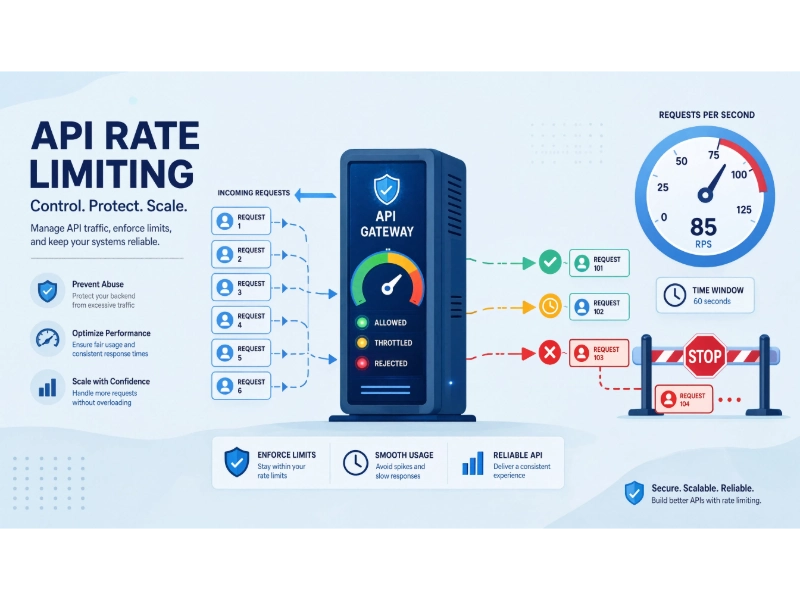
API rate limiting is a control mechanism that restricts the number of requests a user, application, or IP address can send to an API within a set time period. When a client sends more requests than the allowed limit, the server responds with an HTTP 429 status code, meaning “Too Many Requests.” This stops the server from becoming overloaded and keeps the service running for everyone.
Every modern digital product, from mobile apps to payment systems, relies on APIs (Application Programming Interfaces) to share data between servers and clients. Without rate limiting, a single user or automated script could flood a server with thousands of requests in seconds. This would slow down or crash the entire system. Rate limiting solves this problem by creating clear rules about how many requests are allowed per second, per minute, or per hour.
Whether you are a developer building your first REST API, a backend engineer managing cloud infrastructure, or a business owner using third-party API services, rate limiting is a foundational skill to understand. This guide walks through every major concept, from core algorithms like Token Bucket and Sliding Window to real-world implementation strategies, HTTP response headers, and monitoring best practices. By the end, you will have a clear, practical understanding of how to protect, optimize, and scale your APIs with rate limiting.
How Does API Rate Limiting Work
API rate limiting controls how many requests a client can send to an API within a certain period. The API keeps track of requests using information such as an API key, user ID, or IP address. When a client reaches the allowed limit, the server can reject new requests and return an HTTP 429 “Too Many Requests” response.
For example, imagine an API allows 100 requests per minute for each API key. If a client sends all 100 requests within the first 30 seconds, it has already reached its limit for that period. Any additional request may return a 429 error until more requests are allowed. What happens next depends on how the API handles its rate limit. With a fixed one-minute window, the limit resets when the next minute begins. Other systems use a sliding window or token bucket, which can handle request bursts differently.

The method used for rate limiting can make a noticeable difference. A fixed window is simple and works well for many basic APIs, but it can cause a burst of traffic around the point where the window resets. A sliding window keeps track of requests over a moving period, which gives the limit more consistent behavior. A token bucket is another common option when an API needs to allow short bursts without letting traffic grow beyond a certain rate over time.
At a basic level, a rate limiter needs to know three things: how many requests have been made, which period those requests belong to, and how many requests are allowed. Larger APIs may also need to keep this information in a shared system so that the same client has one consistent limit even when requests are handled by different servers.
Rate limiting is useful for protecting an API from sudden traffic spikes and preventing one client from using too many resources. It also gives API providers a way to control usage and keep performance more predictable. When a client receives a 429 response, it should avoid immediately retrying the request over and over. If the response includes a Retry-After header, the client can use it to determine when to try again.
What Happens When the Rate Limit Is Exceeded
When a client sends more requests than an API allows, the server usually responds with an HTTP 429 “Too Many Requests” status code. In simple terms, the API is telling the client to slow down and wait before sending more requests.
Some APIs also include a Retry-After header with the 429 response. This header tells the client how long to wait before making another request. For example, if the value is 30, the client should wait 30 seconds before trying again.
What happens after that depends on the API’s rate-limiting rules. The limit may reset after a fixed period, or requests may become available gradually. A client should avoid repeatedly retrying immediately after receiving a 429 response, as this can create unnecessary traffic and lead to more rejected requests.

A typical 429 response looks like this:
HTTP/1.1 429 Too Many Requests
Content-Type: application/json
Retry-After: 60

{
  "error": "rate_limit_exceeded",
  "message": "You have exceeded 100 requests per minute. Try again in 60 seconds."
}
This clear communication helps developers build client applications that handle rate limits gracefully, using techniques like exponential backoff and retry logic.
Why Is API Rate Limiting Important for Modern Applications?
API rate limiting is important because it helps keep servers stable, protect shared resources, control abuse, and maintain a reliable experience for users. Without a reasonable limit, a sudden burst of requests can put unnecessary pressure on an API and the services behind it.
There are several reasons why rate limiting matters for modern applications:
- Prevents server overload by limiting how many requests can be processed within a given period.
- Helps reduce the impact of DoS and DDoS attacks by making it harder for excessive traffic to consume API resources.
- Keeps resource usage fair so that one client does not take up most of the available capacity.
- Supports different usage plans by allowing providers to set separate limits for free, professional, and enterprise users.
- Helps control infrastructure costs by limiting unexpected request spikes that can increase CPU, memory, database, or network usage.
- Keeps performance more consistent by preventing traffic from overwhelming the API during busy periods.
- Protects databases and other services that may sit behind the API and struggle when they receive too many requests at once.
Rate limiting is common across many types of applications. Banks and payment platforms, for example, may limit repeated login or transaction requests to reduce abuse. E-commerce sites can limit automated requests to product pages and pricing data, while public APIs often set request limits to control heavy usage and prevent spam.
The important part is setting the limit at a sensible level. A limit that is too strict can frustrate legitimate users, while one that is too generous may not provide much protection when traffic suddenly increases.
What Are the 4 Main Rate Limiting Algorithms?

The 4 main rate limiting algorithms are Fixed Window, Sliding Window, Token Bucket, and Leaky Bucket. They all control how many requests an API accepts, but they track and handle traffic in different ways.
The main difference is how each algorithm deals with time, request limits, and traffic bursts. Some are simple to implement, while others provide more control over how requests are spread over time.
| Algorithm | How It Works | Best For | Key Limitation |
|---|---|---|---|
| Fixed Window | Counts requests within a fixed period, such as 100 requests per minute. | Simple APIs with predictable traffic | Can allow large bursts around the window boundary. |
| Sliding Window | Counts requests over a moving time period instead of resetting at fixed boundaries. | APIs that need more consistent traffic control | Can require more memory or processing, depending on the implementation. |
| Token Bucket | Tokens are added to a bucket at a fixed rate, and each request consumes one or more tokens. | APIs that need to allow short traffic bursts | Requires careful configuration of the refill rate and bucket capacity. |
| Leaky Bucket | Requests are placed in a queue and processed at a controlled rate. | APIs that need steady and predictable request processing | Large bursts can cause requests to wait or be rejected when the queue is full. |
Fixed Window
Fixed Window divides time into separate intervals. For example, an API might allow 100 requests from 10:00:00 to 10:00:59. When the next minute starts, the counter resets.
It is easy to understand and relatively simple to implement. The main drawback is the possibility of a burst around the boundary. A client could send 100 requests near the end of one window and another 100 just after the next window begins.
Sliding Window
Sliding Window looks at requests over a moving period rather than relying on fixed reset points. If the limit is 100 requests per minute, the system checks the requests made during the previous 60 seconds.
This can provide smoother control than a fixed window because there is no sudden reset at the start of each minute. The trade-off is that tracking requests over a moving period can require more storage or processing, depending on the implementation.
Token Bucket
Token Bucket starts with a bucket that can hold a certain number of tokens. New tokens are added at a fixed rate, and each API request consumes a token. If there are no tokens available, the request is delayed or rejected.
This approach is useful when an API needs to support short bursts. For example, a limit could refill at 10 requests per second while allowing the bucket to hold 50 tokens. A client could temporarily send more than 10 requests per second if enough tokens have accumulated, but the burst cannot continue indefinitely.
Leaky Bucket
Leaky Bucket controls traffic by placing incoming requests into a queue and processing them at a controlled rate. Instead of allowing requests to pass through as quickly as they arrive, the system releases them at a more predictable pace.
This can be useful when an API needs steady request processing and wants to prevent sudden bursts from reaching downstream services. If the queue becomes full, additional requests may need to wait or be rejected.
Choosing a rate limiting algorithm depends on what the API needs to achieve. Fixed Window is often a good choice when simplicity matters. Sliding Window provides more consistent control, while Token Bucket works well when short bursts are acceptable. Leaky Bucket is useful when maintaining a steady processing rate is the priority.
Different Types of API Rate Limiting
There are four common types of API rate limiting: Key-Level Rate Limiting, API-Level Rate Limiting, User-Based Rate Limiting, and IP-Based Rate Limiting. The main difference is what the API uses to identify and limit requests.
- Key-Level Rate Limiting: Limits requests associated with a specific API key. This is common when developers or applications access an API using unique keys.
- API-Level Rate Limiting: Sets a limit across an entire API or endpoint, helping prevent overall traffic from becoming too high.
- User-Based Rate Limiting: Applies limits to individual users, usually based on a user ID or account. This can help ensure that one user does not consume too many resources.
- IP-Based Rate Limiting: Tracks requests from a particular IP address. It is often useful for controlling anonymous traffic, although shared networks can make IP-based limits less precise.
The right approach depends on how the API identifies its clients and how its resources are shared. In some cases, an API may combine several types, such as applying a limit to both an API key and the overall API.
How to Implement API Rate Limiting in 5 Steps
Implementing API rate limiting involves more than setting a request limit. You also need to choose how requests are counted, decide what happens when the limit is reached, and monitor the results after the system goes live.
Here are 5 practical steps to get started.
Step 1: Choose the Right Rate Limiting Algorithm
Start by looking at how your API normally receives traffic.
Fixed Window is a simple option for APIs with predictable traffic. Token Bucket works well when the API needs to allow short bursts, while Sliding Window can provide more consistent control over requests. Leaky Bucket can be useful when requests need to be processed at a controlled rate.
Your implementation experience also matters. Fixed Window is generally easier to build, while Token Bucket and Sliding Window need more logic to track requests. More advanced or custom approaches can add further development and maintenance work.
Step 2: Define Rate Limits Based on Capacity and User Needs
Set limits based on your server capacity, expected usage, and business requirements. Load testing can help you find a reasonable request rate before the API starts showing slower response times or other performance problems.
You can also use different limits for different types of users. For example:
| User Tier | Requests Per Minute | Requests Per Day | Typical User |
|---|---|---|---|
| Free | 60 | 1,000 | Individual developers testing the API |
| Professional | 300 | 50,000 | Small and medium businesses |
| Enterprise | 1,000+ | 500,000+ | High-volume applications |
These numbers are examples, not fixed standards. A public API with expensive database queries may need much lower limits than an API that handles lightweight requests.
It is usually better to start with reasonable limits and adjust them after looking at actual usage. Watch for legitimate users who regularly hit the limit as well as clients that generate unusually high traffic.
Step 3: Return Useful Rate Limit Information
Give clients enough information to understand their current limit and respond appropriately. Many APIs use headers such as:
X-RateLimit-Limit: The maximum number of requests allowed during the current limit period.X-RateLimit-Remaining: The number of requests remaining.X-RateLimit-Reset: Information about when the limit resets.
These X-RateLimit-* headers are widely used, but they are not universal HTTP standard headers. Your API should document exactly what each header means and what format it uses.
When a client exceeds the limit, return HTTP 429 “Too Many Requests”. You can also include a Retry-After header to tell the client how long to wait before trying again. RFC 6585 defines 429 for rate limiting and allows servers to include Retry-After in the response.
Step 4: Handle 429 Responses Gracefully
A rate limit response should give the client enough information to understand what went wrong. A typical 429 response can include an error message along with rate limit information and, when appropriate, a Retry-After header.
Clients should not immediately send the same request again after receiving a 429 response. Instead, they can wait and retry using an exponential backoff strategy.
For example, a client might wait 1 second before the first retry, 2 seconds before the next, and 4 seconds after that. Adding some random delay, known as jitter, can help prevent many clients from retrying at exactly the same time.
Step 5: Set Up Monitoring and Alerts
Once rate limiting is running, monitor how clients are actually using the API. Useful metrics include:
- Requests per second or minute
- Number and percentage of 429 responses
- Response times
- Rate limit usage by API key, user, or IP address
- Traffic spikes and unusual request patterns
Tools such as Prometheus, Grafana, and Datadog can help track these metrics and display them on dashboards.
You can also set alerts for unusual traffic. For example, a sudden increase in 429 responses may indicate that a client is misconfigured, a usage limit is too low, or the API is receiving suspicious traffic.
The goal is not to make the rate limit as strict as possible. It should protect the API without unnecessarily blocking normal users. Monitoring real traffic gives you the data needed to adjust the limits over time.
What Is the Difference Between Rate Limiting and API Throttling?

The difference between rate limiting and API throttling is how they control excessive traffic. Rate limiting sets a maximum number of requests a client can make within a specific period, while throttling controls the speed or volume at which requests are processed. Both methods help protect APIs from overload, but they handle high traffic in different ways.
Rate limiting creates a defined request limit. For example, an API may allow 100 requests per minute for each user or API key. When a client exceeds that limit, the API may reject additional requests with an HTTP 429 “Too Many Requests” response or apply another limit policy. The goal is to prevent excessive usage and protect available resources.
API throttling takes a more flexible approach by controlling how quickly requests are handled. Instead of immediately blocking traffic, throttling may slow down processing, reduce request frequency, or delay some requests during periods of high demand. This helps maintain service availability while managing resource usage.
| Feature | Rate Limiting | API Throttling |
|---|---|---|
| Main purpose | Sets a maximum number of requests allowed within a time period | Controls how quickly requests are processed |
| Handling excess traffic | Often rejects requests after the limit is reached, commonly with a 429 response | Slows, delays, or reduces request processing speed |
| Client experience | May receive an immediate error response when the limit is exceeded | May experience slower responses or reduced throughput |
| Best use case | Preventing abuse and protecting API resources | Managing traffic spikes while keeping the service available |
Many production APIs use both approaches together. Rate limiting creates clear boundaries for usage, such as limiting requests per user, API key, or IP address. Throttling helps handle temporary traffic increases by reducing pressure on the system without immediately blocking every request.
Using both techniques allows API providers to protect their infrastructure while still providing a reliable experience for legitimate users.
What Are the Best Practices for API Rate Limiting?
The best practices for API rate limiting include setting limits based on real usage data, communicating limits clearly, monitoring traffic patterns, and adjusting policies over time. A well-designed rate limiting strategy protects API infrastructure while still allowing legitimate users to access the service reliably.
Practice 1: Start With Reasonable Limits and Adjust Over Time
Avoid setting rate limits based only on assumptions. Start with limits that match your current infrastructure capacity, then review actual traffic patterns after deployment.
Monitor how users interact with the API, which endpoints receive the most traffic, and when performance begins to degrade. Adjust limits gradually based on real usage instead of applying fixed numbers that may not fit your workload.
Practice 2: Use Different Limits for Different User Groups
Not every API consumer has the same needs. A free developer account, a paid customer, and an enterprise application may require different levels of access.
Tiered rate limits allow API providers to offer different quotas based on subscription plans, user roles, or business requirements. This approach helps balance resource usage while supporting different customer needs.
Practice 3: Document Rate Limits Clearly
API documentation should explain how rate limits work, including request quotas, time windows, and what happens when limits are exceeded.
Developers should understand:
- How to check their current usage.
- What response they receive after exceeding a limit.
- How to handle 429 responses.
- Whether retry headers are available.
Clear documentation helps developers build applications that work well with the API instead of repeatedly hitting limits.
Practice 4: Use Caching to Reduce Unnecessary Requests
Caching can reduce the number of requests reaching your API servers. Frequently requested data can often be stored temporarily and served without repeating the same database queries or backend operations.
Caching solutions such as Redis, Memcached, or CDN caching can improve performance and reduce pressure on API resources. The cache expiration time should match how frequently the data changes.
Practice 5: Apply Rate Limiting at the Right Layer
For many systems, enforcing rate limits at the API gateway or reverse proxy layer is more practical than implementing separate limits inside every service.
A centralized approach makes it easier to apply consistent policies across multiple endpoints and services. Many API gateways and infrastructure tools provide built-in support for rate limiting algorithms, user-based limits, and endpoint-specific rules.
Practice 6: Monitor Rate Limit Usage
Rate limiting should not be a one-time configuration. Review metrics regularly to understand whether limits are helping or creating problems.
Useful metrics include:
- Number of requests hitting rate limits.
- Percentage of 429 responses.
- API response times.
- Traffic patterns by user, API key, or endpoint.
- Server resource usage during peak periods.
If many legitimate users frequently hit limits, the limits may be too restrictive. If traffic spikes are affecting performance, the limits may need to be tightened.
Practice 7: Consider Dynamic Rate Limiting for Changing Workloads
Some APIs experience traffic patterns that change throughout the day. Dynamic rate limiting can adjust limits based on current system conditions.
For example, an API may allow higher request volumes during periods of low usage and reduce limits temporarily when backend resources become heavily utilized.
This approach can help maintain stability without applying unnecessarily strict limits all the time.
Practice 8: Use Distributed Rate Limiting for Multi-Server Systems
Applications running across multiple servers need a shared way to track request counts. Without distributed rate limiting, a client could potentially send requests to different servers and bypass individual limits.
A shared storage system, such as Redis, can help maintain consistent counters across multiple application instances and regions.
What Are Common Rate Limiting HTTP Response Headers?
Many APIs use response headers to provide information about current rate limit usage. Common examples include:
| Header | Purpose | Example Value |
|---|---|---|
| X-RateLimit-Limit | Shows the maximum number of requests allowed during a limit period | 100 |
| X-RateLimit-Remaining | Shows how many requests are still available | 37 |
| X-RateLimit-Reset | Shows when the limit information resets | Unix timestamp |
| Retry-After | Indicates how long a client should wait before retrying after a 429 response | 60 |
The X-RateLimit-* headers are widely used by APIs, although they are not universal HTTP standards. APIs should document their header behavior clearly so developers know how to interpret the values.
Including rate limit information in responses helps client applications manage requests more efficiently and avoid unnecessary failures.
How Do Real-World APIs Use Rate Limiting?
Real-world APIs use rate limiting to protect infrastructure, manage customer access, and prevent abusive traffic patterns. The exact approach depends on the type of service and the resources being protected.
Mapping platforms may limit geocoding or location requests to maintain service reliability. Payment APIs often control traffic carefully because transaction processing requires consistent performance and security. Social media and public APIs commonly apply limits to prevent spam and ensure fair access among developers.
Other industries use rate limiting for different reasons. Financial services may restrict repeated authentication attempts to reduce brute-force attacks. E-commerce platforms may limit automated requests to product and pricing endpoints. Healthcare systems may apply strict controls around sensitive data access to protect reliability and security.
How to Handle API Rate Limit Errors as a Client
Handling API rate limit errors requires more than simply retrying failed requests. A reliable client application should read rate limit information, retry intelligently, reduce unnecessary requests, and control request timing to avoid repeatedly hitting the same limit.
Read the Response Headers First
When an API returns a 429 “Too Many Requests” response, check the available response headers before sending another request.
Headers such as Retry-After can tell the client how long to wait before retrying. Some APIs also provide headers like X-RateLimit-Remaining or X-RateLimit-Reset to show current usage and reset information.
Because header formats vary between APIs, clients should always follow the documentation provided by the API provider instead of assuming every service uses the same format.
Implement Exponential Backoff With Jitter
Clients should avoid immediately retrying a request after receiving a rate limit error. Sending repeated retries too quickly can increase traffic and make the problem worse.
A common approach is exponential backoff, where the delay between retries increases after each failed attempt. For example, the wait time may grow from a short delay to longer intervals after repeated failures.
Adding jitter, which introduces a small random delay, helps prevent many clients from retrying at exactly the same time. This is especially useful when many users experience rate limits during the same period.
Batch and Optimize Your Requests
Reducing unnecessary requests is often better than simply handling more rate limit errors.
Where supported, combine multiple operations into batch requests instead of sending many small requests. Client applications can also cache frequently used data to avoid requesting the same information repeatedly.
For APIs that support conditional requests, headers such as ETag and If-None-Match allow clients to check whether data has changed. If the content is unchanged, the server can return a lightweight 304 Not Modified response instead of sending the full response body.
Queue Requests During Rate Limit Windows
Applications that need to send many requests can use a local queue to control request timing.
Instead of sending all requests immediately, the client can store pending requests and process them gradually as capacity becomes available. This approach helps create smoother traffic patterns and reduces the chance of repeatedly triggering rate limits.
How Does Rate Limiting Improve API Security?
Rate limiting improves API security by reducing the impact of automated abuse, controlling excessive traffic, and protecting critical resources. It is not a complete security solution by itself, but it is an important layer in a broader API protection strategy.
Reducing Brute-Force and Credential Attacks
Attackers often use automated tools to send large numbers of login attempts or API key guesses. Rate limiting slows these attempts by restricting how frequently authentication requests can be made.
This does not completely stop attacks, but it increases the cost and time required for attackers to succeed while giving security systems more opportunities to detect suspicious behavior.
Limiting the Impact of DDoS Traffic
Distributed denial-of-service (DDoS) attacks attempt to overwhelm systems with large amounts of traffic. Rate limiting can help reduce the impact of excessive requests by controlling how much traffic individual clients or groups of clients can generate.
For larger attacks, rate limiting is usually combined with other protections such as traffic filtering, load balancing, and specialized DDoS mitigation services.
Protecting Against Data Scraping
Automated scraping can generate large numbers of API requests and consume server resources. Rate limits help control how quickly data can be collected from an API and prevent individual clients from creating excessive load.
For APIs that expose valuable data, rate limiting is often combined with authentication, access controls, and usage monitoring.
Conclusion
API rate limiting is an important part of designing reliable APIs. It helps control traffic, protect backend resources, and provide predictable access for different types of users.
A good rate limiting strategy involves choosing the right algorithm, communicating limits clearly, handling 429 responses properly, and continuously reviewing real traffic patterns. Supporting techniques such as caching, request queuing, API gateways, and distributed counters can further improve how an API handles demand.
For API providers, effective rate limiting helps maintain system stability and manage resource usage. For API consumers, understanding how rate limits work makes it easier to build applications that recover gracefully from temporary restrictions and use API resources efficiently.
You May Also Like
 Cybersecurity
Is Fanatical Legit and Safe? My Honest Take on Buying Game Keys
 Data Security & Privacy
Is Gameflip Legit and Safe for Gift Cards? What Buyers Should Know
 Data Security & Privacy
Is Eldorado.gg Legit and Safe in 2026? My Investigation and What Buyers Should Know
 Web Development
Supabase vs Firebase: Which Backend Platform is Right for Your Project?
 Cloud Computing
8 Best AWS S3 Alternatives Compared: Pricing, Egress, and S3 Compatibility
 Web Development
SQL vs. NoSQL: How to Choose the Right Database for Your Application
 Web Scraping
TinyFish.ai Review: Is It the Best AI Agent for Web Scraping
 AI Technology
ChatGPT API Alternatives: 13 AI APIs and Platforms for Developers
 VPN & Proxy