

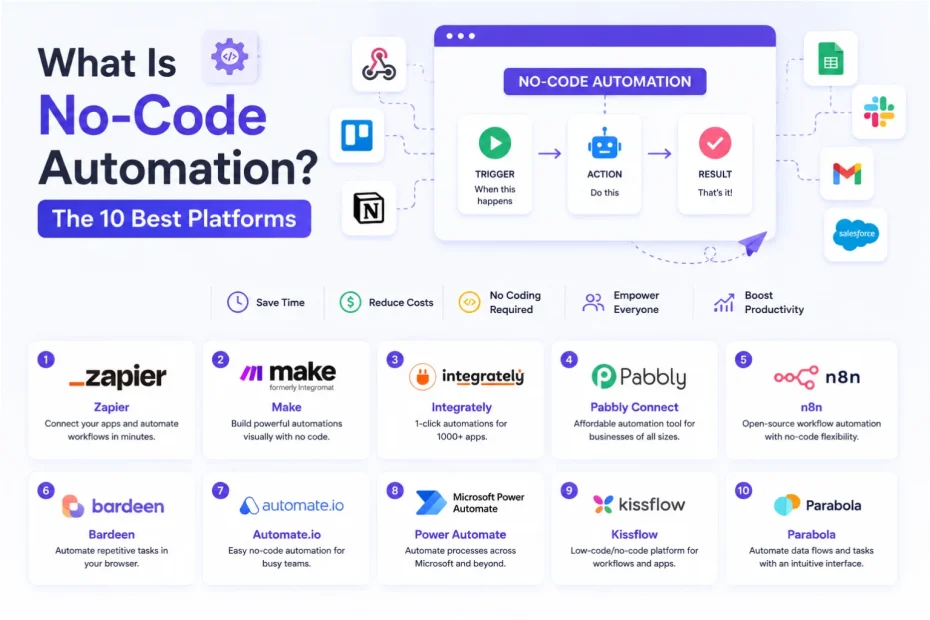
No-code automation is an approach to software orchestration and business process management that allows people to design, connect, and run automated digital workflows using visual interfaces instead of traditional programming languages. Rather than writing custom scripts in Python or JavaScript to move information between software tools, users rely on drag-and-drop canvases, pre-built application connectors, and visual logic maps to automate repetitive tasks.
If you’ve ever set up a rule that automatically saves an incoming email attachment to a cloud drive and alerts your team on Slack, you’ve used no-code automation. Under the hood, these platforms still rely on code, webhooks, and application programming interfaces (APIs). The difference is that much of the underlying code is built into the platform and hidden behind a graphical user interface (GUI), allowing non-programmers to configure workflows visually.
This shift has changed who can build internal tools inside modern companies. Market forecasts from Gartner and IDC have projected significant growth in the combined low-code and no-code market. These platforms are attracting businesses that want to automate repetitive work without depending on developers for every small integration.
Employees who build applications and workflows to solve business problems are often called citizen developers or business technologists. This approach can help operations managers, marketers, finance teams, and business owners address workflow bottlenecks without waiting for an engineering team to handle every request.
However, no-code automation isn’t a cure-all that replaces software engineers or proper system architecture. It works best as an operational layer for routine data routing, status updates, and synchronization between applications. This allows technical and non-technical teams to spend more time on work that requires human judgment.
How No-Code Automation Works Under the Hood
To understand why no-code platforms are useful, and why they sometimes break, it helps to look at what happens behind the visual interface. When you connect two software applications on a workflow canvas, the platform translates your configuration into API requests and structured data payloads.
You can learn more about the underlying technology in our guide to REST API vs. SOAP API.
Most no-code workflow automation tools follow a four-part process.
1. Triggers: Detecting Events
Every automated workflow begins with a trigger. This is an event that tells the platform to start running a workflow.
Triggers commonly use one of two approaches: polling or webhooks.
A polling trigger checks an external application at regular intervals to see whether new records exist. For example, it might check a spreadsheet for a newly added row.
A webhook works differently. Instead of repeatedly checking for changes, the connected application sends data when a specific event occurs. A customer submitting an order form, for example, can trigger a workflow that processes the order automatically.
The availability of instant webhooks depends on the connected application and the automation platform.
2. Actions: Executing Tasks
Once a trigger fires, the platform executes one or more actions in a target application.
An action might create a customer record in a database, generate an invoice, update a project status, or provision user access.
Behind the scenes, the no-code platform sends a request to the receiving application’s server. Depending on the operation, this may involve HTTP methods such as POST, PUT, or PATCH.
The platform handles much of the technical work, but the workflow still depends on valid credentials, compatible data, and the receiving application’s API.
3. Conditional Logic and Filters: Making Decisions
Business processes rarely follow a single straight line. Different situations often require different actions.
No-code platforms handle these situations through conditional branching, filters, routers, and If/Then/Else rules. These features evaluate incoming information before deciding what happens next.
For example, a sales workflow could check the value of a new contract. If the contract exceeds $5,000, it could create a deal in the CRM and alert an account executive. If the value is lower, it could send the lead to a self-service onboarding sequence.
Conditional logic helps teams create more flexible workflows without writing every decision rule in code.
4. Data Mapping and Transformation: Formatting Information
Different applications don’t always store or display information in the same format.
One system might provide a date as MM/DD/YYYY, while another expects an ISO-formatted date. An application might also store a customer’s full name in one field while another system separates first and last names.
No-code platforms provide visual data mappers and formatting tools to handle these differences. Depending on the platform, these tools can split text, standardize phone numbers, convert dates, and parse structured JSON data.
Correct data mapping helps prevent errors when information moves between applications.
Example of a No-Code Automation Workflow
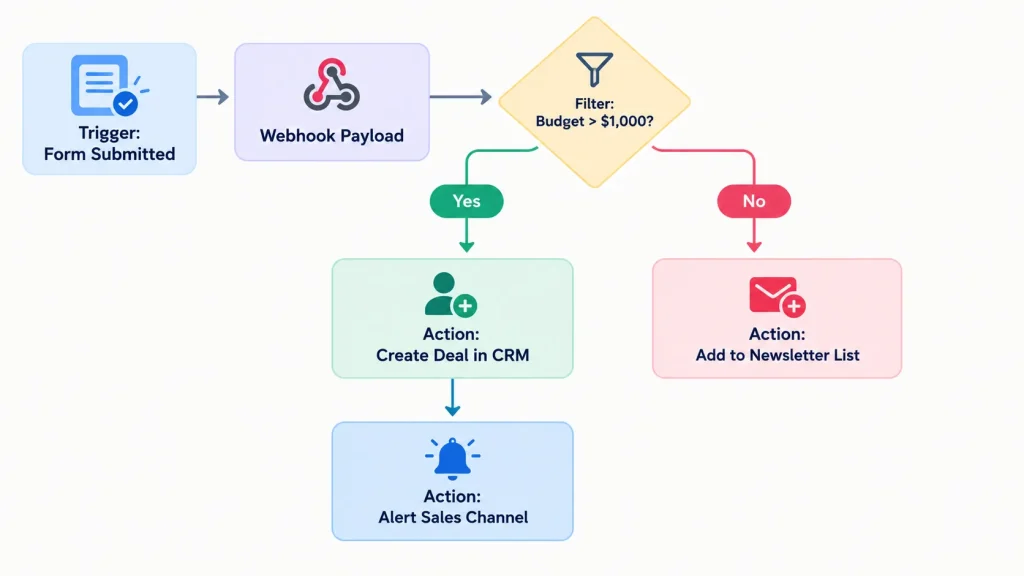
Consider a workflow that processes new contract submissions. The system receives a form submission, checks the contract value, and chooses the appropriate action.
Workflow:
- Trigger: A customer submits a contract form.
- Filter: The platform checks whether the contract value exceeds $5,000.
- If the condition is true: Create a deal in the CRM and alert the account executive.
- If the condition is false: Add the customer to a self-service onboarding sequence.
This simple example demonstrates how triggers, conditions, and actions work together to automate a business process.
No-Code vs. Low-Code vs. Traditional Coding: Choosing the Right Approach
No-code, low-code, and traditional software development can all help businesses automate workflows, but they offer different levels of flexibility and technical control.
The right choice depends on the complexity of the task, the team’s skills, the required integrations, and the long-term operating costs.
No-Code Automation: Visual Workflows for Business Teams
No-code platforms are designed for people who want to automate processes without writing programming syntax.
Tools such as Zapier, Make, and Airtable Automations allow users to connect applications and configure workflows through visual interfaces.
For example, a marketing team could automatically send new form submissions to a spreadsheet, add qualified leads to a CRM, and notify the sales team.
The main advantage is accessibility. Users can build useful workflows without learning Python, JavaScript, or another programming language.
However, customization is often limited to the triggers, actions, and features supported by the platform. Complex requirements may need workarounds or a different development approach.
Low-Code Automation: More Flexibility for Technical Teams
Low-code platforms provide visual workflow builders while allowing users to customize behavior through code or other technical features.
Tools such as n8n, Retool, and Pipedream can support workflows that require more control than a typical no-code integration.
If a pre-built connector lacks a particular feature, a user may be able to add a JavaScript or Python snippet, write an SQL query, or configure a custom HTTP request.
This makes low-code automation useful for developers, technical operations specialists, and teams that need to connect applications with more specialized requirements.
The trade-off is that some technical knowledge may be necessary to build, troubleshoot, and maintain these workflows.
Traditional Custom Engineering: Full Architectural Control
Traditional development involves writing software or integrations using programming languages such as Python, Go, or Node.js.
This approach gives engineering teams greater control over application architecture, execution behavior, error handling, security, and resource usage.
Although coding an app or custom integration generally takes more work upfront, custom development can become more cost-effective for specialized, high-volume workloads.
For example, a company processing millions of events per hour may need custom infrastructure to manage throughput, retries, data consistency, and operating costs.
Custom development also requires ongoing maintenance, testing, monitoring, and engineering resources. It isn’t automatically cheaper or more reliable than a no-code platform.
Ultimately, the best approach is the one that meets your requirements without introducing unnecessary complexity.
Real-World No-Code Automation Use Cases Across Business Departments
No-code automation becomes easier to understand when you look at how teams use it in their daily work.
Many businesses use these tools to reduce manual data entry, keep applications synchronized, and make repetitive processes more consistent.
1. Sales and Lead Management
Sales teams often receive customer inquiries through websites, advertising campaigns, contact forms, and other sources.
A no-code workflow can collect these inquiries, enrich them with available company information, evaluate them against qualification criteria, and route them to the appropriate CRM pipeline.
Teams can also automate workflows involving business leads extracted from Google Maps without coding, provided the data collection method complies with applicable platform rules and privacy requirements.
Whether a company uses Pipedrive integrations or a workspace built around Notion as a CRM, automation can reduce the time employees spend copying contact details between applications.
Sales representatives can then spend more time engaging with prospects and less time handling repetitive administrative tasks.
2. Project and Task Management
Different departments frequently use different project management tools.
Product engineers might track issues in Jira, marketing teams might manage campaigns in Trello, and operations teams might maintain budgets in spreadsheets.
These separate systems can create information gaps when a project changes. Employees may need to update several applications manually, increasing the risk of outdated information.
A Trello and Jira Software Cloud integration or a Jira Software Cloud and Google Sheets integration can help synchronize relevant information.
For example, changing a task’s status in one application could automatically update a connected spreadsheet or notify another department.
The result is less duplicate data entry and better visibility across teams.
3. Finance and Accounts Receivable
Finance teams often handle recurring tasks such as invoice creation, payment reminders, and revenue tracking.
No-code automation can connect checkout systems or completed CRM deals to accounts receivable collection software.
When a contract is signed, a workflow could create an invoice draft, record the expected payment, and schedule reminders if the invoice becomes overdue.
However, financial workflows require extra care. Businesses should validate amounts, confirm customer information, and include appropriate approval steps before executing payments or making irreversible accounting changes.
4. Human Resources and Employee Onboarding
Onboarding a new employee can involve numerous administrative tasks, including preparing documents, creating software accounts, assigning training, and updating internal directories.
A no-code workflow can coordinate many of these tasks after a hiring milestone, such as a signed employment contract.
When combined with an AI HR chatbot for employee onboarding, automation can help new employees access the information and resources they need.
HR teams should still review sensitive decisions and restrict access to confidential employee information. Automated account provisioning should also follow the company’s security and access-control policies.
Calculating the ROI: When Does No-Code Automation Make Financial Sense?
No-code automation can save time, but building and maintaining workflows also costs money. Before automating a task, consider how often it occurs, how much manual work it requires, and what the automation platform charges.
Some automation projects may pay for themselves within months, while others may never produce enough savings to justify the initial effort.
Rather than assuming every workflow will deliver a positive return, calculate the potential financial benefit of each use case.
Calculate Your Monthly Net Savings
You can estimate monthly net savings using four variables:
- N: Number of times the task is performed each month.
- T manual: Time required to complete the task manually, measured in hours.
- C hour: Average hourly labor cost.
- C platform: Monthly platform subscription and maintenance costs.
The calculation is:
Monthly Net Savings = (N × T manual × C hour) − C platform
This formula estimates the monthly labor savings after subtracting the recurring platform and maintenance costs.
It doesn’t automatically account for one-time implementation costs, ongoing employee oversight, or indirect expenses. Include those costs separately when evaluating the full return on investment.
Example: Automating Client Onboarding Folders
Suppose your operations team spends 15 minutes manually compiling and formatting client onboarding folders. The task occurs 80 times per month, and the fully loaded hourly labor cost is $45.
A no-code automation reduces the manual work to zero and costs $50 per month in platform usage.
Step 1: Convert the manual task time into hours.
15 ÷ 60 = 0.25 hours
Step 2: Calculate the monthly labor savings.
80 × 0.25 × $45 = $900
Step 3: Subtract the monthly automation cost.
Monthly Net Savings = $900 − $50 = $850
Under these assumptions, the workflow saves an estimated $850 per month, or $10,200 per year, before accounting for implementation and other indirect costs.
It also frees up 240 hours of employee capacity annually:
80 × 0.25 × 12 = 240 hours
These savings assume the automation eliminates all 15 minutes of manual work for every task. If employees still need to review, correct, or complete part of the process, the actual savings will be lower.
By contrast, imagine a task that occurs only twice per quarter and takes five minutes to complete. Spending four hours building and debugging a multi-step workflow for that task is unlikely to produce a positive return in the near term.
The key is to prioritize processes that consume meaningful amounts of time, occur frequently, and can be automated reliably.
How Generative AI and Agents Are Reshaping No-Code Automation
Traditional no-code automation generally relies on predefined rules. A workflow might move a record to another folder when a field equals a specific value.
This approach works well when the incoming data is structured and the required actions are predictable. However, it can struggle with unstructured emails, inconsistent documents, and requests that don’t fit neatly into predefined conditions.
Today, generative AI is expanding the capabilities of process automation. Many automation platforms support AI-powered steps that can interpret text, classify information, and generate content within a larger workflow.
1. Unstructured Data Extraction
Traditional workflows often require predictable input formats. If information arrives in an unexpected format, a rule-based process may fail.
AI-powered workflows can process email text, documents, and other less structured inputs to extract information such as names, dates, invoice totals, and line items.
A workflow might send a vendor contract to an AI model or a specialized API for PDF data extraction. The extracted information can then be mapped to fields in a spreadsheet, database, or business application.
However, AI extraction isn’t guaranteed to be accurate. Results should be validated, especially when the information affects payments, legal obligations, or other important business decisions.
2. Intelligent Classification and Routing
Natural language processing can help classify incoming support tickets by topic, intent, or urgency.
For example, a workflow might identify a billing complaint and route it to the finance support team. Routine tracking questions could receive a draft response, while more complex issues could be escalated to a human representative.
Combining AI-based classification with conventional rules can make workflows more flexible while preserving predictable handling for important decisions.
Teams should monitor classification errors and provide a way for employees to correct incorrect results.
3. Autonomous Agentic Workflows
Another development is the use of AI agents in business processes. These approaches extend beyond the fixed sequences commonly used in traditional automation.
With AI agent use cases for business, an agent can receive an objective and use connected tools or data sources to work toward that goal.
Depending on the platform and its configuration, an agent may choose which tool to call, evaluate the result, and repeat certain actions until it reaches a defined stopping condition.
For example, an agent might gather information from a CRM, summarize a customer’s recent activity, and prepare a report for a sales representative.
Agentic workflows can be useful for tasks that require several decisions, but they also introduce additional risks. Clear permissions, spending limits, execution boundaries, and human approval checkpoints help prevent unexpected actions.
Realistic Limitations, Risks, and Governance Challenges
No-code automation can make workflows easier to build, but it doesn’t eliminate the technical and operational challenges of running software integrations.
Without proper planning, an organization can accumulate undocumented workflows, unexpected costs, security risks, and difficult-to-diagnose failures.
1. Shadow IT and Workflow Sprawl
When every department connects applications independently, organizations can accumulate hundreds of undocumented workflows.
If an employee who created a critical billing automation leaves the company, other team members may struggle to understand how the workflow operates or which applications it affects.
This problem becomes more serious when several workflows depend on the same account, database, or integration.
To reduce workflow sprawl, businesses should maintain a central registry of production automations, identify each workflow’s owner, and review important workflows periodically.
2. API Rate Limits and Silent Failures
No-code platforms remain subject to the technical limitations of the applications they connect to.
For example, if a marketing campaign triggers 10,000 webhook events in two minutes, the receiving CRM might reject some requests because of API rate limiting.
A workflow can also fail because an API is unavailable, credentials expire, or incoming data doesn’t match the expected format.
Without proper error handling, queue management, and retry logic, some operations may remain incomplete.
Teams should configure execution alerts, monitor failed runs, and establish recovery procedures. When retrying a failed operation, they should also check whether it has already completed to avoid duplicate records or transactions.
3. Data Privacy, Security, and Compliance
When data moves between applications through a third-party automation platform, sensitive information may pass through additional infrastructure.
Organizations should follow appropriate data protection and privacy practices, restrict access to production credentials, and evaluate the security measures of their automation providers.
Depending on the business and the data involved, relevant requirements may include SOC 2 compliance and other applicable legal or contractual obligations.
These precautions are particularly important when workflows handle healthcare information, financial records, employee details, or confidential customer data.
Before adopting a platform, review its data retention policies, permissions, encryption practices, and available access controls.
4. Escalating Usage Costs at Scale
Many cloud-based no-code platforms charge according to tasks, operations, or workflow executions. The exact pricing model varies by provider and subscription plan.
A plan that costs $30 per month may be sufficient for a small team running a few thousand tasks. However, expenses can increase when a company processes hundreds of thousands of records through multi-step workflows.
For example, processing one record might trigger several actions. If each action counts toward the platform’s usage limit, the actual billable volume can be significantly higher than the number of incoming records.
To support cloud cost optimization, review execution volumes, remove unnecessary workflow runs, and filter irrelevant records as early as possible.
Before committing to a platform, check how it defines a billable task or operation and estimate the expected monthly usage.
How to Implement No-Code Automation Successfully
A disciplined rollout helps businesses gain the benefits of automation without creating an unnecessarily complicated environment.
The following practices can make workflows easier to maintain as the organization grows.
1. Simplify the Process Before Choosing a Tool
Don’t automate a broken or chaotic manual process without reviewing it first.
Work with the people who perform the task every day. Map the existing steps, remove unnecessary approvals, and standardize the input forms.
Automating an inefficient process can reproduce its mistakes at a much faster rate.
Once the process is clear, identify which steps can be automated and which still require human judgment.
2. Start With High-Frequency, Low-Risk Workflows
Begin with repetitive internal tasks, such as syncing form submissions to a central database or posting daily summary alerts to a team chat channel.
These workflows allow the team to learn how the platform handles triggers, conditions, errors, and retries without immediately putting sensitive business operations at risk.
Avoid starting with irreversible database deletions or automated financial transactions. Test the workflow with sample data before allowing it to affect production records.
As the team gains experience, it can gradually automate more complex processes.
3. Maintain Documentation and Naming Conventions
Treat production workflows with the same discipline used to maintain software.
Establish a consistent naming convention, such as:
[Department] - [Trigger App] to [Action App] - [Purpose]
For example:
Sales - Website Form to CRM - New Lead Registration
Maintain a central registry in your internal wiki or documentation system. For each workflow, document what it does, who owns it, which applications it connects, and which database fields it reads or modifies.
Clear documentation makes troubleshooting, onboarding, and employee handovers easier.
4. Configure Error Alerts and Fallback Paths
APIs experience downtime, authentication tokens expire, and users sometimes submit unexpected data formats.
Set up a dedicated error-notification channel in Slack or Microsoft Teams so the workflow owner knows when an automation fails.
Define procedures for repairing connections, reviewing incomplete operations, and replaying failed runs without creating duplicate records.
For important business processes, maintain a manual fallback so employees can continue working when the automation platform or a connected application becomes unavailable.
Regularly test these recovery procedures rather than assuming they will work when an actual failure occurs.
Final Thoughts
No-code automation helps businesses connect applications, reduce repetitive work, and make routine processes more efficient without requiring every employee to write code.
It can be especially useful for sales operations, project management, finance, and employee onboarding. Adding AI capabilities can also help teams process unstructured information and handle workflows that involve more complex decisions.
However, choosing the right platform is only part of the equation. Sustainable automation also depends on sound process design, reliable error handling, appropriate security controls, clear ownership, and ongoing cost management.
For simple workflows, a no-code platform may provide everything a team needs. More complex integrations may benefit from low-code customization or traditional software development.
The best automation solution is one that solves a real business problem reliably, securely, and at a reasonable long-term cost.
You May Also Like
 SaaS
SaaSWhy Cloud CRM Has Quietly Become the Backbone of Modern Customer Support
 Web Development
Supabase vs Firebase: Which Backend Platform is Right for Your Project?
 Cloud Computing
8 Best AWS S3 Alternatives Compared: Pricing, Egress, and S3 Compatibility
 SaaS
SaaSWhat is Confluence Used For In Project Management?
 Web Scraping
TinyFish.ai Review: Is It the Best AI Agent for Web Scraping
 AI Technology
ChatGPT API Alternatives: 13 AI APIs and Platforms for Developers
 SaaS
SaaSCognito Forms to Jira Software Cloud Integration: Setup, Automation, Field Mapping, and Best Practices
 Web Development
Building Apps with Lovable and Supabase: A Step-by-Step Guide
 Web Development