

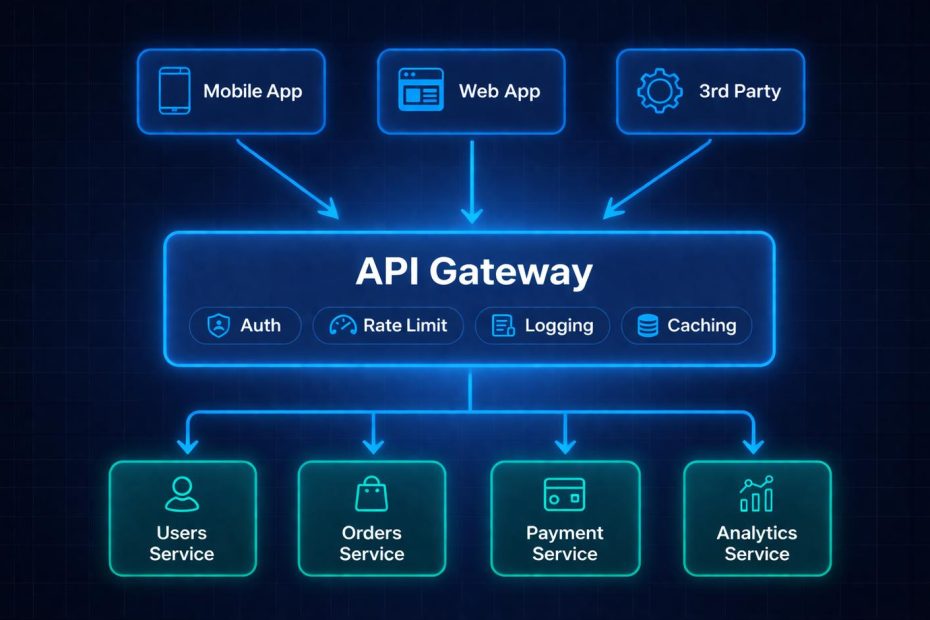
An API gateway is a single entry point between clients and backend services. It receives each request, applies shared controls such as authentication and rate limiting, and routes the request to the right service.
The key distinction is that a gateway manages traffic, not business logic. It decides whether a request may pass, where it goes, and how it’s logged. Your services still decide what the request means. Teams that blur this line often end up with a fragile gateway full of custom rules that nobody wants to change.
This guide is written for developers, backend and platform engineers, solution architects, and technical leads who are building or running APIs and microservices. It explains how API gateway architecture works, how a gateway differs from a reverse proxy, load balancer, and service mesh, and where it helps or hurts. It also covers security, rate limiting, and how to evaluate options.
What Does an API Gateway Do?
A gateway sits at the network edge, in front of the services that implement your APIs. Clients talk to the gateway, and the gateway talks to your services. One common description says it terminates client traffic and routes it to multiple microservices through a single entry point. If you’re still mapping out the layers behind that entry point, the guide to back-end infrastructure gives useful context.
Engineers often describe this position as handling “north-south” traffic, meaning requests that enter your system from outside. Traffic between your own services is “east-west” traffic. That distinction matters later, when we compare gateways with service meshes.
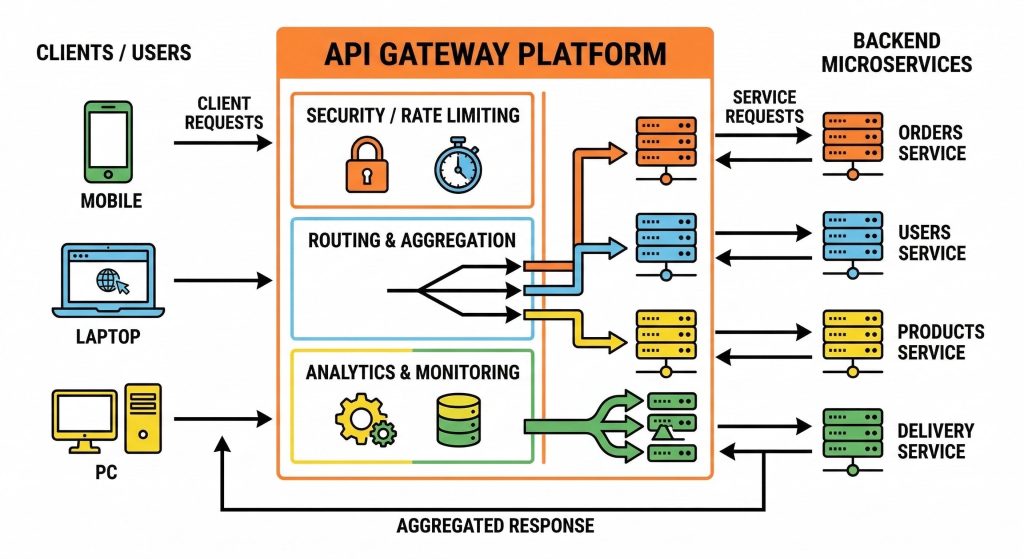
Because every request passes through one place, the gateway can handle work that every API needs. The most common jobs fall into five groups:
- Request routing: Sending a request to the right service based on its path, host, header, or version.
- Authentication and authorization checks: Verifying credentials and confirming that a caller may use a route.
- Traffic management: Applying rate limits, quotas, timeouts, and load balancing.
- Transformation: Converting formats or protocols, and sometimes reshaping responses.
- Observability: Producing consistent logs, metrics, and trace IDs.
One description of gateway duties lists request routing, API composition, edge functions, and protocol transformations as the core responsibilities. Protocol transformation matters most when older and newer styles of API coexist, such as when a modern client must reach a service built around SOAP. If you’re weighing those styles, see REST API vs SOAP API.
API gateway vs reverse proxy, load balancer, and service mesh
These four components overlap, which is why people confuse them. The table summarizes the usual distinctions. It’s my own synthesis, and individual products often combine several roles.
| Component | Main job | Typical traffic | Understands APIs? |
|---|---|---|---|
| Reverse proxy | Forwards client requests to servers on their behalf | North-south | Limited; mostly paths and hosts |
| Load balancer | Spreads traffic across identical instances | North-south or east-west | Usually not at the API level |
| API gateway | Applies API policies such as authentication, rate limits, and routing | North-south | Yes; per-client and per-route policies |
| Service mesh | Manages communication between services | East-west | Yes, for service-to-service calls |
Many gateways are built on a reverse proxy and include load balancing. The difference is the layer of API-aware policy on top: per-client keys, usage quotas, and route-level controls. A service mesh complements a gateway. The gateway guards the front door, while the mesh manages how services talk to one another inside.
If you only need to forward traffic and terminate TLS, a reverse proxy may be enough. If you need per-client limits, credential checks, and API analytics, you’re in gateway territory.
The three core API gateway patterns
Microsoft’s Azure Architecture Center documents three patterns that explain most of what gateways do. Each solves a different problem.
Gateway routing
Gateway routing means routing requests to multiple microservices using a single endpoint, so consumers don’t need to manage many separate endpoints. A mobile app can call one hostname without knowing that orders, accounts, and catalog data live in three separate services.
This is the simplest pattern and the one most teams adopt first. It also gives you room to change the backend later. You can move a route to a new service, split a service in two, or run two API versions side by side without asking clients to change anything.
Gateway aggregation
Gateway aggregation combines requests to several microservices into one request, which reduces chattiness between consumers and services. Consider a product page that needs inventory, pricing, and reviews. Without aggregation, the client makes three calls. With it, the client makes one call, and the gateway fans out and merges the results.
Aggregation helps most on slow or unreliable mobile networks, where each extra round trip is expensive. The cost is that composition logic now lives in the gateway, and it needs tests and an owner. If one of the three backend calls fails, the gateway has to decide whether to return a partial response or an error.
Gateway offloading
Gateway offloading lets services hand off shared functionality, such as SSL certificates, to the gateway. In practice, offloading often covers TLS termination, authentication, rate limiting, request validation, and logging. One description calls this “policy offload,” where access control and security checks are enforced at the gateway rather than repeated in each service.
TLS termination means the gateway handles the encrypted connection with the client, which is why certificates matter here. For background, see the purpose of an SSL certificate.
Offloading reduces duplicated code, but it can create a false sense of security. If a service assumes the gateway already checked everything, any path that bypasses the gateway becomes a way around all of those checks. The security section below returns to this point.
Single gateway vs backend-for-frontend
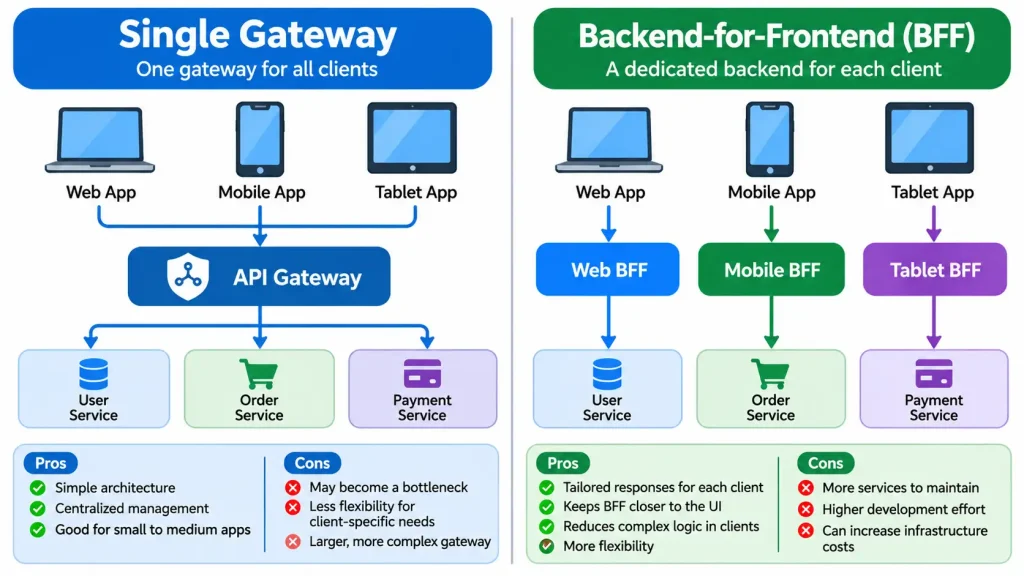
How you deploy gateways matters as much as which patterns you use. Two models appear most often.
A single gateway exposes one endpoint for an application or organization. It’s simple to operate but can become a bottleneck or a large deployment unit. This model suits small and mid-sized systems with one main client type.
The backend-for-frontend (BFF) model uses a separate gateway for each client type, such as web, mobile, or partner applications. Under this model, each gateway returns data in a format suited to its client and keeps client-specific needs from spreading into internal services. Microsoft makes the same point from the service side: separate backends mean a single backend doesn’t have to handle the conflicting requirements of different client types.
| Factor | Single gateway | Backend-for-frontend |
|---|---|---|
| Number of client types | One, or a few with similar needs | Several with different needs |
| Operational overhead | Lower; one deployment to manage | Higher; one deployment per client type |
| Team ownership | Usually one platform team | Often one team per client surface |
| Risk of becoming a bottleneck | Higher | Lower, since failures stay contained |
| Policy consistency | Easier to keep uniform | Needs shared templates or a common baseline |
| Best fit | Early-stage or simpler systems | Larger systems with divergent client requirements |
Neither model wins in every case. A BFF setup multiplies the number of things to deploy, secure, and monitor. If your web and mobile clients need nearly the same data, separate gateways add cost without much benefit.
When you need an API gateway
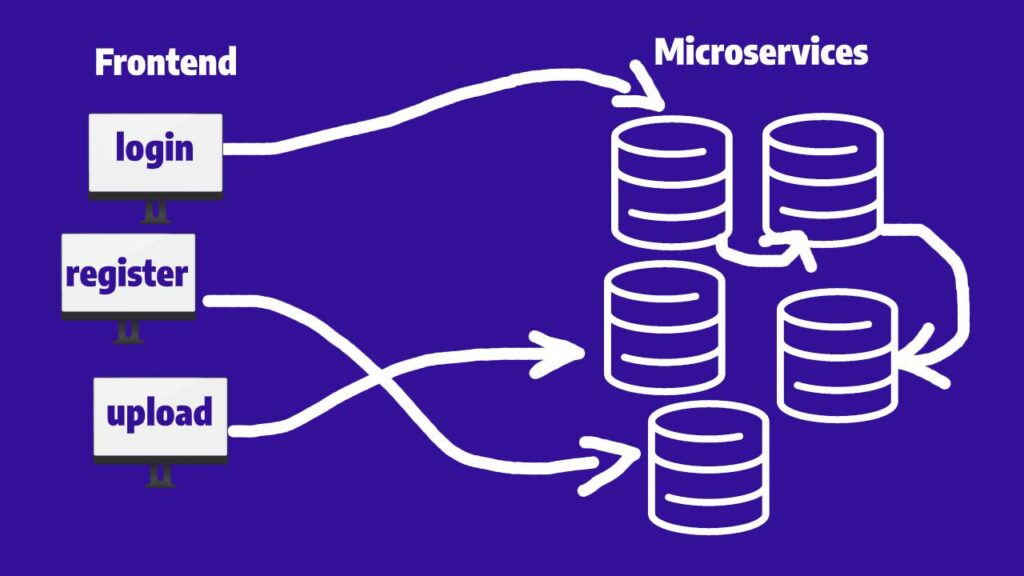
You probably benefit from a gateway when several of these are true:
- You run multiple backend services that clients would otherwise call directly.
- You have more than one client type, such as web, mobile, and third-party integrations.
- You need consistent authentication, rate limiting, and logging across many APIs.
- You publish APIs to external developers and need per-client keys, quotas, or usage reporting.
- You expect to change the backend structure without breaking clients.
The strongest signal is repetition. If your teams keep copying the same authentication middleware or rate-limit code into every service, you’re paying a recurring cost that a gateway can remove.
When you may not need one
A gateway isn’t free. It adds a network hop, another component to run, and another place for configuration errors. Some situations don’t justify that.
You have one service. A single application with one API can often get what it needs from a reverse proxy or the platform’s built-in routing. A full gateway product adds features you won’t use.
You use a backend-as-a-service. Some managed platforms bundle authentication, data access, and API exposure. If you’re evaluating those, compare the best backend as a service providers before adding a separate gateway layer.
Your team is small and your traffic is modest. Operating a gateway takes attention: certificates, upgrades, policy reviews, and incident response. If one team owns everything, a lighter setup may be easier to maintain.
You’d be tempted to put business logic in it. If the main reason for the gateway is to host complex orchestration rules, consider whether that logic belongs in a service with proper tests and versioning.
A reasonable test is to list the specific problems you want the gateway to solve. If you can’t name at least two, you may not need one yet.
API gateway security: what it protects and what it doesn’t
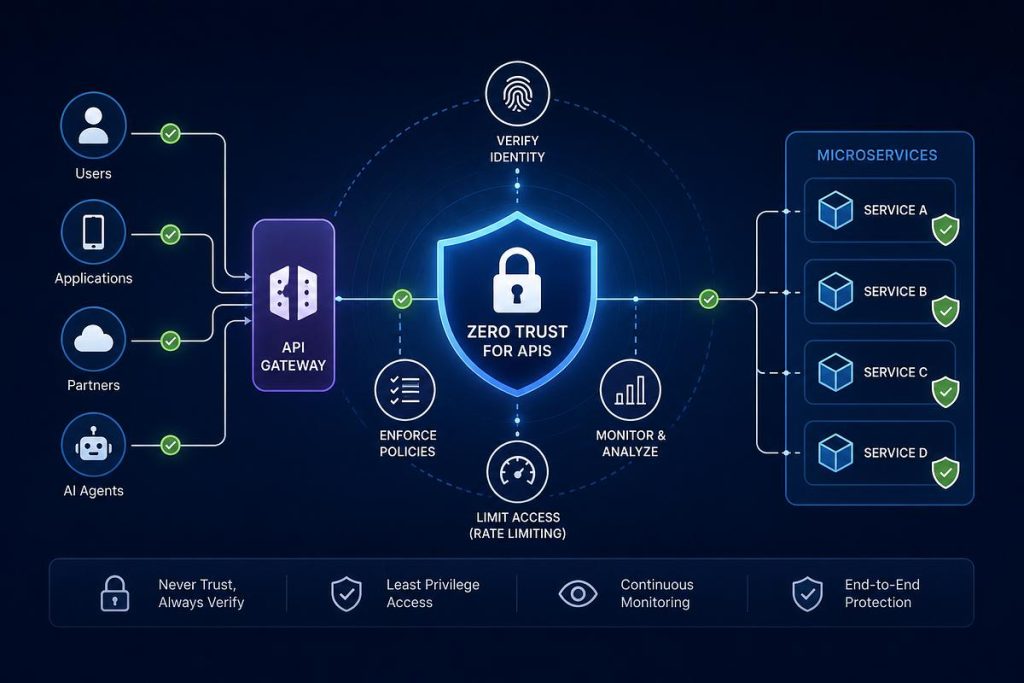
A gateway is a good enforcement point for coarse controls. It can check that a caller presents a valid credential, terminate TLS, reject oversized payloads, and apply rate limits before traffic reaches your services.
Authentication methods a gateway commonly handles
Gateways often support several ways to identify a caller. Typical options include:
- API keys, which identify an application or client but don’t prove a user’s identity.
- OAuth 2.0 access tokens, which represent delegated permission to use an API.
- JSON Web Tokens (JWTs), a token format the gateway can validate before forwarding a request.
- Mutual TLS, where both sides present certificates, often used between services and partners.
Which methods are available depends on the product, so confirm support before you commit.
Coarse authorization at the gateway, fine-grained authorization in services
The gateway can usually decide whether a caller may use a route, which is coarse-grained authorization. It generally can’t decide whether a caller may open a particular record, because that depends on data your services hold. The OWASP API Security Top 10 (2023) lists risks such as broken object level authorization, broken function level authorization, and improper inventory management, and the first two depend on application context that a gateway often can’t see. For help choosing an access model for those service-level checks, see ABAC vs RBAC.
For that reason, keep these rules in mind:
- Don’t let services trust the gateway blindly. Services should still verify identity and check object-level ownership. Network rules should stop clients from reaching services without going through the gateway. This mirrors the thinking behind zero trust security, where no request is trusted just because of where it came from.
- Treat the gateway as a high-value target. It sees all traffic and holds configuration that controls access. Limit who can change its policies, log every change, and protect administrator accounts with privileged access management practices.
- Maintain an inventory. A gateway helps you list the endpoints you expose, but old versions and forgotten routes can persist behind it.
- Validate in layers. Schema checks at the gateway catch malformed requests early, and services still need to validate what they receive.
If your APIs accept data from many sources, our guide to API security best practices for data collection platforms goes deeper on authorization, validation, and retention. Security testing also belongs in your process, since a gateway can’t replace it. See the importance of security testing in software development.
Rate limiting and throttling at the gateway
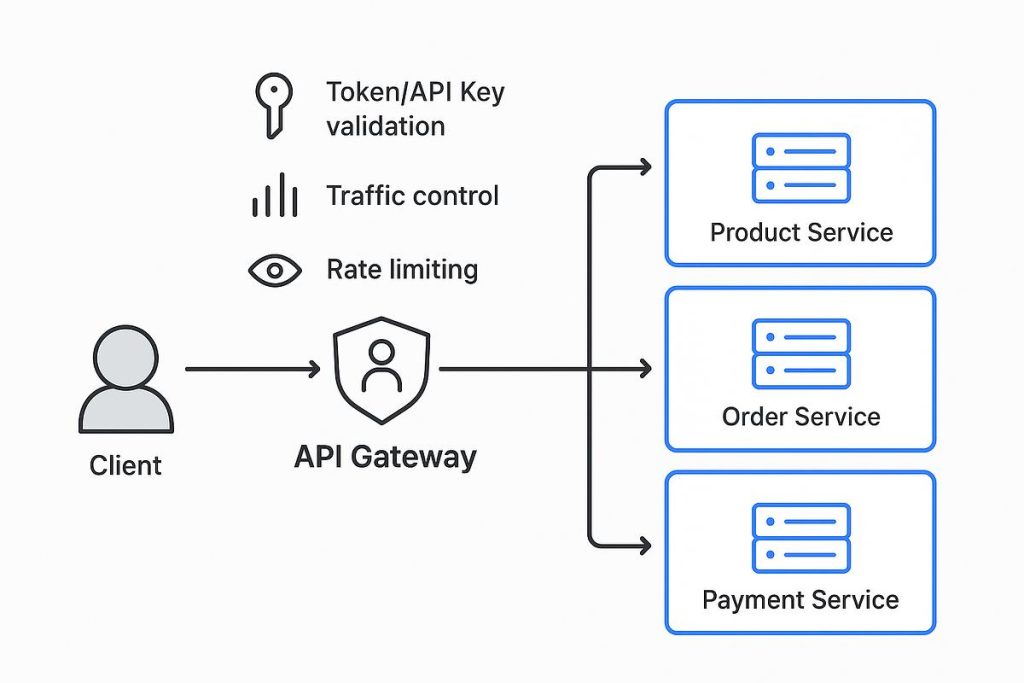
Rate limiting is one of the most common reasons teams adopt a gateway. It protects backends from spikes, limits damage from abusive clients, and controls cost when each request triggers paid downstream work. For a dedicated walkthrough of algorithms and design choices, see API rate limiting.
Many gateways implement limits using a token bucket model. Amazon API Gateway documents this approach: it uses the token bucket algorithm, where each token counts as a request, and lets you set a rate for adding tokens and a burst that sets the bucket’s capacity. A short burst can pass quickly, while sustained traffic above the steady rate gets throttled.
Two details from AWS’s documentation apply broadly. First, throttles are applied on a best-effort basis and should be treated as targets, not guaranteed ceilings. Don’t build billing or compliance logic that assumes a limit is exact. Second, limits often exist at several levels. In Amazon API Gateway, per-client and per-method limits are applied first, followed by Regional and account-level limits, and route-level limits can’t exceed account-level limits. Your provider’s layers may differ, so read its documentation.
When a client exceeds a limit, the usual response is HTTP 429. Under RFC 6585, the 429 status code means the user has sent too many requests in a given amount of time, and the response should explain the condition and may include a Retry-After header. Clients can use that header to back off politely.
A short worked example shows how rate and burst interact. The numbers are hypothetical.
Suppose a route has a steady rate of 100 requests per second and a burst capacity of 200. A client that has been idle starts with a full bucket of 200 tokens, so it can send 200 requests almost instantly. After that, tokens refill at 100 per second. If the client keeps sending 150 requests per second, the bucket drains at 50 tokens per second, which empties a full bucket in about four seconds. Then the gateway starts returning 429 responses. The burst setting tolerates short spikes, and the rate setting limits sustained load.
Choose limits from measured traffic. Record typical and peak request rates for each client and route, then set limits with headroom above peak and alerts well before the limit.
Rate limits also help against some abuse, but they don’t stop a large flood on their own. A distributed attack can overwhelm the network or the gateway before application-level limits matter. See what a DDoS attack is for how those attacks work and why upstream protection usually matters.
Resilience and high availability
Because the gateway sits in front of every service, it’s a natural place to contain failures, and also a place where failures spread. Common resilience features include:
- Timeouts: A request shouldn’t wait forever on a slow service.
- Retries: Retrying can help with brief errors, but retries without limits can multiply load on a struggling service. Retries with jitter spread the attempts out.
- Circuit breakers: After repeated failures, the gateway stops sending traffic to a backend for a while so it can recover.
- Bulkheads: Resource isolation so one busy workload can’t consume every connection. Microsoft describes bulkheads as isolating critical resources such as connection pools, memory, and CPU for each workload, so a single workload can’t starve the others.
- Load shedding: Rejecting some traffic deliberately to protect the rest.
One source notes that gateways frequently implement resilience patterns such as circuit breakers, retries with jitter, bulkheads, and load shedding to contain failures before they reach downstream services. Check which ones your chosen product supports, because retry behavior in particular can make an outage worse when it’s set badly.
The gateway itself needs the same care. Run multiple instances across failure zones and test failover. The principles in server redundancy and building resilient systems for business continuity apply directly.
Observability: the gateway as a source of truth
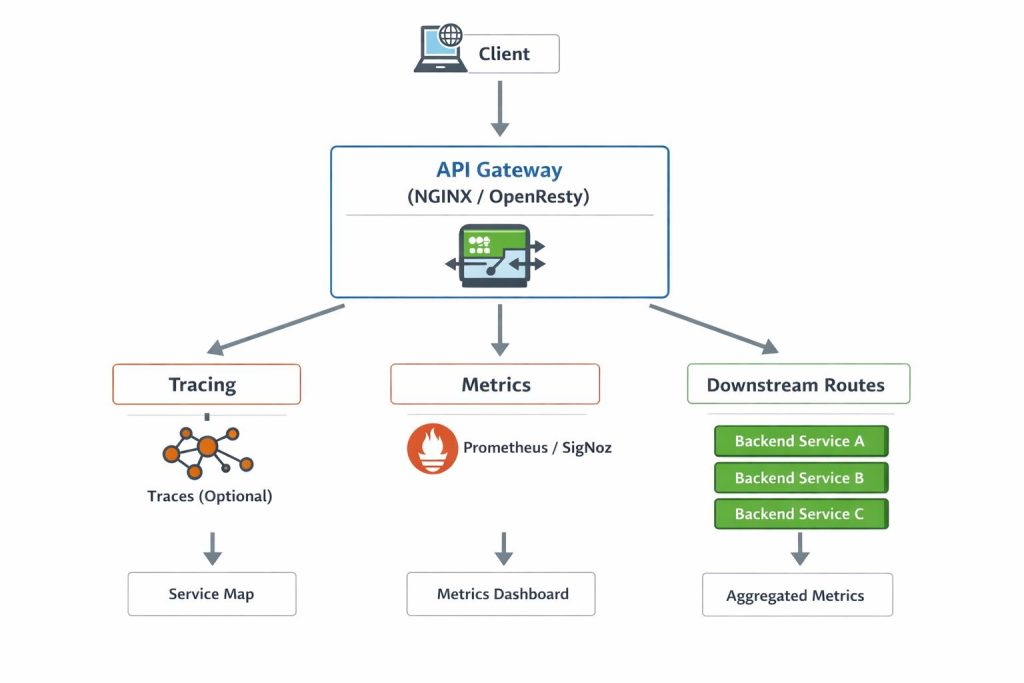
Every request passes through the gateway, so it can produce a consistent record of what happened. That record is valuable when you’re debugging across many services.
Useful gateway telemetry includes:
- Request counts, error rates, and latency by route and client.
- Rate-limit rejections and authentication failures.
- A correlation or trace ID added to each request and passed to backends, so you can follow one request across services.
- Slow upstream calls, separated from time spent in the gateway itself.
Be careful about what you log. Full request bodies, authorization headers, and personal data often don’t belong in gateway logs. Decide in advance which fields you record and how long you keep them.
The costs and risks of using a gateway
Gateways solve real problems, but they have predictable downsides.
A new single point of failure. If every request passes through the gateway, an outage there affects everything. Redundant deployment and tested failover reduce the risk.
Added latency. Each hop adds some delay. For many systems the effect is small compared with backend processing time, but measure it. Aggregation can offset the cost by replacing several client round trips with one.
Logic creep. Gateways are tempting places to add “just one more” transformation or rule. Over time, the gateway accumulates business rules that are hard to test. Keep gateway configuration focused on traffic policy.
Team bottlenecks. If one central team owns the gateway and every API change needs their approval, delivery slows. Many organizations give teams self-service configuration within guardrails set by the platform team.
Vendor lock-in. Gateway policies and extension systems differ across products. Prefer standard formats where you can, such as OpenAPI descriptions, and note which features are product-specific.
How to choose an API gateway
The right choice depends on where you run, what you need, and who will operate it. Options generally fall into three groups:
| Option type | Examples | Strengths | Trade-offs |
|---|---|---|---|
| Managed cloud gateway | Amazon API Gateway, Azure API Management | Less infrastructure to run; integrates with the provider’s identity and monitoring tools | Tied to one provider; limits and pricing models vary |
| Self-managed open-source or commercial gateway | Kong, Envoy-based gateways, NGINX | Portable across environments; more control over configuration | You operate upgrades, scaling, and availability |
| Reverse proxy with gateway features | NGINX, HAProxy | Lightweight and familiar | Fewer built-in API management features, such as developer portals or per-client quotas |
Product capabilities and pricing change often, so confirm current details in each vendor’s documentation. When you evaluate options, a checklist keeps the comparison honest:
- Where will it run? Cloud-only, multi-cloud, on-premises, or Kubernetes. If your environment spans several, read about hybrid cloud computing.
- Which protocols do you need? REST is common, but you may also need WebSocket, gRPC, or GraphQL support.
- What authentication methods must it support? API keys, OAuth 2.0, JWTs, or mutual TLS.
- How granular are the traffic controls? Look for per-client, per-route, and per-tenant limits.
- How does it handle configuration? Look for version control, review workflows, and automated deployment.
- What does observability look like? Check metrics, logs, and tracing integrations.
- What will it cost to run? Include operating effort and usage-based charges, not just license or request fees. Our guide to cloud cost optimization can help you model this.
- How hard is it to leave? Identify product-specific features you’d have to rebuild elsewhere.
Run a short proof of concept on your own traffic before committing. A gateway that looks good in documentation can behave differently with your payload sizes, authentication flow, and latency targets.
A practical rollout plan
Adopting a gateway all at once is risky. A staged approach reduces the blast radius, and it resembles any careful application migration.
- Document what exists. List current endpoints, clients, and authentication methods so you know what the gateway will replace.
- Start with one low-risk API. Choose an API with moderate traffic and a forgiving client base.
- Begin with routing and observability. Get requests flowing and visible before adding stricter policies.
- Add security and traffic controls gradually. Introduce authentication checks, then rate limits, and watch for legitimate traffic being rejected.
- Lock down direct access. Once the gateway works, use network rules so services accept traffic only from it.
- Scan and test. Run vulnerability scanning and manual authorization tests against the gateway and the services behind it.
- Move other APIs over in stages. Keep the old path available until you’ve confirmed the new one behaves correctly.
- Review policies regularly. Remove unused routes, rotate credentials, and revisit limits as traffic changes.
Common mistakes to avoid
- Treating the gateway as the only security control. Services still need their own authorization checks.
- Putting orchestration and business rules in gateway configuration. Keep that logic in tested services.
- Setting limits without measuring traffic. Guessed limits either block real users or fail to protect anything.
- Ignoring the failure path. Test what happens when the gateway, a backend, or an identity provider goes down.
- Skipping configuration review. A small policy change can open a route or disable a check, so require review and keep a history.
- Leaving direct service access open. If clients can reach services without the gateway, its controls don’t apply to them.
- Choosing a product before defining requirements. Start from your needs, not from a demo.
Frequently asked questions
Is an API gateway the same as a reverse proxy?
No. A reverse proxy forwards requests to servers, and many gateways are built on one. A gateway adds API-specific features such as per-client authentication, quotas, and policy management. A plain reverse proxy may be enough if you only need routing and TLS termination.
Do I need an API gateway for microservices?
It depends. Microservices make a gateway more useful because clients would otherwise need to know about many services. A small system with only a few services and one client type may work fine with simpler routing. The more services, client types, and shared policies you have, the stronger the case becomes.
What’s the difference between an API gateway and a load balancer?
A load balancer spreads traffic across identical instances, while a gateway applies API-level policy. A gateway decides who may call which route and how often, and it often includes load balancing as one feature. A standalone load balancer typically doesn’t inspect credentials or enforce per-client limits.
Does a gateway replace a service mesh?
No. They solve different problems and often work together. A gateway mainly handles traffic coming into your system from clients. A service mesh mainly manages communication between services inside it. Whether you need both depends on how many services you run and what controls you need internally.
Can a gateway handle authorization?
Partly. It can check that a caller is authenticated and may call a given route. It usually can’t decide whether a caller may access a particular record, because that depends on data held by your services. Keep fine-grained checks in the services.
Will an API gateway slow down my API?
It adds some latency, but the amount varies. Each extra hop takes time, and the effect depends on the product, the policies you apply, and your network setup. Aggregation can reduce total client time by replacing several calls with one. Measure with your own traffic instead of relying on general figures.
Is a managed gateway better than a self-managed one?
It depends on your constraints. Managed gateways reduce operational work and integrate with their cloud platform, but they tie you to that provider’s limits and pricing model. Self-managed gateways offer portability and control, at the cost of running them yourself.
Conclusion
An API gateway gives clients one entry point and gives you one place to apply routing, security, traffic, and observability policy. It pays off most when you have several services, several client types, and shared controls you’d otherwise repeat. It pays off least when you have a single service or a team that can’t spare the operating effort.
The most important takeaway is to keep the gateway focused on traffic policy and keep authorization and business logic in your services. A gateway that tries to do everything becomes the hardest part of the system to change. As a next step, write down the two or three problems you want a gateway to solve, then test one candidate against your real traffic before committing. If your services handle sensitive data, plan for service-level authorization and independent security review whichever gateway you choose.
You May Also Like
 Data Security & Privacy
API Security Best Practices for Data Collection Platforms
 Web Development
10 Best Mobile App Hosting Providers
 Web Development
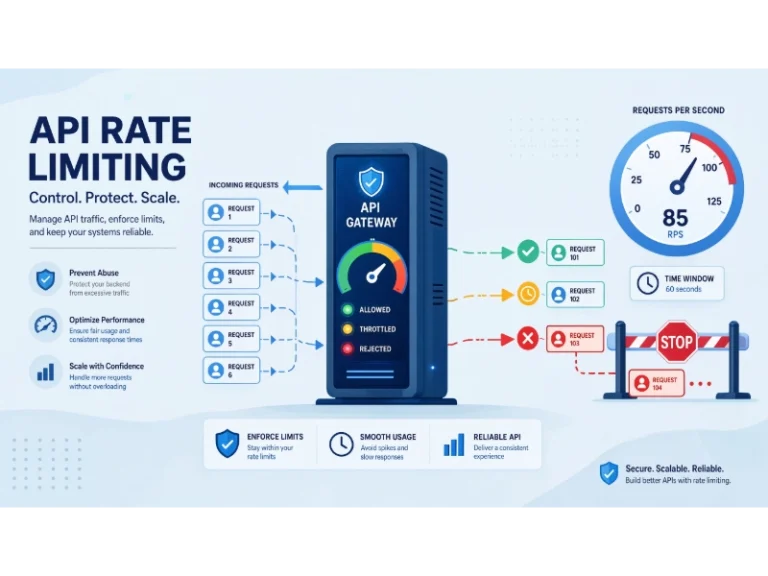
What Is API Rate Limiting? (A Practical, Simple Guide for Safer, Faster APIs)
 Web Development
REST API vs SOAP API: Differences, Pros & Cons, and Use Cases
 Cybersecurity
What Is Zero Trust Network Access (ZTNA)? How It Works, How It Differs From a VPN, and When to Use It
 Cybersecurity
What Is Netskope? Cloud Security, SASE, and Zero Trust Explained
 Web Development
How Long Does It Take to Code an App?
 Cybersecurity
Is Fanatical Legit and Safe? My Honest Take on Buying Game Keys
 Data Security & Privacy
