

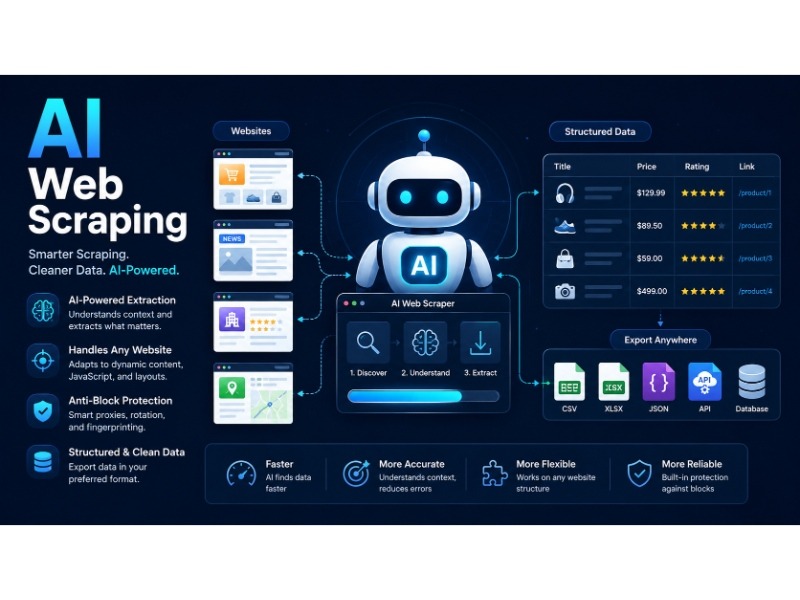
AI web scraping is web or data scraping that uses AI (artificial intelligence), usually a language model (LLM), to understand a web page instead of just reading its raw code and extracting it.
Traditional scraping asks a computer exactly where to look: “grab the text inside this specific HTML tag.” AI scraping works more like a person would. You describe what you want, and the AI figures out where to find it, even if the page’s layout changes tomorrow or changes consistently.
That’s the whole idea in one sentence. The rest of this guide covers how it actually works, what it’s good at, where it falls short, which no-code tools make it accessible without writing a line of code, whether general chatbots like ChatGPT or Claude can be used for it, and how to tell if any of this is the right fit for what you’re trying to do.
A Quick Refresher on Traditional Web Scraping
Before AI entered the topic, scraping worked by targeting specific parts of a page’s HTML. A developer would write code that says something like “find the element with the class price and pull its text.” Tools like Scrapy have handled this kind of structured extraction for years, and if you want the technical side of how that works, our Scrapy guide walks through it step by step.
This approach works well when a website’s structure is stable. The problem shows up the moment a site redesigns its layout. A selector that worked perfectly last week can silently return nothing after a small CSS change, and nobody notices until the data looks wrong.
If you’re also unsure how scraping differs from crawling, that’s worth clearing up too: web scraping and web crawling aren’t quite the same thing, even though people use the terms interchangeably.
So What Changes With AI?
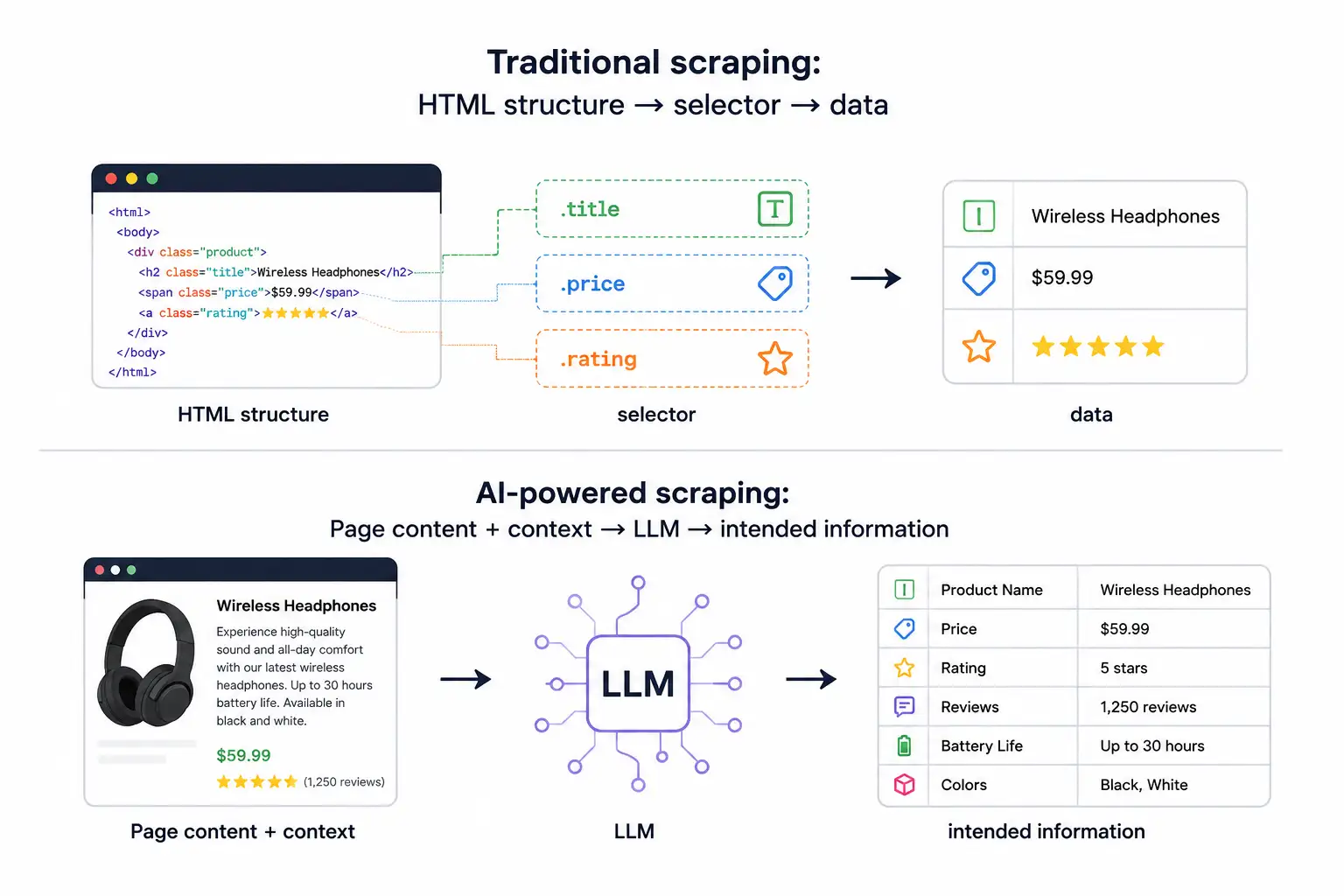
AI web scraping adds a layer of understanding on top of the raw extraction step. Instead of relying only on fixed selectors, it uses a language model to read the content of a page (or the structure around it) and pull out the information that matches what you asked for.
Here’s a simple way to picture it. Imagine handing someone a printed webpage and asking, “What’s the price and the shipping time?” A human doesn’t need to know the page’s HTML tags to answer that. They just read it. AI-powered scraping tools aim to do something similar: interpret meaning, not just structure.
This matters most on pages that are messy, inconsistent, or constantly changing. A product page on one site might list the price in a <span>, and on another site it’s buried in a <div> three layers deep. A rules-based scraper needs separate instructions for each site. An AI-based one can often handle both with the same prompt, because it’s reading for meaning rather than matching a fixed pattern.
- Traditional scraping:
HTML structure → selector → data - AI-powered scraping:
Page content + context → LLM → intended information
How AI Helps Web Scraping
Breaking this down into concrete mechanics, here’s how AI helps the web scraping data process:
- Reads pages semantically instead of structurally — AI will identify a “price” or “job title” by meaning and context, not by a fixed CSS class or XPath.
- Adapts automatically to layout changes — when a site redesigns its pages, an AI extractor often keeps working without a single line of code being touched.
- Handles multiple site layouts with one instruction — the same prompt (“get the price, brand, and availability”) can work across dozens of differently structured stores.
- Understands natural-language instructions — you describe the task in plain English rather than writing selector logic, regex, or XPath expressions.
- Cleans and normalizes messy data on the fly — AI can standardize inconsistent date formats, currencies, or units as part of extraction rather than as a separate step.
- Classifies and judges content, not just extracts it — it can label a review as positive/negative or flag whether a listing matches a set of criteria.
- Summarizes long or unstructured text — turning a lengthy article or product description into a short set of usable data points.
- Fills in gaps using context — if a field is implied rather than stated outright (e.g., “in stock” inferred from a shipping estimate), AI can often still infer the right value.
- Reduces the maintenance burden — fewer broken scrapers means less time spent monitoring and patching selector logic every time a target site changes something cosmetic.
- Lowers the technical barrier to entry — non-developers can build working extraction workflows using plain language instead of code.
What Can AI Web Scraping Actually Extract?
In practice, most AI scraping tools are used for a handful of common jobs:
- Structured facts from unstructured pages. Pulling a product’s price, availability, and specifications out of a page that has no consistent layout.
- Summarized content. Turning a long article or listing into a short summary or a few key data points.
- Entities and relationships. Identifying names, companies, locations, or dates scattered across free-form text.
- Data that changes shape often. News aggregation, job listings, or real estate data, where every source site is formatted differently.
- Content that needs interpretation, not just copying. Classifying a review as positive or negative, or judging whether a listing matches certain criteria.
Once that information is pulled out, it usually needs to be organized into something usable, like JSON. That step, turning messy extracted content into clean structured output, is covered in more depth in open-source tools for extracting JSON data, which is a natural next stop once your AI scraper is producing raw output.
Common Use Cases
Price and product monitoring. Retailers and resellers track competitor pricing across dozens of sites that all format their pages differently.
Lead generation. Pulling contact details, company information, or business listings from directories and public pages.
Market and competitive research. Collecting product descriptions, reviews, or feature comparisons across an industry to spot trends.
SEO and content research. Gathering headlines, meta descriptions, or ranking data across search results to inform content strategy.
Real estate and marketplace data. Listing sites often present data in ways that shift often enough to break rigid scrapers, which makes this a common target for AI-based extraction.
Research and academic data collection. Pulling structured information out of large volumes of loosely formatted public text, like reports or archived pages.
Recruitment and talent sourcing. Aggregating job postings or candidate profiles scattered across boards and company career pages that all use different templates.
Financial and alternative data. Hedge funds and analysts scrape earnings calls, filings, and news to feed sentiment or trend models where interpretation matters as much as raw text capture.
No-Code AI Web Scraping Tools
One of the biggest shifts AI has brought to scraping is accessibility. You no longer need to know Python, HTML, or CSS selectors to build a working scraper — a growing category of “no-code” tools lets you point at a page, describe what you want in plain language, and get structured data back. Here are some of the most widely used options.
Browse AI. Probably the best-known name in this space. You “train” a robot by clicking on the data you want on a sample page, and Browse AI’s underlying models generalize that pattern across similar pages, including ones with different layouts. It supports monitoring for changes (like price drops or new listings), scheduled runs, and exporting to Google Sheets, Airtable, or via API. It’s built specifically for non-developers who want ongoing monitoring rather than a one-off pull.
Octoparse. A point-and-click scraper with an AI-assisted mode that auto-detects data fields (tables, lists, pagination) on a page. It has both cloud-based scheduled scraping and a desktop client, and it’s popular for e-commerce and lead-generation use cases where the target sites are relatively consistent but numerous.
ParseHub. Similar visual, click-to-select interface, with support for handling JavaScript-heavy pages, infinite scroll, and dropdowns. It’s less “AI-native” than Browse AI but has increasingly layered in smarter selector suggestions.
Import.io. One of the older players in this category, now positioned more toward enterprise data extraction with built-in data cleaning and transformation pipelines.
Bardeen. Positioned less as a dedicated scraper and more as a browser automation and workflow tool, with scraping as one of its building blocks — useful if you want extracted data to trigger something else, like updating a CRM record.
Diffbot. Takes a slightly different approach: instead of training a scraper page by page, it uses machine learning models trained to recognize common page types (articles, products, discussions) automatically, and returns structured data via API without any manual configuration for each site.
Apify. Sits between no-code and developer-focused. It offers a marketplace of pre-built scrapers (“Actors”) for common sites, alongside the ability to write custom code, so it’s a reasonable middle ground if you expect to outgrow a purely visual tool.
Instant Data Scraper / Web Scraper (browser extensions). Lighter-weight, free browser extensions that auto-detect tabular data on a page. They’re not as sophisticated as the dedicated platforms above, but they’re a low-friction way to try AI-assisted extraction on simple pages before committing to a paid tool.
The common thread across all of these is that they remove the need to write or maintain selector code. You describe or demonstrate what you want once, and the tool’s underlying AI generalizes that instruction across pages and, in some cases, across entirely different sites.
Can You Use ChatGPT, Perplexity, or Claude for AI Web Scraping?
This comes up constantly, so it’s worth answering directly: general-purpose AI chat assistants like ChatGPT, Claude, and Perplexity can help with parts of a scraping workflow, but they are not scraping tools by themselves, and the details matter.
What they can do well:
- Write and debug scraping code. All three are capable of generating a Python script using libraries like BeautifulSoup, Scrapy, or Selenium, and can help troubleshoot why a selector isn’t matching.
- Parse and structure content you paste in. If you copy the text of a page into the chat and ask for the price, dates, or names pulled out and formatted as JSON, they’ll generally do this well, because it’s a language-understanding task, not a live retrieval task.
- Summarize or classify scraped output. Once you have raw text or a CSV from another scraping tool, these models are good at the interpretation layer — summarizing, tagging, or scoring the data.
- Answer questions about a specific page, when they have browsing enabled. Perplexity is built around live web retrieval by design. ChatGPT and Claude can fetch and read individual pages when their web browsing or search tools are turned on, and can pull out the specific facts you ask for from that page.
Where they fall short as scraping tools:
- No built-in bulk crawling. None of them are designed to systematically crawl hundreds or thousands of pages, follow pagination, and export the results at scale the way a dedicated scraper is.
- No persistent scheduling or monitoring. A chat assistant doesn’t run in the background checking a page every hour for a price change the way Browse AI or Octoparse does.
- Rate limits and access restrictions. Fetching many pages through a chat interface is slow, and heavy automated fetching may run into the platform’s own usage limits, since these products aren’t built for high-volume retrieval.
- No handling of anti-bot defenses. They don’t manage IP rotation, CAPTCHA solving, or headless-browser rendering of JavaScript-heavy sites — the things dedicated scraping infrastructure exists specifically to handle.
- Cost at scale. Running a language model over every page of a large extraction job is far more expensive per page than a lightweight parser, which is the same trade-off that applies to AI scraping tools generally.
The practical pattern that works: use a dedicated scraper (traditional or AI-based, no-code or coded) to do the actual retrieval and crawling, and use ChatGPT, Claude, or Perplexity for the surrounding work — writing the extraction script, cleaning up messy output, summarizing what was collected, or answering follow-up questions about a handful of pages you paste in directly. Treat them as the interpretation layer or the coding assistant, not the crawler itself.
The Real Benefits
- It adapts to change. This is the biggest practical advantage. When a site’s layout shifts, a rules-based scraper usually breaks. An AI-based one has a better chance of still finding the right information, because it’s not tied to one exact selector.
- It handles messy, inconsistent data. Scraping ten different supplier websites that each format their catalog differently used to mean writing ten different scrapers. AI scraping can sometimes use one flexible approach across all of them.
- It reduces the amount of custom code needed. You describe what you want in plain language instead of writing and maintaining selector logic for every site.
- It can do more than just extract. Because it’s built on language understanding, it can also summarize, classify, or judge relevance, tasks a traditional scraper was never designed for.
- It opens scraping up to non-developers. No-code AI tools mean people without programming backgrounds — marketers, researchers, small business owners — can build working extraction workflows on their own.
The Honest Limitations
This is the part that gets glossed over in a lot of marketing copy, so it’s worth being direct about it.
- It’s not always accurate. Language models can misread a page, mix up which price belongs to which product, or confidently return something that’s just wrong. Unlike a selector that either finds the right element or returns nothing, an AI model can return a plausible-looking wrong answer, which is a harder failure to catch.
- It costs more to run. Calling a language model for every page is slower and more expensive than a lightweight HTML parser. For large-scale, high-volume scraping of simple, stable pages, traditional tools are usually still cheaper and faster.
- Dynamic websites are still a challenge. Pages that load content with JavaScript need to be rendered before any scraper, AI-based or not, can read them. AI doesn’t skip this step. If a site needs a real browser to display its content, you’re still looking at a tool like the ones covered in Selenium for web scraping, AI just changes what happens after the page is loaded.
- Anti-bot measures don’t care whether you’re using AI. Rate limits, IP blocking, and CAPTCHAs are aimed at bot-like behavior in general. Using an AI model to parse content doesn’t make your requests any less detectable, so the same defensive practices, like avoiding getting your IP banned, still apply.
- Data quality still needs checking. AI extraction reduces manual coding work, but it doesn’t remove the need to validate what comes out the other end. Treat AI-scraped data the way you’d treat a first draft: useful, but worth reviewing before it feeds into a decision.
- No-code tools have their own ceiling. Visual, click-to-train scrapers are excellent for straightforward, repeatable jobs, but they can struggle with highly irregular pages, complex login flows, or extraction logic that needs custom conditional rules. Situations where a coded solution still wins.
Traditional Scraping vs. AI Scraping: When to Use Which
Neither approach is strictly better. They’re suited to different situations.
Reach for traditional scraping when:
- The target site’s layout is stable and well known
- You’re scraping a huge volume of pages and speed or cost matters
- The data you need is clearly structured (consistent tags, consistent fields)
Reach for AI scraping when:
- You’re pulling data from many different sites with inconsistent layouts
- The information you need requires some interpretation, not just extraction
- The site’s structure changes often enough that maintaining selectors is a constant chore
- You’re extracting from long, unstructured text rather than clean structured fields
- You want a non-developer on your team to be able to build or maintain the workflow
A lot of real-world pipelines end up using both. A crawler collects the raw pages, and an AI step handles the messy interpretation work on top of what’s been collected. That combination is often more practical than picking one approach and forcing every page through it.
Is It Legal?
The legality of scraping, AI-assisted or not, depends on the same factors it always has: the target site’s terms of service, whether the data is publicly accessible, what you’re collecting, and how you’re using it. Using AI in the extraction step doesn’t change any of that. If you’re unsure where a specific project stands, it’s worth reading through whether web scraping is legal before building anything at scale.
Getting Started
If you’re new to this and want to try it out, the practical path usually looks like this:
- Get familiar with basic scraping concepts first, even if you plan to use AI tools. Understanding what data scraping actually involves makes it much easier to judge whether an AI tool is doing a good job or quietly making things up.
- Start with a small, low-stakes project. Try extracting a handful of fields from a few pages before scaling up.
- If you don’t want to write code, try a no-code tool like Browse AI or Octoparse first. Their free tiers are usually enough to test whether AI extraction actually works well on your target sites before you invest more time.
- Always check the output. Compare what the AI extracted against the actual page for a sample of results.
- Decide whether you actually need AI. If the site is simple and stable, a traditional scraper will likely be faster, cheaper, and just as accurate.
The Bottom Line
AI web scraping isn’t a replacement for traditional scraping. It’s a different tool for a different kind of problem: pages that are messy, inconsistent, or require some judgment to interpret correctly. It’s genuinely useful for that, and genuinely overkill for anything simpler.
No-code tools like Browse AI have made this approach accessible to people who’d never write a scraper by hand, and general assistants like ChatGPT, Claude, and Perplexity are useful companions for the coding and interpretation work around a scraping project, even though none of them are a substitute for dedicated crawling infrastructure.
The best approach is usually to match the tool to the site, not the other way around. Simple, stable pages don’t need AI. Messy, ever-changing ones are exactly where it starts to earn its cost.
You May Also Like
 Web Development
What Is API Rate Limiting? (A Practical, Simple Guide for Safer, Faster APIs)
 Web Development
REST API vs SOAP API: Differences, Pros & Cons, and Use Cases
 SaaS
SaaSWhat Is No-Code Automation? How It Works, Benefits, and Risks
 Web Scraping
TinyFish.ai Review: Is It the Best AI Agent for Web Scraping
 AI Technology
ChatGPT API Alternatives: 13 AI APIs and Platforms for Developers
 VPN & Proxy
Mobile Proxies vs. Residential Proxies: Differences, Costs, and Use Cases
 Web Development
Building Apps with Lovable and Supabase: A Step-by-Step Guide
 VPN & Proxy
Datacenter vs. Residential Proxies: Differences, Costs, and Use Cases
 Web Scraping