


Proprietary software has been part of our digital lives for over 40 years. When you buy Microsoft Office, use Adobe Photoshop, or work with Oracle databases, you’re using proprietary software. Companies own the code, charge for licenses, and don’t let you change how it works.
In 2025, the global software market hit $823.92 billion and continues to grow. Most of that money goes to proprietary software, even though open-source alternatives are getting more popular. This guide explains what proprietary software is, how much it really costs, and whether it’s worth paying for.
What is Proprietary Software?
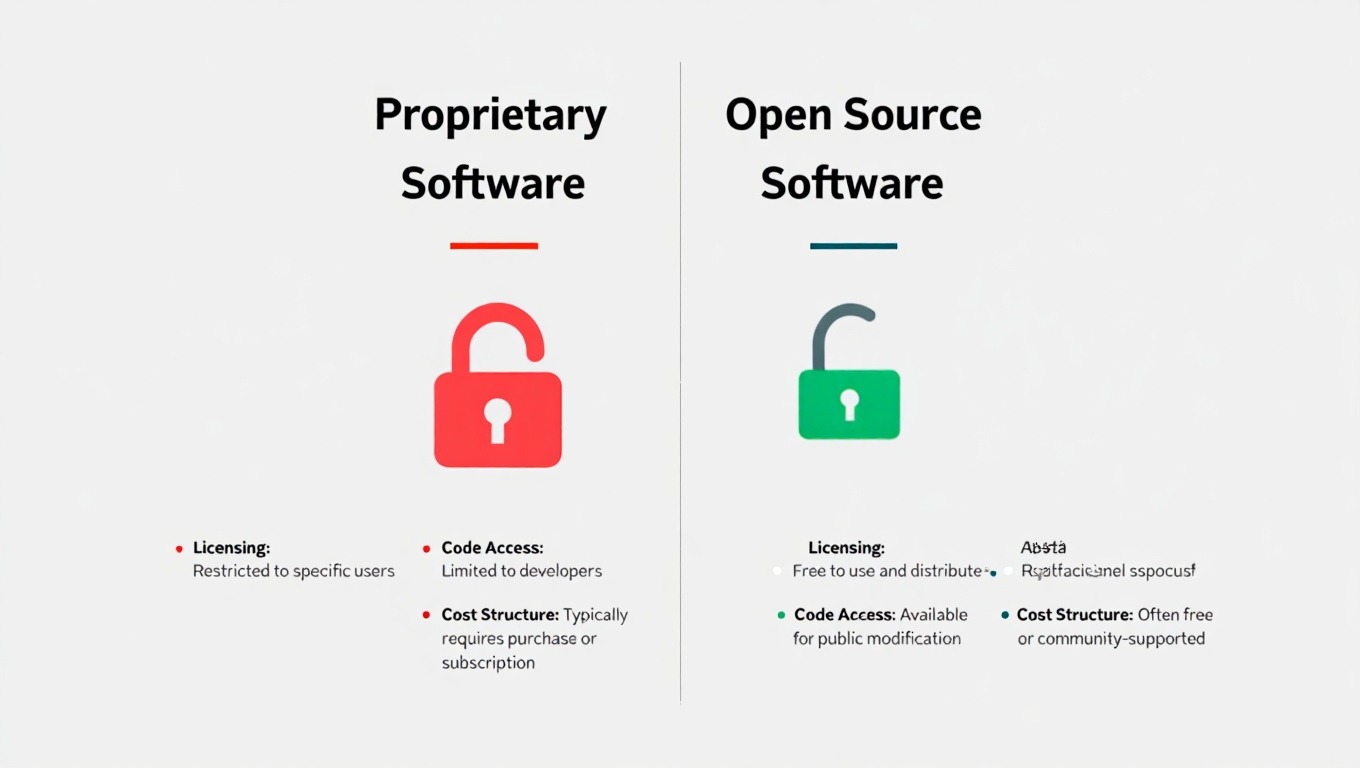
Proprietary software means software owned by a company or person that controls how you use it. You can’t see the source code. You can’t change how it works. You can’t share it freely. The owner decides everything through something called an End-User License Agreement (EULA).
Think about the software you use at work. Microsoft Windows runs on about 71% of all computers worldwide. That’s proprietary software. Adobe Creative Cloud has 37 million paying subscribers as of 2024. Also proprietary. Oracle’s ERP systems manage operations for thousands of big companies. All proprietary.
These companies sell licenses, not the actual software. It’s like renting an apartment instead of buying a house. You pay to use it, but you don’t own it. The difference from open-source software is huge—open source lets anyone see and modify the code.
Just like companies need network security audits to protect their systems, understanding software licenses protects your budget and legal position.
How Proprietary Software Became Normal
Back in the 1960s and 1970s, programmers shared code freely. Computers cost millions of dollars and only universities or big companies could afford them. Software came free with the hardware.
Everything changed in 1976 when Bill Gates wrote his famous “Open Letter to Hobbyists.” He complained that people were copying his BASIC software without paying. That letter kicked off the proprietary software movement.
By the 1980s, companies like IBM, Microsoft, and Oracle realized they could make serious money by selling software separately and restricting access. Microsoft Windows launched in 1985. By the 1990s, proprietary software dominated everything from personal computers to enterprise systems.
Today, even though 96% of organizations use open-source software, proprietary software still makes up most of what businesses actually pay for. Companies spent an average of $4,830 per employee per year on SaaS alone in 2025.
Three Main Features of Proprietary Software
1. Closed Source Code
The company keeps the code secret. You can’t look at it, study it, or modify it. This protects their business model and prevents competitors from copying features. Some companies say this makes software more secure. Others argue that hiding code makes it easier for security holes to go unnoticed.
2. License Agreements That Control Everything
When you install proprietary software, you agree to the EULA. These agreements tell you:
- How many computers can run the software
- Whether you can use it at home or only at work
- What happens if you break the rules
- How much you pay and when
Most people never read these agreements. They’re written by lawyers and filled with confusing language. But they’re legal contracts. Breaking them can get you sued.
3. Vendor Lock-In
Once you commit to proprietary software, leaving gets expensive. Your files might only work with that software. Your employees know how to use it. Your business processes depend on it. Vendor lock-in costs companies millions in migration expenses and lost productivity.
Between 2015 and 2025, IBM software prices rose almost 80%. Customers couldn’t easily switch to alternatives because of lock-in. That’s the power proprietary software companies have.
Proprietary vs. Open-Source Software
People constantly debate whether proprietary or open-source software is better. The truth? It depends on your situation.
Support Differences
Proprietary software gives you professional support. When something breaks at 3 AM, you can call someone. That matters for critical business systems. Open-source software usually relies on community forums. You might wait days for an answer, or you might need to hire your own experts.
Customization
With open-source software, you can modify anything. Need a custom feature? Change the code. Want to integrate with your systems? Do it yourself. Proprietary software locks you out. You get what the vendor provides. Sometimes that’s enough. Sometimes it’s frustrating.
Costs
Open-source software is often free to download. But free doesn’t mean cheap. You need people who know how to install it, maintain it, and fix problems. Studies show enterprises can save up to 60% by using open-source solutions—but only if they do it right.
Proprietary software has clear costs: license fees, support contracts, and maintenance. Companies spend between $100,000 and $750,000 for enterprise software implementation. That’s expensive, but predictable.
Security
People assume proprietary software is more secure because the code is hidden. That’s not always true. A 2023 study found 84% of codebases contain open-source vulnerabilities. But proprietary software has problems too—they’re just hidden until hackers find them.
Common Types of Proprietary Software
Operating Systems
Windows dominates with 71% market share. Apple’s macOS has 16%. These operating systems cost money and restrict what you can do with them. Compare this to Linux, which is free and open-source, but harder to use for average people.
Productivity Software
Microsoft Office remains the standard. Word, Excel, and PowerPoint run most business operations. Google Workspace offers cloud-based alternatives. Both are proprietary, though Google’s pricing is lower.
Creative Software
Adobe Creative Cloud leads this space with 37 million subscribers paying monthly fees. Photoshop, Illustrator, and Premiere Pro are industry standards. Adobe earned $21.51 billion in 2024—that’s how profitable proprietary creative software can be.
Enterprise Resource Planning (ERP)
Oracle recently overtook SAP as the top ERP provider. Oracle captured 6.63% market share with $8.77 billion in revenue. These systems are complex, expensive, and hard to replace once installed. That’s vendor lock-in at its finest.
For businesses managing operations, understanding ERP software and how it integrates with other systems is critical.
Security Software
Norton, McAfee, and similar antivirus programs are proprietary. They keep their virus definitions and detection methods secret to prevent hackers from working around them. This is one case where proprietary makes sense—you don’t want criminals knowing exactly how your security works.
Real Advantages of Proprietary Software
Professional Support When You Need It
Call centers, dedicated account managers, and guaranteed response times cost money. Proprietary software companies provide this because you’re paying for it. When your business depends on software working 24/7, professional support isn’t optional.
Polished User Experience
Companies like Apple and Adobe spend millions on user interface design. They test with real users. They hire experts. The result? Software that works smoothly and looks professional. Open-source alternatives often work great but look clunky.
Regular Updates and New Features
Subscription models mean constant improvement. Adobe adds new Photoshop features every month. Microsoft keeps patching Windows security holes. Oracle updates database performance. These companies have entire teams dedicated to making their software better.
Legal Protection and Compliance
Enterprise customers need
legal guarantees. Proprietary software comes with contracts, warranties, and legal recourse if something goes wrong. For industries with strict regulations—healthcare, finance, government—this matters a lot.
Companies using CRM software or project management tools often choose proprietary options because of support and compliance features.
Real Problems with Proprietary Software
Costs Keep Rising
Software companies love subscription models. Pay $50/month and that’s $600/year. Multiply by 100 employees and you’re spending $60,000 annually on one tool. Annual cost impacts range from $66,108 for small organizations to $6.8 million for large enterprises—representing 67-132% increases in recent years.
Plus, 55% of enterprise software licenses go unused, costing companies an average of $127.3 million annually. That’s money down the drain.
Limited Control and Flexibility
You can’t modify proprietary software to fit your exact needs. If it doesn’t do what you want, tough luck. You can ask the vendor to add features, but they might say no. You can’t fix bugs yourself. You wait for the company to fix them.
Vendor Lock-In Gets Expensive
Switching from one proprietary system to another costs time and money. You need to:
- Export and migrate all your data
- Retrain your entire team
- Rebuild integrations with other systems
- Test everything to make sure it works
Some companies stay with terrible software for years because switching seems too hard. That’s exactly what software vendors want.
Privacy and Data Concerns
Proprietary software can send data back to the company. You don’t know what information they’re collecting because you can’t see the code. Some companies sell user data. Some share it with governments. You’re trusting them to behave ethically.
For businesses handling sensitive information, understanding data protection and encryption becomes essential.
Real-World Examples
Microsoft Windows and Office
Windows runs most business computers. The office handles most business documents. Microsoft made $211 billion in revenue in 2024. They dominate because they were first, they’re good enough, and everyone already knows how to use them.
Adobe Creative Cloud
Designers and video editors have few alternatives. Adobe’s subscription model brought in $21.51 billion in 2024. Many professionals hate the monthly fees but pay anyway because clients expect Adobe file formats.
Oracle Database
Oracle charges about $47,500 per processor for enterprise licenses. Big companies pay it because Oracle databases handle billions of transactions reliably. Switching would cost even more.
SAP ERP
SAP dominates enterprise resource planning with over 42,000 customers. Implementation takes months or years and costs millions. Once you’re in, you’re stuck. That’s vendor lock-in working exactly as designed.
For smaller businesses, accounting software and inventory management systems offer more affordable proprietary options.
Common Myths About Proprietary Software
Myth: Proprietary Software Is Always More Secure
Not true. Security depends on good coding practices, not whether code is hidden. Many proprietary programs have serious security flaws that stay hidden for years until hackers exploit them. Open-source software often gets fixed faster because more people can see the problems.
Myth: You Get What You Pay For
Sometimes yes, sometimes no. Expensive proprietary software can be buggy, slow, and frustrating. Free open-source software can be fast, stable, and powerful. Price doesn’t automatically equal quality.
Myth: Proprietary Software Has Better Features
Ten years ago, maybe. Today, open-source alternatives match or beat proprietary software in many categories. LibreOffice competes with Microsoft Office. GIMP rivals Photoshop for many tasks. Linux servers outperform Windows servers.
Myth: Open Source Is Too Complicated for Regular People
Some open-source software is complicated. But so is some proprietary software. SAP and Oracle are notoriously difficult to use. Meanwhile, Ubuntu Linux is easier to install than Windows for many users.
When Should You Choose Proprietary Software?
When You Need Guaranteed Support
Running a hospital? Managing financial transactions? Can’t afford downtime? Proprietary software with professional support makes sense. The cost is worth the peace of mind.
When Industry Standards Matter
If everyone in your industry uses AutoCAD, you probably need AutoCAD. If clients send you Adobe Illustrator files, you need Illustrator. Fighting industry standards costs more than paying for proprietary software.
Similar considerations apply when choosing dental practice software or HR management tools—industry-specific needs often require specialized proprietary solutions.
When You Lack Technical Staff
Open-source software often requires technical expertise. Small businesses without IT staff might find proprietary software easier. You call support instead of fixing problems yourself.
When Compliance Is Critical
Regulated industries need certified software. Healthcare, finance, and government agencies often require proprietary solutions that meet specific compliance standards.
Considering Alternatives?
Before committing to expensive proprietary software, research alternatives:
Try Open-Source First
Many open-source programs work great and cost nothing. LibreOffice, GIMP, Blender, and hundreds of other programs might meet your needs. The worst case? You wasted some time testing them.
Learn more about open-source benefits and how it compares to proprietary options.
Look for Smaller Vendors
Big companies like Oracle and Adobe charge premium prices. Smaller companies often provide similar features at lower costs with better customer service.
Negotiate Contracts
Everything in software licensing is negotiable. Don’t accept the first price. Ask for discounts. Bundle products. Threaten to switch vendors. Companies want your money—make them work for it.
Plan Your Exit Strategy
Before signing any proprietary software contract, plan how you’ll leave if needed. Can you export your data easily? What formats does the software use? Are they standard or proprietary? Knowing your exit strategy prevents lock-in.
What’s Coming Next
AI Integration Everywhere
By 2024, 35% of enterprise software companies planned to use AI in their licensing. Expect AI-powered features in all proprietary software, usually at higher prices.
More Subscription Models
One-time purchases are disappearing. Everything becomes a subscription. Software companies love predictable monthly revenue. This trend will continue.
Hybrid Solutions
Some companies now offer proprietary software built on open-source foundations. This combines open-source flexibility with proprietary support and features. Expect more hybrid models.
Stricter Data Regulations
Laws like GDPR and CCPA force software companies to protect user data better. Proprietary software will need clearer privacy policies and better security. Companies that ignore this will lose customers.
For businesses concerned about security, resources like cybersecurity best practices and vulnerability management provide valuable guidance.
Making the Right Choice
Choosing between proprietary and open-source software depends on:
Your Budget: Can you afford ongoing subscription fees? Or do you need free software and can handle technical challenges?
Your Technical Skills: Do you have IT staff who can manage open-source software? Or do you need vendor support?
Your Industry: Does your industry require specific proprietary tools? Or can you use alternatives?
Your Risk Tolerance: Can you handle occasional downtime while learning open-source tools? Or do you need guaranteed uptime?
Your Long-Term Plans: Will you need to scale up? Switch vendors? Exit the market? Think years ahead, not just today.
Final Thoughts
Proprietary software dominates business technology for good reasons. It provides professional support, polished interfaces, and predictable costs. Companies like Microsoft, Adobe, and Oracle built empires by solving real problems.
But proprietary software isn’t perfect. High costs, vendor lock-in, and limited flexibility frustrate users. With the global software market reaching $823.92 billion in 2025 and growing to an expected $2.25 trillion by 2034, understanding these trade-offs matters more than ever.
The best choice depends on your specific situation. Some businesses need proprietary software’s guaranteed support and industry compatibility. Others save money and gain flexibility with open-source alternatives. Many companies use both proprietary software for mission-critical systems, open-source for everything else.
Whatever you choose, read the license agreements carefully. Plan your exit strategy before signing contracts. Budget for the real costs, including training and support. And stay flexible—technology changes fast, and today’s perfect solution might be tomorrow’s expensive mistake.
The software industry will keep evolving. Subscription models will grow. AI features will become standard. Data privacy will matter more. But the basic choice remains the same: pay for proprietary convenience and support, or invest time learning open-source alternatives. Neither option is wrong. Both have their place.
Make your decision based on your needs, not marketing hype. Test before buying. Ask current users about their experiences. And remember—the most expensive software isn’t always the best software.
You May Also Like
 Software
9 Best Free Laser Engraver Software Tools in 2026
 Software
When Fixing Bugs Is No Longer Enough: How to Rescue a Failing Software Project
 SaaS
SaaSNotion vs Coda vs ClickUp for Teams: A Field Report From 18 Months
 SaaS
SaaSTrello vs monday.com vs ClickUp: Which Project Management Tool Fits Your Team in 2026?
 SaaS
SaaS8 Best Asana Alternatives in 2026: Free Tools, Top Competitors, and How to Choose
 Software
What is Asana Software? How Businesses Use It for Project Management and Team Collaboration
 Software
10 Best Audio Redaction Software in 2026 (Tested Picks by Use Case)
 SaaS
SaaS10 Best AI Audio Enhancers for Podcasts in 2026 (Reviewed & Compared)
 Software