

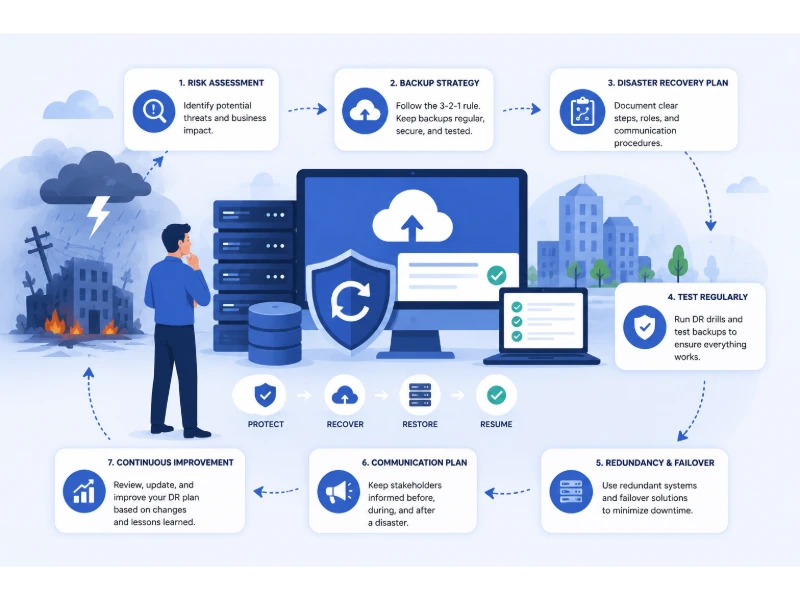
A single bad afternoon — a ransomware attack, a burst pipe over your server rack, a regional power outage — can stop a business cold. It can trigger data loss, direct financial damage, and lasting harm to your reputation with clients who trusted you with their information. A well-built Disaster Recovery Plan (DRP) is what separates a business that’s back up and running by the next morning from one that never fully recovers. It’s the difference between a controlled, practiced response and total chaos.
The scale of what’s at stake is easy to underestimate. Industry research consistently puts the cost of unplanned downtime for small and mid-sized businesses somewhere between $8,000 and $25,000 per hour, and some studies covering the past year push that figure even higher once lost productivity, recovery labor, and customer churn are factored in. More sobering still: multiple sources, including data cited by the National Archives and Records Administration, suggest that a large share of businesses that experience extended downtime never fully recover and close within a year. A DRP isn’t a bureaucratic checkbox; it’s one of the highest-leverage documents a business can own.
The good news is that building one doesn’t require an enterprise IT budget or a dedicated compliance team. By working through a structured set of best practices, you can create a plan that matches your business’s actual size, risk profile, and budget — one that identifies real threats, lays out concrete recovery steps, and makes sure every person on your team knows exactly what to do when something goes wrong.
This guide covers 13 disaster recovery planning best practices, along with two concepts (Recovery Time Objective and Recovery Point Objective) that most basic DRP guides skip entirely but that shape almost every decision you’ll make about backups, budget, and priority. Let’s get into it.
Why Disaster Recovery Planning Deserves Real Investment
Before diving into the practices themselves, it’s worth being honest about what a DRP actually buys you:
- Faster, calmer recovery. Teams that have a documented plan and have rehearsed it recover measurably faster than teams improvising in the moment.
- Protection of client trust. Clients and partners judge you not by whether something bad happened, but by how quickly and professionally you handled it.
- Regulatory and contractual coverage. Many industries — healthcare, finance, legal, and increasingly any business handling customer data — face contractual or legal obligations around data protection and continuity, and a documented DRP is often part of demonstrating due diligence.
- Insurance leverage. Cyber-insurance underwriters increasingly ask for evidence of a tested recovery plan before issuing or renewing a policy, and having one can measurably affect your premium.
- A cultural shift toward resilience. Once a team has been through even one tabletop exercise, disaster preparedness stops being abstract and starts being a shared habit.
With that context in mind, here’s how to build a plan that actually holds up under pressure.
1. Assess Your Risks and Needs
Understanding your business’s specific risk profile is the foundation of an effective Disaster Recovery Plan. Start by cataloging realistic threats: natural disasters, ransomware and other cyberattacks, hardware failure, power and connectivity outages, vendor or supply-chain disruption, and plain human error. For each one, think through how it would actually play out — which systems would go down, which data could be lost, and how visible the disruption would be to clients.
From there, conduct a Business Impact Analysis (BIA). A BIA identifies which functions of your business are truly mission-critical (the ones that cause real financial or reputational damage within hours) versus which ones can tolerate a longer outage. This distinction is what lets you build a plan that’s proportionate to real risk instead of trying to protect everything equally — which is both expensive and, paradoxically, less effective.
Steps to Assess Risks and Needs
- Identify threats: List every plausible disaster scenario relevant to your location, industry, and infrastructure.
- Evaluate impact: Estimate how each threat would affect operations, revenue, data integrity, and client relationships.
- Prioritize critical areas: Flag the systems and processes that must be restored first.
- Determine recovery objectives: Set specific, measurable goals for how quickly each critical area needs to come back online.
2. Understand RTO and RPO — the Two Numbers Your Whole Plan Depends On
This is the piece most basic disaster recovery guides leave out, and it’s arguably the most useful addition you can make to your plan.
Recovery Time Objective (RTO) is the maximum amount of time a system or process can be down before the disruption becomes unacceptable to the business. Recovery Point Objective (RPO) is the maximum amount of data loss you can tolerate, measured in time — in other words, how far back your most recent usable backup needs to reach.
These two numbers aren’t abstract compliance jargon; they directly determine what you spend money on. A system with a four-hour RTO and a fifteen-minute RPO needs real-time replication and a tested failover process. A system with a 48-hour RTO and a 24-hour RPO can often be covered by a solid nightly backup routine. Setting these numbers explicitly — system by system — keeps you from either overspending on redundancy nobody needs or underspending on the one application that would actually sink the business if it went dark for a day.
| Business Function | Example RTO | Example RPO | Typical Approach |
|---|---|---|---|
| Customer-facing e-commerce platform | Under 1 hour | Near-zero (minutes) | Real-time replication, automated failover |
| Core financial/accounting systems | 4–8 hours | 1–4 hours | Frequent automated backups, standby server |
| Email and internal communication | 4–8 hours | 24 hours | Cloud-hosted, provider-managed redundancy |
| File storage and document archives | 24 hours | 24 hours | Daily backup, cloud sync |
| Internal reporting/analytics tools | 48–72 hours | 24–48 hours | Weekly backup, lower priority restore |
Use a table like this — even a rough version — as a working reference inside your DRP so recovery priorities are explicit rather than assumed.
3. Develop a Comprehensive Plan
A well-structured plan outlines exactly what to do before, during, and after a disaster, covering IT systems, data, physical facilities, and personnel in one place. It should specify how to activate the plan, who needs to be contacted first, and what resources — hardware, credentials, vendor contacts — are required at each stage.
Clarity here is what prevents a bad situation from becoming a worse one. When roles and responsibilities are spelled out in advance, people spend their energy executing the plan instead of figuring out what the plan even is.
Key Elements of a Comprehensive Plan
- Emergency contacts: A current list of team members, vendors, insurance contacts, and emergency services.
- Communication plan: Defined channels and messaging for employees, customers, and stakeholders during an incident.
- Recovery procedures: Step-by-step instructions for restoring specific systems and data sets.
- Resource inventory: A living record of the hardware, software licenses, and backup locations needed for recovery.
4. Prioritize Data Backup
Regular, reliable data backups are the backbone of any recovery effort. Combine cloud storage with physical, off-site backups so you’re not exposed to a single point of failure — a flood or fire that takes out your office shouldn’t also take out your only backup copy.
Automating backups removes the single biggest point of human failure: someone simply forgetting to run one. Just as important, and just as often skipped, is actually testing that your backups restore correctly. A backup you’ve never tested is a hypothesis, not a safety net.
Best Practices for Data Backup
- Follow the 3-2-1 rule: Keep at least three copies of your data, on two different types of media, with one copy stored off-site.
- Set backup frequency by data volatility: High-change data (transactions, active client files) may need hourly or continuous backup; static archives can run on a weekly cycle.
- Use both on-site and off-site storage: This protects against localized disasters without sacrificing quick local recovery for minor incidents.
- Encrypt everything: Backup data should be encrypted both in transit and at rest.
- Consider immutable or air-gapped backups: With ransomware increasingly targeting backup systems directly, at least one copy of your data should be stored somewhere an attacker with network access can’t modify or delete it.
- Test restorations on a schedule: Quarterly restoration drills catch corruption or configuration drift long before you actually need the backup in an emergency.
5. Implement Redundant Systems
Redundancy means your business keeps functioning even when one system fails. Backup servers, alternate power sources, and failover internet connections all act as a safety net while your primary systems are being repaired.
This doesn’t have to mean a fully mirrored data center. For most small and mid-sized businesses, redundancy means a secondary internet provider, an uninterruptible power supply (UPS) sized to bridge short outages, and cloud-hosted core applications that don’t depend on your physical office at all.
Examples of Redundant Systems
- Servers: Dual or clustered servers so one failure doesn’t take down the whole system.
- Power supplies: Backup generators or UPS units sized for your actual runtime needs.
- Internet connections: A secondary ISP or a cellular failover connection for critical operations.
- Cloud failover: Applications hosted with providers that offer built-in multi-region redundancy.
6. Establish Clear Roles and Responsibilities
Every team member should know exactly what they’re responsible for the moment a disaster is declared. This clarity is what prevents the kind of confusion that turns a manageable incident into a prolonged outage.
Build a dedicated disaster recovery team with named leads for different recovery functions, and train them until their roles are second nature. In a real incident, people default to whatever they’ve practiced — which is exactly why practice matters more than the document itself.
Components of Clear Roles and Responsibilities
- Team leader: Owns the overall recovery process and makes the final call on major decisions.
- IT specialist: Handles technical restoration of systems and data.
- Communications manager: Owns internal and external messaging throughout the incident.
- Operations manager: Focuses specifically on restoring day-to-day business functions.
7. Test Your Disaster Recovery Plan
A DRP that’s never been tested is a document, not a plan. Regular simulations and drills are what reveal the gaps — the contact number that’s out of date, the backup that doesn’t actually restore, the assumption that someone else has the admin password.
Involve the people who would actually be responding, not just management. Document what goes wrong in every test — that friction is the most valuable output of the exercise — and feed it back into the plan.
Types of DRP Tests
- Tabletop exercises: A structured, discussion-based walkthrough of a specific scenario, without touching live systems.
- Simulation drills: A more realistic run-through that mimics an actual incident, often with a time limit.
- Full interruption testing: A genuine, planned shutdown of systems to validate the complete recovery process end-to-end — the most rigorous test, and the one most businesses skip because of its cost, but also the one that catches the most real problems.
A reasonable cadence for most small and mid-sized businesses is one tabletop exercise per quarter and at least one simulation drill annually, with full interruption testing reserved for your most critical systems.
8. Secure Your Physical Infrastructure
Physical security is just as important as digital security, and it’s easy to overlook once a business goes cloud-first. Offices, server closets, and any on-site equipment need protection from theft, vandalism, and environmental hazards.
Access control systems, surveillance, and secure, locked storage for sensitive hardware all reduce your exposure. Environmental protection — fire suppression, climate control, and simply elevating critical equipment off the floor — guards against the more mundane disasters, like a burst pipe, that are far more common than dramatic ones.
Physical Security Measures
- Access control: Keycards, PIN codes, or biometric scanners restricting who can reach sensitive equipment.
- Surveillance: Cameras covering entry points and equipment rooms.
- Secure storage: Locked, access-controlled areas for backup hardware and spare equipment.
- Environmental protections: Fire suppression systems, climate control, and elevated equipment placement to prevent water damage.
9. Develop a Communication Plan
Clear, timely communication is often what determines whether clients stay calm and patient or start looking for another vendor. A communication plan defines who says what, through which channel, and on what timeline once an incident is declared.
Prepared message templates matter more than they might seem to. Drafting your first client update in the middle of an actual crisis wastes precious time and increases the odds of an inconsistent or overly technical message going out.
Key Elements of a Communication Plan
- Communication channels: The right channel for each audience — email for employees, phone for high-value clients, a status page or social post for the broader public.
- Contact lists: Maintained, current lists for every stakeholder group.
- Message templates: Pre-written drafts for common scenarios, ready to be filled in and sent quickly.
- Assigned communication roles: One clearly designated person (or small team) responsible for all outbound messaging during the incident, to keep the message consistent.
10. Train Your Employees
Employees are both your first line of defense and, statistically, one of the more common sources of incidents — a single misjudged click on a phishing email can trigger the very disaster your DRP is designed to handle. Regular training turns the plan from an IT document into an organization-wide habit.
Cover both prevention (recognizing phishing, using strong and unique passwords, following data-handling procedures) and response (what to do, and who to tell, the moment something looks wrong). Well-trained employees consistently shorten the gap between “something happened” and “the right people know about it.”
Topics for Employee Training
- Disaster response procedures: What to do, step by step, when an incident is declared.
- Data security practices: Password hygiene, safe handling of sensitive information, and secure device use.
- Phishing and cyber threats: Recognizing the current tactics attackers actually use, since these evolve constantly.
- Emergency evacuation plans: Safe, practiced procedures for physical emergencies affecting the workplace.
11. Use Cloud-Based Solutions
Cloud-based infrastructure gives small and mid-sized businesses a level of redundancy that would be prohibitively expensive to build in-house. Storing data and running applications in the cloud keeps your business operational even if your physical office is completely unusable.
Reputable cloud providers maintain security certifications, geographically distributed redundancy, and dedicated incident-response teams — resources far beyond what most small businesses could staff independently. Cloud services also scale with you, so your disaster recovery capability grows in step with your business rather than requiring a large upfront capital investment.
Benefits of Cloud-Based Solutions
- Accessibility: Access to critical data and applications from anywhere, on any device.
- Built-in redundancy: Data replicated across multiple facilities and, often, multiple geographic regions.
- Scalability: Storage and compute capacity that expands as your business grows, without a hardware refresh.
- Lower capital cost: Reduced need for expensive, self-maintained on-site infrastructure.
12. Implement Data Encryption
Encryption scrambles your data so that only authorized parties with the correct key can read it — a protection that matters both while data sits in storage and while it moves across a network. Without it, a breach or intercepted transmission hands attackers usable, readable information: account numbers, client records, credentials.
With strong encryption in place, that same stolen data is unreadable and effectively useless to an attacker. Encryption standards do evolve, so this isn’t a “set it once” control — it needs periodic review as part of your broader security posture.
Encryption Best Practices
- Use strong, current standards: Industry-standard algorithms such as AES-256 for data at rest and TLS for data in transit.
- Prioritize sensitive data: Client information, financial records, health data, and credentials should be encrypted first and verified most often.
- Manage keys separately: Store encryption keys apart from the encrypted data itself, so a single compromised location doesn’t expose both.
- Review protocols regularly: Revisit your encryption approach at least annually, since what counts as “strong” shifts as computing power and attack methods evolve.
13. Maintain Regular Software Updates
Outdated software is one of the most common — and most preventable — entry points for a cyberattack. Vendors release patches specifically to close known security holes, and delaying those updates leaves a documented vulnerability open for attackers who actively scan for exactly that.
Turn on automatic updates wherever it’s safe to do so, but don’t treat that as a complete solution — schedule a recurring manual check for anything that failed to apply automatically or requires a maintenance window, particularly for line-of-business applications and network hardware.
Key Areas for Software Updates
- Operating systems: Every workstation and server running the latest supported OS version.
- Applications: Business software kept current, including less visible tools like accounting platforms and CRMs.
- Security software: Antivirus, endpoint detection, and firewall rules updated on a defined schedule.
- Firmware: Routers, switches, and other network hardware, which are frequently overlooked but just as exploitable as software.
14. Review and Update Your DRP Regularly
A Disaster Recovery Plan is a living document, not a one-time deliverable. Your business changes — new systems, new vendors, new staff, new office space — and your plan needs to change with it, or it quietly becomes inaccurate right when you need it most.
Review your DRP at minimum once a year, and immediately after any significant change to your infrastructure, staffing, or vendor relationships. Fold in lessons from every test and every real incident, however minor.
Steps to Regularly Review Your DRP
- Schedule regular reviews: Set a recurring annual review, plus ad hoc reviews after major changes.
- Update contact information: Confirm every contact — internal and external — is still current.
- Incorporate feedback: Apply lessons learned from tests and real incidents directly into the plan.
- Adapt to changes: Adjust procedures to reflect new technology, new processes, or new regulatory requirements.
- Communicate updates: Make sure every team member knows what’s changed and why.
Frequently Asked Questions About Disaster Recovery Planning
Is a Disaster Recovery Plan necessary for my small business?
Yes. Disaster recovery isn’t only an enterprise concern — smaller businesses often have less financial cushion to absorb extended downtime, which makes a documented plan proportionally more important, not less.
Can I create my own DRP, or should I hire a professional?
You can build a solid first version yourself using the framework above, especially if your business is straightforward. That said, bringing in an outside consultant — even just to review a draft — often surfaces blind spots, particularly around technical recovery steps and regulatory requirements you might not know apply to you.
How often should I test my Disaster Recovery Plan?
At minimum once a year, with additional tabletop exercises whenever your systems, staff, or vendors change significantly. Businesses running mission-critical, customer-facing systems should test more frequently — quarterly tabletop exercises are a reasonable baseline.
What should I do first when a disaster occurs?
Activate the plan immediately rather than improvising: notify your designated recovery team, follow the documented first steps for the specific type of incident, and begin communication with stakeholders according to your communication plan.
How can the cloud help with disaster recovery?
Cloud infrastructure provides built-in geographic redundancy and professional-grade security that most small businesses couldn’t cost-effectively replicate on their own, meaning your data and applications stay accessible even if your physical location is compromised.
Do I need to involve my employees in the DRP?
Yes, directly and continuously. A plan that lives only in an IT manager’s head or a folder nobody’s opened fails the moment that one person is unavailable. Every employee needs to know their specific role.
How can I ensure my DRP stays effective over time?
Treat review, testing, and updating as recurring calendar items rather than one-time tasks. The plans that hold up under real pressure are the ones that get revisited and adjusted after every test and every real incident, however small.
What are the most common mistakes in disaster recovery planning?
The biggest ones are building a plan once and never testing or updating it, leaving out clear ownership of specific recovery tasks, failing to test backup restoration (not just backup creation), and underestimating how much communication matters during an actual incident.
How important is communication in a DRP?
It’s one of the most underrated components. Clear, timely, consistent communication is often what protects client trust and internal morale more than the speed of the technical recovery itself.
Can a DRP help with regulatory compliance?
In many industries, yes — a documented, tested disaster recovery and data protection plan is increasingly treated as evidence of due diligence for data protection regulations and, in some sectors, is a contractual requirement from clients or insurers.
Conclusion
Building and maintaining a Disaster Recovery Plan is one of the most valuable investments a small or mid-sized business can make in its own longevity. Working through these 13 best practices — plus setting explicit RTO and RPO targets for your most critical systems — gives you a plan that’s specific to your actual risks rather than a generic template that falls apart under real pressure.
Disaster recovery planning isn’t a project with an end date; it’s an ongoing discipline. Keep the plan current, train your team until the response becomes second nature, and stay current on emerging threats. A well-maintained DRP today is what keeps your business — and your clients’ trust — intact tomorrow, no matter what disaster eventually tests it.
You May Also Like
 Cybersecurity
What Is Zero Trust Network Access (ZTNA)? How It Works, How It Differs From a VPN, and When to Use It
 Cybersecurity
What Is Netskope? Cloud Security, SASE, and Zero Trust Explained
 Cybersecurity
Is Fanatical Legit and Safe? My Honest Take on Buying Game Keys
 Data Security & Privacy
Is Gameflip Legit and Safe for Gift Cards? What Buyers Should Know
 Data Security & Privacy
Is Eldorado.gg Legit and Safe in 2026? My Investigation and What Buyers Should Know
 VPN & Proxy
Why Does Google Say Our Systems Have Detected Unusual Traffic From Your Computer Network?
 Cybersecurity
Is Groupon Legit? An Honest Review In 2026
 Cybersecurity
Is Romspure Safe? An Honest Look at the ROM Site’s Risks and Trust Scores
 Cybersecurity