

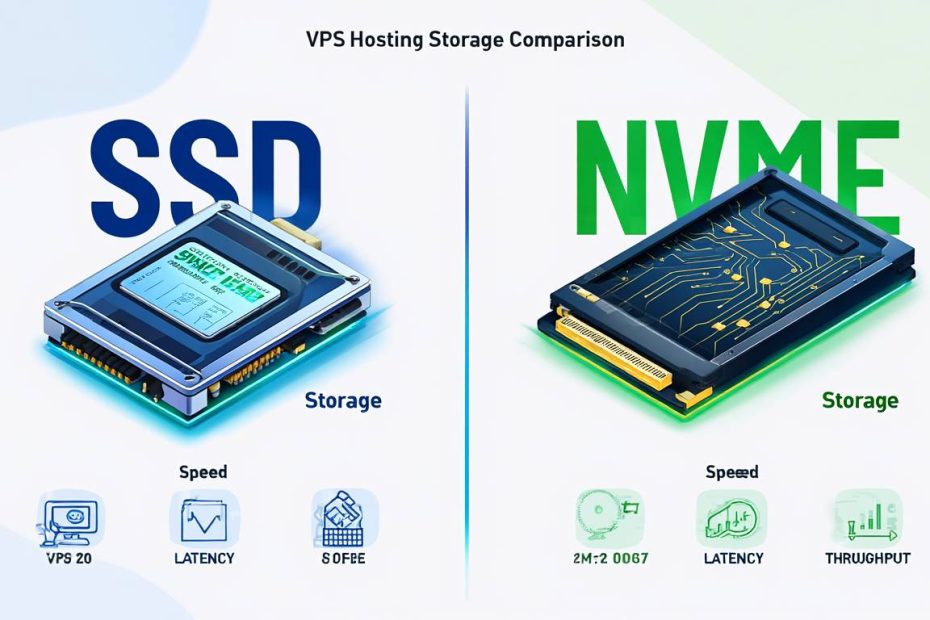
When choosing a VPS hosting plan, the type of storage can make a huge difference in how fast your website loads and performs. Most hosting providers now offer either SSD or NVMe storage options, but many people don’t understand what these terms mean or which one they should choose. The storage type affects everything from how quickly your website loads to how fast databases process information.
VPS hosting gives you a virtual private server that acts like your own dedicated computer in the cloud. The storage on this virtual server is where all your website files, databases, and applications live. Traditional hosting used to rely on slow spinning hard drives, but modern VPS providers have moved to faster solid-state storage options. Understanding the difference between SSD and NVMe storage will help you choose the right hosting plan for your needs.
The main thing to know is that both SSD and NVMe are much faster than old hard drives, but NVMe takes speed to the next level. For websites, faster storage means pages load quicker, databases respond faster, and visitors have a better experience. However, you’ll also pay more for NVMe storage, so it’s important to understand whether the extra speed is worth the additional cost for your specific situation.
What is SSD Storage in VPS Hosting?

SSD stands for Solid State Drive, and it’s a type of storage that uses flash memory chips instead of spinning disks. In VPS hosting, SSD storage means your website files and databases are stored on these fast flash memory drives. This makes everything much quicker compared to older hosting that used traditional hard drives with moving parts.
When someone visits your website, the server needs to read files from storage and send them to the visitor’s browser. With SSD storage, this happens much faster because there are no mechanical parts that need to physically move to find your data. The server can access any file almost instantly, which means your web pages load faster and your visitors don’t have to wait.
SSD storage in VPS hosting typically uses SATA connections, which are reliable and well-tested technology. Most hosting providers have been using SSD storage for several years now, so it’s proven to work well for websites of all sizes. For most websites, SSD storage provides excellent performance at a reasonable price point.
The main advantage of SSD storage over traditional hard drives is speed, but there are other benefits too. SSDs use less power, which can help keep hosting costs down. They’re also more reliable because there are no moving parts that can break. This means less downtime for your website and better overall hosting stability.
Understanding NVMe Storage for VPS

NVMe stands for Non-Volatile Memory Express, and it’s a newer, faster way to connect storage to servers. While regular SSDs use older SATA connections, NVMe drives connect directly through faster PCIe lanes. This direct connection allows data to move much quicker between the storage and the server’s processor.
Think of it like the difference between a small pipe and a large pipe for water flow. SATA SSDs are like a garden hose that can deliver plenty of water for most needs. NVMe is like a fire hose that can deliver much more water much faster. For websites that need to handle lots of visitors or process large amounts of data quickly, this extra speed can make a real difference.
NVMe storage is relatively new in the hosting world, but it’s becoming more popular as prices come down. The technology was originally designed for high-performance computing and enterprise servers, but now it’s available for VPS hosting too. Many hosting providers are starting to offer NVMe as a premium option for customers who need the fastest possible performance.
The key advantage of NVMe over regular SSD is raw speed. NVMe drives can read and write data several times faster than SATA SSDs. This means database queries run faster, file uploads complete quicker, and dynamic web pages generate more rapidly. However, this extra performance comes at a higher cost.
Speed Comparison: SSD vs NVMe in Real Web Hosting
The speed difference between SSD and NVMe storage can be significant, but how much it matters depends on what your website does. Regular SSD storage typically provides read/write speeds of around 500-600 MB per second. NVMe storage can reach speeds of 2,000-7,000 MB per second or even higher. That’s 3-10 times faster on paper.
However, these maximum speeds don’t always translate to dramatically faster websites for typical use cases. A simple blog or business website might load only slightly faster on NVMe compared to SSD storage. The difference becomes more noticeable for websites that do heavy database work, handle file uploads, or serve many visitors at the same time.
For WordPress sites, the difference might be 100-500 milliseconds in page load times. While this doesn’t sound like much, even small improvements in loading speed can help with search engine rankings and user experience. Google considers page speed as a ranking factor, and visitors tend to leave websites that take too long to load.
E-commerce sites and applications that process lots of data see bigger benefits from NVMe storage. If your website handles online payments, manages inventory, or processes user uploads, the faster storage can improve performance noticeably. Database-heavy applications like forums, membership sites, and custom web applications also benefit more from NVMe speed.
Complete Comparison: SSD vs NVMe VPS Hosting
| Feature | SSD VPS Hosting | NVMe VPS Hosting |
|---|---|---|
| Read Speed | 500-600 MB/s | 2,000-7,000 MB/s |
| Write Speed | 450-550 MB/s | 1,800-6,500 MB/s |
| Page Load Time | Fast | Faster |
| Database Performance | Good | Excellent |
| File Upload Speed | Standard | Much faster |
| Monthly Cost | $5-50 | $10-80 |
| Best For | Most websites | High-traffic sites |
| WordPress Performance | Excellent | Outstanding |
| E-commerce Sites | Good | Better |
| Availability | Widely available | Limited providers |
| Reliability | Very reliable | Very reliable |
| Power Usage | Low | Very low |
| Technology Maturity | Proven | Newer but stable |
| Value for Money | Excellent | Good for demanding sites |
Performance Impact on Different Website Types

Simple websites like blogs, portfolios, and small business sites see modest improvements with NVMe storage. These sites typically serve mostly static content like text, images, and basic styling. While NVMe storage will make these sites load faster, the difference might only be a few hundred milliseconds. For many visitors, this improvement isn’t dramatically noticeable.
WordPress sites with lots of plugins and dynamic content benefit more from NVMe storage. When WordPress needs to process complex queries, load plugin data, or generate pages dynamically, faster storage can reduce loading times significantly. Sites that use page builders, membership plugins, or e-commerce functionality see bigger improvements with NVMe.
Online stores and e-commerce websites gain substantial benefits from NVMe storage. These sites often handle product catalogs, customer accounts, shopping carts, and payment processing. All of these features require fast database access and file processing. NVMe storage can make the difference between a smooth shopping experience and frustrated customers who abandon their carts.
Web applications and SaaS platforms see the biggest improvements with NVMe storage. These types of sites process lots of user data, handle file uploads, and run complex database queries constantly. The faster storage can improve response times, handle more concurrent users, and provide a better overall user experience.
Cost Analysis: Is NVMe Worth the Extra Money?
NVMe VPS hosting typically costs 50-100% more than comparable SSD hosting plans. A basic SSD VPS might cost $10-20 per month, while the same specifications with NVMe storage could cost $15-35 per month. For higher-end plans, the price difference can be even larger, sometimes adding $20-50 per month to your hosting costs.
For small websites and blogs, the extra cost of NVMe might not be justified by the performance gains. If your site gets fewer than 1,000 visitors per day and consists mainly of static content, regular SSD storage will provide excellent performance at a lower price. The money saved on hosting could be better spent on other aspects of your website like design, marketing, or content creation.
Businesses with revenue-generating websites should consider the return on investment of faster loading times. Studies show that even small improvements in page speed can increase conversion rates and reduce bounce rates. If faster loading times help you convert just a few more visitors into customers, the extra hosting cost might pay for itself.
High-traffic websites and applications often find NVMe storage essential for maintaining good performance. When you’re serving thousands of visitors simultaneously or processing large amounts of data, the faster storage becomes necessary rather than optional. In these cases, the improved performance often justifies the higher cost.
Best VPS Providers Offering SSD and NVMe Storage
Premium NVMe VPS Providers
Vultr offers some of the best NVMe VPS options in the market. Their high-frequency compute instances use NVMe SSD storage and modern CPUs for excellent performance. Plans start around $6 per month for basic configurations and scale up for high-performance needs. They have data centers worldwide and provide good customer support.
DigitalOcean provides both regular SSD and premium NVMe storage options. Their premium droplets with NVMe storage offer excellent performance for demanding applications. DigitalOcean is known for their developer-friendly interface and comprehensive documentation. Plans with NVMe storage start around $10 per month.
Linode offers high-performance instances with NVMe storage that provide excellent speed for databases and applications. Their infrastructure is reliable and they offer good customer support. Linode has been focusing on performance improvements and their NVMe offerings are competitive. Pricing starts around $12 per month for NVMe-enabled plans.
Reliable SSD VPS Providers
Hostinger provides excellent value SSD VPS hosting with good performance at budget-friendly prices. Their plans start as low as $4 per month and include SSD storage, decent bandwidth, and reliable uptime. Hostinger is great for beginners and small websites that need good performance without premium pricing.
InMotion Hosting offers managed SSD VPS hosting with excellent customer support and reliable performance. Their plans include managed services, which means they handle server maintenance and updates for you. This is ideal for businesses that want fast SSD performance without dealing with server management.
A2 Hosting provides both managed and unmanaged SSD VPS options with their “Turbo” technology for enhanced speed. They offer good performance and have data centers in multiple locations. A2 Hosting is known for their speed optimizations and developer-friendly features.
Provider Comparison Table
| Provider | Storage Type | Starting Price | Best For | Key Features |
|---|---|---|---|---|
| Vultr | NVMe | $6/month | Developers, high-performance | Global locations, hourly billing |
| DigitalOcean | SSD & NVMe | $4/month | Developers, startups | Easy interface, great docs |
| Linode | SSD & NVMe | $5/month | Businesses, applications | Reliable, good support |
| Hostinger | SSD | $4/month | Beginners, small sites | Budget-friendly, managed |
| InMotion | SSD | $20/month | Small businesses | Fully managed, US-based |
| A2 Hosting | SSD | $5/month | Performance-focused | Turbo servers, global |
When to Choose SSD vs NVMe VPS Hosting
Choose SSD VPS hosting if you have a small to medium-sized website with moderate traffic. This includes personal blogs, small business websites, portfolios, and simple online stores. SSD storage provides excellent performance for these use cases at a reasonable price. Most WordPress sites, static websites, and low-traffic applications work perfectly well with SSD storage.
Opt for NVMe VPS hosting if you run a high-traffic website or performance-critical application. This includes large e-commerce stores, popular blogs with thousands of daily visitors, web applications, and sites that handle file uploads or downloads. The extra cost of NVMe storage is justified when fast performance directly impacts your business success.
Consider your growth plans when making the decision. If you expect your website traffic to grow significantly over the next year, starting with NVMe storage might save you from needing to migrate later. However, if you’re just starting out or have a limited budget, beginning with SSD storage and upgrading later is a perfectly valid approach.
Think about your technical requirements as well. Sites that use multiple databases, process large files, or run complex applications benefit more from NVMe storage. Simple websites that mostly serve cached content or static files might not see enough improvement to justify the extra cost.
Technical Considerations for VPS Storage
Both SSD and NVMe storage are much more reliable than traditional hard drives. They have no moving parts, so there’s less chance of mechanical failure. However, you should still maintain regular backups regardless of which storage type you choose. Good hosting providers include backup services, but having your own backup strategy is always recommended.
Consider the IOPS (Input/Output Operations Per Second) ratings when comparing plans. NVMe storage typically provides much higher IOPS than SSD storage, which means it can handle more simultaneous read/write operations. This is particularly important for websites with active databases or applications that process many requests simultaneously.
Look at the total storage space included with each plan. Sometimes NVMe plans offer less storage space for the same price as SSD plans. Make sure you have enough space for your website files, databases, backups, and future growth. It’s often better to have more SSD storage than less NVMe storage if space is a concern.
Check whether the hosting provider offers easy migration between storage types. Some companies allow you to upgrade from SSD to NVMe storage without rebuilding your entire server. This flexibility can be valuable if your performance needs change over time.
Frequently Asked Questions
Will NVMe storage make my WordPress site significantly faster?
Yes, but the improvement varies depending on your site’s complexity. Simple WordPress sites might see 10-20% faster loading times, while complex sites with many plugins and database queries could see 30-50% improvements. The difference is most noticeable during peak traffic periods.
Can I upgrade from SSD to NVMe storage later?
It depends on your hosting provider. Some companies offer migration services to move your data from SSD to NVMe storage, while others require you to set up a new server. Check with your provider about upgrade options before choosing your initial plan.
Do I need NVMe storage for a small business website?
Probably not, unless speed is critical to your business. Most small business websites perform excellently with SSD storage. Consider NVMe if you process online orders, have high traffic, or if page speed directly impacts your revenue.
How much more does NVMe VPS hosting cost compared to SSD?
NVMe hosting typically costs 50-100% more than comparable SSD plans. A $10/month SSD VPS might cost $15-20/month with NVMe storage. Higher-tier plans often have larger price differences.
Is NVMe storage more reliable than SSD storage?
Both are highly reliable with similar failure rates. The main difference is performance, not reliability. Both types use flash memory technology and have no moving parts, making them much more reliable than traditional hard drives.
Can I use a CDN instead of upgrading to NVMe storage?
A CDN can improve performance significantly and might eliminate the need for NVMe storage. CDNs cache your content globally, reducing the load on your server’s storage. However, dynamic content and database operations still benefit from faster local storage.
What types of websites benefit most from NVMe storage?
E-commerce sites, large WordPress installations, web applications, and high-traffic websites benefit most. Sites that frequently access databases, process file uploads, or serve many concurrent users see the biggest improvements with NVMe storage.
Do all hosting providers offer NVMe storage options?
No, NVMe hosting is still relatively new and not all providers offer it. Most major cloud providers and performance-focused hosting companies now have NVMe options, but budget providers often stick with SSD storage to keep costs down.
Conclusion
Choosing between SSD and NVMe storage for your VPS hosting depends on your website’s specific needs, traffic levels, and budget. Both options provide excellent performance compared to traditional hard drive hosting, but NVMe offers additional speed that can benefit certain types of websites significantly. The key is understanding whether the extra performance justifies the higher cost for your particular situation.
For most small to medium websites, blogs, and business sites, SSD VPS hosting provides excellent performance at a reasonable price. The speed difference from traditional hosting to SSD is much more dramatic than the jump from SSD to NVMe for typical websites. If you’re just starting out or have budget constraints, SSD hosting will serve you well and you can always upgrade later if needed.
However, if you run an e-commerce site, high-traffic blog, web application, or any site where loading speed directly impacts your success, NVMe storage can provide meaningful benefits. The faster database performance, quicker file processing, and improved response times can enhance user experience and potentially increase conversions. For business-critical applications, the extra cost of NVMe hosting is often justified by the performance improvements.
Remember that storage is just one factor in overall website performance. Good caching, optimized images, clean code, and proper server configuration all play important roles in how fast your site loads. Choose a reputable hosting provider that offers the storage type you need, provides good support, and has a track record of reliability. Whether you choose SSD or NVMe, focus on finding a hosting solution that matches your current needs while providing room for future growth.
You May Also Like
 Web Development
What Is API Rate Limiting? (A Practical, Simple Guide for Safer, Faster APIs)
 Web Development
REST API vs SOAP API: Differences, Pros & Cons, and Use Cases
 Web Development
Supabase vs Firebase: Which Backend Platform is Right for Your Project?
 Cloud Computing
8 Best AWS S3 Alternatives Compared: Pricing, Egress, and S3 Compatibility
 Cloud Computing
What Is Cloud Cost Optimization? Strategy & Best Practices
 Web Development
Supabase Auth Guide: Authentication, OAuth, OTP, MFA, SSO, Sessions, and Pricing
 Web Development
15 Best CyberPanel Alternatives in 2026: Free and Paid
 Web Development
Heroku vs. Netlify (2026): Pricing, Features, and Best Uses
 Cloud Computing