

ClaudeBot is Anthropic’s crawler for collecting public web content that could contribute to model training. A user agent is a text identifier a website server can read in a request to recognize the software making it. Could a familiar-looking label prove who made a request? It cannot. For site owners, an unfamiliar visit can affect how they read traffic, protect content from crawlers, and set access rules. The label offers a useful clue, but a request can carry text that does not match its true source. I’ll explain what the crawler’s identifier means and how to read it with care. That distinction matters when logs show automated activity among visits from people and other software. It can also help you decide whether an access rule fits your site’s preferences. A request’s user-agent label is a starting clue, not proof of its origin.
Key Takeaways
- ClaudeBot gathers public web content that could contribute to Anthropic model training.
- The user-agent label identifies the crawler it claims to be.
- A label alone does not confirm a request’s network source.
- Anthropic’s three website agents have separate access purposes.
- Robots.txt can state a site’s crawling preference.
- A ClaudeBot rule concerns future materials, not past collection.

What Does the ClaudeBot User Agent Identify?
ClaudeBot is Anthropic’s crawler for gathering public web content that could contribute to model training. In a log, the token ClaudeBot identifies the claimed crawler, rather than a person’s browser or a tool fetching one page for a person. A ClaudeBot visit signals an automated request for publicly accessible web content, not a person’s individual choice of your site.
The word “public” describes content a crawler can reach on the web. It does not mean every page must be open to every visitor, or that a site owner has no say over crawling. I treat the label as a sign of the request’s stated purpose, not a record of what later happens to each page. The crawler may request pages as part of a broader collection process.
Model training uses material to help build or improve a model. A crawler’s request does not by itself tell a site owner whether a particular page will be used. It does show that software asked the server for content that could contribute to training. That is a useful distinction when a site’s logs include both human visits and automated traffic.
The user-agent token is a short part of a request’s user-agent string. It can help a server classify traffic and apply a rule meant for a named agent. The text is still supplied with the request, so it can be copied or changed. I would not use the token alone to make a security decision.
For a site owner asking what ClaudeBot is, the direct answer is Anthropic’s crawler for public content that could contribute to model training. It is one agent with one stated collection purpose, not a sign that a person asked an assistant to visit a page. Treat the ClaudeBot token as an identifier of the claimed crawler, then check the request’s origin before acting on it.
Which Anthropic Bots Access a Website, and Why?
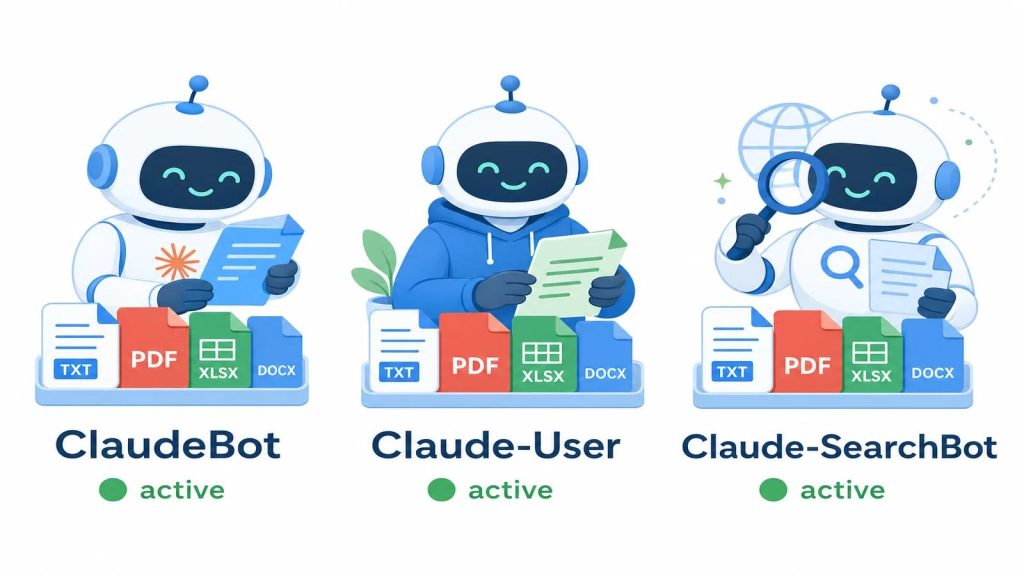
Anthropic separates website access into training collection, user-requested fetching, and search improvement. ClaudeBot, Claude-User, and Claude-SearchBot have separate purposes, so one token does not represent every Anthropic request. Their names help a site owner connect a request with the type of access involved.
Claude-User fetches a website in response to a user-initiated request. Claude-SearchBot crawls to improve search results. Anthropic’s crawler documentation changes describe these distinct roles and the effects of blocking each agent.
| User agent | Purpose | Type of access |
|---|---|---|
| ClaudeBot | Gathers public content that could contribute to model training | Automated collection |
| Claude-User | Fetches a website after a user-initiated request | On-demand retrieval |
| Claude-SearchBot | Crawls to improve search results | Search indexing |
These differences matter because a site may welcome one kind of request and limit another. A search crawler and a user-requested fetcher serve different functions, even when both request the same page. The table gives me a quick way to match an agent’s name with its access type before considering a site rule.
One token does not stand in for all of Anthropic’s web access. A rule that names ClaudeBot addresses that crawler, rather than silently controlling the other two agents. The user’s request and the search process remain distinct routes to site content.
When reviewing an unfamiliar request, I first identify the precise token shown in the log. The name is a practical clue about the agent’s purpose, while the request’s network details help assess its origin. Identify the token before changing a rule, because each agent controls a different kind of access.
What Does a ClaudeBot Request Look Like in Server Logs?
A ClaudeBot request identifies itself with the ClaudeBot token in its user-agent string. The full string can help distinguish it from other user agents, but the token alone does not authenticate the request or prove its source.
ClaudeBot’s User-Agent String
The ClaudeBot user-agent string shown for server logs is Mozilla/5.0 AppleWebKit/537.36 (KHTML, like Gecko; compatible; ClaudeBot/1.0; [email protected]). The Claude-User and Claude-SearchBot strings use their own tokens. A log may show different string forms, so a list of user agents for 2025 is a reference, not a way to confirm identity.
Most server logs record the user-agent text alongside the requested page and other request details. The complete text is more useful than a search for one name, since it can show whether the claimed agent token appears in a longer string. Even then, a user agent remains a label supplied by the requester.
Checks for a Genuine Request
I would compare the label with other signs before treating traffic as genuine. These checks help separate a claimed bot from an unrelated request that uses similar text.
- Inspect the complete user-agent string, including the agent token and surrounding text.
- Compare the request IP with Anthropic’s published ranges.
- Review requested paths and timing against your site’s logs.
Patterns can add context. For example, a burst of requests to several pages looks different from one visit to a single page. The log’s paths and timing do not prove identity on their own, but they can help you decide which entries need closer review.
A user-agent list can change as software changes, and a log may retain older or varied forms. I avoid treating one copied string as a permanent fingerprint. A match in text is only one part of checking a request’s source network.
Server logs are useful because they pair the claimed label with details about the request. They do not turn that label into proof. Confirm the source network as well as the text label before treating a log entry as an Anthropic request.
What Changes When You Disable Anthropic’s Other Bots?
Disabling Claude-User or Claude-SearchBot can affect user-facing discovery, while disabling ClaudeBot signals a training preference. ClaudeBot controls training collection, not the other two access paths. A site owner should match each rule to the kind of access they want to limit.
Blocking Claude-User prevents Anthropic from retrieving site content in response to a user query. That choice may reduce the site’s visibility in user-directed web search. A person using an assistant may then have less access to the site’s pages when asking about a topic.
| Agent | What disabling prevents | Possible visibility effect |
|---|---|---|
| ClaudeBot | Future training collection | Future materials excluded under the stated preference |
| Claude-User | Retrieval for a user query | Visibility in user-directed web search may fall |
| Claude-SearchBot | Search optimization indexing | Visibility and accuracy in user search results may fall |
Blocking Claude-SearchBot prevents Anthropic from indexing site content for search optimization. Site visibility and accuracy in user search results may fall as a result. That effect differs from blocking a fetch made in response to an individual user’s request.
These outcomes are possible effects, not a promise that every blocked site will lose the same amount of traffic. A site’s content and how people find it shape the practical impact. I would consider which access path matters for the site before changing a rule.
Some owners may value search reach more than reduced crawler access. Others may prefer to limit one route while leaving the other routes open. The agents are separate, so rules can reflect those separate choices rather than treating them as one switch.
ClaudeBot’s role is limited to training collection; disabling it does not itself stop search indexing or user-directed fetching. Choose rules by the access path you want to allow, rather than treating all three bots as interchangeable.
How to Block ClaudeBot in Robots.txt?

To block ClaudeBot across an entire website, add a dedicated ClaudeBot user-agent group to the site’s top-level robots.txt file. Set Disallow: / to tell the crawler not to access any paths on that host.
Robots.txt is a plain-text file that provides crawling instructions to automated bots. It is not a security feature, however. The rules rely on crawlers choosing to follow them, so they cannot prevent unauthorized access to private pages or files.
Block ClaudeBot Across a Website
Add the following two lines to your robots.txt file:
User-agent: ClaudeBot
Disallow: /
The User-agent directive identifies the crawler the rule applies to, while Disallow: / tells it not to crawl any path on the host. This applies across the website rather than restricting access to selected directories or pages.
Keep in mind that this rule targets ClaudeBot specifically. It does not automatically block other Anthropic crawlers or bots, which may use separate user-agent names.
Allow Only Specific Sections (Partial Access)
If you don’t want to block ClaudeBot entirely, you can allow it to crawl specific sections of your website while restricting access to other paths.
For example, the following rules allow ClaudeBot to access the blog and documentation directories:
User-agent: ClaudeBot
Disallow: /
Allow: /blog/
Allow: /docs/
Here, Disallow: / blocks all paths by default, while the more specific Allow rules create exceptions for /blog/ and /docs/.
This approach gives you more control over which public sections ClaudeBot can crawl without opening the entire website to it. Remember that robots.txt is not an access-control mechanism, so it should not be used to protect sensitive content.
Apply Rules to the Right Paths and Subdomains
Place the rule in the top-level robots.txt file for the relevant host. A rule on one host does not automatically cover another subdomain. Each subdomain that should opt out needs its own robots.txt file with the intended group.
Path-specific rules should name only the paths the owner intends to limit. Avoid using a site-wide slash when the goal is to restrict just a few pages. The rule should match the scope of the choice.
- Open the robots.txt file for the correct host.
- Add the ClaudeBot group and intended disallow rule.
- Check the file separately on each subdomain in scope.
A common oversight is editing the main host’s file and assuming a shop or blog subdomain inherits it. It does not. Each host needs the instruction where its own crawler requests can read it.
After editing, check the text at the host’s robots.txt address and confirm that the rule names the intended agent. Check the robots.txt file on every subdomain you intend to cover, since a rule on one host does not automatically apply to another.
How Does the General AI-Training Preference Interact With Robots.txt?
If robots.txt names ClaudeBot, that direct rule takes precedence over a conflicting general training preference. Anthropic began recognizing a machine-readable training preference signal on October 30, 2026. A specifically named ClaudeBot rule controls when it conflicts with that general signal.
The general signal expresses a site owner’s preference about AI training. It is broader than a rule that names one crawler. When the two settings disagree, Anthropic follows the direct ClaudeBot instruction in robots.txt.
| Robots.txt condition | General preference | Rule Anthropic follows |
|---|---|---|
| ClaudeBot named and rules agree | Either preference | The named robots.txt rule |
| ClaudeBot named and rules conflict | General signal differs | The specific ClaudeBot robots.txt rule |
| ClaudeBot not named | General signal is present | The general signal |
The table shows why checking only one setting can give an incomplete picture. A general preference matters when robots.txt does not name ClaudeBot. A direct rule takes priority when the file does name it, even if the broader signal says something else.
If the two instructions agree, the direct rule still states the site’s choice for ClaudeBot. If they conflict, the crawler-specific instruction is the one Anthropic follows. This gives site owners a clear way to state a preference for that agent.
I would keep the settings aligned when possible, so the site’s general training preference and its ClaudeBot rule do not point in different directions. If the site’s needs change, update both settings rather than leaving an old conflict in place.
The October 30, 2026 start date marks when Anthropic began recognizing the general signal. Check the ClaudeBot group and the general signal together whenever the two settings appear to disagree.
Can IP Blocking Replace Robots.txt?
IP blocking is not a reliable substitute for a robots.txt opt-out because it may stop Anthropic’s bots from reading the file. An IP rule may not reliably or persistently express an opt-out when it blocks access to the site’s instructions.
Anthropic publishes crawler IP information at claude.com/crawling/bots.json. The published file held 14 IP prefixes on November 1, 2026. That dated count is a reference point, not a promise that the list will stay the same.
An IP address helps identify the network that sent a request, while the user-agent text names the software the request claims to use. Comparing both can help with log review. A fixed IP block, though, can prevent an Anthropic bot from reaching robots.txt and reading the owner’s stated preference.
That creates a practical problem: the block may cut off the very file meant to tell a crawler how to behave. It may also become stale as the published IP information changes. I use the published list to check a request’s network, not as a permanent replacement for a crawling rule.
These checks help keep the file useful and the log review current:
- Compare the request IP with the published file.
- Check the file’s update date before relying on it.
- Use robots.txt to express the crawling preference.
A list’s update date matters because a network range can change. A site owner who relies on old ranges may miss a genuine request or block a different one. The published file gives a place to compare the request, but it is not a static record.
For a durable preference, use the site access file instead of relying only on network blocks. Recheck the published IP list when investigating a request, because its contents can change.
How Can I Limit Crawling Without Blocking ClaudeBot?
A Crawl-delay rule can ask ClaudeBot to slow its visits without blocking it outright. Anthropic supports the non-standard Crawl-delay directive, including a one-second delay example. That lets a site limit request pace while keeping access open.
The setting is a way to ask for space between crawler requests. It is not the same as denying access to pages. A site owner who wants to slow traffic can use a delay rather than a full block.
Set a Crawl Delay
You can use the Crawl-delay directive to request a pause between crawler requests. For example:
User-agent: ClaudeBot
Crawl-delay: 1
The value
1represents a one-second delay between requests. However,Crawl-delayis not part of the official Robots Exclusion Protocol standard, and support varies between crawlers. Do not assume ClaudeBot will follow this instruction.
Crawl-delay is non-standard, so not every crawler supports it. Anthropic supports the directive. The value shown asks for a delay of one second between requests, rather than telling the crawler to stop visiting.
A delay can help when a site wants to manage request pace but still allow content access. It does not guarantee a fixed number of requests or change which pages the crawler may reach. The rule speaks to timing, not page permission.
Keep Standard Access Protections in Place
Anthropic honors standard robots.txt directives, including directives that limit crawling. A site can use those standard rules to restrict selected paths without making a full-site block.
Anthropic also respects anti-circumvention measures such as CAPTCHAs. Those protections can help keep access controls in place when a site asks visitors to complete a check. I would not remove them simply to make a crawler’s visit easier.
Slowing a crawler and denying access solve different problems. Crawl-delay asks for a slower pace; a disallow rule limits access to named paths. Pick the rule that fits the site’s goal, and keep protections that serve other site needs.
CAPTCHAs and other anti-circumvention tools remain part of a site’s access protections, not a setting to trade away for crawler convenience. Keep CAPTCHA and other anti-circumvention protections enabled rather than weakening them to accommodate a crawler.
What Does a ClaudeBot Block Mean for Future Training?
A ClaudeBot restriction signals that future site materials should be excluded from Anthropic’s AI model training datasets. The restriction concerns future materials; it does not state that content already collected has been erased.
This distinction matters for a site owner deciding what a rule can do. A block expresses a preference about material the crawler may collect in the future. It does not reach backward and make a claim about earlier visits or past collection.
Site content may include pages, images, or other public materials. Restricting the crawler signals that future materials from the site should not enter Anthropic’s training datasets. That is the scope of the preference described by the restriction.
I would avoid reading a new rule as a promise to remove material gathered before the rule took effect. The signal addresses future access and future materials. It does not say that prior content has been deleted from existing data or training sets.
Keeping a rule in place gives the crawler a continuing instruction about the site’s preference. If the owner later changes that preference, the instruction can be revised. The important point is to understand what the rule addresses before setting it.
A restriction is a forward-looking choice, not a way to undo an earlier request. Keep the robots.txt rule in place if your preference is to exclude future materials from training.
Conclusion
ClaudeBot is Anthropic’s training crawler, and its access can be controlled separately from user-directed fetching and search indexing. I would choose a direct robots.txt rule when the goal is to exclude future materials, or a crawl delay when slower access is acceptable.
The choice should match the site’s training preference, not a guess based only on a log label. Check your site’s robots.txt file and make sure its ClaudeBot rule reflects your preference for future training use.
You May Also Like
 AI Technology
What is a GAN? – Generative Adversarial Networks
 SaaS
What Is No-Code Automation? How It Works, Benefits, and Risks
 Web Scraping
TinyFish.ai Review: Is It the Best AI Agent for Web Scraping
 AI Technology
ChatGPT API Alternatives: 13 AI APIs and Platforms for Developers
 Web Development
Building Apps with Lovable and Supabase: A Step-by-Step Guide
 AI Tools
10 Best PDF Extraction APIs for Text, Tables, OCR, and Structured Data
 Web Scraping
What Is AI Web Scraping? A Complete Guide to AI-Powered Data Extraction
 Web Scraping
Scrapy in Python: A Practical Guide to Web Scraping
 AI Tools
