


What is an AWS S3 bucket object? It’s a file or piece of data stored in Amazon Web Services’ Simple Storage Service (S3), a cloud storage solution. Think of it as anything you can upload—like photos, videos, or documents—kept in a special container called a bucket. Why does this matter? S3 bucket objects help people and businesses store data securely, access it anytime, and scale up as needed without spending a fortune. In this article, we’ll explain everything about S3 bucket objects.
What Exactly Is an AWS S3 Bucket Object and How Does It Work?
An AWS S3 bucket object is any data stored in an S3 bucket, which is a container in Amazon’s cloud storage service. Each object has three parts: the data (like a photo or text file), a key (its unique name), and metadata (extra info about it, like size or date).
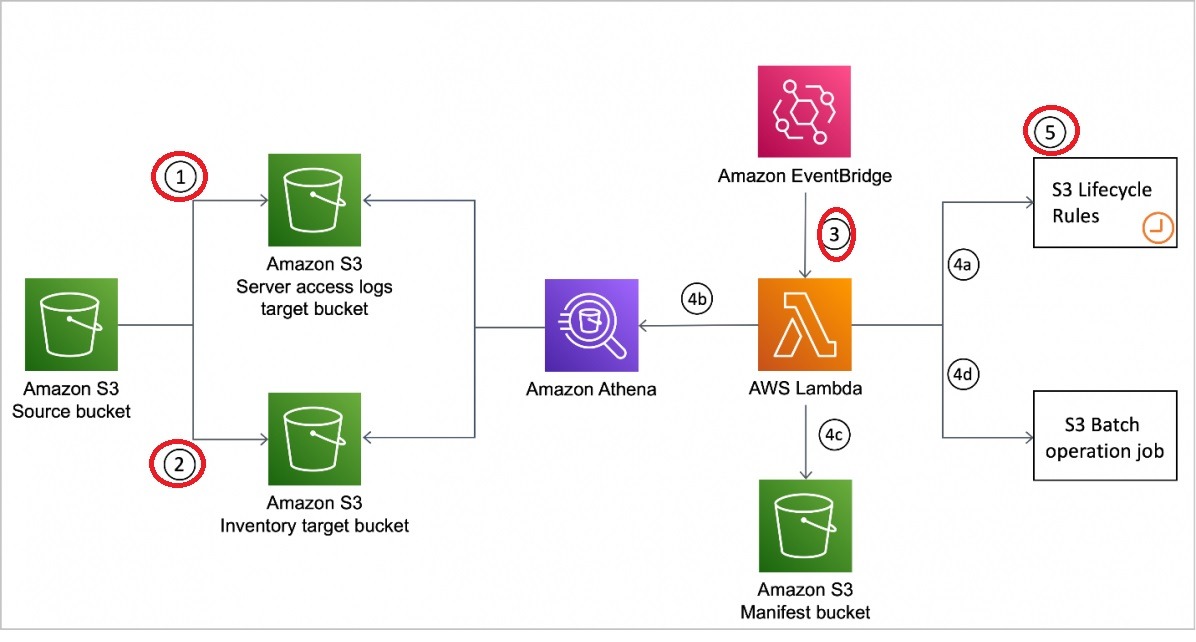
S3 buckets act like big storage boxes in the cloud. You put objects inside them, and each bucket has a unique name across all of AWS. For example, if you upload a video called “family_vacation.mp4” to a bucket named “my-memories,” the key becomes “family_vacation.mp4,” and metadata might show it’s 50 MB and was uploaded on October 1, 2023.
Objects can be almost anything—images, PDFs, backups, or even software files. AWS S3 stores them securely and lets you access them from anywhere with internet. According to Amazon, S3 handles billions of objects daily, proving its reliability for users worldwide.
What Are the Key Features That Make AWS S3 Bucket Objects Useful?
S3 bucket objects come with features that make them powerful for storing data. Here are the main ones:
- Storage Classes: S3 offers options like Standard (for frequent use), Intelligent-Tiering (auto-adjusts based on access), and Glacier (cheap for rare access). This saves money and matches your needs.
- Versioning: This keeps old versions of objects. If you accidentally delete a file, you can get it back. Each version gets a unique ID.
- Encryption: S3 encrypts objects to keep them safe. You can use AWS keys or your own, ensuring no one reads your data without permission.
- Access Control: You decide who sees or edits your objects using policies, lists, or user roles. This protects your stuff.
These features help with everything from quick access to long-term storage. Research from AWS shows 99.999999999% durability, meaning your data stays safe almost forever.
Table: S3 Storage Classes
| Storage Class | Best For | Cost | Access Speed |
|---|---|---|---|
| Standard | Frequent use | Higher | Fast |
| Intelligent-Tiering | Changing access | Medium | Varies |
| Glacier | Rarely used data | Low | Slow |
How Can You Use AWS S3 Bucket Objects in Everyday Tasks?
You can use S3 bucket objects by uploading, downloading, or managing them. Here’s how:
- Uploading: Add files via the AWS website, command line (CLI), or code (SDKs). On the website, pick your bucket, hit “Upload,” and choose files.
- Downloading: Get files from the website by clicking “Download,” or use CLI commands like
aws s3 cp s3://my-bucket/file.txt localfile.txt. - Managing: Delete, move, or copy objects. Set permissions or turn on versioning to keep old copies.
For example, a student might upload a project to S3, share it with a teacher using a temporary link, and delete it later. AWS reports millions use these tools daily for tasks like these.
Instruction List: Uploading a File
- Log into the AWS Management Console.
- Find your S3 bucket.
- Click “Upload.”
- Select your file (e.g., “homework.pdf”).
- Hit “Upload” to finish.
What Are the Top Benefits of Using AWS S3 Bucket Objects for Storage?
S3 bucket objects offer 4 key benefits:
- Scalability: Store as much as you want—S3 grows with you. No need to buy more space.
- Durability: AWS promises 99.999999999% durability. Your files are safe across multiple locations.
- Cost-Effectiveness: Pay only for what you use. Options like Glacier cut costs for old data.
- Integration: Works with AWS tools like Lambda (automation) or CloudFront (fast delivery).
Studies by Amazon show businesses save up to 30% on storage costs using S3 compared to traditional methods. It’s perfect for small startups or big companies.
What Are Some Real-World Use Cases for AWS S3 Bucket Objects?
S3 bucket objects shine in these 4 scenarios:
- Static Website Hosting: Upload website files (HTML, CSS) to a bucket and make it a site. Great for simple pages.
- Data Backup and Archiving: Save important files or old records. Glacier keeps costs low.
- Big Data Analytics: Store huge datasets for tools like Amazon Athena to analyze.
- Content Distribution: Share videos or apps fast with CloudFront.
For instance, Netflix uses S3 to store and stream movies, handling millions of users daily, per AWS case studies.
Unordered List: Example Uses
- Backing up school projects
- Hosting a blog
- Storing research data
- Sharing family photos
What Are the Best Practices for Managing AWS S3 Bucket Objects Effectively?
Follow these 4 best practices to manage S3 bucket objects:
- Naming Conventions: Use clear names like “2023_report.pdf” for easy finding.
- Organizing Objects: Add prefixes like “photos/” or “docs/” to sort files.
- Lifecycle Policies: Set rules to move old files to Glacier or delete them after 1 year.
- Monitoring: Track usage with logs or CloudWatch to avoid surprises.
AWS data shows organized buckets reduce retrieval time by 20%, making life easier.
What Are Common Challenges with AWS S3 Bucket Objects and Their Solutions?
You might face 3 challenges with S3 bucket objects:
- Large Files: Big uploads (over 5 GB) need multipart uploads. This splits files into chunks.
- Access Permissions: Too many users can confuse access. Use strict policies and check them often.
- Cost Management: Bills can grow. Watch usage with Cost Explorer and set alerts.
For example, splitting a 10 GB video into parts ensures it uploads smoothly, per AWS guidelines.
Table: Challenges and Fixes
| Challenge | Solution |
|---|---|
| Large Files | Use multipart uploads |
| Access Issues | Set clear policies |
| Rising Costs | Monitor with alerts |
Frequently Asked Questions About AWS S3 Bucket Objects
Here are answers to common questions:
- Can I store any file type in an S3 bucket?
- Yes. S3 accepts all files, like videos or docs, if they follow AWS rules.
- Is there a size limit for an object?
- No. Objects can be up to 5 terabytes, using multipart uploads for big ones.
- Can I make objects public?
- Yes. You can, but set permissions carefully to keep data safe.
- Will I lose my data in S3?
- No. S3’s 99.999999999% durability means loss is rare.
- Can I move objects between buckets?
- Yes. Copy them with the console or CLI, then delete the original.
Conclusion: Why AWS S3 Bucket Objects Are a Smart Choice for Storage
AWS S3 bucket objects are files stored in Amazon’s cloud, offering a simple, secure way to manage data. With features like storage classes, versioning, and encryption, they fit many needs—hosting websites, backing up files, or analyzing data. Benefits include scalability, durability, and low costs, backed by AWS’s promise of 99.999999999% reliability. By using best practices like clear naming and lifecycle rules, you can keep everything organized and affordable. Challenges like large files or permissions have easy fixes with AWS tools. Whether you’re a student or a business owner, S3 bucket objects make cloud storage accessible and powerful.
You May Also Like
 Cloud Computing
8 Best AWS S3 Alternatives Compared: Pricing, Egress, and S3 Compatibility
 Cloud Computing
What Is Cloud Cost Optimization? Strategy & Best Practices
 Web Development
Supabase Auth Guide: Authentication, OAuth, OTP, MFA, SSO, Sessions, and Pricing
 Web Development
15 Best CyberPanel Alternatives in 2026: Free and Paid
 Web Development
Heroku vs. Netlify (2026): Pricing, Features, and Best Uses
 Cloud Computing
What Is Hybrid Cloud Computing? A Complete Guide
 Cloud Computing
11 Best Cloud Migration Service Providers in 2026
 Cloud Computing
Cloudflare Outage That Broke X, ChatGPT, and Major Online Media
 E-Commerce