


Zero Trust Network Access (ZTNA) is a security service that gives users access to specific private applications only after verifying their identity, device, and context. Unlike a traditional VPN, it does not place users on the wider network. ZTNA follows the zero trust model, which holds that a device’s location alone should not grant trust.
Most work no longer happens inside one office. Employees sign in from home, from hotel Wi-Fi, and from personal laptops. Business tools run in public clouds, while some older systems still sit in private data centers. The traditional approach assumed that anyone inside the corporate network was safe. That assumption becomes harder to defend when users and applications are spread across many locations. ZTNA checks each access request as it arrives, rather than trusting a connection because it started inside the network.
This guide explains how ZTNA works, how it differs from a VPN and from software-defined perimeter (SDP), and which signals drive its decisions. It also covers use cases, limits, pilot metrics, and a rollout plan. Where a detail depends on a specific product, this article says so, because vendors describe their features in different ways.
What Is ZTNA and Which Terms Should You Know?
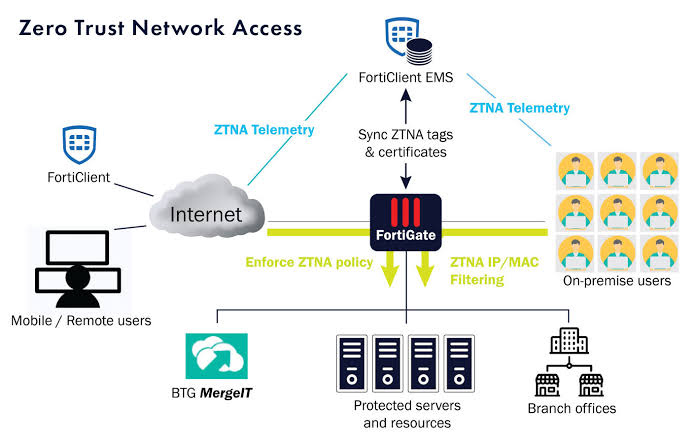
ZTNA is a access model that connects a verified user to one application, not to an entire network. Several terms appear often in ZTNA discussions, and knowing them makes vendor material easier to read:
- Identity provider (IdP): The system that confirms who the user is, such as a directory service or cloud sign-in platform.
- Single sign-on (SSO): A method that lets a user sign in once and access several approved apps.
- Multi-factor authentication (MFA): A second check, such as a code or hardware key, that confirms the user’s identity.
- Device posture: The health status of a device, including whether its software is current and its disk is encrypted.
- Connector and broker: Components that link a private application to the users who are allowed to reach it.
The NIST zero trust framework, described in Special Publication 800-207, Zero Trust Architecture, supplies the broader principles behind these terms. It treats every resource as something to protect and asks the system to make access decisions for each session.
How Does ZTNA Work Step by Step?
ZTNA checks identity, device posture, and policy before it opens a connection to a single application. Each stage can stop the request, so a failure at any point blocks access. Products differ in design, but most follow a similar sequence:
- Sign-in: The user authenticates through the identity provider, often with SSO and MFA.
- Device check: The system reviews whether the device meets the organization’s baseline, such as current updates or managed status.
- Policy decision: The policy engine compares the user, the device, the requested app, and the current context.
- Brokered connection: If the request passes, the service connects the user only to that app.
- Session monitoring: The system watches the session and can ask for a new check or end access if conditions change.
Connectors and Brokers in Practice
Most ZTNA designs place a connector near the private application and a broker in the cloud. The connector sits inside the network, often in a data center or a cloud virtual network, and it creates an outbound connection to the broker. Because the connection starts from inside, the application does not need to be published directly to the internet. The broker matches each verified request with the correct connector and forwards only approved traffic.
This design can lower exposure, but it does not remove the need for care. Connectors, brokers, and identity systems all require updates, monitoring, and secure configuration.
Agent-Based and Clientless Access
Some ZTNA products install a small agent on the device, while others offer clientless access through a web browser. An agent can collect posture data and manage connections for desktop and mobile apps. Clientless access works well for web applications, because users need only a browser. Legacy client-server software often requires an agent or a specialized connector. The right choice depends on the application type, the device types in use, and the level of control the team needs.
How Is ZTNA Different From a Traditional VPN?
A traditional VPN usually provides network-level access, while ZTNA provides application-level access. This difference determines how much damage a stolen password or infected laptop can cause. A connected VPN user may reach many servers, subnets, and file shares. A ZTNA user typically reaches only the approved application.
Consider a contractor who needs one project tracking tool. Under a VPN model, the contractor’s session may reach a wider range of internal systems, depending on network design and firewall rules. Under a ZTNA model, the same contractor reaches only the project tool. If the contractor’s account is compromised, the attacker’s options are narrower.
The table below summarizes the main differences.
| Area | Traditional VPN | Zero Trust Network Access (ZTNA) |
|---|---|---|
| Access scope | Network-level, often broad | Application-level, usually narrow |
| Trust model | Trust is often set at sign-in | Requests and sessions are checked as they occur |
| Inbound exposure | Often requires inbound network access | Commonly uses outbound connectors |
| Visibility | Often focused on network sessions | Can show which user reached which application |
| Typical fit | Legacy setups and specialized network tasks | Hybrid, cloud, and remote application access |
Does ZTNA Replace a VPN?
ZTNA can replace a VPN for many remote access needs, but the answer depends on the applications involved. Some older applications rely on broad network protocols and may need extra planning before they work through a broker. Many teams move high-value applications to ZTNA first and reduce broad VPN access over time.
What Is Software-Defined Perimeter (SDP) and How Does It Relate to ZTNA?
Software-defined perimeter (SDP) is a related model that hides network resources behind an authentication gateway until a user is verified. In an SDP design, the system does not reveal an application’s address to an unverified device. This approach shares the core idea of ZTNA, which is that access should depend on verification rather than network location.
People often use the two terms interchangeably, but they are not identical. SDP describes a specific architecture, while ZTNA describes a category of services that different vendors build in different ways. Some ZTNA products use SDP-style concepts, while others use other designs. When a vendor claims SDP support, buyers should ask how the product hides resources, how it authenticates devices, and what happens to traffic after the connection is approved.
Which Signals Does ZTNA Use to Make Access Decisions?
ZTNA policies combine several signals, and the most useful ones are identity, device health, location, time, and the sensitivity of the application. Each signal adds context. A user who signs in from a managed laptop during business hours may get access to a routine tool. The same user on an unmanaged device at an unusual hour may need to complete extra verification, or may be denied access to a sensitive finance system.
Teams often build policies around a short list of signals:
- Identity strength: Whether the user passed MFA and whether the account has elevated privileges.
- Device status: Whether the device is managed, patched, encrypted, and free of known risky conditions.
- Application sensitivity: Whether the app holds customer records, payment data, or internal source code.
- Behavior and timing: Whether the request matches normal patterns, such as usual hours or known locations.
Signals are only as reliable as the systems that produce them. An identity provider with stale accounts or an outdated device inventory will weaken every decision that depends on those signals.
How Do ZTNA Logs Support Incident Response?
ZTNA logs record who accessed which application, from which device, and when, which helps security teams investigate incidents quickly. Logs are most useful when they flow into a security information and event management (SIEM) system or another central monitoring tool. This connection lets analysts compare ZTNA events with identity alerts, endpoint warnings, and network data.
Incident response also depends on speed. Administrators should know how to revoke a user’s access to specific apps without waiting for a broad network change. Teams should test this process before an incident happens. A short drill, where the team disables one test account and confirms that access ends, can reveal gaps in account ownership, escalation paths, and log retention.
What Are the Main Use Cases for ZTNA?
ZTNA fits best when organizations need secure access to private applications for remote, mobile, or outside users. Several common situations match this model:
- Remote employees: Staff can reach internal tools from home without joining the full corporate network.
- Contractors and vendors: Outside partners can access only the project system or support portal they need, and access can end when the contract ends.
- Hybrid environments: Applications can run in a data center, a public cloud, or both, while users connect through one access method.
- Unmanaged or personal devices: Device checks can confirm baseline requirements before a user reaches business apps, which can reduce the risk of personal devices.
- Regulated data: Organizations that handle health or financial records can restrict access to the specific systems that hold that data, which can support compliance efforts. Compliance itself still depends on the full control set.
What Are the Benefits and Limits of ZTNA?
ZTNA narrows access and improves visibility, but it does not solve every security problem on its own. Its value is clearest when a team knows exactly what it protects and what it leaves to other controls.
The main benefit is a smaller blast radius. If one account is compromised, the attacker can reach fewer systems. Logs can also be more detailed, because each event links a user, a device, and an application. Many teams report a smoother remote experience, since traffic goes directly to the application rather than through a broad tunnel. Performance results vary by provider, user location, and configuration, so they should be measured locally.
The limits matter just as much. ZTNA depends on a strong identity system, so weak passwords or missing MFA weaken the entire design. Policies can also undermine the model. Broad rules bring back the access problem that ZTNA was meant to solve. ZTNA controls who reaches an application, but it does not automatically stop a user from copying sensitive data after access is granted. Data protection controls, such as those described in Data Loss Prevention Best Practices, usually work alongside ZTNA.
What Mistakes Should You Avoid When Adopting ZTNA?
The most common mistake is writing access policies that are too broad. A rule that grants every employee access to every private application recreates the VPN problem under a new name. Group users by job role, then assign access one application at a time.
A second mistake is leaving application ownership unclear. Each private app should have a named owner who approves access requests, reviews exceptions, and confirms when a policy should change. Without ownership, temporary exceptions often become permanent.
A third mistake is treating identity as a finishing step. Organizations should confirm that SSO and MFA work for each app before rollout, and that privileged accounts follow stricter controls. The guidance in Privileged Access Management Solutions covers these practices in more depth.
A fourth mistake is ignoring the human side of credential theft. Attackers often try to steal login details, which can help them pass identity checks. Staff training on recognizing suspicious messages, such as the guidance in What Is Phishing and How to Avoid Phishing Emails, supports every access decision that ZTNA makes.
How Should You Measure a ZTNA Pilot?
A ZTNA pilot should measure user experience, policy accuracy, and log quality before the rollout expands. Choose a few measures before the pilot starts, so the results are not interpreted after the fact. Useful measures include:
- Connection success rate: The share of legitimate access attempts that succeed on the first try.
- Time to connect: How long users wait from sign-in to application access, compared with their current method.
- Support tickets: The number and type of help desk requests linked to access problems.
- Policy exceptions: How many exceptions exist, who approved them, and when they expire.
- Log coverage: Whether every application access event reaches the monitoring system with the fields that investigators need.
Pilots work best with real users and real workflows. A test account that opens a few web pages will not reveal how the product behaves during a busy workday.
How Do You Plan a ZTNA Rollout?
A practical ZTNA rollout starts with an application inventory and moves through a pilot to a gradual expansion. The following sequence keeps the work manageable:
- Inventory private applications. Record each app, where it runs, who uses it, and what data it holds.
- Confirm identity controls. Verify that SSO and MFA are working for the users who will reach these apps.
- Group users by role. Build access groups that match real job functions.
- Write narrow policies. Allow access to specific apps, and document every exception with an owner and a review date.
- Run a pilot. Test one team and one or two applications, then review the metrics described above.
- Expand and retire old access. Move more apps over time, and reduce broad VPN access once the new model is stable.
Timelines vary widely. A small pilot may take a few weeks, while a larger rollout across many applications and regions can take several months. Inventory and identity cleanup usually take the most effort. Organizations that also need stronger network protections can use a Small Business Network Security Checklist to find gaps that ZTNA does not address.
Where Does ZTNA Fit in SSE, SASE, and Zero Trust Programs?
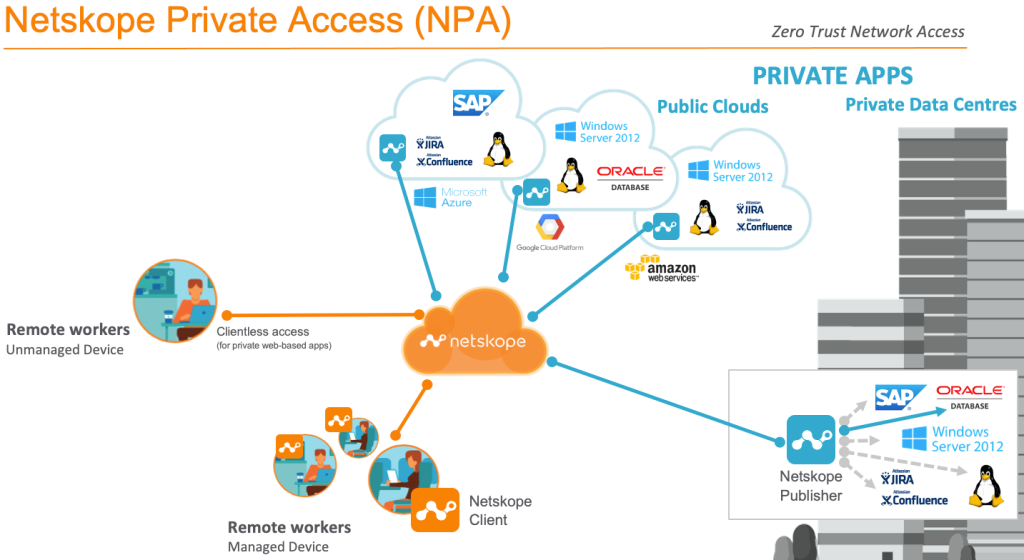
ZTNA is one component within larger frameworks, including Security Service Edge (SSE), Secure Access Service Edge (SASE), and an organization’s overall zero trust program. SSE groups cloud-delivered security services, such as secure web gateways, cloud access security brokers, and ZTNA. SASE adds networking functions, such as software-defined wide area networking (SD-WAN), to those security services. In many vendor bundles, ZTNA handles private application access, while other components inspect web traffic and control cloud app use.
Organizations do not need a full bundle to benefit from ZTNA. They can start with private application access and add other controls later. The broader model is explained in Zero Trust Security, and a vendor example that covers SSE and SASE together appears in What Is Netskope?.
The U.S. Cybersecurity and Infrastructure Security Agency (CISA) publishes a Zero Trust Maturity Model that organizes zero trust work into five pillars: identity, devices, networks, applications and workloads, and data. Using it as a checklist shows where ZTNA contributes and where other investments, such as device management or data classification, are still needed.
How Should You Compare ZTNA Vendors?
A fair ZTNA comparison relies on testing with your own applications, rather than on vendor marketing alone. Many vendors offer ZTNA, including Zscaler, Palo Alto Networks, Cloudflare, Microsoft, and Cisco. Each uses a different architecture, pricing model, and integration approach, so buyers should compare them against the same list of requirements.
Architecture questions come first. Does the product support older private applications or only web apps? Does it use agents, clientless access, or both? How does it handle users in different regions?
Operational questions come next. Which identity providers and MFA tools does it integrate with? What logs can it send to a SIEM? How easy is it to write, test, and review policies? What does vendor support look like during setup and after a security incident?
Commercial questions matter too. Pricing often depends on user counts, traffic volume, and included features, so buyers should request a quote based on their real environment.
Frequently Asked Questions
What is Zero Trust Network Access in simple terms?
Zero Trust Network Access gives a user access to one application after checking identity, device, and context. It does not place the user on the full internal network. The NIST zero trust framework describes the broader principles behind this approach.
Is ZTNA more secure than a VPN?
Yes, in many common scenarios, but the result depends on configuration. ZTNA usually limits access to specific applications and checks each session, which can reduce the damage from a compromised account. Weak identity controls or broad policies can still expose data, so the design matters as much as the technology.
Does ZTNA require agent software?
No, not always. Some ZTNA products use an agent on the device to collect posture data and manage connections. Others offer clientless browser access for web applications. Teams should confirm which option each application needs during testing.
Does ZTNA only apply to remote workers?
No, ZTNA can also apply to users inside the office. Organizations often use it for remote staff, contractors, and on-site users alike. The same policies can apply across locations, which keeps access rules consistent.
Can ZTNA work with legacy applications?
Often, yes, but legacy applications may need extra configuration. Older apps that depend on broad network protocols or unusual ports can be harder to support through a broker. A short pilot shows whether a specific application works well.
Does ZTNA handle split tunneling?
ZTNA usually avoids the broad tunnel that split tunneling creates, but product designs vary. Split tunneling sends some traffic through a VPN tunnel while other traffic goes directly to the internet. With ZTNA, the policy design determines which application traffic is brokered and how it is inspected.
Is ZTNA the same as SASE?
No, ZTNA is one service that can be part of a SASE offering. SASE combines security and networking functions, while ZTNA focuses on private application access. Some organizations buy ZTNA as a standalone service.
Conclusion
Zero Trust Network Access gives users access to specific applications after verifying identity, device, and context. It differs from a traditional VPN because it limits access to approved applications rather than the wider network. Its principles, including least privilege, continuous verification, and reduced exposure, align with the NIST zero trust model.
A successful ZTNA project depends on planning. Organizations should inventory their applications, name an owner for each one, strengthen identity controls, write narrow policies, and measure a pilot before expanding. ZTNA works best alongside data protection, phishing awareness, and monitoring. Used this way, it can reduce unnecessary access while keeping remote work practical.
You May Also Like
 Web Development
What Is API Rate Limiting? (A Practical, Simple Guide for Safer, Faster APIs)
 Web Development
REST API vs SOAP API: Differences, Pros & Cons, and Use Cases
 Cybersecurity
What Is Netskope? Cloud Security, SASE, and Zero Trust Explained
 Cybersecurity
Is Fanatical Legit and Safe? My Honest Take on Buying Game Keys
 Data Security & Privacy
Is Gameflip Legit and Safe for Gift Cards? What Buyers Should Know
 Data Security & Privacy
Is Eldorado.gg Legit and Safe in 2026? My Investigation and What Buyers Should Know
 Web Development
Supabase vs Firebase: Which Backend Platform is Right for Your Project?
 VPN & Proxy
Why Does Google Say Our Systems Have Detected Unusual Traffic From Your Computer Network?
 Cybersecurity