

Netskope is a cloud security and networking company that helps organizations control how people reach websites, cloud apps, generative AI tools, and private business applications. It was founded in 2012 and is based in Santa Clara, California. Its main product, the Netskope One platform, delivers security and networking services from the cloud instead of depending only on an office network.
Most company data no longer sits in one building. Employees check email from home, open files from a café, and log in to tools like Microsoft 365, Google Workspace, and Salesforce from their phones. Traditional office firewalls were built for a different setup. They often cannot see inside cloud traffic, so they miss risks that happen outside the office. Netskope places its checks in the cloud, close to the user, so the same rules can follow the data wherever it goes.
This guide explains what Netskope does and how its platform is organized. It covers the main security services, the difference between Security Service Edge (SSE) and Secure Access Service Edge (SASE), and the company’s background and stock listing. It also explains how to read analyst ratings and company claims, and what to check before you choose a vendor. Most product details come from Netskope’s own materials, so this article marks those claims clearly. Independent testing is still the best way to judge whether the product fits your needs.
What Netskope Does in Simple Terms
Netskope checks and controls the traffic between users and the internet, cloud services, and private applications. The company says its goal is to provide “optimized access and real-time, context-based security for people, devices, and data anywhere they go.” In practice, the platform looks at who is making a request, which device they use, which app they want, and what kind of data is involved. Then it decides whether to allow the action, block it, or limit it in some way.
The Problem Netskope Targets
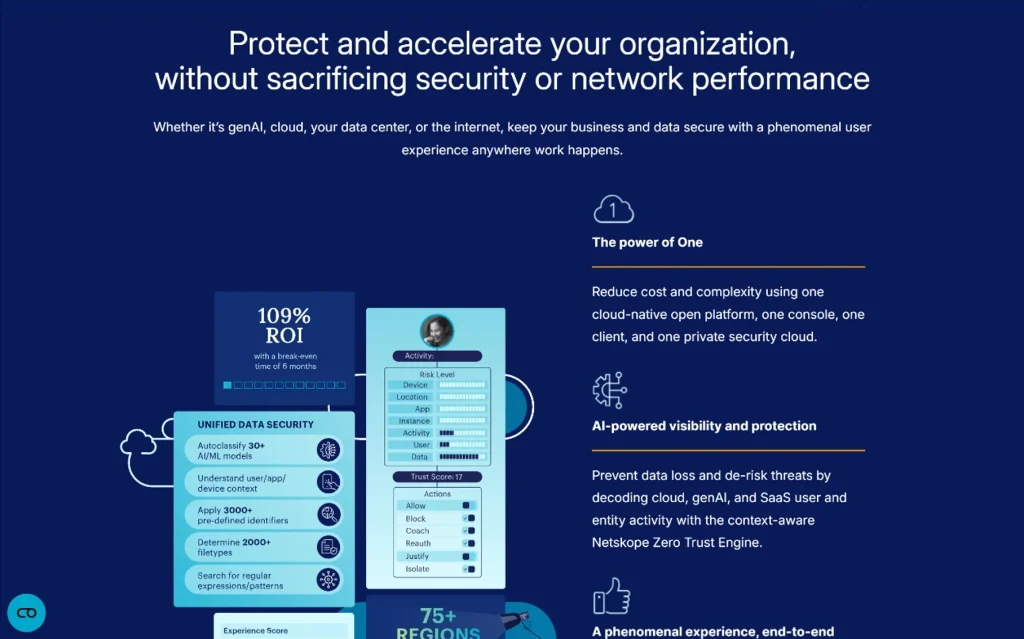
Many security problems start outside the network edge that older tools were designed to protect. Netskope’s security materials point to firewalls, on-premises web proxies, sandboxing systems, security information and event management (SIEM) software, and endpoint protection as tools built for an office-centered model. The company argues that these tools struggle with the way businesses work now, when so much traffic goes straight to cloud services.
Older tools still have value. Many organizations should keep them. The gap appears when an employee uploads a file to a personal storage account from a home laptop. Netskope focuses on closing that kind of gap with tools that can read and act on cloud traffic.
Who Typically Uses Netskope
Netskope is built for several groups inside an organization. Security teams use it to set data rules, investigate alerts, and review risky app use. Networking teams can use its networking features to route remote traffic more efficiently, so it does not always need to travel back through headquarters. Compliance teams may rely on its reporting tools when they need to show how sensitive information is handled.
Netskope says it serves thousands of customers, including more than 30% of the Fortune 100 companies. Large enterprises often have many users, many apps, and regulated data, so they tend to need this level of control. Smaller organizations can also evaluate the platform, but they should check package options, support levels, and total cost before they commit.
How the Netskope One Platform Fits Together
The Netskope One platform combines security and networking services in one cloud-based system that a single vendor manages. Many companies buy separate tools for web filtering, cloud app control, remote access, and firewalls. Each tool has its own console, policies, and logs. This setup makes it harder to see what is happening across the whole environment. Netskope aims to bring these functions together so that policies and reports stay consistent. The company calls Netskope One a “single-cloud platform.”
How a Request Moves Through the Platform
A typical request follows a clear sequence. The platform first identifies the user, the device, the app, and the type of data involved. It then checks the request against the organization’s policies. Based on that check, it can allow the request, block it, ask the user to confirm the action, or record it for review. Finally, it logs the event so administrators can see what happened.
Consider a finance employee who tries to upload a spreadsheet with customer account numbers to a personal file-sharing account. The platform can recognize the sensitive content and see that the destination is not approved. It can then block the upload. The same employee can still save files to the company’s approved storage service, because the policy targets the risky action and not the employee’s whole job.
The NewEdge Network and the Zero Trust Engine
Netskope names two supporting components. The first is its NewEdge network, which carries traffic while the security checks run. The second is its Zero Trust Engine, which the company describes as the part that makes access decisions based on context. Netskope says these components work together to reduce risk and give organizations visibility into cloud, SaaS, web, and private application use.
These are company descriptions, not independent test results. Real performance depends on user location, network design, traffic type, and configuration. Before relying on any speed or reliability claim, a team should test the platform in its own environment.
The Main Security Services Inside Netskope
Netskope’s core security services are secure web gateway, cloud access security broker, zero trust network access, data loss prevention, and firewall-as-a-service. These services cover different parts of the same problem. Netskope presents them as a set that works together under its Security Service Edge offering. The sections below explain each one in plain language.
Secure Web Gateway (SWG)
A secure web gateway inspects web traffic between users and websites. It can block known harmful sites, filter content by category, and stop malicious files that come through web pages. Most employees never notice it working. The security team, however, gets a record of visited sites and blocked requests, which helps during investigations.
Cloud Access Security Broker (CASB)
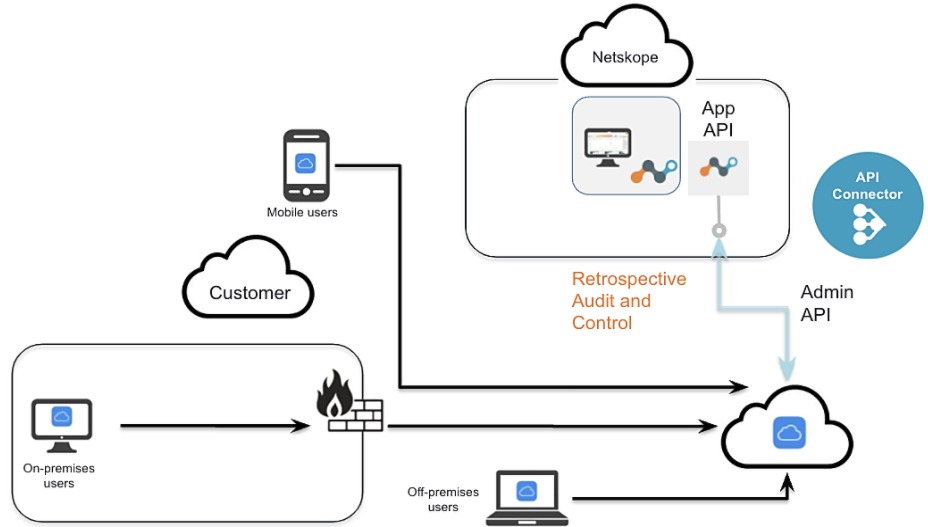
A cloud access security broker sits between users and cloud applications. It shows which apps are in use, including tools that employees adopt without approval. IT teams often call this shadow IT. A CASB can also check sharing settings. For example, it can flag a document that someone accidentally made public. It can then enforce rules for approved apps.
Zero Trust Network Access (ZTNA)
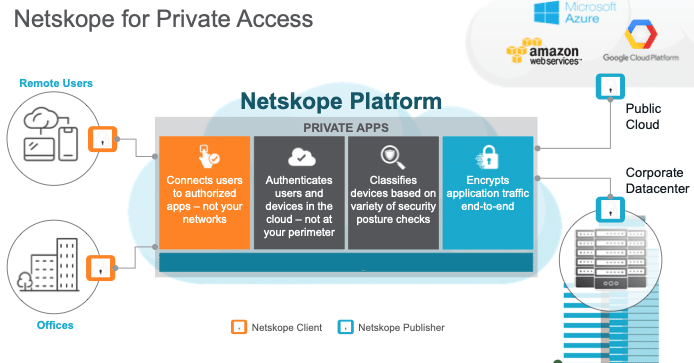
Zero trust network access gives a user access only to the specific private applications they need. It does not place them on the entire internal network. The main idea is that being inside the office or on the corporate network does not automatically mean a user is trusted. The U.S. National Institute of Standards and Technology explains this model in Special Publication 800-207, Zero Trust Architecture, which is a strong reference for the formal definition.
Netskope offers a free test drive of its Private Access product. This lets an organization try the approach before buying. For a broader introduction to the model, read the guide on Zero Trust Security.
Data Loss Prevention (DLP)
Data loss prevention looks for sensitive information, such as personal identifiers, financial records, source code, or internal documents. It then stops that information from leaving approved channels. A DLP policy might block an email attachment, prevent an upload, or warn a user before sharing a file. Policies often need tuning, because a rule that is too strict can block normal work. For more background, see Data Loss Prevention Best Practices.
Firewall-as-a-Service (FWaaS)
Firewall-as-a-service applies firewall rules from the cloud instead of from a physical device in each office. This makes it easier to apply the same rules to remote workers, branch offices, and mobile devices. The trade-off is that the organization depends on the provider’s network and management systems. Teams should review service terms and data handling practices before they sign a contract.
SSE and SASE: What Changes Between Them
SSE focuses on security services, while SASE adds networking services to those security services. Buyers often mix up these terms because vendors use them side by side. Netskope’s blog explains that SASE joins security and networking into one model, while SSE covers the security side only.
The table below shows the main differences.
| Area | Security Service Edge (SSE) | Secure Access Service Edge (SASE) |
|---|---|---|
| Main focus | Cloud security services | Security plus networking services |
| Typical services | SWG, CASB, ZTNA, DLP, FWaaS | SSE services plus software-defined wide area networking (SD-WAN) |
| Usual buyers | Security teams | Security and networking teams together |
| Main goal | Protect users, apps, and data | Protect data and manage network performance from one platform |
An organization that mainly needs better control over web use, cloud apps, and sensitive data may begin with SSE. An organization that also wants to manage branch networks and remote access from the same vendor may look at SASE. Many organizations add features in stages, starting with security and adding networking later.
Zero Trust and Government Guidance
Zero trust is a security approach that checks each access request instead of trusting users or devices by default. Netskope’s products are built around this idea. The U.S. Cybersecurity and Infrastructure Security Agency (CISA) also publishes a Zero Trust Maturity Model. This model describes five pillars: identity, devices, networks, applications and workloads, and data. It also helps organizations measure how far they have progressed.
A product is only one part of a zero trust plan. A company still needs strong identity controls, device checks, logging, and staff training. A government framework works well as a checklist. It can show where a product fits and where other tools are still needed.
How Netskope Handles Generative AI
Netskope offers controls for employees who use generative AI tools at work. Staff often paste meeting notes, code, customer details, or draft contracts into AI chat tools. Some of those tools are approved by the company, and many are not. Netskope’s security materials describe a practical approach. Safe use of an app such as ChatGPT can involve an application connector, real-time coaching for users, protection for uploaded content, and control over what the app can do.
Netskope has also introduced a product line called Netskope One AI Security. The company says it is designed to protect AI agents, AI applications, the data those tools use, and users across public SaaS, enterprise, and privately hosted AI environments. Coverage can differ by app and by configuration, so teams should confirm support for the exact tools their staff use.
Who Founded Netskope and Where It Is Based
Netskope was founded in 2012 and is headquartered in Santa Clara, California. The founding team is described differently across sources, so it helps to be precise. Wikipedia names Sanjay Beri and Krishna Narayanaswamy as founders. An investor profile from Lightspeed Venture Partners lists four co-founders: Beri, Narayanaswamy, Ravi Ithal, and Lebin Cheng. The investor profile says Beri serves as co-founder and chief executive officer, and Narayanaswamy as co-founder and chief technology officer. Ithal’s professional profile describes him as a founder and chief architect who helped build the company’s early cloud security technology.
These differences matter for research. If you cite the founding team, check the company’s own leadership page and its SEC filings, since they are the most direct sources for current roles.
The 2025 IPO and What the Filings Show
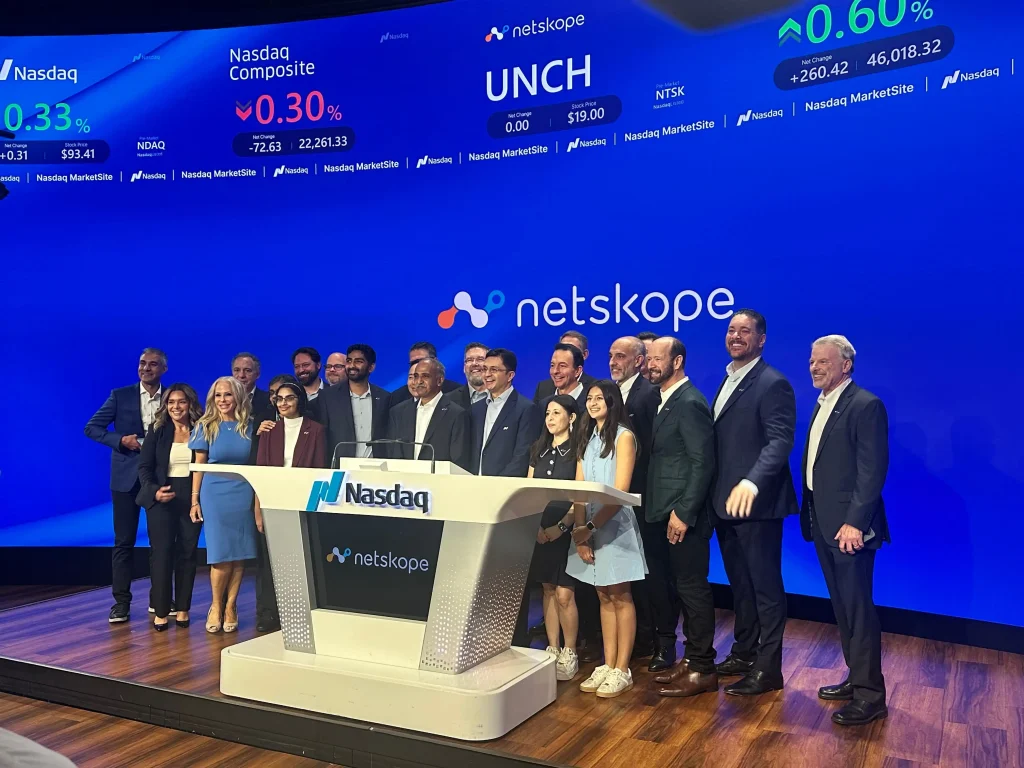
Netskope became a public company in September 2025, when it listed on the Nasdaq Global Select Market under the ticker NTSK. The company priced its initial public offering at $19.00 per share on September 17, 2025. The offering included 47,800,000 Class A common shares, all sold by the company. Shares started trading on September 18, 2025. Reuters reported that the offering raised about $908 million.
A public company must share financial results and risk factors with the public. Netskope’s annual report for the fiscal year ended January 31, 2026, is available in the U.S. Securities and Exchange Commission filing. That document is the best place to check revenue, costs, customer numbers, and risk disclosures. Secondary summaries may round figures or update them later, so verify any number against the filing before you publish it. Stock prices change daily, so use a live market source for current prices.
A stock listing says little about whether a product fits your business. It shows that investors have bought into the company’s future. It does not show how well the software will protect your data.
What Analyst Ratings Mean for Buyers
Netskope reports that Gartner has named it a Leader in the Magic Quadrant for Security Service Edge for five years in a row. Gartner is a research firm that evaluates technology vendors. Its Magic Quadrant reports compare vendors on factors such as the strength of their products and their ability to execute. Netskope says it received the SSE recognition in 2026. The company also reports that it is a Leader in the Gartner Magic Quadrant for SASE Platforms in 2026.
These ratings are useful, but they have limits. A report reflects one evaluation period and a set of criteria that may not match your needs. A vendor that ranks highly for global reach may not suit a company with a small team and one office. Read the full report when you can, and compare it with Gartner Peer Insights reviews for single-vendor SASE. Then test the product yourself.
Who Might Consider Netskope
Netskope may suit organizations that use many cloud apps, support remote workers, and handle sensitive data that needs close monitoring. Healthcare, finance, legal, and technology companies often evaluate platforms like this because they face strict data rules. Still, the right choice depends on the number of users, existing vendors, internal skills, and compliance duties.
Some organizations do not need a full SSE platform. A small team that mainly needs a password manager and standard cloud backups may get enough protection from simpler tools. The right question is not whether a vendor is well known. The right question is which risks your organization actually faces.
Questions to Ask Before You Choose
Before buying any SSE or SASE product, ask a few practical questions. Which apps and data types matter most? Does the platform work with your current sign-in system, such as single sign-on? How will it affect speed for users in each office and region? What reports can your compliance team export? How much help will the vendor give during setup and migration?
Answers to these questions will shape your policies more than any feature list. Write them down before you talk with sales teams.
A Simple Pilot Plan
A short pilot can answer many of these questions. Netskope offers hands-on labs, live product demos, and instructor-led workshops. A practical pilot might follow these steps. First, list the cloud apps and data types with the highest risk. Second, choose a small group of users from different departments. Third, set a few policies, such as blocking personal uploads of customer files or monitoring use of unapproved AI tools. Fourth, measure the effect on speed, help desk requests, and user complaints. Last, review the logs with the security team and decide whether the results meet your goals.
Pilots work best when they include real users and real workflows. A test account that only opens a few web pages will not show how the product behaves during daily work.
Teams that also manage access rights may find it useful to read the guide on Privileged Access Management Solutions, because access management often works alongside SSE tools.
Common Mistakes When Evaluating Netskope
The most common mistake is assuming that one platform can replace every other security tool. Netskope focuses on web use, cloud apps, sensitive data, and private application access. Endpoint protection, identity management, backup systems, and employee training still matter. A company that drops these tools in favor of a single platform may leave gaps.
A second mistake is assuming that cloud security always runs faster than office-based security. Cloud delivery can improve access for remote staff, but speed depends on routing, network design, and settings. Netskope’s own materials acknowledge that traffic still has to cross the public internet, which is one reason the company also discusses private network paths.
A third mistake is treating vendor consolidation as automatic protection. Putting most controls under one provider can simplify management, but it also increases dependence on that provider. Before you sign, ask how you would export your policies and logs if you changed vendors.
How to Read Vendor Claims
A vendor claim is useful, but it should be checked against independent evidence. Netskope’s descriptions of its platform, its NewEdge network, and its Zero Trust Engine come from the company. Analyst ratings are third-party opinions, but they still reflect a specific date and method. Financial figures come from filings, which carry legal responsibility for accuracy.
A simple rule helps here. Give the most weight to primary documents, such as government frameworks and SEC filings. Then consider independent analysts and user reviews. Treat marketing language as a starting point for questions, not as proof.
Frequently Asked Questions
Is Netskope a cloud security company?
Yes. Netskope delivers security services from the cloud. Its platform checks web use, cloud app activity, private application access, and sensitive data movement. It does not depend only on a traditional office firewall.
Does Netskope offer networking services?
Yes. Netskope’s SASE offering adds networking capabilities to its security services, and its NewEdge network supports traffic routing. Its SSE products cover the security side only.
Is Netskope publicly traded?
Yes. Netskope trades on the Nasdaq Global Select Market under the ticker NTSK. Shares began trading on September 18, 2025, after the company priced its IPO at $19.00 per share.
Is Netskope a Gartner Leader?
Yes, according to the company. Netskope states that Gartner named it a Leader in the Magic Quadrant for Security Service Edge and in the Magic Quadrant for SASE Platforms in 2026. Buyers should read the full reports and confirm that the rating matches their use case.
Is Netskope only for large enterprises?
No, not necessarily. Netskope serves large enterprises, but organizations of other sizes may evaluate its products. Smaller teams should compare licensing, support, and deployment effort before they choose a plan.
Can Netskope help prevent data leaks?
Yes, it can help. Netskope includes data loss prevention features that look for sensitive information and can block or monitor its movement. Results depend on how well policies are designed and on how users behave, so a pilot is important.
Does Netskope cover generative AI use?
Yes, it offers controls for generative AI. The company says its AI security features address data uploads, app activity, and AI tools. Coverage varies by application, so confirm support for the specific tools your staff use.
Conclusion
Netskope is a cloud security and networking company that helps organizations protect users, devices, and data across web, cloud, AI, and private application environments. It was founded in 2012, is based in Santa Clara, California, and offers the Netskope One platform. The platform includes secure web gateway, cloud access security broker, zero trust network access, data loss prevention, and firewall-as-a-service. Its SASE offering adds networking to the security layer.
Netskope listed on the Nasdaq in September 2025 under the ticker NTSK. The company reports that Gartner has recognized its products in its 2026 evaluations. These facts give a clear starting point, but they do not replace testing. If Netskope is on your shortlist, review the latest SEC filings, read the full analyst reports, and run a pilot with real users. Those steps will show whether the platform fits your apps, your people, and your compliance needs.
You May Also Like
 Web Development
What Is API Rate Limiting? (A Practical, Simple Guide for Safer, Faster APIs)
 Web Development
REST API vs SOAP API: Differences, Pros & Cons, and Use Cases
 Cybersecurity
What Is Zero Trust Network Access (ZTNA)? How It Works, How It Differs From a VPN, and When to Use It
 Cybersecurity
Is Fanatical Legit and Safe? My Honest Take on Buying Game Keys
 Data Security & Privacy
Is Gameflip Legit and Safe for Gift Cards? What Buyers Should Know
 Data Security & Privacy
Is Eldorado.gg Legit and Safe in 2026? My Investigation and What Buyers Should Know
 Web Development
Supabase vs Firebase: Which Backend Platform is Right for Your Project?
 VPN & Proxy
Why Does Google Say Our Systems Have Detected Unusual Traffic From Your Computer Network?
 Cybersecurity