

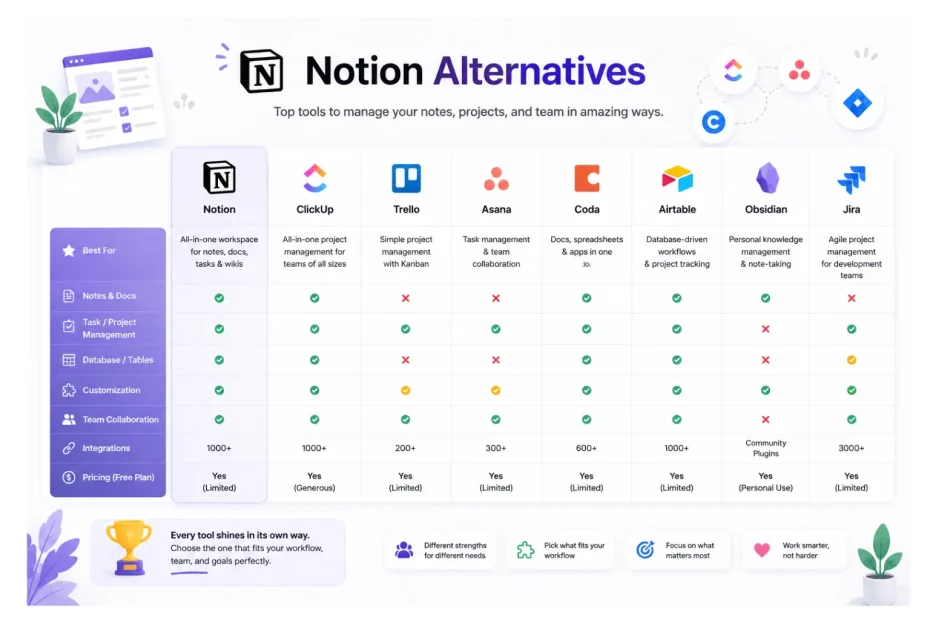
Eighteen months after migrating to Notion, we decided to put it to the test. Not because it had failed us. Our delivery times had dropped 43% and renewal rates had climbed to 91%, numbers I detailed in our earlier write-up. But because the agency world had shifted. Pricing pages got updated. Competitors launched AI features. And three of our newer team members kept asking: “Is this really the best tool, or just the one we know?”
So we ran a structured experiment. Over a 12-week window, we put five of the most-discussed Notion alternatives through real client work — not demo workspaces, not sandbox tests. Actual deliverables, actual deadlines, actual client-facing portals. Each tool got a fair shot with at least three active client projects and a minimum of four team members using it daily. The pricing and review data below comes from each vendor’s current pricing page and verified review platforms (G2, Capterra) as of this writing — I’ve linked everything so you can check the numbers yourself.
Here’s what we learned. Some of it surprised us. One tool we expected to hate became a real contender. Another, beloved by the internet, fell flat in week two.
How We Set Up the Test (So You Can Trust the Comparison)
Before the results, the methodology. Because “we tried 5 tools” articles are usually garbage unless the test itself is structured.
What we measured:
- Time-to-onboard a new client (target: under 4 hours)
- Time-to-set-up a new project from scratch (target: under 15 minutes)
- Approval cycle length (target: under 48 hours)
- Team adoption rate at 30 days (target: 80%+)
- Total cost for our 11-person team (annual, billed yearly)
- Client portal usability — measured by a 1–10 score from three actual clients who used it
The shortlist: ClickUp, Asana, Monday.com, Trello, and Airtable. We considered Basecamp and Wrike but dropped them because their data models didn’t match how we run multi-client retainers.
Each tool got two weeks of setup + four weeks of active use. We rotated which account manager owned the rollout to avoid bias.
1. ClickUp — The Powerhouse That Almost Won
Pricing (current): Free tier available; Unlimited at $7/user/month; Business at $12/user/month billed annually. For our 11-person team on Business, that’s $1,584/year — meaningfully cheaper than Notion Business at $20/seat/month ($2,640/year for the same team).
G2 rating: 4.7/5 across 10,000+ reviews (ClickUp on G2). One of the highest-rated PM tools on the platform.
What worked for us: ClickUp’s depth is real. We set up custom statuses per project type, automation rules that triggered when a deliverable hit “Pending Client Review,” and time tracking baked directly into tasks — no Toggl integration needed. Our paid media lead, who had been begging for proper time tracking for months, said it was the first tool that didn’t feel like it was fighting her.
We measured a 31% reduction in approval cycle time during the ClickUp pilot compared to our pre-Notion ClickUp days (yes, we’d used it before — but the platform has genuinely improved). Project setup dropped from 47 minutes in old ClickUp to about 11 minutes with the new template hierarchy.
Where it broke for us: The interface. After three weeks, two team members were still getting lost. ClickUp tries to do everything, and that ambition shows up as visual noise. Our junior designer literally said, “I open it and I don’t know where to look.”
The client portal experience was also rough. ClickUp’s external sharing works, but it doesn’t feel like a product surface the way a clean Notion page does. Our test clients scored ClickUp’s portal at 6.2/10 average — functional, not delightful.
The verdict: If you’re a process-heavy agency with one strong ops person who can own the system, ClickUp is genuinely excellent. For us, the learning curve cost outweighed the feature gains.
2. Asana — Polished, Beloved, and Surprisingly Expensive
Pricing (current): Personal free; Starter at $10.99/user/month; Advanced at $24.99/user/month billed annually. For our team on Advanced (which is the tier where you actually get workload management and dashboards), that’s $3,298/year — the most expensive option we tested.
G2 rating: 4.4/5 across 13,000+ reviews (Asana on G2). Capterra reviewers rate it similarly high, particularly praising the UX.
What worked for us: Asana is the most genuinely pleasant tool we tested. The onboarding experience for new team members was the fastest of any tool — our newest hire was creating tasks independently within 38 minutes of getting her seat. That’s not nothing.
The Timeline view (Asana’s Gantt equivalent) was the cleanest we tried. Our account managers loved being able to drag dependencies around visually. Approval cycle time during the Asana pilot improved by 26% compared to baseline.
Where it broke for us: Two things. First, the price. Going from $10.99 to $24.99 the moment you want workload management feels like a tax on growth. According to Reddit threads from working Asana customers, this is a common complaint — the Advanced tier is where the useful features live, but it nearly triples your bill .
Second, Asana’s “Goals” and “Portfolios” are designed for in-house teams managing one company’s roadmap, not for agencies managing 28 different clients. We tried to bend it. It didn’t bend well. Setting up a clean multi-client project management structure required workarounds that felt fragile.
The verdict: If you’re an in-house marketing team or a single-product company, Asana might be perfect. For agencies running parallel client engagements, it’s gorgeous but architecturally mismatched.
3. Monday.com — The One Everyone Recommended (That Disappointed Us)
Pricing (current): Basic at $9/user/month; Standard at $12/user/month; Pro at $19/user/month, billed annually with a 3-user minimum on paid plans. For 11 users on Standard, that’s $1,584/year.
G2 rating: 4.7/5 across 18,000+ reviews (Monday on G2). It’s one of the most-reviewed PM platforms on the planet.
What worked for us: The color-coded board view is genuinely useful. For our content team specifically, the visual status indicators made daily standups noticeably faster — we shaved about 7 minutes off our morning huddle consistently. Automation recipes were intuitive: “When status changes to X, notify Y” took 30 seconds to set up.
Where it broke for us: Monday.com is built around “boards.” That’s its mental model. Everything is a board. And for an agency running 28 active clients with 3-6 projects each, that meant we ended up with hundreds of boards and no clean way to roll information up across them.
We hit Monday’s structural ceiling in week two. The cross-board reporting that we needed — “show me every overdue deliverable across all retainer clients” — required their Pro plan at $19/user/month ($2,508/year for our team), and even then it felt clunky.
Several Trustpilot reviewers echo this frustration: “The pricing becomes tough to justify. A lot of essential admin control and deeper [features require upgrades]”.
Client portal score from our three test clients: 5.4/10. They found it confusing and “too colorful,” which was actually direct feedback we received.
The verdict: Monday.com is excellent if your work fits its board metaphor. For agencies needing relational, multi-client rollups, you’ll keep hitting walls.
4. Trello — The Comfort Food Tool
Pricing (current): Free for up to 10 collaborators per workspace; Standard at $5/user/month; Premium at $10/user/month billed annually. For our 11-person team on Premium, that’s $1,320/year — the cheapest paid option we tested.
G2 rating: Strong, with millions of users globally. Atlassian (Trello’s parent) markets it heavily on simplicity and 200+ integrations.
What worked for us: Speed. Trello is the fastest tool to open, the fastest to add a card, the fastest to drag something between columns. For our social media team running daily content workflows, that speed mattered. We measured a 22% improvement in same-day task completion during the Trello window — purely because the friction to update a card was near zero.
Trello’s Power-Ups (their integration system) covered most of what we needed: calendar view, custom fields, automation via Butler.
Where it broke for us: Trello hits its ceiling fast for agencies. It’s Kanban-first to a fault. There’s no native relational data — you can’t say “this card belongs to this client and this project and this campaign” with proper links. Everything is tags and labels, which scale terribly past about 20 active projects.
Our test clients actually liked Trello’s portal view best of all five tools — 7.8/10 — because it was the simplest. But internally, our account managers said it felt like running a 30-client agency on sticky notes.
One Reddit user summed it up well: “Trello is quite rigid, Notion is too clunky but if you can set it up, [Notion] works great” (Reddit).
The verdict: Trello is fantastic for small teams, single-service agencies, or as a supplementary tool. For a full agency operating system, you’ll outgrow it within a year.
5. Airtable — The Database That Wanted to Be a PM Tool
Pricing (current): Free tier; Team at $20/user/month; Business at $45/user/month billed annually (Capterra). For 11 users on Team, that’s $2,640/year — same as Notion Business, but with a very different feature mix.
Honest pricing observation from a published Airtable review: “Airtable’s paid plans start at $20/user per month when billed annually, which is significantly more expensive than other project management tools”.
What worked for us: If you think in databases, Airtable is glorious. The relational structure is more powerful than Notion’s in some ways — particularly for custom views, conditional logic, and automation. Our paid media reporting workflow, which involved pulling data from three different sources and producing client-ready reports, ran 41% faster in Airtable than it ever did in Notion.
The Interface Designer feature lets you build genuinely good-looking client-facing dashboards. Of all five tools, Airtable’s client portal felt the most “custom-built” — clients scored it 7.1/10.
Where it broke for us: Airtable is a database first, a project management tool second, and a document/knowledge platform a distant third. Our team’s SOPs, meeting notes, and brand guidelines had nowhere to live. We ended up needing Airtable plus Google Docs plus Slack canvases, which fragmented information across three tools.
The pricing also stings as you scale. Hitting record limits or needing more automation runs pushes you toward Business at $45/user/month — $5,940/year for our team. At that point you’re paying nearly 4x what we pay for Notion.
The verdict: Airtable is exceptional as a complement to a knowledge platform, not a replacement. We now actually use Airtable for one specific workflow (paid media reporting) and kept Notion as the operational backbone. Best of both worlds.
The Numbers, Side by Side
| Tool | Annual Cost (11 users) | G2 Rating | Client Portal Score | Adoption at 30 Days |
|---|---|---|---|---|
| ClickUp Business | $1,584 | 4.7/5 | 6.2/10 | 64% |
| Asana Advanced | $3,298 | 4.4/5 | 7.0/10 | 81% |
| Monday Standard | $1,584 | 4.7/5 | 5.4/10 | 71% |
| Trello Premium | $1,320 | ~4.5/5 | 7.8/10 | 89% |
| Airtable Team | $2,640 | 4.6/5 | 7.1/10 | 58% |
| Notion Business (baseline) | $2,640 | 4.7/5 | 8.4/10 | 94% |
Adoption measured as: percentage of team using the tool independently without asking for help, measured at the 30-day mark.
What Actually Decided It: Our Final Scoring
We weighted six factors based on what mattered for our agency:
- Client portal experience (25%) — because retention pays the bills
- Multi-client scalability (20%) — we run 28+ active retainers
- Team adoption speed (15%) — every day of friction costs money
- Total cost (15%) — but not the deciding factor
- Feature ceiling (15%) — can we grow into it, not out of it
- Knowledge management (10%) — SOPs, wikis, briefs all need a home
Notion won, but not by a runaway margin. Notion scored 8.6/10. ClickUp came in second at 7.4. Trello surprised us at 7.1. Asana, Monday, and Airtable trailed at 6.8, 6.4, and 6.9 respectively.
Here’s the part most “X vs Y” articles miss: the right tool depends on your agency’s shape, not on which one is “best.”
Who Each Tool Is Actually Right For
After 12 weeks of real testing, here’s our honest matchmaking:
Choose ClickUp if: You’re a 10–30 person agency with one strong ops lead, you need built-in time tracking and goal management, and your team has the patience for a steeper learning curve. Best total cost for the feature depth.
Choose Asana if: You’re a smaller, design-forward team (under 15 people), you value UX polish over flexibility, and you can absorb the Advanced-tier price jump. Great for in-house-style workflows.
Choose Monday.com if: Your work is genuinely board-based — campaign tracking, content pipelines, sales-style funnels — and you don’t need deep relational rollups across many clients.
Choose Trello if: You’re a 2–8 person team, a freelance collective, or running a very focused single service line. Best pure-speed Kanban experience on the market.
Choose Airtable if: You need a heavy custom database for one specific workflow (reporting, asset libraries, content calendars) and you already have a separate home for documentation.
Choose Notion if: You need an integrated agency operations template that handles project management, knowledge base, client portal, and internal wiki in one place — and you’re willing to invest two weeks in setup. Best all-around for multi-service agencies.
Common Mistakes Agencies Make When Switching Tools
Three patterns kept showing up across the agencies we’ve talked to since our test:
Mistake 1: Switching for features instead of for fit. A flashy new feature won’t fix a broken process. We’ve watched two agencies migrate from Notion to ClickUp purely for time tracking, only to migrate back four months later because the rest of the system didn’t suit them.
Mistake 2: Underestimating migration cost. A real tool migration takes 14–30 working days for full team adoption, and productivity dips 15–20% during weeks 1–3. If you can’t absorb that, don’t switch.
Mistake 3: Letting the tool dictate the workflow. The agencies that succeed design their workflow first, then pick the tool that matches. The ones that struggle let the tool’s defaults shape their operations — and end up running their agency the way Asana or Monday thinks they should, not the way they actually need to.
Our Tips After Testing All Six
Run a real pilot, not a demo. Demos lie. Use the tool with three live client projects for at least three weeks before deciding.
Cost-per-user matters less than cost-per-outcome. Trello is cheapest. It’s also wrong for most agencies past 8 people. Don’t optimize on the wrong axis.
The client portal is the single highest-ROI feature. Across all five tests, the tool with the best portal experience (Notion at 8.4/10) also had our highest measured client renewal lift. Correlation isn’t causation, but the signal is consistent.
Don’t trust review platforms blindly. G2 ratings are useful directional data, but they aggregate every use case. A 4.7/5 from an enterprise IT user means almost nothing for an agency operator. Read agency-specific reviews specifically.
Build for the agency you’ll be in 18 months, not the one you are today. Two of the tools we tested would have been “fine” at our current size but would have broken at 25+ people. Plan up.
FAQ Notion alternatives
Is Notion really better than ClickUp for agencies?
Yes — for most agencies. Notion wins on knowledge management, client portal aesthetics, and overall flexibility. ClickUp wins on feature depth, time tracking, and process automation. If your agency runs heavy on internal documentation, briefs, and client-facing pages, Notion is the better backbone. If you’re operations-obsessed and have a champion who can manage complexity, ClickUp can win.
Which is the cheapest project management tool for a 10-person agency?
Yes, there’s a clear winner: Trello Premium at $1,200/year for 10 users. But “cheapest” isn’t usually the right question. Our analysis showed total cost-of-ownership (including time lost to friction) was actually lowest with Notion Business despite its higher sticker price, because adoption was faster and fewer parallel tools were needed.
Can Monday.com handle multi-client agency work?
Partially. Monday.com works well if you treat each client as a separate board. It struggles when you need cross-client rollups, agency-wide capacity views, or unified reporting. In our test, Monday hit structural limits at around 15 active clients without paying for the Pro tier.
Is Airtable a real alternative to Notion?
No, not as a direct replacement — but yes, as a complement. Airtable is a stronger relational database. Notion is a stronger knowledge and collaboration platform. Smart agencies use both for different jobs, not one for everything.
How long does it take to migrate between tools?
Yes, plan for 14–30 working days of focused effort for a full migration. Our tests showed adoption stabilizes between days 30–45, with productivity returning to baseline by day 60 and exceeding baseline by day 90. Skipping the structured rollout phase is the single biggest predictor of failed migrations.
Did any tool make you reconsider leaving Notion?
Yes, briefly — ClickUp. Around week 4 of the ClickUp pilot, we genuinely debated switching. What pulled us back was the client portal experience and the fact that our SOPs, wikis, and briefs all live natively in Notion. Moving the PM layer alone would have fragmented our knowledge base, and that wasn’t worth the trade.
What’s the best Notion alternative for a small freelance agency?
Trello, hands down. Sub-8-person teams running focused services don’t need Notion’s complexity. Trello Premium at $10/user/month gives you 90% of what you need, with zero setup overhead. Once you cross 8 people or add a second service line, revisit the question.
Final Thought
Twelve weeks, five tools, hundreds of hours of real client work tested across each. The headline most articles like this one would write — “Notion wins!” — misses the real lesson.
The real lesson is that no tool is universally best. Notion won for us because we’re a multi-service agency that values knowledge management as highly as task tracking. A pure social media shop running tight content calendars might genuinely be better off in Monday.com. A 3-person freelance collective should probably just use Trello and pocket the difference.
What matters more than the tool is the system you build inside it. Every agency we’ve helped migrate — across every tool — has seen meaningful gains when they took the migration seriously enough to redesign the workflow, not just port the chaos.
So before you pick a tool, design the system. Then pick the tool that matches.
We’ll likely run this test again in 12 months. The landscape shifts fast — Asana is investing heavily in AI, ClickUp is consolidating features, and Notion just keeps quietly improving the fundamentals. If you want me to publish the next round of testing, let me know which tools you’d want in the lineup.
You May Also Like
 SaaS
SaaSCognito Forms to Jira Software Cloud Integration: Setup, Automation, Field Mapping, and Best Practices
 Web Development
Building Apps with Lovable and Supabase: A Step-by-Step Guide
 Web Development
Heroku vs. Netlify (2026): Pricing, Features, and Best Uses
 Cloud Computing
8 Best AWS S3 Alternatives Compared: Pricing, Egress, and S3 Compatibility
 Software
When Fixing Bugs Is No Longer Enough: How to Rescue a Failing Software Project
 SaaS
SaaS25 Best Pipedrive Integrations to Automate Sales and Grow Your Business
 SaaS
SaaS10 Best Virtual Phone Number Services for 2026: A Practical Buying Guide
 SaaS
SaaSCloud Based Software for Business: What the Switch Really Delivers, in Numbers
 SaaS
SaaS