

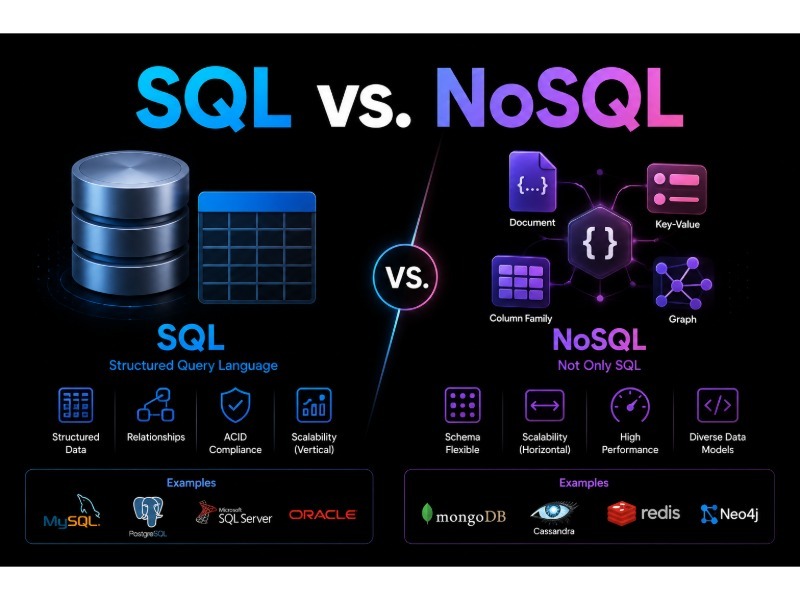
The SQL vs. NoSQL debate often gets framed as old vs. modern, or rigid vs. scalable. In 2026, neither framing really holds. PostgreSQL can store and index JSON documents. MongoDB has supported multi-document ACID transactions since version 4.0. Distributed SQL databases like Google Cloud Spanner and CockroachDB scale horizontally across regions. The line between the two categories is much blurrier than it was a decade ago.
So instead of asking “which is better?”, it’s more useful to ask: which data model fits how your application stores, reads, and changes data, and which system can your team run reliably?
Quick answer: If your application is built around related records like customers, orders, accounts, and permissions, a relational (SQL) database such as PostgreSQL or MySQL is usually the safer default. A NoSQL database tends to be worth it when your data fits a specific non-relational model (documents, key-value pairs, wide columns, or graphs) and you already know how the application will query it. Many production systems use both.
SQL vs. NoSQL at a Glance
| Consideration | Relational (SQL) databases | NoSQL databases |
|---|---|---|
| Data model | Tables with rows and columns | Document, key-value, wide-column, or graph |
| Schema | Defined up front and enforced by the database | Usually flexible; enforcement varies by product |
| Relationships | Handled natively through keys and joins | Often handled by embedding or duplicating data |
| Ad hoc queries | Strong; SQL lets you ask new questions without redesigning | Usually best when queries are known in advance |
| Transactions | Mature multi-row, multi-table ACID support | Ranges from none to full ACID, depending on product |
| Scaling | Vertical by default; horizontal through replicas, sharding, or distributed SQL | Many products are built for horizontal scaling from the start |
| Common examples | PostgreSQL, MySQL, SQL Server, Oracle Database, SQLite | MongoDB, DynamoDB, Cassandra, Redis, Neo4j |
Use this table as a starting point, not a rulebook. The specific product matters more than which column it falls under.
What Is a Relational (SQL) Database?
Strictly speaking, SQL (Structured Query Language) is a language, not a database. When people say “SQL database,” they usually mean a relational database: one that stores data in tables, connects those tables through keys, and uses SQL to query them.
Here’s a simple example with two related tables:
customers
| customer_id | name | |
|---|---|---|
| 101 | Alex | [email protected] |
| 102 | Jamie | [email protected] |
orders
| order_id | customer_id | total | created_at |
|---|---|---|---|
| 5001 | 101 | $89.00 | 2026-09-12 |
| 5002 | 102 | $625.00 | 2026-09-28 |
The customer_id column links each order to a customer. That link is what lets you answer questions that span both tables, like “Which customers placed orders over $500 in the last 30 days?”:
-- PostgreSQL syntax; date functions vary slightly by database
SELECT DISTINCT c.name, c.email
FROM customers AS c
JOIN orders AS o ON o.customer_id = c.customer_id
WHERE o.total > 500
  AND o.created_at >= CURRENT_DATE - INTERVAL '30 days';
Nobody had to plan for this exact question when the tables were designed. That flexibility is one of the biggest practical advantages of relational databases.
Widely used options include PostgreSQL, MySQL, MariaDB, Microsoft SQL Server, Oracle Database, and SQLite. They differ in a lot of ways. SQLite, for example, is an embedded library that runs inside the application rather than a separate server, which is why it shows up in phones, browsers, and desktop apps.
What Is a NoSQL Database?
“NoSQL” originally meant “non-SQL” and is now often read as “not only SQL.” It’s an umbrella term for databases that don’t use the relational table model. Ironically, some of them use SQL-like query languages, such as Cassandra’s CQL and Couchbase’s SQL++.
Because NoSQL covers very different designs, saying “we’ll use NoSQL” doesn’t tell you much. The four main families behave very differently:
| Type | How it stores data | Examples | Often a good fit for | Watch out for |
|---|---|---|---|---|
| Document | JSON-like documents, often with nested fields | MongoDB, Couchbase, Firestore | Records with varying or nested attributes, such as product catalogs or user profiles | Duplicated data that has to stay in sync |
| Key-value | A unique key mapped to a value | Redis, Valkey, Amazon DynamoDB | Caching, sessions, rate limiting, lookups by known ID | Limited querying beyond the key |
| Wide-column | Rows grouped by partition keys, spread across many nodes | Apache Cassandra, ScyllaDB, Google Bigtable | High write volumes, time-ordered event data, multi-region deployments | Tables must be designed around specific queries |
| Graph | Nodes and the relationships between them | Neo4j, Amazon Neptune | Recommendations, fraud detection, dependency mapping | Smaller ecosystem; not a general-purpose store |
DynamoDB and Redis both blur these categories a bit. DynamoDB supports key-value and document-style data, and Redis offers lists, sets, sorted sets, streams, and more beyond simple key-value pairs.
The Key Differences in Practice
Schema
A relational database enforces a schema: every row in a table has the same columns, and the database rejects data that doesn’t fit. That doesn’t make the schema frozen. Migrations change it all the time. It just means structure changes happen deliberately.
Document databases let records in the same collection have different shapes, which helps when your data changes often or varies a lot. But “schemaless” is a bit misleading. The structure still exists; it has just moved into your application code. Many teams end up adding validation rules (MongoDB supports JSON Schema validation, for example) once inconsistent data starts causing bugs.
Relationships
Relational databases are built to connect data across tables with joins. Many NoSQL databases take a different route: they embed related data inside a single record or duplicate it wherever it’s read. That makes common reads fast but makes updates harder. If a customer changes their name, how many documents need to be updated?
Transactions
A transaction groups several changes so they either all succeed or all fail. The classic example is a bank transfer: you never want money debited from one account without being credited to the other.
Relational databases have offered this for decades. The old claim that “NoSQL doesn’t do transactions” is out of date, though support varies widely. MongoDB supports multi-document ACID transactions, but recommends designing data so you rarely need them. DynamoDB offers transactional APIs capped at 100 items per request. Cassandra provides lightweight transactions, which are conditional updates scoped to a single partition, at a noticeable performance cost.
So instead of asking “does it support transactions?”, ask: what guarantees does it provide, at what scope, and at what cost?
Querying
SQL is excellent at answering questions nobody planned for. Many NoSQL systems, especially DynamoDB and Cassandra, work the other way around: you list your access patterns first and then design your tables to serve them. That approach can deliver predictable, low-latency performance at very large scale. The tradeoff is that adding a new type of query later may mean adding indexes, duplicating data, or restructuring tables.
Is NoSQL Easier to Scale?
This is the most common oversimplification in the whole comparison. “SQL scales vertically, NoSQL scales horizontally” was a decent rule of thumb around 2010. Today it misses a lot.
Relational databases scale in several ways: bigger servers, read replicas, table partitioning, and sharding through tools like Vitess (for MySQL, originally built at YouTube) or Citus (for PostgreSQL). Distributed SQL databases such as Spanner, CockroachDB, and YugabyteDB spread data across many nodes and still offer SQL with strong consistency.
What’s true is that many NoSQL systems make horizontal scaling the default instead of an add-on. DynamoDB partitions data automatically, and adding nodes to a Cassandra cluster is routine. That scaling isn’t free, though. It relies on choosing good partition keys, and a poorly chosen key can create “hot partitions” that bottleneck the whole system.
For many business applications, this debate is mostly theoretical. A single well-tuned PostgreSQL or MySQL instance with read replicas can handle far more traffic than most apps ever see. Scaling strategy becomes a central design question mainly for very high write volumes, global user bases, or strict multi-region availability requirements.
Consistency: More Nuanced Than “SQL Is Consistent, NoSQL Isn’t”
Consistency guarantees depend on the product and on how you configure it, not on the SQL or NoSQL label. A few examples:
- DynamoDB uses eventually consistent reads by default, but you can request strongly consistent reads on a table (not on global secondary indexes).
- Cassandra lets you set consistency per query.
QUORUMreads and writes give you stronger guarantees thanONE, at the cost of extra latency. - Azure Cosmos DB offers five consistency levels, ranging from strong to eventual.
- Relational databases with asynchronous read replicas can return stale data too. If your app writes to the primary and immediately reads from a replica, the user may not see their own change yet.
That last point surprises a lot of teams. “We use PostgreSQL, so everything is consistent” isn’t automatically true once replicas are involved.
In practice, figure out where strict consistency really matters (account balances, inventory reservations, payments) and where brief staleness is fine (view counts, recommendation feeds, cached profiles). Then choose and configure your database to match.
Data Modeling: Normalize or Embed?
Relational design usually normalizes data: customers, orders, order items, and products each get their own table, and keys connect them. Each fact is stored once, so updates stay simple.
Document design often embeds data that’s read together:
{
  "orderId": 5001,
  "customer": { "id": 101, "name": "Alex" },
  "items": [
    { "productId": 42, "name": "Keyboard", "quantity": 1, "price": 89.00 }
  ]
}
One read returns the whole order, with no joins needed. And sometimes duplication is exactly what you want: storing the product name and price at the time of purchase keeps the order history accurate even if the catalog changes later. The cost shows up when shared data does need to change everywhere it appears.
Neither approach is better across the board. The right model depends on which reads are most frequent and which data changes most often.
Which Database Fits Which Use Case?
| Use case | Common starting point | Why |
|---|---|---|
| Banking and payments | Relational | Strict transactional guarantees and auditability |
| E-commerce core (orders, inventory, payments) | Relational | Highly connected data with transactional updates |
| Product catalog with varied attributes | Relational with JSON columns, or a document database | Depends on how much attributes vary between products |
| Content management | Either | Depends on content structure and how it’s queried |
| Sessions and caching | Key-value store (Redis, Valkey) | Fast lookups by known key, with optional expiration |
| Social graphs and recommendations | Graph database, or relational for simpler cases | Multi-hop relationship queries favor graphs |
| IoT and telemetry | Wide-column or time-series database (Cassandra, TimescaleDB, InfluxDB) | High write volumes, time-ordered data, retention policies |
| Analytics and reporting | Analytical warehouse (BigQuery, Snowflake, ClickHouse) | Operational databases usually aren’t built for large-scale analysis |
Several rows list more than one option on purpose. The use case alone rarely decides the database; the specific data and query patterns do.
A Closer Look: E-Commerce
An online store shows why context matters. Customers, orders, products, payments, inventory, and shipping are all closely connected. When an order is placed, inventory should drop, the payment should be recorded, and the order status should change, ideally as a single transaction. That makes a relational database a natural fit for the core of most stores.
Other parts of the same store may have different needs. Product catalogs with very different attributes (a laptop vs. a T-shirt) can fit a document model, or a PostgreSQL JSONB column. Shopping carts and sessions are classic key-value workloads. Product search usually works best in a dedicated search engine like Elasticsearch or OpenSearch.
Web and Real-Time Applications
Being a “web app” or a “real-time app” doesn’t determine the database on its own. A chat app or multiplayer game might keep messages and user accounts in PostgreSQL, while storing presence status (“who’s online”), typing indicators, and leaderboards in Redis. That ephemeral data changes constantly, and losing a few seconds of it is acceptable. The useful question is which data needs to be durable and which can be temporary.
Using SQL and NoSQL Together
Using several data stores for different jobs is called polyglot persistence, and it’s common. A typical setup might pair PostgreSQL for core business data with Redis for caching, OpenSearch for full-text search, and object storage such as Amazon S3 for files.
Each extra system adds real costs, though: more backups, monitoring, security configuration, failure modes, and things your team has to learn. Plus, you now have to keep data in sync across systems. A good rule of thumb is to add a second data store when you can name the specific problem it solves, not because it might help with scale someday.
A Practical Decision Framework
Before choosing a product, answer these questions about your workload:
| Question | Leans relational if… | Leans NoSQL if… |
|---|---|---|
| What does the data look like? | Many entities that reference each other | Self-contained documents, simple key lookups, or graph traversals |
| How will you query it? | Varied, evolving, or ad hoc queries and reports | A small set of known, high-volume access patterns |
| How critical are transactions? | Multi-step changes must succeed or fail together | Most writes affect a single record |
| How will it need to scale? | Moderate growth, mostly in a single region | Very high write volumes or active multi-region writes |
| What does your team know? | Strong SQL and relational modeling skills | Hands-on experience with a specific NoSQL system |
| What’s the operational picture? | You want the most mature tooling and hosting options | A managed NoSQL service fits your cloud and budget |
Don’t forget cost. Managed service pricing, storage, data transfer, licensing, and engineering time all add up. Some serverless NoSQL services charge per request, which can be very cheap at low traffic and surprisingly expensive at high traffic.
Common Mistakes to Avoid
Choosing NoSQL “for scale” before you have a scale problem. Many teams take on NoSQL’s modeling constraints for growth that never comes, then struggle when product requirements call for new queries.
Treating “schemaless” as “no design needed.” Flexible documents without validation tend to collect inconsistent fields that are hard to clean up later.
Assuming relational databases can’t scale. Replicas, partitioning, sharding tools, and distributed SQL cover far more ground than the old stereotype suggests.
Ignoring access patterns. For DynamoDB and Cassandra especially, designing tables before you know your queries is one of the most expensive mistakes to undo.
Trusting generic benchmarks. Published benchmarks rarely match your data, queries, or hardware. If performance is a deciding factor, test with a realistic sample of your own workload.
Underestimating operations. Someone has to secure, monitor, back up, upgrade, and restore whatever you choose, usually at an inconvenient hour.
Frequently Asked Questions
Is SQL better than NoSQL?
No, neither is better overall. Relational databases are usually the stronger fit for connected, transactional data and flexible querying. NoSQL databases tend to do better when the workload matches a specific non-relational model or needs built-in horizontal scaling.
Is NoSQL faster than SQL?
Not automatically. A NoSQL database can be very fast for the access patterns it was designed around, and a well-indexed relational database can be just as fast for many workloads. Query design, indexing, data size, and infrastructure usually matter more than the category.
Is SQL more secure than NoSQL?
Neither is inherently more secure. Security depends on authentication, access controls, encryption, patching, network configuration, and how your application builds queries. Both categories are vulnerable to injection attacks if input isn’t handled safely.
Which is easier to learn?
It depends on your background. SQL is a widely taught standard, and the concepts carry over across PostgreSQL, MySQL, SQL Server, and others. Document databases can feel more intuitive at first for developers who work in JSON, but modeling data well in NoSQL often takes more planning than beginners expect.
Should I use PostgreSQL or MongoDB?
Choose PostgreSQL if your data is highly relational, you need multi-table transactions, or you expect to run varied queries and reports. Choose MongoDB if your data is mostly self-contained documents with nested or varying fields. Since PostgreSQL also supports JSONB, it can cover a fair amount of document-style data, which makes it a flexible default when you’re not sure.
Which database is best for a startup?
For many startups, a managed relational database such as PostgreSQL is a practical default. It handles a wide range of query patterns, which helps when the product is still changing, and it’s easy to hire for. Choose something else when your requirements clearly point to a different model.
Can I migrate from SQL to NoSQL (or the reverse) later?
Yes, but plan on it being a significant project. Changing data models usually means rewriting queries, restructuring data, updating application logic, and running both systems in parallel during the move. Making a well-informed choice up front is usually cheaper.
Final Verdict
Relational databases are usually the better starting point when your application depends on relationships, transactions, and flexible querying, which describes most business software. NoSQL databases earn their place when a specific model (document, key-value, wide-column, or graph) or a large-scale distributed workload fits your requirements more naturally. Often the best answer is a relational core with one or two specialized stores added for clear, specific reasons.
Whatever you choose, base the decision on your data, your queries, your consistency needs, and your team’s ability to operate the system, not on the label or the hype. The best database is the one that fits the workload you actually have and that your team can run reliably.
You May Also Like
 Web Development
What Is API Rate Limiting? (A Practical, Simple Guide for Safer, Faster APIs)
 Web Development
REST API vs SOAP API: Differences, Pros & Cons, and Use Cases
 Web Development
How Long Does It Take to Code an App?
 Web Development
Supabase vs Firebase: Which Backend Platform is Right for Your Project?
 Cloud Computing
8 Best AWS S3 Alternatives Compared: Pricing, Egress, and S3 Compatibility
 AI Technology
ChatGPT API Alternatives: 13 AI APIs and Platforms for Developers
 Web Development
Building Apps with Lovable and Supabase: A Step-by-Step Guide
 Web Development
Supabase Auth Guide: Authentication, OAuth, OTP, MFA, SSO, Sessions, and Pricing
 Web Development