

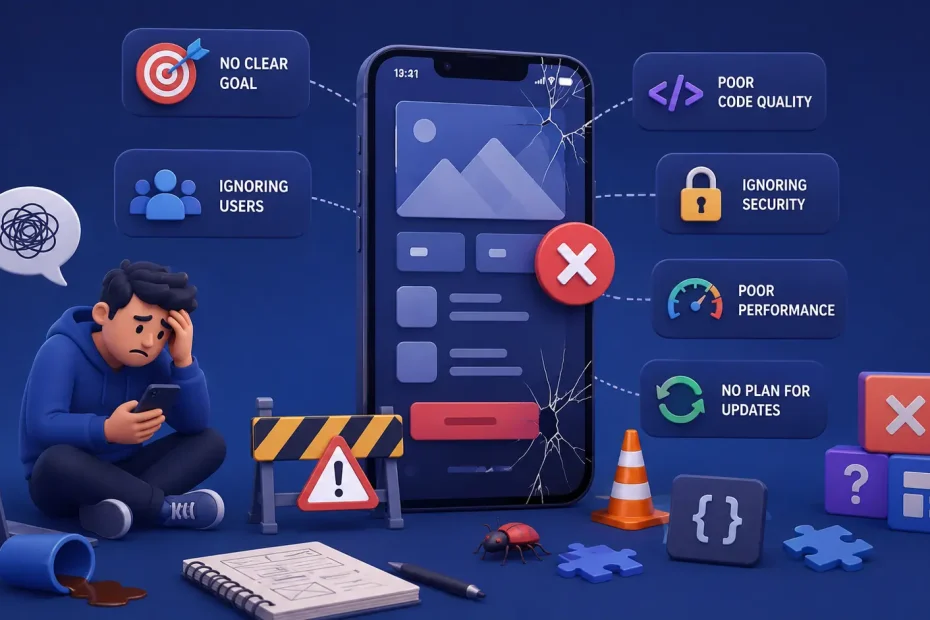
Most articles about mobile app development mistakes read like checklists pulled from a textbook: test your app, design it well, update it often. True, but useless. Anyone who has actually shipped a product knows the real story is messier — a founder who insists on launching before QA has finished, a backend that was never load-tested past 500 concurrent users, a monetization model bolted on three weeks before launch because “we’ll figure out revenue later.”
The Google Play Store alone hosts somewhere between 1.8 and 2.4 million active apps, depending on which dataset you trust and how aggressively Google has cleaned house that quarter. Estimates from 42matters put the figure at roughly 2.4 million, while other trackers show numbers closer to 1.9–2 million after Google’s periodic purges of low-quality listings. Whatever the exact count, the takeaway is the same: your app isn’t competing against ten alternatives. It’s competing against a market so saturated that mediocre execution is invisible, and only genuinely well-built products survive past the first few weeks of installs.
What follows isn’t a generic list. It’s a breakdown of the ten mistakes that recur most often in real projects, why they happen even to experienced teams, and what actually fixes them — based on patterns we’ve seen play out across dozens of mobile builds, not theory.
1. Treating User Feedback as an Afterthought Instead of a Product Input
Here’s the uncomfortable truth: most teams don’t ignore user feedback because they don’t care. They ignore it because they don’t have a system for turning it into action. Feedback sits in App Store reviews, scattered support tickets, and the occasional Slack message from a customer success rep — and nobody owns the process of aggregating it into something the product team can act on.
The fix isn’t “listen to your users” — it’s building a feedback pipeline with an owner attached to it. That means:
- In-app feedback prompts triggered contextually (after a completed action, not randomly on launch)
- A tagging system for support tickets and reviews so recurring complaints surface as patterns, not isolated noise
- A closed-loop process where the team that reads feedback can push it into the sprint backlog, and users who reported bugs are told when they’re fixed
Teams that treat feedback as a compliance checkbox — “we have a feedback form” — rarely see it translate into retention gains. Teams that treat it as a triage system, reviewed weekly with clear ownership, consistently catch churn-driving issues (a confusing onboarding step, a broken payment flow on one device type) months before they’d show up in aggregate analytics.
2. Designing for Aesthetics Instead of Behavior
Poor UI/UX rarely looks like ugly design. It usually looks like design that looks fine in Figma and falls apart under real usage patterns — a five-tap checkout flow, a navigation structure that makes sense to the person who built it but not to a first-time user, or an app that’s visually polished but ignores platform conventions (fighting against native gestures on iOS, ignoring Material Design expectations on Android).
The deeper issue is that UI/UX decisions are frequently made in isolation from behavioral data. A design team ships a flow they believe is intuitive; nobody watches five real users attempt to complete it before launch. Usability testing gets treated as a “nice to have” step that gets cut when timelines compress — which is exactly when it matters most, because compressed timelines are when assumptions go unchecked.
Practical fixes that actually move the needle:
- Five-user hallway testing before every major release — it doesn’t need a lab, just five people who’ve never seen the app attempting three core tasks while you watch silently
- Session replay tools (not just funnel analytics) to see exactly where users hesitate, rage-tap, or abandon
- Platform-native patterns first, brand customization second — fighting iOS/Android conventions to preserve a brand aesthetic almost always costs more in confused users than it gains in visual distinctiveness
3. Skipping the Testing Phases That Actually Catch Real-World Failures
“We tested it” often means someone on the dev team clicked through the happy path on their own device. That’s not testing — that’s confirmation that the demo works. Real testing accounts for the messy diversity of actual usage: dozens of Android OEM skins, varying network conditions, interrupted sessions, background app states, and the specific device fragmentation that iOS mostly avoids but Android developers live with daily.
A defensible testing strategy has layered phases, each catching different failure classes:
- Unit and integration testing during development, not bolted on afterward — catching logic errors before they reach a human tester
- Alpha testing internally, focused on core flows and edge cases the dev team already suspects are fragile
- Beta testing with real external users on real devices, ideally through structured programs like Google Play’s internal/closed testing tracks or TestFlight, where you can control cohort size and gather structured crash data
- User Acceptance Testing (UAT) against actual business requirements, not just technical functionality — does the app do what the business needed, not just what the spec said
- Automated regression suites so that every new feature doesn’t silently break three old ones — a problem that compounds invisibly in apps that ship fast without regression coverage
The apps that get burned hardest by skipping this are the ones where the failure only appears at scale or on specific hardware — a memory leak that only shows up after 40 minutes of continuous use, a crash that only affects a particular mid-range Android chipset. These are exactly the bugs that alpha testing on a developer’s flagship phone will never catch.
4. Building for Today’s User Count, Not Tomorrow’s
Scalability failures are almost never visible at launch — they’re visible six months later, right after a successful marketing push, when the app that handled 2,000 daily users suddenly has 40,000 and the backend starts timing out. This is one of the most expensive mistakes to fix retroactively, because by the time it manifests, you’re re-architecting under pressure with real users watching the app degrade in real time.
The mistake usually stems from an early, reasonable-sounding decision: “let’s build a monolith first and worry about scaling later, we don’t even have users yet.” That’s not unreasonable for an MVP — but it becomes a mistake when nobody revisits the decision once traction starts, or when the database schema and API design make it structurally difficult to introduce scaling patterns later without a rewrite.
What holds up under growth:
- Stateless application layers that can be horizontally scaled behind a load balancer, rather than architectures that assume a single server instance
- Database indexing and query design done early, since retrofitting indexes onto a production database with millions of rows is far more painful than designing for query patterns from the start
- Caching layers (Redis or equivalent) for read-heavy endpoints, introduced before they’re strictly necessary rather than after the first outage
- Cloud-native storage and CDN delivery for media-heavy apps, so a viral spike in one region doesn’t take down the whole service
- Load testing against projected — not current — user numbers, ideally simulating 5–10x current traffic before a major launch or marketing campaign
None of this means over-engineering an MVP with microservices on day one — that’s its own well-documented mistake. It means making architectural decisions that don’t structurally block scaling later, even if you’re not implementing full scale infrastructure yet.
5. Treating Security as a Launch-Week Checklist Item
Security gets deprioritized for a predictable reason: it’s invisible until it fails, and failure is catastrophic rather than gradual. A slow app degrades reputation slowly. A data breach destroys trust instantly and often irreversibly — users don’t give a second chance to an app that leaked their payment details.
The recurring pattern in breached or exploited apps isn’t exotic zero-day vulnerabilities — it’s basic hygiene gaps:
- Hardcoded API keys or secrets shipped inside the client-side app binary, easily extracted by anyone who decompiles the APK
- Weak or missing authentication on backend endpoints that assume the mobile client is the only caller, ignoring that any API endpoint is publicly reachable by definition
- Unencrypted local storage of sensitive data like tokens or personal information, readable by any app with root/jailbreak access to the device
- No certificate pinning, leaving apps vulnerable to man-in-the-middle interception on compromised networks
A credible security posture treats these as non-negotiable baseline requirements, not advanced features: server-side validation on every input regardless of client-side checks, encrypted storage for anything sensitive, regular dependency audits (a huge share of mobile vulnerabilities come from outdated third-party libraries, not custom code), and periodic penetration testing before major releases — not just before the first one.
6. Optimizing for the Demo, Not the Device in Someone’s Pocket
Performance problems are a retention killer specifically because users don’t file a support ticket about a slow app — they just delete it. There’s no feedback loop for silent abandonment, which is exactly why performance issues persist longer than they should; the team never hears about them directly.
The gap is usually between how an app performs on a developer’s testing device (typically a recent flagship with excess RAM and a fast chipset) and how it performs on the median user’s device — which, especially in Android’s fragmented market, might be a budget device three years old with a fraction of the processing power.
Concrete, high-leverage fixes:
- Lazy loading and pagination for any list or feed, rather than fetching entire datasets upfront
- Image compression and adaptive resolution serving, so a user on a mid-range device isn’t downloading assets sized for a tablet
- Memory leak audits, particularly around image caches, listeners that aren’t unregistered, and background services that outlive their purpose
- Background process discipline — killing unnecessary polling, location tracking, or sync jobs that drain battery and get an app flagged by the OS’s battery optimization systems (which can throttle or kill the app entirely)
- Testing on actual low-to-mid-range devices, not just simulators or flagship hardware — a $150 Android phone will surface performance issues that never appear in a simulator
7. Skipping Market Research Because “We Already Know Our Users”
This mistake is subtle because it doesn’t look like a mistake — it looks like confidence. A founding team with deep domain expertise assumes their intuition about user needs is sufficient, and treats formal research as a delay tactic rather than a risk-reduction step.
The problem is that domain expertise and user empathy are not the same thing. Someone who deeply understands an industry can still be wrong about what a specific user segment finds frustrating, valuable, or worth paying for — especially because the people building the app are, almost by definition, more sophisticated users of the product category than the average target user.
Research that actually changes product decisions (rather than just validating what the team already believed) tends to include:
- Structured user interviews with people who are not already fans of the concept, specifically probing for objections and points of confusion
- Competitive teardown analysis — not just listing competitor features, but understanding why users choose one competitor over another based on reviews and support forums
- Persona development grounded in actual interview data, not internal assumptions about who “typical users” are
- Willingness-to-pay research conducted before monetization decisions are locked in, rather than after
The teams that skip this step most often aren’t naive — they’re usually under time pressure and treat research as a “we’ll validate as we go” activity. Sometimes that works. More often, it means discovering a fundamental mismatch between the product and the market only after significant development spend, when pivoting is expensive.
8. Bolting On Monetization as an Afterthought
A monetization strategy decided after the product is built is almost always worse than one designed alongside it, because monetization mechanics shape product decisions — pricing tiers affect feature gating, ad placement affects UX flow, subscription models affect onboarding design. Retrofitting monetization onto a product that wasn’t designed with it in mind usually means awkward compromises: ads inserted into flows that weren’t built to accommodate them, paywalls placed based on guesswork rather than usage data.
There’s also a trust cost to getting this wrong. Users who feel a monetization approach is aggressive or bait-and-switch — a free app that suddenly gates a feature they were relying on, or an ad load that increases sharply after the user base is established — churn faster and leave more negative reviews than users who understood the value exchange from day one.
What tends to work:
- Deciding the monetization model before finalizing core UX flows, since freemium, subscription, one-time purchase, and ad-supported models each imply different design choices
- Transparent value gating — free users should understand exactly what upgrading unlocks, not discover restrictions unexpectedly
- Usage-data-informed paywall placement, testing where in the user journey people are most willing to convert, rather than placing paywalls at arbitrary points
- Diversified revenue where appropriate — many successful apps blend a lighter ad load with an ad-free subscription tier, rather than betting entirely on one model
9. Treating Launch as the Finish Line Instead of the Starting Line
An app that ships and then goes quiet — no updates, no bug fixes, no visible signs of active maintenance — signals abandonment to both users and app store algorithms. Google Play and the App Store both factor recency of updates into discoverability, meaning a stagnant app doesn’t just lose users organically; it becomes harder to find for new ones too.
The mistake often isn’t a conscious decision to stop maintaining the app — it’s a resourcing problem. Budget and team attention get allocated heavily to the pre-launch build, and post-launch maintenance is treated as a smaller, almost incidental line item, even though it’s where most of an app’s lifetime cost and value actually accrues.
A sustainable maintenance rhythm usually includes:
- A fixed release cadence (biweekly or monthly, depending on team size), even if releases are sometimes small
- Active monitoring of crash reporting tools (Crashlytics, Sentry, or equivalent) with a defined response time for critical crashes
- OS compatibility tracking — every major iOS and Android release changes behavior in ways that can silently break existing apps if nobody tests against beta OS versions ahead of public rollout
- A visible changelog or release notes practice, which signals active development to users browsing the app store listing, not just to the people who already use the app
10. Building a Great App and Assuming Discovery Will Happen on Its Own
This is arguably the most common and most costly mistake, because it happens after every other mistake has been avoided. A team does everything right — good UX, solid testing, scalable architecture, real security, thoughtful monetization, an active maintenance plan — and then discovers that none of it matters because nobody can find the app.
App Store Optimization (ASO) is not the same discipline as SEO, though it shares some DNA — keyword research, metadata optimization, and conversion-rate thinking all apply, but the mechanics (icon design, screenshot sequencing, review velocity, category selection) are specific to app stores and frequently underinvested in.
A credible go-to-market plan for an app includes:
- ASO from day one, not as a post-launch afterthought — title, subtitle, and keyword fields optimized based on actual search volume research, not guesswork
- A pre-launch audience-building phase, so the app isn’t launching to zero — waitlists, landing pages, and early access programs give a launch-day download spike that itself feeds app store ranking algorithms
- Review acquisition strategy, since review volume and recency directly affect both ranking and conversion, and most apps never proactively ask satisfied users to review
- Paid acquisition testing at small scale before major spend, to validate cost-per-install and retention economics before committing a large marketing budget
- Category and competitive positioning decisions made deliberately — the wrong category can bury a good app in irrelevant search results
Why These Mistakes Persist Even on Experienced Teams
None of the ten mistakes above are the result of not knowing better. Most product and engineering teams, if asked directly, would agree that testing matters, that scalability matters, that security matters. The mistakes persist because of structural pressure: compressed timelines, unclear ownership of post-launch responsibilities, and a natural bias toward visible, demo-able work (new features, polished screens) over invisible, defensive work (load testing, security audits, regression suites) that only pays off when something doesn’t go wrong.
That’s the actual reason these mistakes are common across the industry rather than isolated to inexperienced teams: they’re not knowledge gaps, they’re prioritization failures under pressure. The fix isn’t more awareness — it’s structuring a development process (and choosing a development partner, if you’re outsourcing) where testing, security, and scalability aren’t optional line items that get cut when deadlines compress, but built-in stages of the process from the start.
Whether you’re building an app in-house or working with an external team, the projects that avoid these ten pitfalls consistently share one trait: a development process where these considerations are designed in from the architecture phase, not patched in after launch. That’s the difference between an app that survives its first year in a market of nearly two million competitors, and one that quietly disappears into it. If you’re evaluating how to structure that process for your own product, it’s worth looking closely at how a team approaches custom mobile app development — specifically whether testing, scalability, and security are built into their standard process or treated as add-ons.
You May Also Like
 Web Development
What Is API Rate Limiting? (A Practical, Simple Guide for Safer, Faster APIs)
 Web Development
REST API vs SOAP API: Differences, Pros & Cons, and Use Cases
 Web Development
How Long Does It Take to Code an App?
 Web Development
Supabase vs Firebase: Which Backend Platform is Right for Your Project?
 Cloud Computing
8 Best AWS S3 Alternatives Compared: Pricing, Egress, and S3 Compatibility
 Web Development
SQL vs. NoSQL: How to Choose the Right Database for Your Application
 AI Technology
ChatGPT API Alternatives: 13 AI APIs and Platforms for Developers
 Web Development
Building Apps with Lovable and Supabase: A Step-by-Step Guide
 Web Development