

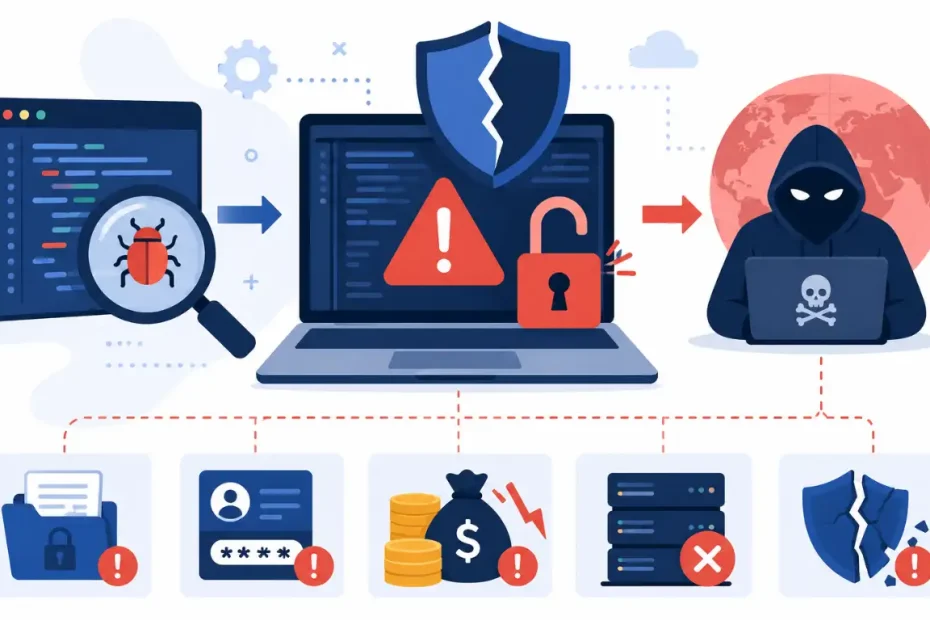
A software vulnerability is a weak spot in code that attackers use to break into systems without permission. These weak spots live in apps, websites, phone software, and network tools. Every business faces these risks today.
In 2025, security experts found over 23,667 new software flaws. This count grew by 16% from the year before. One unpatched flaw can cause data theft, money loss, fines, and system downtime. Small firms and large firms face the same dangers.
This guide explains what software vulnerabilities are, lists the 10 most common types, and shows how teams can find, fix, and stop them before damage occurs.
What Is a Software Vulnerability?
A software vulnerability is a mistake or weak spot in code, design, or settings that attackers use to steal data, take control, or stop systems from working. These weak spots appear in custom apps, bought software, free code libraries, cloud tools, and device firmware. All software has risks because people write code under tight deadlines and shifting needs.
The Three Parts of a Software Flaw
Every software flaw has three parts: the weak spot, the path in, and the damage. The weak spot sits in the code or settings. The path shows how attackers reach it. The damage shows what breaks after the attack works.
People write millions of lines of code each year. Mistakes happen during this work. Even skilled coders create flaws when time is short, needs change, or tests miss items. Some tools catch flaws early, but many stay hidden until attackers or testers find them.
The CVE system gives each known flaw a unique ID number. The CVSS system gives each flaw a score from 0.0 to 10.0. Scores above 9.0 mean the flaw is critical and needs fast action.
How a Software Flaw Differs from Malware
Malware is bad software built to harm systems or steal data. A software flaw is an accidental weak spot that exists before any attacker touches it. Malware needs a way to enter, such as a bad email link. A flaw already lives inside the software.
Attackers often use both. They first use a flaw to get in, then install malware to stay inside, steal files, or lock data for ransom.
What Are the 10 Most Common Types of Software Flaws?
The OWASP Top 10 lists the most critical app security risks. The 2026 list names 10 types that appear in real apps. These types include broken access rules, wrong security settings, supply chain attacks, weak crypto, injection attacks, bad design, login failures, data tampering risks, poor logging, and error handling gaps.
| Rank | Flaw Type | Primary Defense | Risk Level |
|---|---|---|---|
| 1 | Broken Access Rules | Server-side role checks | Critical |
| 2 | Wrong Security Settings | Hardened configs and audits | High |
| 3 | Supply Chain Attacks | Signed packages and SBOM tracking | High |
| 4 | Weak Crypto | Modern encryption libraries | Critical |
| 5 | Injection Attacks | Parameterized queries | Critical |
| 6 | Bad Design | Threat modeling before coding | High |
| 7 | Login Failures | Two-factor auth and rate limits | High |
| 8 | Data Tampering Risks | Digital signatures and checksums | High |
| 9 | Poor Logging | SIEM and real-time alerts | Medium |
| 10 | Error Handling Gaps | Controlled error screens | Medium |
Broken Access Rules
Broken access rules let users see data or use tools outside their allowed role. This flaw affects 3.73% of all tested apps, making it the most common type. Attackers change URL numbers, API calls, or session keys to view other users’ files.
Server-side checks stop this flaw. Every request must verify the user’s role before sending back data. Front-end blocks do not work because attackers can bypass browsers and send direct server requests.
Wrong Security Settings
Wrong security settings happen when systems run with unsafe defaults, open permissions, extra features turned on, or debug screens left open. This flaw rose to second place in the OWASP 2025 list. It affects 90% of tested apps.
Common examples include default passwords still active on live systems, cloud storage set to public view, containers running with too much power, and error screens that show internal system details. Cloud tools and microservices have made settings harder to manage.
Supply Chain Attacks
Supply chain attacks happen when attackers break into third-party code libraries, build tools, or software updates. These attacks doubled in 2025, with 26 incidents each month. Attackers slip bad code into trusted parts that apps install on their own.
The 2025 Bybit theft shows this risk. Attackers broke into wallet software through the supply chain and stole $1.5 billion. Another group named GlassWorm poisoned VS Code extensions that updated on their own onto coder machines.
Teams must track every third-party tool with SBOM lists. Signed code, auto scans, and trusted sources cut this risk.
Weak Crypto
Weak crypto exposes sensitive data through poor encryption, old methods, bad key storage, or missing encryption. Plaintext passwords, expired TLS certs, old MD5 hashes, and home-grown encryption schemes create this flaw.
Modern systems must use proven tools, not custom crypto. AES-256 guards data at rest. TLS 1.3 guards data in motion. Bcrypt or Argon2 guard password storage.
Injection Attacks
Injection attacks happen when untrusted data enters a command or query without checks. SQL injection, command injection, and cross-site scripting fall into this group. Attackers tweak input boxes, cookies, headers, or API calls to run bad commands.
An SQL injection attack can skip login checks, pull full databases, change records, or erase tables. Parameterized queries and input checks stop this attack.
Bad Design
Bad design means security gaps built into the app plan before coders start work. These gaps come from missing security needs, poor threat models, broken business logic, or failure to think about misuse. An app that lets users reset passwords without proving who they are shows bad design.
Secure-by-design rules and threat model sessions fix these gaps before coding starts. Security needs must appear next to feature needs in project docs.
Login Failures
Login failures happen when systems cannot prove who users are. Weak password rules, missing two-factor auth, endless login tries, poor session handling, and unsafe token storage let attackers crack accounts.
Strong password rules, login limits, secure session keys, and two-factor auth improve login safety. Session keys must expire after idle time. Passwords must use slow hash methods.
Data Tampering Risks
Data tampering risks happen when updates, third-party tools, or key data lack proof of validity. Attackers alter software updates to add backdoors. Unsigned packages and unchecked data parsing create this risk.
Digital signatures, checksums, and trusted build pipelines keep data safe. Build steps must check every part before launch. Update tools must reject packages that fail signature checks.
Poor Logging
Poor logging slows breach detection and incident response. When apps skip logging of login tries, permission denials, access to sensitive tools, or setting changes, attackers move without being seen.
SIEM tools, real-time alerts, and central log storage improve detection speed. Logs must hold user names, times, and action details. Logs must never store passwords or payment data.
Error Handling Gaps
Error handling gaps happen when apps crash, freeze, or leak data during unexpected errors, timeouts, or overload. Stack traces, file paths, database queries, and internal IP addresses shown on error screens help attackers plan next steps.
Controlled error screens and simple user-facing messages cut this risk. Detailed error data belongs in server logs only. Request limits stop denial-of-service attacks from too many calls.
How Do Software Flaws Enter Code?
Software flaws enter code through human error, old parts, complex systems, and AI coding tools. Knowing these entry points helps teams stop flaws at the source.
Human Error During Coding
Coders work under deadlines, shifting needs, and complex systems. These pressures raise the chance of mistakes. Missing input checks, wrong permission rules, broken logic, and poor error handling create flaws that hide until tests or attacks reveal them.
Code reviews and pair coding cut human error. Security training helps coders spot common flaw patterns. Checklists based on the OWASP Top 10 guide review steps.
Old Third-Party Parts
Modern apps use dozens or hundreds of outside libraries, frameworks, and services. Each part may hold known flaws. Teams that skip updates leave attack paths open for long periods.
Package tools like npm, Maven, and pip track installed items. Auto scanners like Snyk and Dependabot find risky versions. Teams must apply critical patches within 24 to 72 hours.
AI Coding Tool Risks
Over 92% of firms now use or test AI coding helpers. AI code has become the top hidden risk for app security teams. 81% of firms lack full view into how AI tools work across their coding pipeline.
AI helpers write code based on training data patterns. These patterns may include unsafe examples that slip flaws into live code. Teams must review AI code with the same care given to human code.
What Is the Flaw Management Process?
The flaw management process is a fixed cycle that finds, ranks, fixes, and checks security gaps. This cycle has six steps: find, rank, fix, check, report, and watch.
Find and List All Assets
Finding starts with a full list of all software, hardware, cloud assets, and network devices. Scan tools and asset databases map the attack surface. Hidden cloud tools, temp resources, and remote endpoints need constant finding.
Teams cannot guard assets they do not know exist. Auto asset finding runs nonstop to catch new devices, cloud instances, and services.
Rank by Risk
Ranking orders flaws by ease of attack, business impact, asset value, and threat data. The CVSS system gives a score from 0.0 to 10.0. Flaws with known attacks, active campaigns, or CISA KEV listing need instant action.
Threat data turns flaw management from reactive patching into smart risk reduction. Flaws on public-facing systems need faster response than internal-only flaws.
Fix and Patch
Fixing applies patches, changes settings, writes code fixes, or retires risky assets. Coders fix app code. Ops teams deploy OS patches during planned windows. Critical flaws may need emergency patches outside normal times.
Patch rules set timeframes by severity. Critical patches deploy within 24 hours. High patches deploy within 7 days. Medium and low patches follow normal cycles.
Check and Watch
Checking confirms that fixes solved the flaw without causing new issues. Re-scans and pen tests verify the fix. Watching tracks new flaws as they appear and stops regressions.
Constant watch tools alert teams when new CVEs hit their asset list. Regular scans catch setting drift and newly deployed risky parts.
What Damage Do Software Flaws Cause?
Software flaws cause data theft, money loss, reputation harm, and legal fines. The damage reaches past IT teams to customers, partners, and owners.
Data Theft and Money Loss
One exploited flaw can expose millions of records. The 2025 Bybit supply chain attack caused $1.5 billion in losses. Firms spend an average of $4.45 million per data breach.
Ransomware attacks often start with exploited flaws. Attackers gain entry, deploy ransomware, and demand payment. Recovery costs include ransom fees, system rebuilds, legal bills, and customer notices.
Reputation Harm and Legal Fines
Customers lose trust after breaches. Regulators impose fines under GDPR, PCI DSS, HIPAA, and SOX rules. Public firms face stock drops and leadership changes.
The Novant Health breach exposed 1.3 million patient records due to a wrong setting in a tracking script. This event triggered regulatory probes, patient notice costs, and reputation damage.
How Can Teams Stop Software Flaws?
Teams stop software flaws through safe coding habits, auto testing, regular patching, and security training. These steps shrink the attack surface and catch flaws before launch.
Safe Coding Habits
Safe coding habits include input checks, parameterized queries, least-privilege access, proper error screens, and secure session handling. Coders must check all user inputs against safe lists. They must use server-side access checks for every call. They must avoid custom crypto.
Coding standards like OWASP ASVS, CERT, and MISRA give detailed guides. Security needs must appear in project docs next to feature needs.
Auto Security Testing
Auto security test tools scan code during coding and launch. SAST finds flaws in source code before build. DAST tests live apps through simulated attacks. SCA finds risky dependencies.
IAST mixes static and dynamic analysis for live feedback. Fuzz testing sends odd inputs to find crashes and memory issues.
Regular Patch Management
Regular patch management applies security updates within set timeframes. Critical patches deploy within 24 to 72 hours. High patches deploy within one week. Teams must keep patch schedules for OS, apps, databases, and firmware.
Patch tools auto-deploy, track compliance, and create audit reports. Emergency patch steps handle zero-day flaws that attackers use before vendors release fixes.
Frequently Asked Questions About Software Flaws
Is a software flaw the same as a bug?
No. A bug is any error that makes software act wrong. A software flaw is a specific bug that attackers can use to break security, access data, or stop systems.
Can all software flaws be patched?
No. Some flaws live in old systems that vendors no longer support. Teams must replace, upgrade, or isolate these systems to cut risk. End-of-life software gets no security updates.
Does every software flaw have a CVE number?
No. Only publicly reported flaws that meet set rules receive CVE IDs. Many internal flaws, zero-day gaps, and private issues lack CVE numbers until experts or vendors report them.
Is the OWASP Top 10 updated every year?
No. OWASP updates the Top 10 about every three to four years based on real-world data. The 2026 version comes from analysis of over 175,000 CVE records across tested apps.
Can AI code contain flaws?
Yes. AI coding helpers write code based on training data patterns. These patterns may include unsafe examples that slip flaws into live code. Human review stays essential.
Do small firms need flaw management?
Yes. Small firms face the same attackers as large firms. Auto tools and managed security services make flaw management reachable for teams with limited security staff.
Is flaw scanning enough to stay safe?
No. Flaw scanning finds known gaps. Teams also need pen tests, code reviews, threat models, and incident response plans to handle complex and unknown risks.
Can a software flaw live in hardware firmware?
Yes. Firmware in routers, printers, IoT devices, and embedded systems holds code that may contain flaws. Firmware updates are often missed but remain critical for safety.
Conclusion
A software vulnerability is a weak spot in code, design, or settings that attackers use to access systems without permission. The 10 most common types include broken access rules, wrong security settings, supply chain attacks, weak crypto, injection attacks, bad design, login failures, data tampering risks, poor logging, and error handling gaps.
Firms that follow structured flaw management cut their risk in a big way. Finding, ranking, fixing, checking, and watching form a nonstop cycle that keeps systems safe. Safe coding habits, auto testing, and regular patching stop flaws from reaching live systems.
The threat scene keeps changing. AI code, supply chain attacks, cloud setting errors, and self-running system risks create new tests. Security teams must shift their plans to meet these new risks. Knowing software flaws is the first step toward building strong systems that guard data, operations, and trust.
You May Also Like
 Cybersecurity
What Is Zero Trust Network Access (ZTNA)? How It Works, How It Differs From a VPN, and When to Use It
 Cybersecurity
What Is Netskope? Cloud Security, SASE, and Zero Trust Explained
 Cybersecurity
Is Fanatical Legit and Safe? My Honest Take on Buying Game Keys
 Data Security & Privacy
Is Gameflip Legit and Safe for Gift Cards? What Buyers Should Know
 Data Security & Privacy
Is Eldorado.gg Legit and Safe in 2026? My Investigation and What Buyers Should Know
 VPN & Proxy
Why Does Google Say Our Systems Have Detected Unusual Traffic From Your Computer Network?
 Cybersecurity
Is Groupon Legit? An Honest Review In 2026
 Cybersecurity
Is Romspure Safe? An Honest Look at the ROM Site’s Risks and Trust Scores
 Cybersecurity