

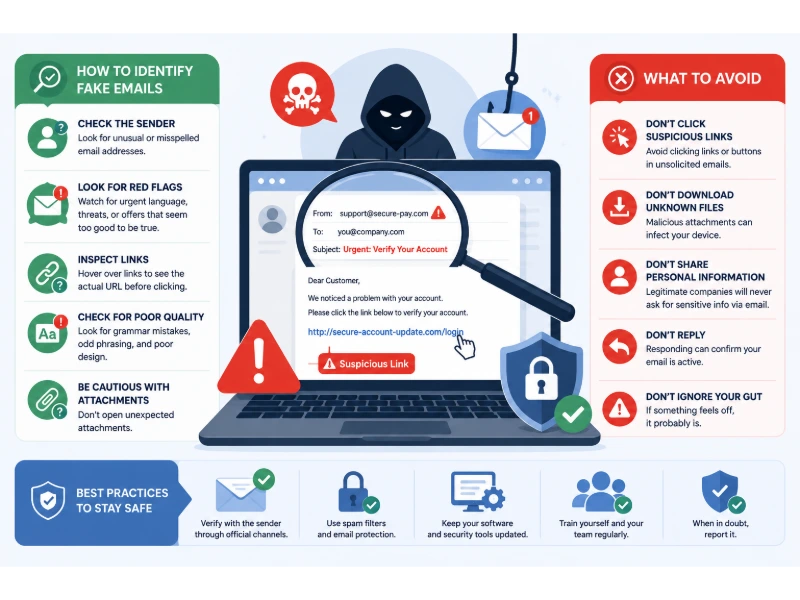
Almost everyone has gotten an email that felt a little off. Maybe it said your package couldn’t be delivered. Maybe it said your bank account had a problem. Maybe it looked like it came from your boss, asking for a quick favor. These emails are designed to make you react fast, before you have time to think. That’s the whole trick.
This guide breaks down exactly how fake emails and fake links work, what signs to look for, and what to do if you’re not sure. You don’t need to be a computer expert to spot most of these. You just need to know what to check, and where to slow down.
Key Takeaways
- Fake emails almost always want you to do something fast: click a link, send money, or share personal information.
- The sender’s name can be faked easily. The real clue is the email address behind that name, and the actual web address behind any link.
- Business email scams alone cost companies billions of dollars a year, much of it from a single fake email that looked routine.
- You can check most suspicious links without clicking them, just by hovering your mouse over them first.
- If you already clicked a bad link or gave out information, acting quickly (changing passwords, telling your bank, telling your IT team) matters more than feeling embarrassed about it.
Why This Actually Matters
Fake emails aren’t just annoying spam anymore. They’re one of the most common ways criminals steal money and personal information today. In the most recent year of reported data, business email scams alone cost companies more than $3 billion in the United States, spread across tens of thousands of separate cases. That’s not from one huge hack. It’s from thousands of single emails that looked believable enough for someone to click, reply, or send a payment.
Most people picture a hacker breaking into a computer. In reality, a lot of break-ins start with someone simply being tricked into opening the door themselves. A fake email that looks like it’s from a real company, a real coworker, or a real bank is often the very first step. Everything after that, stolen passwords, stolen money, stolen data, usually starts right there.
How Fake Emails Try to Trick You
Fake emails work because they aim at feelings, not logic. Once you know the common tricks, they start to stand out a lot faster.
They create urgency. “Your account will be closed in 24 hours.” “Your payment failed, click here now.” Urgency is designed to make you act before you think it through.
They copy trusted names. A fake email might use a real company’s logo, real colors, and a name that looks almost right, like “Amaz0n” or “PayPaI” with a capital I instead of a lowercase L.
They ask for something small at first. Instead of asking for your password directly, they might ask you to “confirm your account” or “verify your identity,” which sounds harmless but leads to the same place.
They use fear or reward. Some threaten a fine, a suspended account, or legal trouble. Others promise a refund, a prize, or a gift card. Both approaches are trying to get the same reaction: act now, ask questions later.
Red Flags That Should Make You Slow Down
| Warning Sign | What It Looks Like | Why It Matters |
|---|---|---|
| Urgent or threatening language | “Act now,” “your account will be suspended,” “final notice” | Real companies rarely threaten you within a single email |
| Generic greeting | “Dear Customer” instead of your actual name | Real accounts you’ve signed up for usually know your name |
| Mismatched sender address | Display name says “Netflix,” but the email address is a string of random letters | The display name can be typed to say anything, the actual address usually can’t be faked as easily |
| Spelling and grammar mistakes | Odd phrasing, missing words, strange punctuation | Legitimate companies typically have their emails proofread |
| Unexpected attachments | A ZIP file or Word document you weren’t expecting | These are a common way to deliver malware |
| Links that don’t match the text | Text says “Click here to verify your PayPal account,” but the actual link goes somewhere unrelated | This is one of the clearest signs of a fake link, and it’s easy to check before clicking |
| Requests for gift cards or wire transfers | “Please buy five $100 gift cards and send me the codes” | Legitimate businesses almost never ask to be paid this way |
| Too-good-to-be-true offers | You’ve won a prize you never entered, or a huge unexpected refund | If it sounds unbelievable, it usually is |
How to Check a Link Before You Click It
This is the single most useful habit you can build, and it takes about two seconds once you know how.
On a computer: Hover your mouse over the link without clicking. Most email programs and browsers will show you the real web address in a small box, usually near the bottom of the screen. Compare that address to what the email claims it is. If the email says “PayPal” but the real link shows something like “paypal-secure-login.xyz” or a string of random letters, that’s a fake.
On a phone: Press and hold the link instead of tapping it. A preview of the real address should pop up. If you don’t see a clear preview, don’t tap it at all.
What to actually look at in the web address: Focus on the part right before the first single slash (/), and specifically the part right before “.com,” “.net,” or whatever ending it uses. Scammers often add extra words to make a fake site look real, like “amazon-support-verify.com” or “secure-chase-login.com.” The real company’s name being somewhere in a long, strange web address doesn’t make it safe. What matters is what’s directly attached to the actual domain ending.
If you’re ever unsure, don’t click the link at all. Instead, open a new browser tab and type the company’s actual website address yourself, or search for it, and log in that way. This one habit alone blocks a huge share of these scams. For a deeper look at how criminals set up fake sites that look nearly identical to real ones, I go into more detail in what is pharming in cyber security, which covers a related trick that redirects you to a fake site even when you type the address correctly.
How to Check Who Really Sent the Email
The name you see at the top of an email (“Bank of America Support,” “Your Boss’s Name”) is just a label the sender chose. Anyone can set that label to say almost anything they want. The real identity is in the email address itself, which usually shows up if you click or tap on the sender’s name.
Here’s what to check:
- Does the domain (the part after the @ symbol) actually match the company? A real Microsoft email should end in @microsoft.com, not @microsoft-support-team.com or @micros0ft.net.
- Does the domain match exactly, letter for letter? Scammers rely on people not looking closely enough to catch a swapped letter or an extra word.
- If it claims to be a coworker or boss, does the address match previous, legitimate emails from that same person? If your company usually uses [email protected], an email from a slightly different domain is a major red flag, even if the name and signature look right.
If a message claims to be from your bank, your employer, or a government agency, and something feels off, don’t reply to the email to ask if it’s real. Scammers control that inbox too. Instead, contact the company directly using a phone number or website you already know is correct, not one provided in the suspicious email itself.
Common Types of Fake Emails
| Type | What It Usually Says | The Real Goal |
|---|---|---|
| Fake invoice or payment request | “Your invoice is attached, payment overdue” | Get you to open a malware-infected attachment or send money to the wrong account |
| Fake delivery notice | “We couldn’t deliver your package, click to reschedule” | Get you to click a fake tracking link that steals your login or payment info |
| Fake bank or account alert | “Unusual activity detected, verify your account now” | Get you to enter your real banking username and password on a fake copy of the site |
| CEO or boss impersonation | “I need you to buy gift cards for a client, urgent” | Get an employee to purchase gift cards or wire money directly to the scammer |
| Fake tech support warning | “Your computer is infected, call this number now” | Get you to call a fake support line and pay for unnecessary “fixes,” or give remote access to your device |
| Fake prize or lottery notice | “You’ve won $1,000, click to claim” | Get you to enter personal details or pay a fake “processing fee” |
What to Do If You’re Not Sure
- Don’t click anything yet. Taking ten extra seconds to think doesn’t cost you anything. Clicking too fast can cost you a lot.
- Check the sender’s actual email address, not just the name shown.
- Hover over any link before clicking, and compare the real address to what the email claims.
- Look up the company yourself instead of using any contact information in the email.
- Ask someone else, especially at work. A quick message to a coworker or your IT team asking “does this look real to you?” takes a minute and can save a lot of trouble.
- When in doubt, delete it or report it. Most email services have a “report phishing” button for exactly this situation.
What to Do If You Already Clicked
Mistakes happen, and acting quickly matters far more than feeling embarrassed about it.
- Disconnect from the internet if you downloaded a file or think malware might already be running.
- Change your password immediately for the account involved, and for any other account using that same password. Reusing passwords is exactly why why strong passwords are important matters so much here: one leaked password can unlock several accounts at once if they’re all the same.
- Turn on two-factor authentication if you haven’t already, so a stolen password alone isn’t enough to get into your account.
- Contact your bank directly if you entered any payment information, using the number on the back of your card, not anything from the suspicious email.
- Run a security scan using trusted antivirus software to check for anything that might have installed itself. If you’re deciding which antivirus tool is actually worth trusting, I compared a few honestly in is Kaspersky legit and safe antivirus.
- Tell your IT department right away if this happened on a work account or work device. Reporting it quickly gives them a real chance to limit any damage before it spreads further.
Building Habits That Protect You Every Day
Spotting one fake email is useful. Building habits that catch most of them automatically is what actually keeps you safe long term.
- Set up a password manager so you’re not reusing the same password across accounts, which limits the damage if one account does get compromised.
- Turn on two-factor authentication everywhere it’s offered, especially email, banking, and work accounts.
- Keep your email provider’s spam and phishing filters turned on, and check that you know how to report suspicious emails with one click. A few email providers handle this better than others, and it’s worth knowing the best ways to secure your email if you want to tighten this up further.
- If you use Outlook, it’s worth understanding the specific protections built in and where the gaps are, covered in is Outlook mail safe.
- Slow down on anything urgent. Real emergencies from real companies almost never depend on you clicking within minutes.
- Treat unexpected messages from “your boss” asking for gift cards or wire transfers as automatically suspicious, and confirm through a different channel, like a phone call or a message on a separate app, before doing anything.
Fake Emails Aren’t Just an Email Problem
The same tricks that show up in email also show up in text messages and phone calls. A message claiming your package is stuck, or a call claiming to be your bank’s fraud department, uses the exact same playbook: urgency, a trusted name, and a request for quick action. If you’ve ever gotten a strange call and wondered whether it was real, the patterns are covered in what are scam likely calls, and a lot of the same advice applies directly.
Why This Matters More for Businesses, Too
If you run a business or work in one, a single fake email can be far more expensive than a personal one. A convincing fake invoice or fake “urgent request from the CEO” can lead to a real wire transfer that’s impossible to get back once it’s sent. This is exactly why training employees to recognize these emails is now considered a core part of protecting customer and company data, not just an IT afterthought. I go into this in more depth, including the current cost of these incidents, in how can companies protect customer data.
Final Thoughts
Fake emails and suspicious links rely on speed and trust. They want you to react before you look closely, and they borrow the appearance of companies and people you already trust to make that reaction feel automatic. The good news is that the actual defense doesn’t require special technical skill. It just requires a short pause: check the real sender address, hover before you click, and go directly to a company’s real website instead of trusting a link in your inbox. Building that pause into a habit is genuinely one of the most effective things you can do to protect yourself, and it costs nothing but a few extra seconds.
You May Also Like
 Cybersecurity
Is Fanatical Legit and Safe? My Honest Take on Buying Game Keys
 Data Security & Privacy
Is Gameflip Legit and Safe for Gift Cards? What Buyers Should Know
 Data Security & Privacy
Is Eldorado.gg Legit and Safe in 2026? My Investigation and What Buyers Should Know
 VPN & Proxy
Why Does Google Say Our Systems Have Detected Unusual Traffic From Your Computer Network?
 Cybersecurity
Is Groupon Legit? An Honest Review In 2026
 Cybersecurity
Is Romspure Safe? An Honest Look at the ROM Site’s Risks and Trust Scores
 Cybersecurity
Is KashKick Legit? Honest KashKick Review (Payouts, Earnings, and Pros & Cons)
 Cybersecurity
Bookvip reviews: Is Bookvip Travel Legit or Scam?
 Cybersecurity