

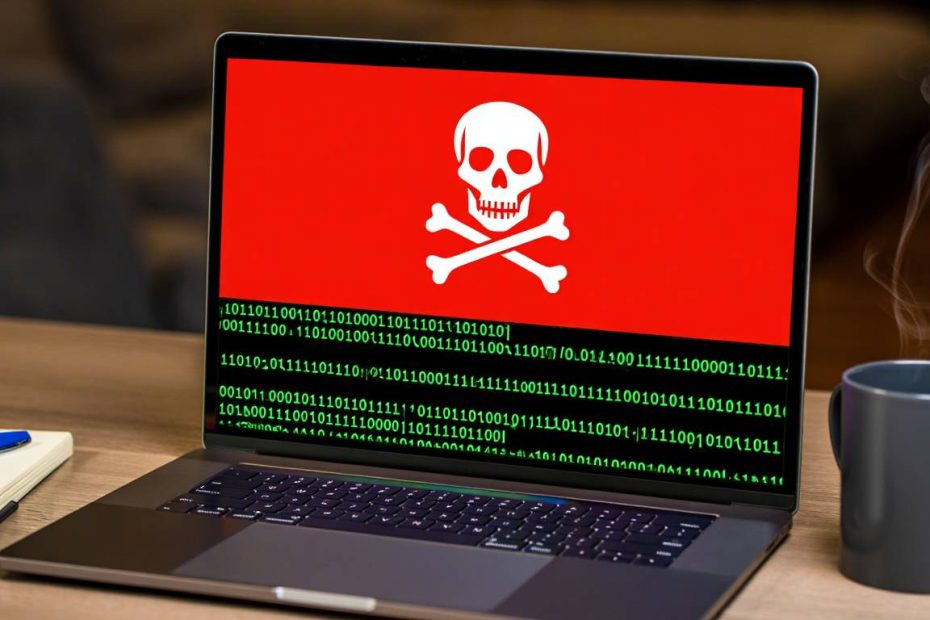
Ransomware is a type of harmful computer program that tries to hold your files hostage. Think of it like a digital kidnapper. The ransomware sneaks into your computer without you knowing, usually through a suspicious email link or attachment you click on by mistake. Once it’s inside your system, it encrypts all your important files like family photos, work documents, and other data you care about. This means it locks and scrambles everything so you can’t open or use your files anymore.
After locking your files, a threatening message pops up on your screen. This message demands money (usually paid in cryptocurrency like Bitcoin) to get the key that will unlock your files. The criminals behind the attack threaten that you’ll lose all your data forever if you don’t pay up. According to the FBI’s Internet Crime Complaint Center, ransomware attacks have cost victims billions of dollars in recent years.
If ransomware hits your computer, don’t panic and definitely don’t pay the criminals right away. First, unplug your computer from the internet immediately to stop the infection from spreading. Don’t use the infected device until you get help from computer experts or law enforcement. The Cybersecurity and Infrastructure Security Agency (CISA) offers free resources and may help you find ways to unlock your files without paying criminals. You should also contact your local police to file a report and get advice.
Most importantly, never give in to the ransomware scammers quickly. Even if you pay, there’s no promise they’ll actually unlock your files. Many victims pay and still lose everything. The best protection is being very careful about what email attachments and links you open to avoid these attacks completely.

Understanding Ransomware
What is Ransomware?
Ransomware is harmful software designed to block access to your computer or files until you pay money. It works by scrambling your data with secret codes, making everything unreadable without a special key. The attackers then demand payment in exchange for this key.
You might face different types of ransomware attacks, including:
- Crypto ransomware: Locks up files on your device by scrambling them
- Locker ransomware: Blocks you from using your entire computer system
- Scareware: Tricks you into thinking your computer is infected and makes you pay to remove fake threats
- Doxware: Threatens to post your private information online for everyone to see
Learning about these different attack types helps you respond better when facing a ransomware emergency. Each type needs a slightly different approach to fix the problem.
How Ransomware Spreads
Ransomware can get into your computer through many different ways. The most common infection methods include:
- Fake emails with dangerous attachments – These look like real messages from banks, delivery companies, or friends
- Harmful links in emails or websites – Clicking these downloads the ransomware instantly
- Exploit kits – Programs that find weak spots in your software and attack through them
- Drive-by downloads – Visiting infected websites automatically downloads malware
- Remote desktop attacks – Hackers break into computers that allow remote access
Understanding how ransomware spreads helps you spot potential dangers and protect yourself better in the future. The Cybersecurity and Infrastructure Security Agency provides detailed information about common attack methods.
Immediate Actions to Take
Isolate the Infected Device
When you think ransomware has infected your computer, your first job is to separate it from other devices. This stops the malware from jumping to other computers, phones, or tablets on your network.
To isolate your infected device:
- Disconnect from the internet right away – Unplug the ethernet cable or turn off Wi-Fi
- Turn off Wi-Fi and Bluetooth – This cuts all wireless connections
- Remove any connected storage devices – Unplug USB drives, external hard drives, and other accessories
- Disconnect from your network – If you’re at work, tell IT staff immediately
By isolating the infected device quickly, you contain the threat and prevent more damage to your data or other systems. This step is crucial and can save you from a much bigger disaster.
Don’t Pay the Ransom
Even though paying the ransom might seem like the fastest way to get your files back, cybersecurity experts and police strongly tell people not to pay. Here’s why paying is usually a bad idea:
- No guarantee of getting files back – Many people pay and never receive working decryption keys
- Encourages more criminal activity – Your payment funds more attacks on other people
- Makes you a target again – Criminals often attack the same victims multiple times
- May violate sanctions laws – Paying certain groups could break federal laws
Instead of paying immediately, focus on containing the damage, reporting to authorities, and exploring recovery options. The FBI recommends against paying ransoms because it doesn’t guarantee file recovery and supports criminal organizations.
Document Everything
Keeping detailed records during a ransomware attack is very important. Good documentation helps with recovery efforts, potential legal cases, and improving your security later.
Document these important details:
- When you first noticed the infection – Write down the exact time and date
- Any ransom messages from attackers – Save screenshots but don’t click any links
- Which files or computers are affected – Make a list of everything that’s locked
- Steps you’ve taken since finding the infection – Keep a timeline of your actions
Take screenshots when possible, but be very careful not to click on any ransom messages or suspicious files. This evidence might help law enforcement track down the criminals or help you with insurance claims.
Reporting the Attack
Notify Your IT Department or Managed Service Provider
If you work for a company or organization, tell your IT department or computer support team immediately. Don’t wait or try to fix it yourself first. They can help in several important ways:
- Help stop the infection from spreading – They know how to isolate systems quickly
- Start the emergency response plan – Most companies have procedures for cyber attacks
- Coordinate recovery efforts – They can manage multiple steps at once
- Communicate with bosses and important people – They know who needs to be informed
Give them all the information you’ve written down about the attack. The faster they get involved, the better your chances of limiting damage and getting your data back. Time is critical in ransomware situations.
Contact Law Enforcement
Reporting ransomware attacks to police is an important step that helps everyone. While they might not be able to get your files back right away, they serve important purposes:
- Gather information about the criminals – This helps catch the bad guys
- Track down attackers – Multiple reports help identify patterns
- Prevent future attacks – Your report contributes to stopping other victims
- Provide free resources – Law enforcement often has decryption tools
Contact your local FBI field office or file a report with the Internet Crime Complaint Center (IC3). Give them as much detail as possible about the attack. The more information they have, the better they can help you and others.
Inform Relevant Parties
Depending on what kind of information was affected and what type of business you run, you might need to tell other people about the ransomware attack. This could include:
- Customers whose information might be stolen – They have a right to know about potential data breaches
- Business partners who might be affected – Other companies you work with could be at risk
- Government agencies in your industry – Some businesses must report cyber attacks by law
- Insurance companies – Your cyber insurance policy might require immediate notification
Check your local data breach notification laws to make sure you’re following all legal requirements. Being honest about the attack helps maintain trust with people who count on you.
Assessing the Damage
Identify Affected Systems and Data
Once you’ve stopped the infection from spreading and reported it to authorities, it’s time to figure out how much damage was done. This step is very important for planning how to fix everything.
To identify what was affected:
- Make a list of all devices that might be infected – Include computers, servers, phones, and tablets
- Check for locked files or blocked systems – Look for files you can’t open or systems that won’t work
- Review computer logs for suspicious activity – IT staff can help check these technical records
- Figure out which information might be stolen – Consider what sensitive data was accessible
This damage assessment helps you decide what to fix first and determines the best way to restore your data and systems. Focus on the most important systems and information first.
Determine the Type of Ransomware
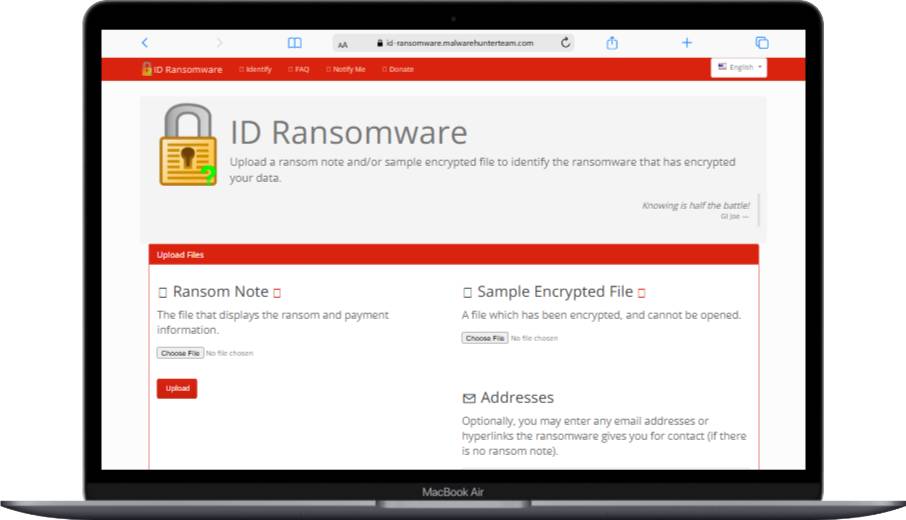
Finding out exactly what type of ransomware attacked you can provide valuable information for recovery. Different ransomware families have different characteristics and potential weaknesses that might help you.
To figure out the ransomware type:
- Look for unique ransom notes or file extensions – Each ransomware family leaves different clues
- Use online identification tools – Websites like ID Ransomware can help identify the strain
- Ask cybersecurity experts or your IT team – Professionals can often identify ransomware quickly
Knowing the specific ransomware type can help you find free decryption tools or other recovery methods that work for that particular family of malware.
Evaluate the Impact on Operations
Take time to understand how the ransomware attack is affecting your daily work or business operations. This evaluation helps you develop a recovery plan and communicate clearly with important people.
Consider these questions:
- Which important systems or data can’t you access? – Focus on business-critical items first
- How does this affect your ability to serve customers? – Can you still provide services or products?
- What are the potential money losses from downtime? – Calculate lost revenue and extra costs
- Are there legal or regulatory problems? – Some industries have strict data protection rules
Understanding the full impact of the attack guides your recovery decisions and helps you explain the situation to stakeholders, insurance companies, and customers.
Recovery Options
Use Backups to Restore Data
If you have recent, clean data backups, this is often the best and safest way to recover from a ransomware attack. Good backups can be a lifesaver in these situations and let you avoid paying criminals.
To restore from backups safely:
- Make sure the backup isn’t infected – Check that backup files were created before the attack
- Clean the infected system completely – Remove all traces of ransomware first
- Restore your data from the clean backup – Copy files back to the cleaned system
- Update all software and security before going online – Install patches and updates before reconnecting
Remember, your backups should be stored offline or in a cloud service that keeps multiple versions of files. This protects them from being encrypted along with your main system.
Check for Decryption Tools
For some ransomware families, security researchers have created free decryption tools that can unlock your files without paying the criminals. These tools are made when experts find weaknesses in the ransomware’s security.
To find free decryption tools:
- Check the No More Ransom Project – This international initiative offers free decryption tools for many ransomware families
- Search for your specific ransomware plus “decryption tool” – Use the ransomware name you identified earlier
- Ask cybersecurity experts for help – Professionals often know about the latest available tools
- Contact law enforcement – Police sometimes have decryption keys from successful investigations
While decryption tools aren’t available for all ransomware types, they offer a free way to recover your data when they exist. Always download these tools from official, trusted sources.
Professional Data Recovery Services
If you don’t have usable backups and can’t find a free decryption tool, professional data recovery companies might be able to help. These services use advanced techniques and sometimes have access to decryption keys.
When considering a data recovery service:
- Research their reputation and success rate – Look for companies with good reviews and proven results
- Understand their pricing – Get clear information about costs before starting
- Ask about security measures – Make sure they’ll protect your sensitive information
- Get a realistic timeline – Understand how long the recovery process might take
While potentially expensive, professional services can be worth considering before you think about paying the ransom to criminals.
Rebuilding and Strengthening Your Systems
Clean and Rebuild Infected Systems
After you’ve recovered your data or decided to start over, it’s time to clean and rebuild your infected computers. This process makes sure all traces of the ransomware are completely gone and your system is secure.
Steps to clean and rebuild properly:
- Completely wipe infected devices – Format hard drives to remove everything
- Reinstall the operating system from scratch – Use clean installation media from trusted sources
- Update all software to the newest versions – Install the latest security patches immediately
- Install good antivirus and anti-malware programs – Choose reputable security software
- Restore your data from clean backups – Only use backups you know are safe
Taking time to rebuild your systems properly reduces the risk of getting infected again and improves your overall security. Don’t rush this important step.
Implement Stronger Security Measures
Use this difficult experience as a chance to make your cybersecurity much stronger. Putting in place solid security measures helps prevent future ransomware attacks and other cyber threats.
Consider adding these important protections:
- Regular software updates and patch management – Keep everything current with security fixes
- Strong, unique passwords for all accounts – Use different complex passwords everywhere
- Multi-factor authentication – Add extra login steps beyond just passwords
- Network segmentation – Separate different parts of your network to limit damage
- Email filtering and web browsing protection – Block dangerous messages and websites
- Employee security training – Teach everyone how to spot and avoid threats
These measures create multiple layers of defense against ransomware and other cyber attacks. The CISA cybersecurity best practices provide detailed guidance on implementing these protections.
Develop or Update Your Incident Response Plan
An incident response plan is crucial for handling future cyber attacks effectively. If you don’t have one, now is the time to create it. If you already have a plan, update it based on what you learned from this ransomware attack.
Your incident response plan should include:
- Clear steps for identifying and containing threats – Know exactly what to do when something bad happens
- Specific roles and responsibilities – Everyone should know their job during an emergency
- Communication procedures – Know who to call and how to reach them quickly
- Recovery procedures – Have step-by-step instructions for getting back to normal
- Post-incident review process – Plan how to learn from each incident
A well-prepared incident response plan can significantly reduce the impact and cost of future cyber attacks on your organization.
Prevention Strategies
Regular Backups
Keeping regular, secure data backups is one of the most effective ways to protect yourself from ransomware. With good backups, you can restore your system without paying criminals if you get infected.
Best practices for backups include:
- Follow the 3-2-1 rule: Keep 3 copies of important data, on 2 different types of storage, with 1 copy stored offline
- Test your backups regularly to make sure they work – Practice restoring files to verify everything works
- Keep at least one backup completely offline – Store it somewhere ransomware can’t reach
- Use cloud backup services with file versioning – This lets you go back to earlier versions of files
With solid backups in place, ransomware loses much of its power to hurt you. Regular backups are like insurance for your digital life.
Software Updates and Patch Management
Many ransomware attacks exploit known software vulnerabilities that have already been fixed. Keeping your systems and programs up to date is crucial for preventing these attacks from succeeding.
Create a strong patch management routine:
- Enable automatic updates when possible – Let your computer install security fixes automatically
- Check for and apply updates manually when needed – Some programs need manual updating
- Focus on critical security patches first – Install the most important fixes immediately
- Consider using patch management software – This helps manage updates across multiple computers
Staying current with updates closes potential entry points for ransomware and other malware. The US-CERT security tips explain why updates are so important for security.
Employee Training and Awareness
Your employees can be your strongest defense against ransomware attacks – or your biggest weakness. Regular security awareness training is essential to help everyone recognize and avoid potential threats.
Your training program should cover:
- How to spot phishing emails and suspicious links – Teach people what to look for in dangerous messages
- Safe internet browsing habits – Show how to avoid dangerous websites and downloads
- The importance of software updates – Help people understand why updates matter
- Password best practices – Teach how to create and manage strong passwords
- How to report suspected security problems – Make it easy for people to ask for help
Empowering your employees with knowledge and making them feel comfortable reporting concerns is a key part of ransomware prevention.
Network Segmentation
Network segmentation can limit how far ransomware spreads if an infection happens. By dividing your network into smaller sections, you can keep damage contained to a smaller area.
Consider these segmentation strategies:
- Separate important systems from everyday networks – Keep critical servers isolated
- Use virtual networks (VLANs) to separate different departments – Limit access between groups
- Put firewalls between network sections – Control what traffic can move between areas
- Restrict access between segments based on need – Only allow necessary connections
Good network segmentation can turn a potentially devastating ransomware attack into a manageable problem that affects only a small part of your organization.

Legal and Ethical Considerations
Understanding Ransomware Laws
The legal rules around ransomware are complicated and constantly changing. Understanding the laws in your area is important for proper incident handling and reporting requirements.
Key legal things to consider include:
- Data breach notification requirements – You might have to tell customers and regulators about the attack
- Potential legal responsibility for data loss – You could be liable if customer data is compromised
- Laws about ransom payments – Some jurisdictions restrict or prohibit paying ransoms
- Reporting requirements to law enforcement – Some industries must report cyber attacks
Talk with legal experts who know about cybersecurity law to make sure you’re following all relevant regulations. The Department of Justice ransomware guidance provides helpful information about legal considerations.
Ethical Implications of Paying Ransom
The decision to pay a ransom isn’t just a practical choice – it’s also an ethical dilemma. While paying might seem like the quickest way to recover your data, it has broader consequences for society.
Ethical things to think about include:
- Funding criminal activities – Your payment directly supports criminal organizations
- Encouraging future attacks – Successful ransom payments motivate more attacks
- Potential sanctions violations – Paying certain groups could violate federal laws
- Impact on other potential victims – Your payment funds attacks on others
Carefully weigh these ethical concerns against the potential benefits of paying before making any decisions. Many organizations choose never to pay on principle.
Insurance and Ransomware
Cyber insurance can play a big role in ransomware recovery, but it’s a complex and changing field. Understanding your coverage and what it means is very important.
Consider these points about cyber insurance:
- What does your policy cover for ransomware attacks? – Read the fine print carefully
- Does your policy cover ransom payments? – Some policies exclude or limit this coverage
- What are the requirements for making a claim? – Know what you need to do to get coverage
- How might your rates change after an attack? – Understand potential premium increases
Review your cyber insurance policy regularly and discuss any questions with your insurance agent. Make sure you understand exactly what is and isn’t covered.
Future of Ransomware
Emerging Ransomware Trends
The ransomware landscape constantly changes as criminals develop new methods. Staying informed about emerging trends helps you prepare for future threats.
Some current trends include:
- Double extortion tactics – Criminals steal data before encrypting it, then threaten to publish it
- Ransomware-as-a-Service models – Criminal groups rent out ransomware to other attackers
- Targeting cloud services and data – Attacks increasingly focus on cloud-stored information
- Exploiting remote work vulnerabilities – Criminals take advantage of work-from-home security gaps
- Increased focus on critical infrastructure – Attacks target power grids, hospitals, and essential services
Understanding these trends helps you adapt your prevention and response strategies to stay ahead of evolving threats. The CISA ransomware guide provides current information about emerging threats.
Advancements in Anti-Ransomware Technology
As ransomware evolves, so do the technologies to fight it. Staying informed about these improvements can help you strengthen your defenses.
Promising anti-ransomware technologies include:
- AI and machine learning threat detection – Smart systems that can spot new attack patterns
- Behavioral analysis tools – Software that watches for suspicious computer behavior
- Automated response systems – Technology that can respond to threats without human intervention
- Hardware-based security features – Built-in protections that are harder for malware to bypass
- Advanced backup and recovery solutions – Better ways to protect and restore data
Consider incorporating these advanced technologies into your security strategy as they become more mature and affordable.
Preparing for Future Threats
While it’s impossible to predict every future ransomware threat, you can take steps to improve your overall ability to survive attacks.
To prepare for future threats:
- Stay informed about cybersecurity trends – Follow trusted security news sources and alerts
- Regularly review and update your security measures – Don’t let your defenses get stale
- Conduct frequent security assessments – Test your defenses regularly with professional help
- Create a culture of security awareness – Make cybersecurity everyone’s responsibility
- Work with other organizations to share threat information – Learn from others’ experiences
By staying proactive and adaptable, you can better position yourself to face whatever ransomware threats emerge in the future.
Conclusion
Dealing with a ransomware infection can be scary and stressful. However, by following the steps outlined in this guide, you can handle the crisis more effectively and reduce its impact on your life or business. Remember, the key to dealing with ransomware lies in acting quickly, keeping detailed records, and taking a careful, step-by-step approach to recovery.
More importantly, the best defense against ransomware is prevention. By putting in place strong security measures, keeping regular backups, updating your systems, and teaching your team about cybersecurity best practices, you can significantly reduce your risk of becoming a ransomware victim in the first place.
As ransomware continues to change and evolve, so must our approaches to cybersecurity. Stay informed about new threats and defense technologies. Regularly review and update your security strategies. Remember that cybersecurity isn’t just an IT problem – it’s a critical part of protecting yourself, your family, or your business in today’s digital world.
By taking a proactive, comprehensive approach to ransomware prevention and response, you can protect your valuable information, keep your life or business running smoothly, and safeguard your reputation when facing these persistent cyber threats. The fight against ransomware requires ongoing attention and effort, but with the right knowledge and tools, you can successfully defend against these digital criminals.
For more information and resources, visit StopRansomware.gov, a joint initiative by CISA, FBI, and other federal agencies that provides the latest guidance on preventing and responding to ransomware attacks.
You May Also Like
 Cybersecurity
What Is Zero Trust Network Access (ZTNA)? How It Works, How It Differs From a VPN, and When to Use It
 Cybersecurity
What Is Netskope? Cloud Security, SASE, and Zero Trust Explained
 Cybersecurity
Is Fanatical Legit and Safe? My Honest Take on Buying Game Keys
 Data Security & Privacy
Is Gameflip Legit and Safe for Gift Cards? What Buyers Should Know
 Data Security & Privacy
Is Eldorado.gg Legit and Safe in 2026? My Investigation and What Buyers Should Know
 VPN & Proxy
Why Does Google Say Our Systems Have Detected Unusual Traffic From Your Computer Network?
 Cybersecurity
Is Groupon Legit? An Honest Review In 2026
 Cybersecurity
Is Romspure Safe? An Honest Look at the ROM Site’s Risks and Trust Scores
 Cybersecurity