


Antidetect browsers create separate, isolated browsing environments, each presenting a unique and customizable digital fingerprint to the sites you visit. Instead of relying on a single browser identity that websites can track across sessions, an antidetect browser lets you run many distinct “identities” from one machine — each with its own cookies, cache, and device signature. This is the core reason businesses that manage multiple accounts, and privacy-conscious individuals who want more than a VPN provides, use them.
Key Takeaways
- What they do: Antidetect browsers generate multiple, isolated browser profiles, each with its own digital fingerprint, so websites can’t tie your activity across accounts back to a single device.
- Core technology: The central mechanism is browser fingerprint spoofing — altering or masking signals like user agent, screen resolution, installed fonts, and hardware parameters so each profile looks like a distinct, ordinary user rather than a modified one.
- Privacy design: Cookie isolation, separate local storage, and separate caches per profile stop cross-session tracking that a standard browser — even in incognito mode — cannot prevent.
- Common uses: Multi-account management for social media and e-commerce, affiliate and ad verification, web scraping, and general privacy-hardened browsing.
- Security layer: Better-built tools add proxy integration for IP masking, encryption for stored profile data, and defenses against advanced tracking techniques such as canvas fingerprinting.
- Not inherently illicit: The technology itself is neutral. It’s used for platform abuse in some cases, but its mainstream, legitimate use is operational: letting marketers, researchers, and security teams manage separate identities without those identities bleeding into one another.
What Is an Antidetect Browser?
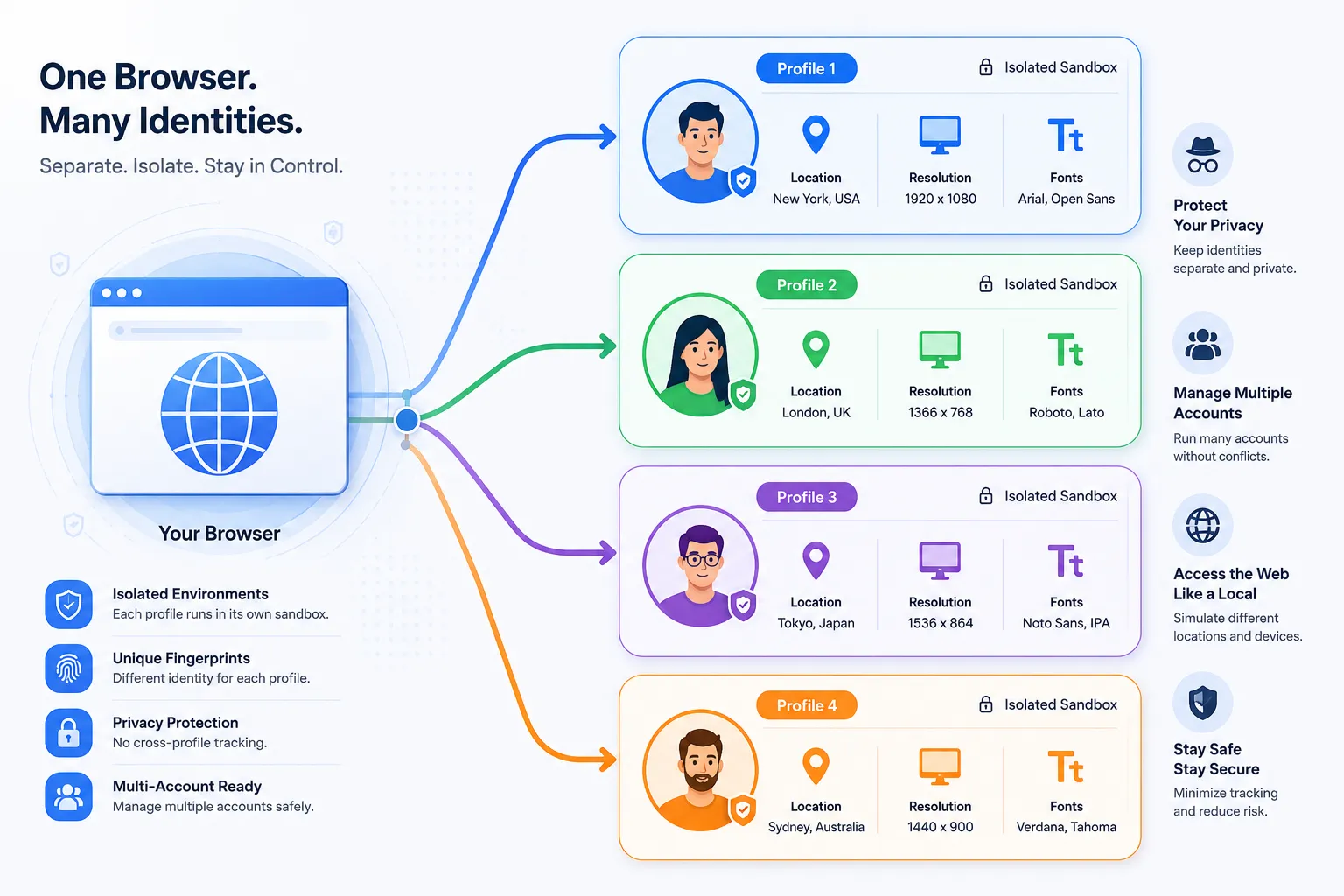
An antidetect browser is a browser built specifically to control and modify your digital fingerprint, so you can manage multiple online identities from one device without those identities being linked. It does this by creating isolated virtual profiles. Each one looks to a website like a completely separate, authentic user — with its own cookies, cache, browsing history, and set of browser and device parameters.
This exists because tracking has moved well past cookies. A VPN masks your IP address, but it does nothing about the dozens of other data points a browser exposes by default: operating system, screen resolution, installed fonts, GPU details, timezone, and more. Combined, these form a “fingerprint” that can re-identify a user even after cookies are cleared or an IP address changes. Antidetect browsers address this by feeding sites plausible, deliberately varied data for each profile, so no single profile stands out as anomalous or clearly spoofed.
How Antidetect Browsers Actually Protect Privacy
The privacy value of an antidetect browser comes from fingerprint spoofing, not from blocking tracking scripts outright. Outright blocking is often a bigger giveaway than a plausible fake value — a browser reporting zero fonts or a blank canvas hash looks more suspicious to a fraud-detection system than one reporting a slightly randomized, internally consistent set of values. Good antidetect tooling is judged on how convincingly it can pass as an ordinary device, not just on whether it hides data.
The mechanisms involved:
- Fingerprint masking and spoofing. The browser intercepts requests for device and browser data and substitutes altered values — spoofing the user agent, adjusting screen resolution and color depth, randomizing font lists, and modifying reported hardware like CPU core count and memory.
- Full session isolation. Each profile runs in a genuinely separate environment. Cookies, cache, local storage, and session data from one profile are never visible to another, which is what actually stops a platform from linking two of your accounts by shared session artifacts.
- Defenses against advanced tracking techniques, including:
- Canvas fingerprint protection — randomizing the output of the HTML5 canvas element, one of the more reliable ways sites identify specific graphics hardware.
- WebGL and AudioContext spoofing — masking details about the graphics card and audio stack that would otherwise be near-unique per machine.
- WebRTC leak protection — preventing your real IP address from leaking through WebRTC, a known weak point even when a VPN or proxy is active elsewhere in the browser.
- Proxy integration. Profiles are typically paired with independent proxies — residential or datacenter — so each identity gets its own IP address in addition to its own fingerprint. Fingerprint spoofing without a matched proxy strategy is a partial solution at best: if ten “different” profiles all connect from the same IP, the IP itself becomes the correlating signal.
By isolating profiles this thoroughly, antidetect browsers prevent the kind of cross-session data leakage — shared cookies, shared local storage, shared cache — that otherwise lets platforms quietly reconnect accounts a user intended to keep separate.

Key Security Features to Evaluate
Fingerprinting aside, the security posture of an antidetect browser matters as much as its spoofing quality, especially for teams handling client accounts or sensitive credentials.
What separates a serious tool from a lightweight one:
- Encrypted profile storage. Profile data — including saved cookies and credentials — should be encrypted at rest (commonly AES-256), so a compromised device doesn’t hand over every stored session.
- Team permissions. For agencies and businesses, the ability to share a profile with a teammate without sharing the underlying password, and to set view-only versus full-access permissions, is what makes multi-person account management workable without creating a shared-credential liability.
- Maintained browser cores. Reputable tools are built on actively maintained cores — Chromium or Firefox — and update them regularly to patch the same vulnerabilities that affect mainstream browsers. A tool running on a stale core is a security liability regardless of how good its fingerprinting is.
- Encrypted cloud sync. If profiles sync across devices, that data should be encrypted in transit and at rest, not just convenient to access.
- Realistic, not just random, fingerprints. The stronger implementations generate fingerprints modeled on real device data — a specific laptop model running a specific, common OS and browser build — rather than arbitrary combinations that a fraud model can flag as internally inconsistent.
| Feature | Standard browser (incognito) | Antidetect browser |
|---|---|---|
| Fingerprint | Unchanged, easily trackable | Unique and customizable per profile |
| Cookies & cache | Deleted after session | Isolated and persistent per profile |
| IP address | Unchanged | Masked via per-profile proxy |
| WebRTC leaks | Often present | Blocked or spoofed |
| Profile management | Not available | Centralized and scalable |
| Data storage | Not encrypted | Often AES-256 encrypted |
Who Actually Needs One
- Digital marketers and social media managers handling multiple client accounts on platforms like Facebook, Instagram, or TikTok from one machine, without triggering the security flags that come from many accounts sharing one fingerprint.
- E-commerce and dropshipping sellers on Amazon, eBay, or Shopify who manage multiple storefronts or run region-specific market research without those accounts appearing linked — something most marketplace terms of service restrict.
- Affiliate marketers testing how ad campaigns and links render from different geographies and device types, to confirm creative and redirects behave correctly before spending on traffic.
- Web scrapers and data teams who rotate profiles and IPs to avoid the blocks and CAPTCHAs that hit a single fingerprint making high volumes of requests.
- Security researchers and pentesters simulating traffic from varied device profiles to understand how a target application tracks and fingerprints its users.
- Privacy-conscious individuals who want protection against fingerprinting-based tracking that a VPN or incognito mode simply doesn’t address.
A Realistic Read on Limitations
No antidetect browser makes you undetectable. Sophisticated anti-fraud systems increasingly correlate behavioral signals — typing cadence, mouse movement, session timing — not just static fingerprint data, and no fingerprint tool addresses that layer. The quality gap between providers is real: a browser with a shallow or dated fingerprint database is often more detectable than no spoofing at all, because it produces telltale inconsistencies a well-tuned detection system is built to catch. Pairing a strong tool with well-matched, high-quality proxies, and treating “realistic” as more important than “hidden,” is what actually determines whether the approach works.
Legally, the technology is not restricted — it’s a browser configuration tool. What matters is how it’s used: managing separate legitimate business identities is different from evading a platform’s terms of service or enabling fraud, and the tool doesn’t change which of those a given use case is.
Taking a Deliberate Approach
Antidetect browsers solve a specific problem standard browsers and VPNs don’t: they prevent a single device from being fingerprinted into a single trackable identity. For businesses managing multiple accounts, researchers who need clean, unbiased browsing conditions, or individuals pushing back against pervasive tracking, they’re a meaningfully different tool than incognito mode or a VPN alone — not a replacement for either, but a layer neither one covers.
Anyone evaluating one should start by defining the actual use case — multi-account management, research, or personal privacy — since that determines which features (proxy integration, team permissions, fingerprint realism) actually matter, rather than defaulting to whichever provider markets the most aggressively.
You May Also Like
 Cybersecurity
What Is Zero Trust Network Access (ZTNA)? How It Works, How It Differs From a VPN, and When to Use It
 Cybersecurity
What Is Netskope? Cloud Security, SASE, and Zero Trust Explained
 Cybersecurity
Is Fanatical Legit and Safe? My Honest Take on Buying Game Keys
 Data Security & Privacy
Is Gameflip Legit and Safe for Gift Cards? What Buyers Should Know
 Data Security & Privacy
Is Eldorado.gg Legit and Safe in 2026? My Investigation and What Buyers Should Know
 VPN & Proxy
Why Does Google Say Our Systems Have Detected Unusual Traffic From Your Computer Network?
 Cybersecurity
Is Groupon Legit? An Honest Review In 2026
 Cybersecurity
Is Romspure Safe? An Honest Look at the ROM Site’s Risks and Trust Scores
 Cybersecurity